

- Posts: 25
- Thank you received: 5
User Panel
2 years 2 months ago #362882
by Reyesar
User Panel was created by Reyesar
-- HikaShop version -- : 5.1.0
-- Joomla version -- : 5.1.4
-- PHP version -- : 8.1.29
Hi
I´m having some Itemid issues with the user panel. If I create a menu option to Hikashop addresses and another to Hikashop user panel, the first one is showed with the itemid of the page from where the menu is clicked, but the other with its own id. When you go back in addresses with the first option you see the panel with different style and url than by the other way. The same happens when you click in the first option user profile which is a component outside the panel.
Is there a way to not use the panel? it´s easier to have the menu as module for example and each option as pages. We prefer to keep the right menu always visible not to hide it when you click in an option as addresses. It´s mandatory to use that panel?
We don´t pretend to offend. For us is not really useful that structure.
Thank you very much
-- Joomla version -- : 5.1.4
-- PHP version -- : 8.1.29
Hi
I´m having some Itemid issues with the user panel. If I create a menu option to Hikashop addresses and another to Hikashop user panel, the first one is showed with the itemid of the page from where the menu is clicked, but the other with its own id. When you go back in addresses with the first option you see the panel with different style and url than by the other way. The same happens when you click in the first option user profile which is a component outside the panel.
Is there a way to not use the panel? it´s easier to have the menu as module for example and each option as pages. We prefer to keep the right menu always visible not to hide it when you click in an option as addresses. It´s mandatory to use that panel?
We don´t pretend to offend. For us is not really useful that structure.
Thank you very much
Please Log in or Create an account to join the conversation.

2 years 2 months ago #362885
by nicolas
Replied by nicolas on topic User Panel
Hi,
You don't have to use the user panel.
Just create a menu item for each page (one for the "HikaShop order listing", one for the addresses, one for the Joomla user profile, etc) in a menu of your Joomla menu manager. Then, you can create a menu module for that menu that you can display in a position of your template and it will list the menu items.
You don't have to use the user panel.
Just create a menu item for each page (one for the "HikaShop order listing", one for the addresses, one for the Joomla user profile, etc) in a menu of your Joomla menu manager. Then, you can create a menu module for that menu that you can display in a position of your template and it will list the menu items.
Please Log in or Create an account to join the conversation.
2 years 2 months ago #362888
by Reyesar
Replied by Reyesar on topic User Panel
Hi. But if i do that i have the return button that again opns the menu. I´m searching where is that button to make an overwrite to not show it. The menu element for addresses opens the address lists inside the panel so that solution still implies the use of the panel.
Thank you very much for all your help
Thank you very much for all your help
Please Log in or Create an account to join the conversation.
2 years 2 months ago #362889
by Reyesar
Replied by Reyesar on topic User Panel
Another problem I have is that the menu element Hikashop Addresses does not use the itemid of the menu. It uses the home page it seems, so the template is not correct and all is a bit mess up. If I rewrite the url to index.php?option=com_hikashop&view=order&layout=listing&Itemid=600 then the template is correct and even the return button is not present. That´s why I asked about the mandatory use of the cpanel. If i don´t wnt it can i avoid the Itemid replacement?
Thanks again and always for all
Thanks again and always for all
Please Log in or Create an account to join the conversation.
2 years 2 months ago #362890
by Reyesar
Replied by Reyesar on topic User Panel
Even if a create an URL menu element and i write manually /index.php?option=com_hikashop&view=address&layout=listing&Itemid=598
The return button is still there so the panel is still there. With this trick I can overwrite the Itemid change (it´s not perfect as I must write manually every Itemid instead of the normal behaviour that is use the menu ID but at least works)
But that return button means the panel is still there
The return button is still there so the panel is still there. With this trick I can overwrite the Itemid change (it´s not perfect as I must write manually every Itemid instead of the normal behaviour that is use the menu ID but at least works)
But that return button means the panel is still there
Please Log in or Create an account to join the conversation.
2 years 2 months ago #362891
by Reyesar
Replied by Reyesar on topic User Panel
More problems. If I use create URL then i cant select that elemnt menu in the modules assignament as that option is not selectable.
I have aldo tried to hide the button with CSS but then the other form elements are not displayed correctly.
I suppose that I will need to overwrite listing.php to avoid a big amount of CSS. And the Itemid issue is also a problem with the friendly URLs as the create URL has many problems.
Not easy to avoid the panel, not easy
I have aldo tried to hide the button with CSS but then the other form elements are not displayed correctly.
I suppose that I will need to overwrite listing.php to avoid a big amount of CSS. And the Itemid issue is also a problem with the friendly URLs as the create URL has many problems.
Not easy to avoid the panel, not easy
Please Log in or Create an account to join the conversation.
2 years 2 months ago #362892
by Reyesar
Replied by Reyesar on topic User Panel
I have tried to change route.php or create a plugin. But I don´t know so much Joomla and no success. The problem is that when I use create an URL element the addresses are shown in the correct template (because itemid) with the modules of that page (as the menu) but i lost friendly urls and i cant assign modules to that option as Joomla doen´t let click on it in the module assignament.
Thank you Nicolas for your idea but I failed in make it work because that two issues.
The cpanel is not our biggest preference and it has also the wrong template issue. Today i´m going to sleep and Tomorrow maybe i will try to make my own addresses module and use it in a page that keeps the template. Is my last idea
Thank you for your time and attention.
Best Regards
Thank you Nicolas for your idea but I failed in make it work because that two issues.
The cpanel is not our biggest preference and it has also the wrong template issue. Today i´m going to sleep and Tomorrow maybe i will try to make my own addresses module and use it in a page that keeps the template. Is my last idea
Thank you for your time and attention.
Best Regards
Please Log in or Create an account to join the conversation.
2 years 2 months ago #362905
by nicolas
Replied by nicolas on topic User Panel
Hi,
If I create a menu item of the type "HikaShop user addresses", when I access that menu item, it doesn't have any back button. The system only adds the back button if the addresses manager is accessed from the control panel.
Can you please double check ? This would prevent having to go complex routes.
Also, you could easily hide this back button with CSS if necessary:
www.hikashop.com/support/documentation/1...ize-the-display.html
Starting afresh on this should help clear things up.
That's not what I see on my end.But if i do that i have the return button that again opns the menu. I´m searching where is that button to make an overwrite to not show it. The menu element for addresses opens the address lists inside the panel so that solution still implies the use of the panel.
If I create a menu item of the type "HikaShop user addresses", when I access that menu item, it doesn't have any back button. The system only adds the back button if the addresses manager is accessed from the control panel.
Can you please double check ? This would prevent having to go complex routes.
Also, you could easily hide this back button with CSS if necessary:
Code:
#hikashop_address_listing .hika_toolbar { display:none; }
That's not what I see. If I create a menu item of the type HikaShop user addresses, and then I use this menu item in order to access the address manager on the frontend, the current menu item is this menu item. Please double check.Another problem I have is that the menu element Hikashop Addresses does not use the itemid of the menu. It uses the home page it seems, so the template is not correct and all is a bit mess up.
Joomla will only use the homepage menu when the current Itemid doesn't match with the component displaying the main area.If I rewrite the url to index.php?option=com_hikashop&view=order&layout=listing&Itemid=600 then the template is correct and even the return button is not present. That´s why I asked about the mandatory use of the cpanel. If i don´t wnt it can i avoid the Itemid replacement?
I think you must have miss something down the line and that led to complex solutions that aren't worth pursuing.I have tried to change route.php or create a plugin. But I don´t know so much Joomla and no success. The problem is that when I use create an URL element the addresses are shown in the correct template (because itemid) with the modules of that page (as the menu) but i lost friendly urls and i cant assign modules to that option as Joomla doen´t let click on it in the module assignament.
Starting afresh on this should help clear things up.
Please Log in or Create an account to join the conversation.
2 years 2 months ago #362908
by Reyesar
Replied by Reyesar on topic User Panel
I have created the menu element again (see image)
I have clicked in it and the page is the home template (yo can see the banner over the addressess) and the return button. The URL is component/hikashop/view-address/layout-listing
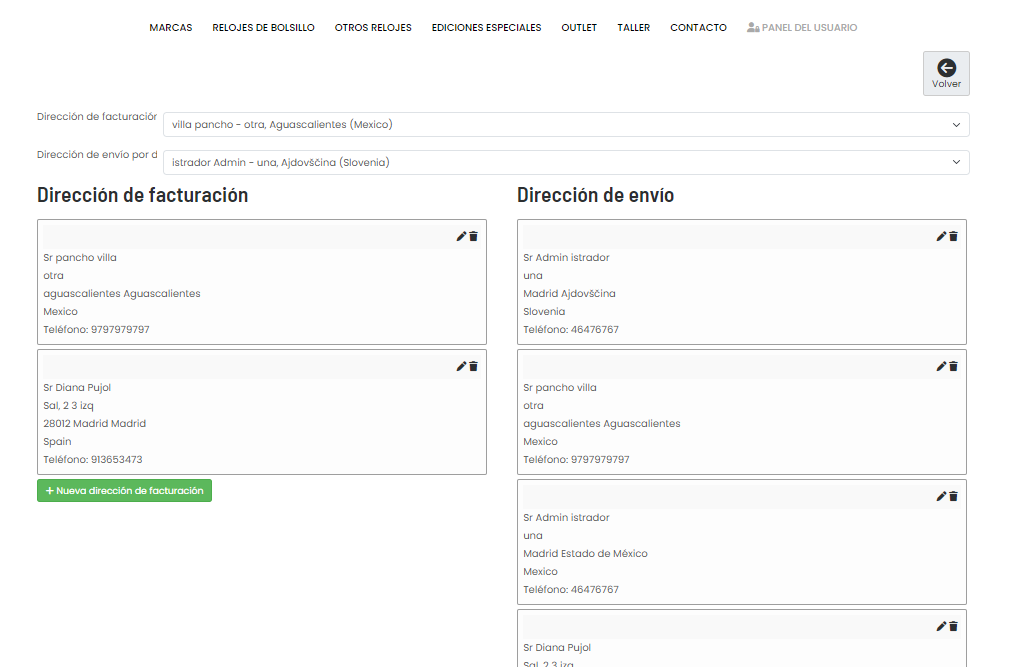
I have clicked on addressess from the cpanel (another template). The URL is panel-del-usuario/panel-del-usuario/address
And I don´t have any idea of how to fix it
Thank you
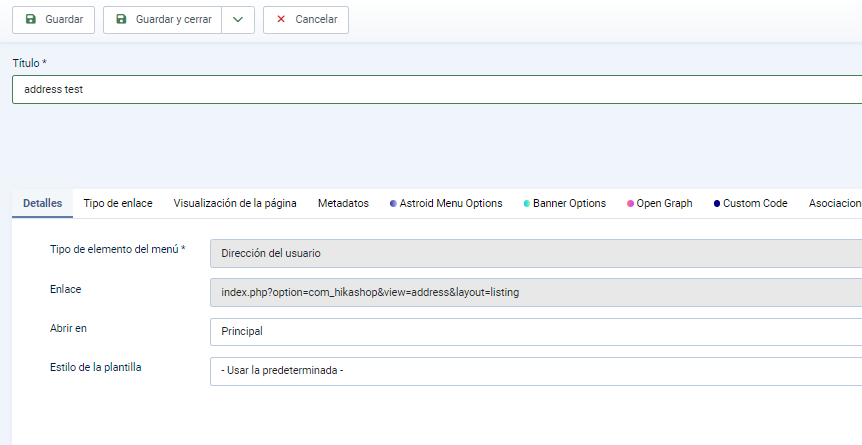
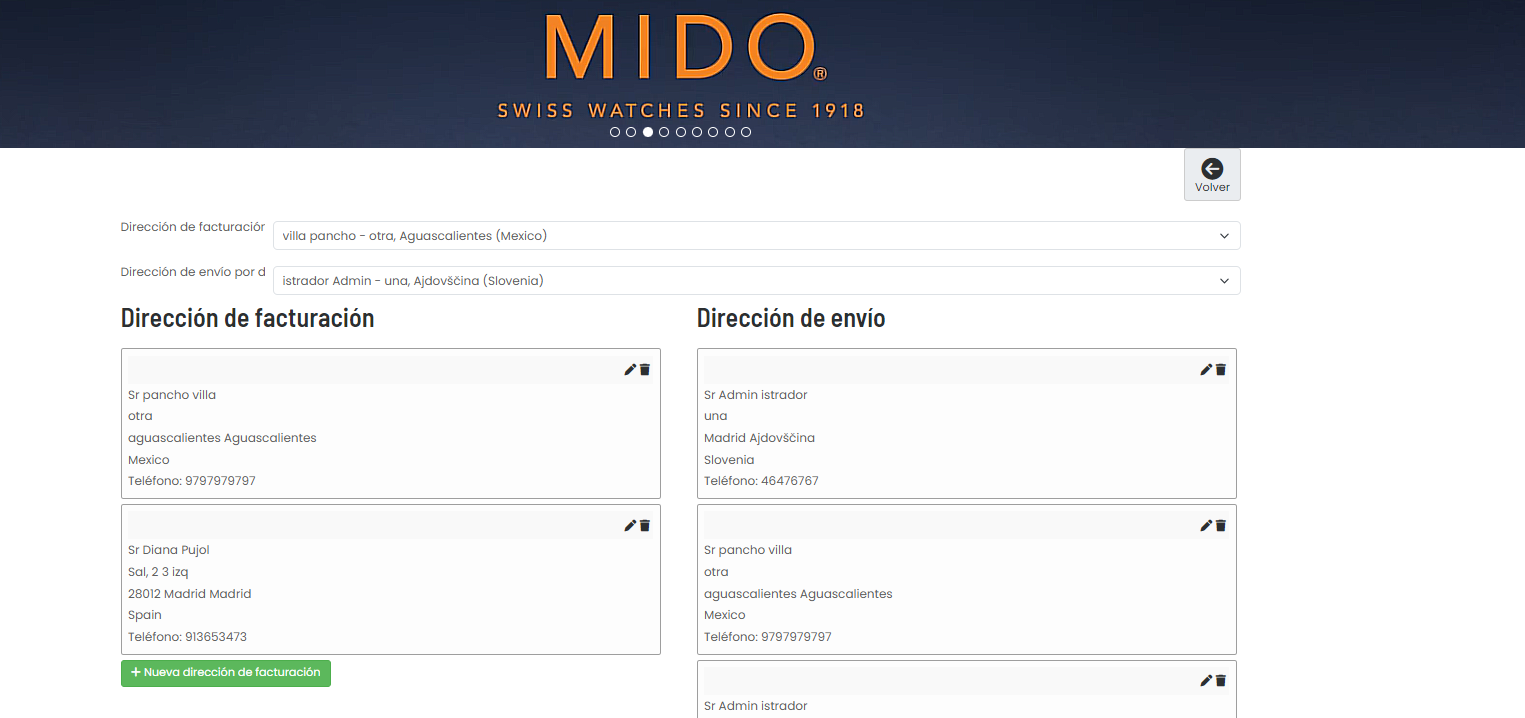
I have clicked in it and the page is the home template (yo can see the banner over the addressess) and the return button. The URL is component/hikashop/view-address/layout-listing
I have clicked on addressess from the cpanel (another template). The URL is panel-del-usuario/panel-del-usuario/address
And I don´t have any idea of how to fix it
Thank you
Please Log in or Create an account to join the conversation.
2 years 2 months ago - 2 years 2 months ago #362913
by nicolas
Replied by nicolas on topic User Panel
Hi,
I don't see how that's possible that you get that URL when accessing the user addresses area from a menu item configured like that.
Either there's an extension messing with the URL generation or there's something else I'm missing.
Could you provide via our contact form a backend access and a FTP access in order to check on the situation ?
www.hikashop.com/support/contact-us.html
I don't see how that's possible that you get that URL when accessing the user addresses area from a menu item configured like that.
Either there's an extension messing with the URL generation or there's something else I'm missing.
Could you provide via our contact form a backend access and a FTP access in order to check on the situation ?
www.hikashop.com/support/contact-us.html
Last edit: 2 years 2 months ago by nicolas.
Please Log in or Create an account to join the conversation.
Time to create page: 0.091 seconds