

- Posts: 101
- Thank you received: 4
Outlook printout issue
6 hours 55 minutes ago #100000493
by alainz
Outlook printout issue was created by alainz
-- HikaShop version -- : 6.7.1
-- Joomla version -- : 4.4.14
-- Browser(s) name and version -- : Chrome 154.0
Hi,
Our Sales team having issue when the receive payment confirmation about the order, they have to print it and prepare the product.
But right now, when they print out the email, the layout not display properly. Below are the example of the print out on A4 paper. For your information they are using Outlook. I try to test from another mail app and it now showing this problem.
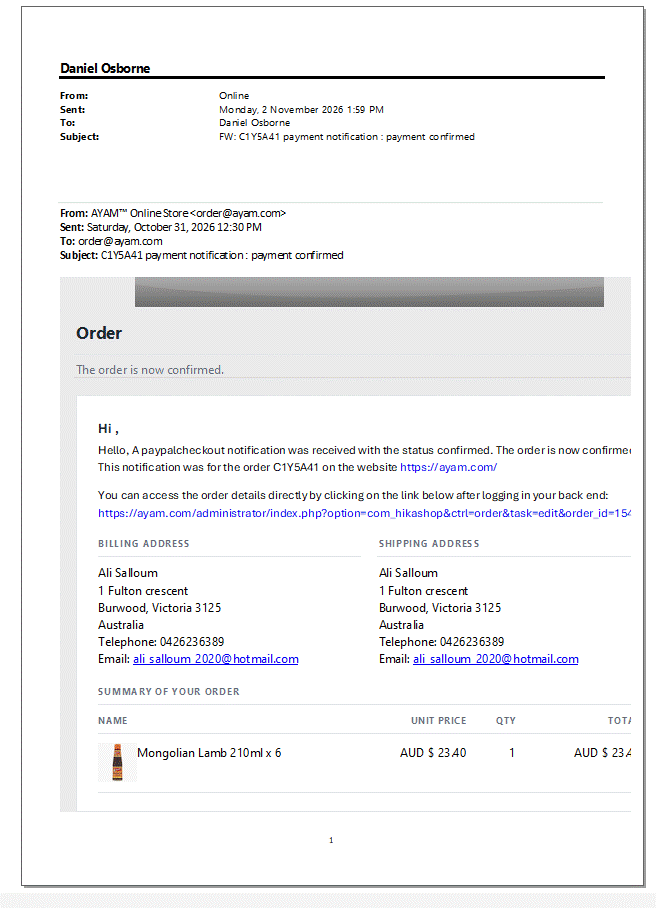
How can i solve the issue as they are pushing us to fix this problem? Thanks.
-- Joomla version -- : 4.4.14
-- Browser(s) name and version -- : Chrome 154.0
Hi,
Our Sales team having issue when the receive payment confirmation about the order, they have to print it and prepare the product.
But right now, when they print out the email, the layout not display properly. Below are the example of the print out on A4 paper. For your information they are using Outlook. I try to test from another mail app and it now showing this problem.
How can i solve the issue as they are pushing us to fix this problem? Thanks.
Please Log in or Create an account to join the conversation.

2 hours 7 minutes ago #100000496
by nicolas
Replied by nicolas on topic Outlook printout issue
Hi,
The email is cut on the right because of the link to the order in your back end: it shows the full address of the order as one very long word. Other mail apps break that address over two lines, but Outlook on Windows cannot, so it makes the whole email wider than the page and the right side is lost on screen and on paper.
This is fixed in the latest build of HikaShop 6.7.1: the link now shows the order number instead of the long address, so the email keeps its normal width in Outlook. Please download HikaShop 6.7.1 again from your account on our website and install it over your current HikaShop (same version number, so Joomla's updater will not offer it; your settings are kept). The next payment notifications will then print correctly.
The email is cut on the right because of the link to the order in your back end: it shows the full address of the order as one very long word. Other mail apps break that address over two lines, but Outlook on Windows cannot, so it makes the whole email wider than the page and the right side is lost on screen and on paper.
This is fixed in the latest build of HikaShop 6.7.1: the link now shows the order number instead of the long address, so the email keeps its normal width in Outlook. Please download HikaShop 6.7.1 again from your account on our website and install it over your current HikaShop (same version number, so Joomla's updater will not offer it; your settings are kept). The next payment notifications will then print correctly.
Please Log in or Create an account to join the conversation.
Time to create page: 0.045 seconds