

- Posts: 47
- Thank you received: 1
Characteristics/product code on invoice
13 years 2 weeks ago - 13 years 2 weeks ago #128149
by word
Characteristics/product code on invoice was created by word
Hello- Can you please direct me to the files that I can edit to show the characteristics name on the invoice? I do not want it on the product page, so I have that disabled. But I would like it on the invoice, as it appears on the order screen in the backend.
I did numerous searches and saw to edit the file order/invoice, but I couldn't find such file, nor would I know what to do if I did find it.
Shown is picture of the invoice now, the product name and custom field is shown, but not the characteristics.
Thanks in advance!!
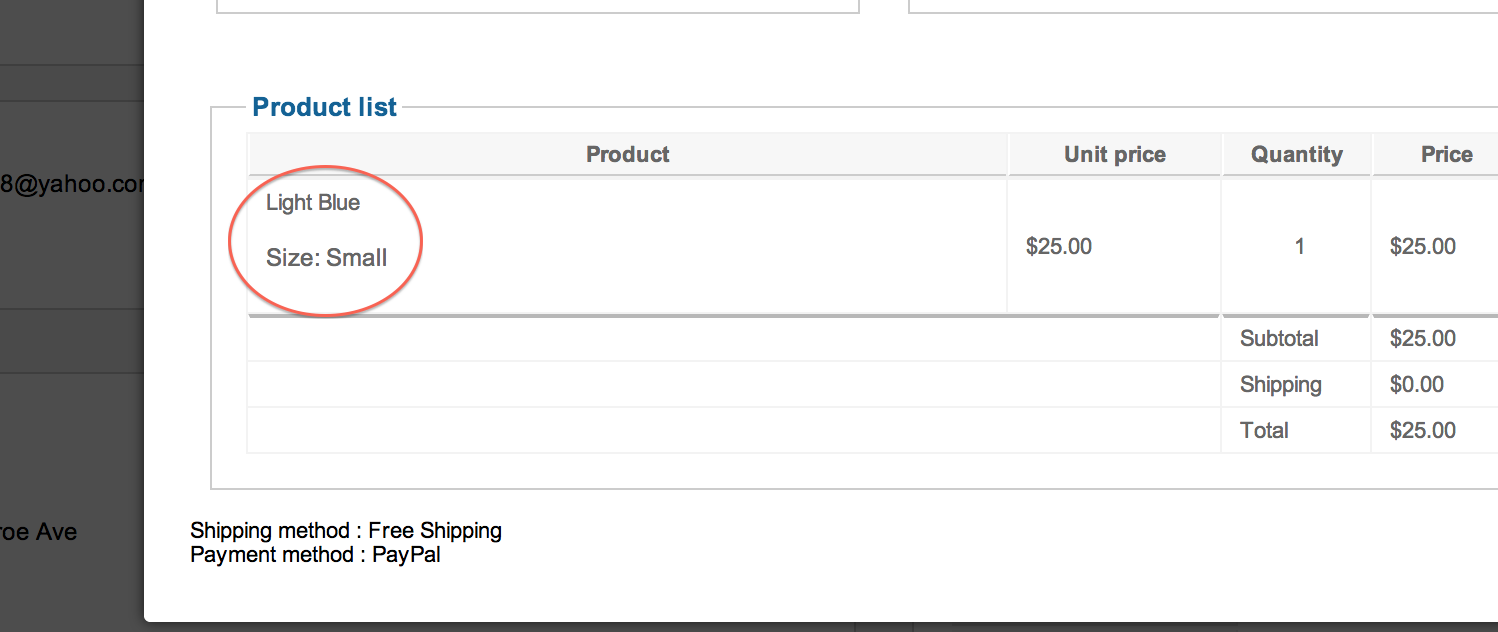
I did numerous searches and saw to edit the file order/invoice, but I couldn't find such file, nor would I know what to do if I did find it.
Shown is picture of the invoice now, the product name and custom field is shown, but not the characteristics.
Thanks in advance!!
Last edit: 13 years 2 weeks ago by word.
Please Log in or Create an account to join the conversation.

Less
More
- Posts: 12953
- Thank you received: 1778
13 years 2 weeks ago #128166
by Mohamed Thelji
Replied by Mohamed Thelji on topic Characteristics/product code on invoice
Hi,
You'll be able to edit this file through "Hikashop->Display->Views" by editing the "invoice" file of your "order" view of your back-end template.
You'll be able to edit this file through "Hikashop->Display->Views" by editing the "invoice" file of your "order" view of your back-end template.
Please Log in or Create an account to join the conversation.
13 years 2 weeks ago #128177
by word
Replied by word on topic Characteristics/product code on invoice
Thanks Mohamed, Can you please advise me on the code to place?
thanks
thanks
Please Log in or Create an account to join the conversation.

13 years 1 week ago #128295
by Xavier
Replied by Xavier on topic Characteristics/product code on invoice
Hi,
You need to be placed in the foreach "foreach($this->order->products as $product){"
and use something like:
This code is maybe wrong (not tested) but it's the way of doing that.
You need to be placed in the foreach "foreach($this->order->products as $product){"
and use something like:
Code:
$productClass = hikashop_get('class.product');
$fullProduct = $productClass->get($product->order_product_id);
$characteristic = str_replace('Product_with_variant_','',$fullProduct->product_code);
$db = JFactory::getDbo();
$db->setQuery("SELECT 'characteristic_id' FROM ".hikashop_table('characteristic')." WHERE 'characteristic_id' = ".(int)$characteristic);
$characteristic = $db->loadResult();
echo $characteristic;
This code is maybe wrong (not tested) but it's the way of doing that.
Please Log in or Create an account to join the conversation.
13 years 1 week ago #128392
by word
Replied by word on topic Characteristics/product code on invoice
Thanks guys. I am still having a bit of trouble. Here is the best I could do:
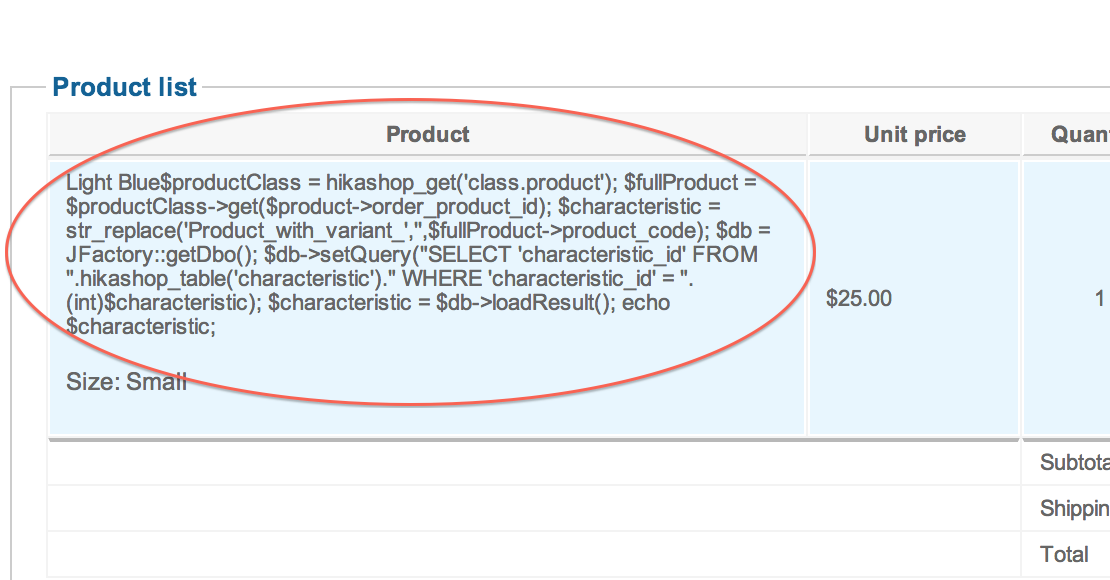
It's in the right place, maybe the code is wrong? Maybe I placed it wrong? I don't know what to look for.
Thanks for you help.
It's in the right place, maybe the code is wrong? Maybe I placed it wrong? I don't know what to look for.
Thanks for you help.
Please Log in or Create an account to join the conversation.
13 years 1 week ago - 13 years 1 week ago #128427
by word
Replied by word on topic Characteristics/product code on invoice
OK, I have been working on this code and getting nowhere. :S Let me rephrase my request, maybe you guys have a better way of doing it. 
I would like to display the product code on the invoice but not the product page.
The characteristics are set to show on the product page, and that works. But I would like the code on the invoice but not the product page. Is it possible?
Thanks for all your help!!!!
I would like to display the product code on the invoice but not the product page.
The characteristics are set to show on the product page, and that works. But I would like the code on the invoice but not the product page. Is it possible?
Thanks for all your help!!!!
Last edit: 13 years 1 week ago by word.
Please Log in or Create an account to join the conversation.

13 years 1 week ago #128474
by nicolas
Replied by nicolas on topic Characteristics/product code on invoice
You added the code in the HTML of the page, not in the PHP code of the page. So you need to add the tag <?php at the beginning and the tag ?> at the end so that the code is interpreted and not simply displayed like you have on your screenshot.
Please Log in or Create an account to join the conversation.
13 years 1 week ago - 13 years 1 week ago #128478
by word
Replied by word on topic Characteristics/product code on invoice
Thanks Nicolas. I think there may be an easier way to do this. How can I remove the product code from the product page? I would like to remove the numbers in the box.
Thanks
Thanks
Last edit: 13 years 1 week ago by word.
Please Log in or Create an account to join the conversation.
13 years 1 week ago #128490
by Xavier
Replied by Xavier on topic Characteristics/product code on invoice
Hi,
By using this css property:
Thanks to read our documentation about how to customize the layout:
www.hikashop.com/support/documentation/1...ize-the-display.html
By using this css property:
Code:
.hikashop_product_page .hikashop_product_code_main{ display: none;}
www.hikashop.com/support/documentation/1...ize-the-display.html
Please Log in or Create an account to join the conversation.
13 years 1 week ago #128548
by word
Replied by word on topic Characteristics/product code on invoice
Got it! Thanks so much guys!
Please Log in or Create an account to join the conversation.
Time to create page: 0.119 seconds