

- Posts: 214
- Thank you received: 1
Add Custom Fields to Order Summary Email
12 years 11 months ago #134007
by matps
Add Custom Fields to Order Summary Email was created by matps
Hi There,
I'm wondering if this is possible. Firstly, see the following screen shots
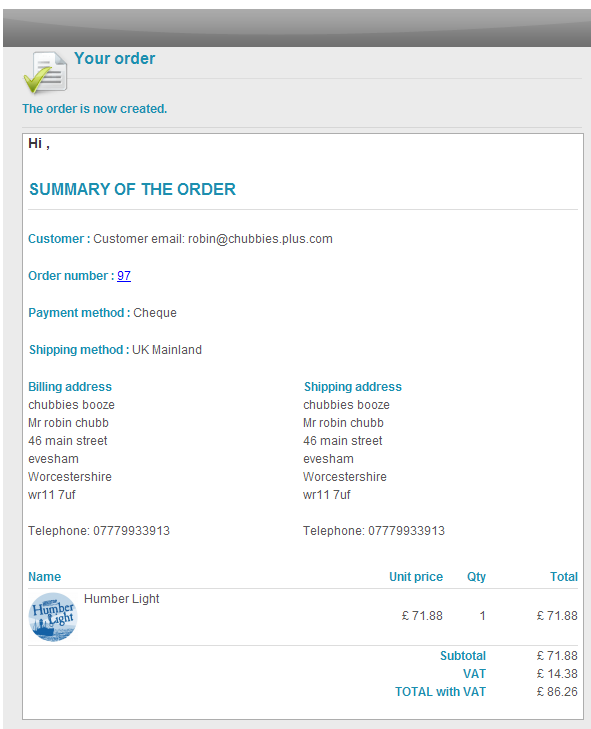
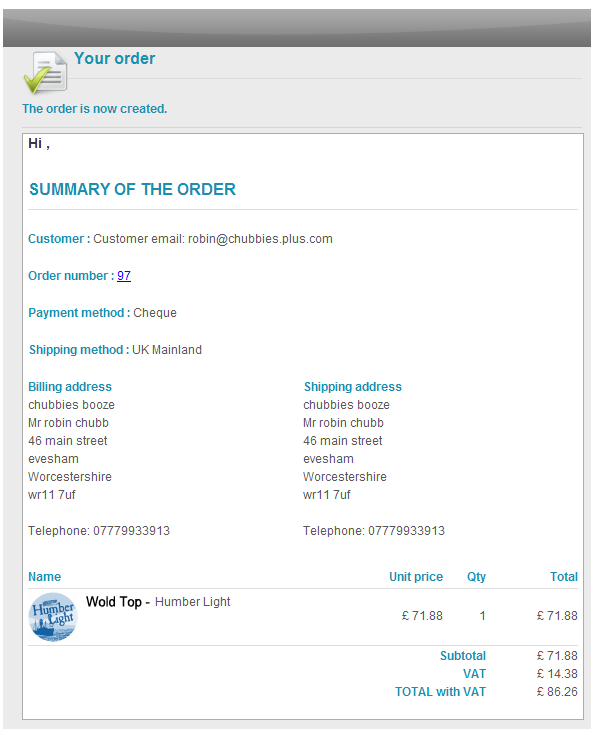
What I've been asked to do is add the brewery name to the order summary email, in this case it's the text "Wold Top -".
Now I've already created a custom field in the products table, and I'm inserting it into product > listing > img_title.php to display the brewery on the product listing page. So my question is can I use this same code (which is <?php echo $this->row->brewer; ?>) to display that custom field on the order summary email or do I have to do something different?
Kind Regards,
Matthew
I'm wondering if this is possible. Firstly, see the following screen shots
What I've been asked to do is add the brewery name to the order summary email, in this case it's the text "Wold Top -".
Now I've already created a custom field in the products table, and I'm inserting it into product > listing > img_title.php to display the brewery on the product listing page. So my question is can I use this same code (which is <?php echo $this->row->brewer; ?>) to display that custom field on the order summary email or do I have to do something different?
Kind Regards,
Matthew
Please Log in or Create an account to join the conversation.

Less
More
- Posts: 12953
- Thank you received: 1778
12 years 11 months ago #134019
by Mohamed Thelji
Replied by Mohamed Thelji on topic Add Custom Fields to Order Summary Email
Hi,
Note that if you use a custom field from the "Item" table, your custom field will automatically show through your invoice and emails.
Note that if you use a custom field from the "Item" table, your custom field will automatically show through your invoice and emails.
Please Log in or Create an account to join the conversation.
12 years 11 months ago #134024
by matps
Replied by matps on topic Add Custom Fields to Order Summary Email
Hi Mohamed,
I wasn't looking to create another new custom field, I was looking to insert a custom field I had already created into an email if that makes sense?
I wasn't looking to create another new custom field, I was looking to insert a custom field I had already created into an email if that makes sense?
Please Log in or Create an account to join the conversation.

12 years 11 months ago #134103
by Xavier
Replied by Xavier on topic Add Custom Fields to Order Summary Email
Hi,
In the email you can add the following tag:
after this line:
In the email you can add the following tag:
Code:
{LINEVAR:product.CUSTOM_FIELD_NAME}
Code:
{LINEVAR:PRODUCT_NAME}<!--{IF:ORDER_PRODUCT_CODE}--> {LINEVAR:PRODUCT_CODE}<!--{ENDIF:ORDER_PRODUCT_CODE}-->
Please Log in or Create an account to join the conversation.
12 years 11 months ago - 12 years 11 months ago #134107
by matps
Replied by matps on topic Add Custom Fields to Order Summary Email
Hi Xavier,
I'm afraid I don't see the line
{LINEVAR:PRODUCT_NAME}<!--{IF:ORDER_PRODUCT_CODE}--> {LINEVAR:PRODUCT_CODE}<!--{ENDIF:ORDER_PRODUCT_CODE}-->
I assume I should be looking in the email 'Order creation notification'?
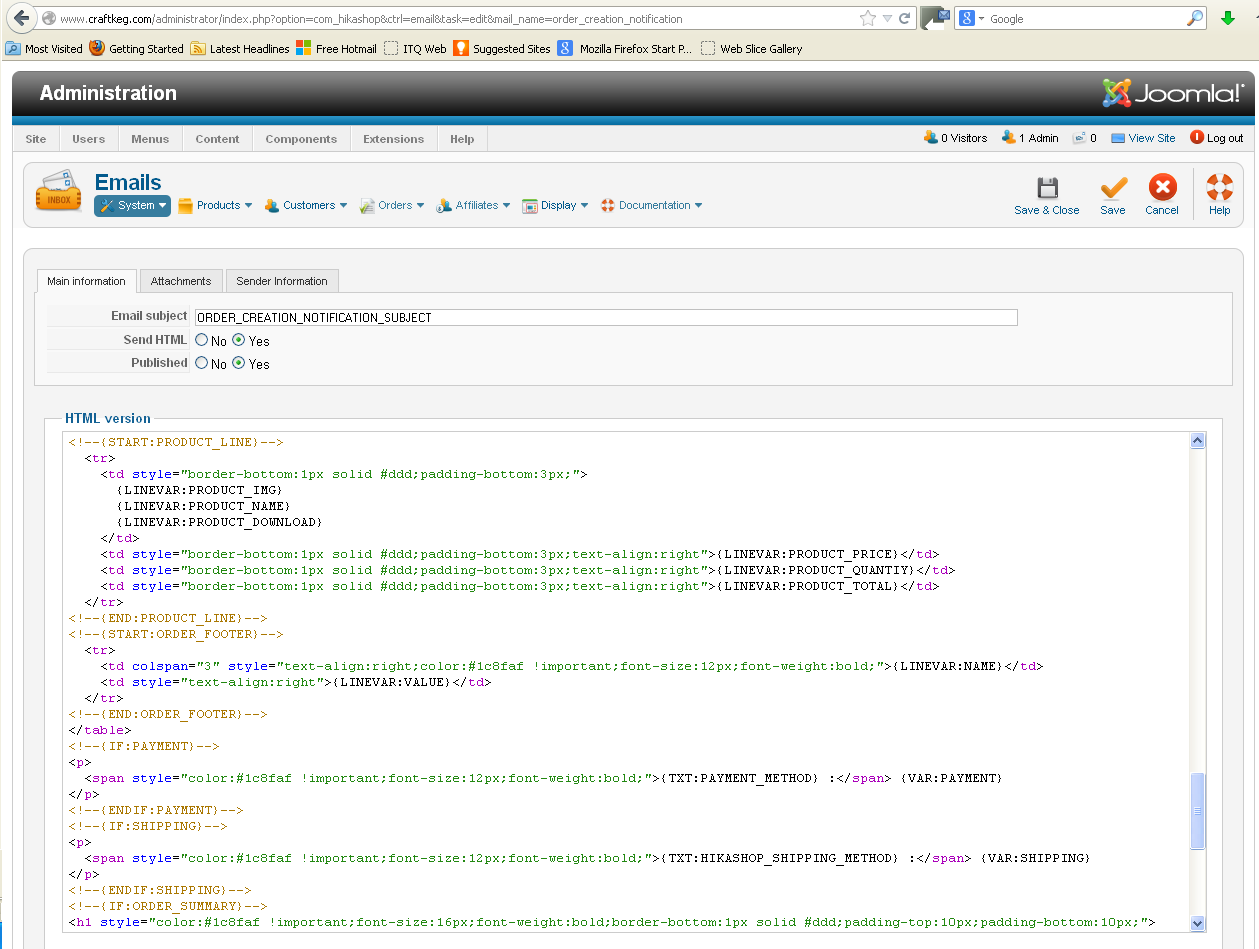
I'm afraid I don't see the line
{LINEVAR:PRODUCT_NAME}<!--{IF:ORDER_PRODUCT_CODE}--> {LINEVAR:PRODUCT_CODE}<!--{ENDIF:ORDER_PRODUCT_CODE}-->
I assume I should be looking in the email 'Order creation notification'?
Last edit: 12 years 11 months ago by matps.
Please Log in or Create an account to join the conversation.
12 years 11 months ago #134398
by matps
Replied by matps on topic Add Custom Fields to Order Summary Email
Hi Guys, wondering if I could have abit more help with this?
I tried putting {LINEVAR:product.CUSTOM_FIELD_NAME} after it says {LINEVAR:PRODUCT_NAME} which didn't seem to work, but I'm not sure if I'm looking in the right place?
I tried putting {LINEVAR:product.CUSTOM_FIELD_NAME} after it says {LINEVAR:PRODUCT_NAME} which didn't seem to work, but I'm not sure if I'm looking in the right place?
Please Log in or Create an account to join the conversation.

12 years 11 months ago #134469
by nicolas
Replied by nicolas on topic Add Custom Fields to Order Summary Email
Xavier was correct and wrong in his answer 
The problem with what he told you is that the tags he gave you will only exist in next version of HikaShop.
With the current version of HikaShop, such modification is much more complex as you also need to edit the preload file corresponding to the email in the folder media/com_hikashop/mail/ in order to add php code to generate the var tag that you'll be able to use on the email template. If you're well versed into programming, look at what we do for the product_name field and do the same for your custom field column name and that will work. If not, then I would recommend to wait for next version of HikaShop in one or two weeks in order to be able to do what Xavier explained.
The problem with what he told you is that the tags he gave you will only exist in next version of HikaShop.
With the current version of HikaShop, such modification is much more complex as you also need to edit the preload file corresponding to the email in the folder media/com_hikashop/mail/ in order to add php code to generate the var tag that you'll be able to use on the email template. If you're well versed into programming, look at what we do for the product_name field and do the same for your custom field column name and that will work. If not, then I would recommend to wait for next version of HikaShop in one or two weeks in order to be able to do what Xavier explained.
Please Log in or Create an account to join the conversation.
12 years 11 months ago #134535
by matps
Replied by matps on topic Add Custom Fields to Order Summary Email
While I am starting to understand PHP a lot more then I did thanks to the help from all you guys, I certainly wouldn't call myself "well versed" at all! I'll look into what you suggested, as I like to give things a go, but I think it would probably make sense to wait for the next update!
Thanks Guys
Thanks Guys
Please Log in or Create an account to join the conversation.
Time to create page: 0.077 seconds