
- Posts: 26
- Thank you received: 0
Change style of the "add to cart" lightbox
- commander64
-
 Topic Author
- Offline
Less
More
12 years 10 months ago #135654
by commander64
Change style of the "add to cart" lightbox was created by commander64
Hi,
I want to change the look of the lightbox which appears, if I put an article to the cart.
Can you please tell me which file I had to edit ( I use the default style in hikashop and I want to add a picture to that lightbox)
Thanks
Tom
I want to change the look of the lightbox which appears, if I put an article to the cart.
Can you please tell me which file I had to edit ( I use the default style in hikashop and I want to add a picture to that lightbox)
Thanks
Tom
Please Log in or Create an account to join the conversation.

12 years 10 months ago #135664
by Jerome
Jerome - Obsidev.com
HikaMarket & HikaSerial developer / HikaShop core dev team.
Replied by Jerome on topic Change style of the "add to cart" lightbox
Hi,
I think you want to override the view "checkout | notice".
www.hikashop.com/support/documentation/1...ize-the-display.html
Regards,
I think you want to override the view "checkout | notice".
www.hikashop.com/support/documentation/1...ize-the-display.html
Regards,
Jerome - Obsidev.com
HikaMarket & HikaSerial developer / HikaShop core dev team.
Please Log in or Create an account to join the conversation.
- commander64
-
Topic Author
- Offline
Less
More
- Posts: 26
- Thank you received: 0
12 years 10 months ago - 12 years 10 months ago #135715
by commander64
Replied by commander64 on topic Change style of the "add to cart" lightbox
Hi Jerome,
No , I want to change the content of the lightbox (see picture)
(Everything which is in the red box)
But I didn't find the css or php file to do that.
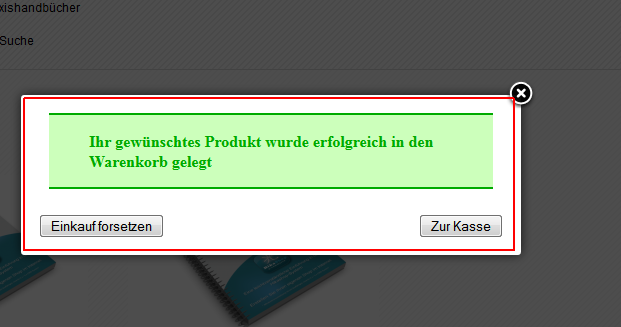
Tom
No , I want to change the content of the lightbox (see picture)
(Everything which is in the red box)
But I didn't find the css or php file to do that.
Tom
Last edit: 12 years 10 months ago by commander64.
Please Log in or Create an account to join the conversation.

Less
More
- Posts: 12953
- Thank you received: 1778
12 years 10 months ago #135731
by Mohamed Thelji
Replied by Mohamed Thelji on topic Change style of the "add to cart" lightbox
Hi,
As Jerome said, you'll be able to change the content of the add to cart popup, by editing the "notice" file, of the "checkout" view of your front-end template through "Hikashop->Display->Views".
As Jerome said, you'll be able to change the content of the add to cart popup, by editing the "notice" file, of the "checkout" view of your front-end template through "Hikashop->Display->Views".
The following user(s) said Thank You: commander64
Please Log in or Create an account to join the conversation.
- commander64
-
Topic Author
- Offline
Less
More
- Posts: 26
- Thank you received: 0
12 years 10 months ago #135732
by commander64
Replied by commander64 on topic Change style of the "add to cart" lightbox
Hi Mohamed,
I got it !
Thanks a lot !
Tom
I got it !
Thanks a lot !
Tom
Please Log in or Create an account to join the conversation.
Time to create page: 0.261 seconds