

- Posts: 2
- Thank you received: 0
Enclose VAT number in email notification
12 years 8 months ago #144734
by mv
Enclose VAT number in email notification was created by mv
-- url of the page with the problem -- :
mywebsite.com/mypage
-- HikaShop version -- : x.x.x
-- Joomla version -- : x.x
-- PHP version -- : x.x.x
-- Browser(s) name and version -- : XXXXX x.x.x
-- Error-message(debug-mod must be tuned on) -- : Error_message
Hello,
one of the "custom field" I use for the customer registration is the VAT number.
I would like it to appear in the email notification sent to the customer and to me after payment.
How is that possible ?
Thanks in advance
Best regards
Morgan
-- HikaShop version -- : x.x.x
-- Joomla version -- : x.x
-- PHP version -- : x.x.x
-- Browser(s) name and version -- : XXXXX x.x.x
-- Error-message(debug-mod must be tuned on) -- : Error_message
Hello,
one of the "custom field" I use for the customer registration is the VAT number.
I would like it to appear in the email notification sent to the customer and to me after payment.
How is that possible ?
Thanks in advance
Best regards
Morgan
Please Log in or Create an account to join the conversation.

12 years 8 months ago #144777
by Eliot
Replied by Eliot on topic Enclose VAT number in email notification
Hi Morgan,
It's pretty easy, you just have to add the tag to the email.
Tag can look like {VAR:user.vat}.
Check this topic for more information: www.hikashop.com/forum/4-how-to/864797-c...fication.html#139433
It's pretty easy, you just have to add the tag to the email.
Tag can look like {VAR:user.vat}.
Check this topic for more information: www.hikashop.com/forum/4-how-to/864797-c...fication.html#139433
Please Log in or Create an account to join the conversation.
12 years 8 months ago #144831
by mv
Replied by mv on topic Enclose VAT number in email notification
Hi Eliot,
thank you for the answer.
I've been to System --> Emails but I don't see where I am supposed to add the tag. Is it possible that I don't have the proper version of Hikashop ?
Morgan
thank you for the answer.
I've been to System --> Emails but I don't see where I am supposed to add the tag. Is it possible that I don't have the proper version of Hikashop ?
Morgan
Please Log in or Create an account to join the conversation.

12 years 8 months ago #144897
by nicolas
Replied by nicolas on topic Enclose VAT number in email notification
Hi,
You need to edit the files 'address_template' via the menu Display>Views and add the tag {address_vat} to them. Then you'll see the VAT number in the emails.
You need to edit the files 'address_template' via the menu Display>Views and add the tag {address_vat} to them. Then you'll see the VAT number in the emails.
Please Log in or Create an account to join the conversation.
Less
More
- Posts: 22
- Thank you received: 0
6 years 2 months ago #323371
by dutchaudio
Replied by dutchaudio on topic Enclose VAT number in email notification
Old topic, I know but I'm having problems with this to work.
The custom field is there, I can see the VAT number when I login to hikashop, but I don't get it into my emails.
Below is what my address / address_template.php looks like, am I doing something wrong here?
<?php
defined('_JEXEC') or die('Restricted access');
?>
{address_company}
{address_title} {address_firstname} {address_lastname}
{address_street}
{address_post_code} {address_city} {address_state}
{address_country}
{address_vat}
<?php echo JText::sprintf('TELEPHONE_IN_ADDRESS','{address_telephone}');?>
The custom field is there, I can see the VAT number when I login to hikashop, but I don't get it into my emails.
Below is what my address / address_template.php looks like, am I doing something wrong here?
<?php
defined('_JEXEC') or die('Restricted access');
?>
{address_company}
{address_title} {address_firstname} {address_lastname}
{address_street}
{address_post_code} {address_city} {address_state}
{address_country}
{address_vat}
<?php echo JText::sprintf('TELEPHONE_IN_ADDRESS','{address_telephone}');?>
Please Log in or Create an account to join the conversation.
6 years 2 months ago #323380
by nicolas
Replied by nicolas on topic Enclose VAT number in email notification
Hi,
There are two view files for the address format, one for the backend, and one for the frontend.
So both need to be modified.
However, since a few years back, you now have a setting "address format" understand the checkout tab of the HikaShop configuration.
So you should do the modification there (maybe it's already there) and save the configuration.
That will update / create automatically both view overrides for you and it should hopefully work fine after that.
There are two view files for the address format, one for the backend, and one for the frontend.
So both need to be modified.
However, since a few years back, you now have a setting "address format" understand the checkout tab of the HikaShop configuration.
So you should do the modification there (maybe it's already there) and save the configuration.
That will update / create automatically both view overrides for you and it should hopefully work fine after that.
Please Log in or Create an account to join the conversation.
Less
More
- Posts: 22
- Thank you received: 0
6 years 2 months ago - 6 years 2 months ago #323393
by dutchaudio
I just see save buttons, no other options and the {address_vat} line is there already.
Am I still missing something? It still doesn't add it to the emails (both customer as admin), but it's there when i check the order/contact in the interface. :huh:
EDIT: I also checked the address format and this is what it looks like.
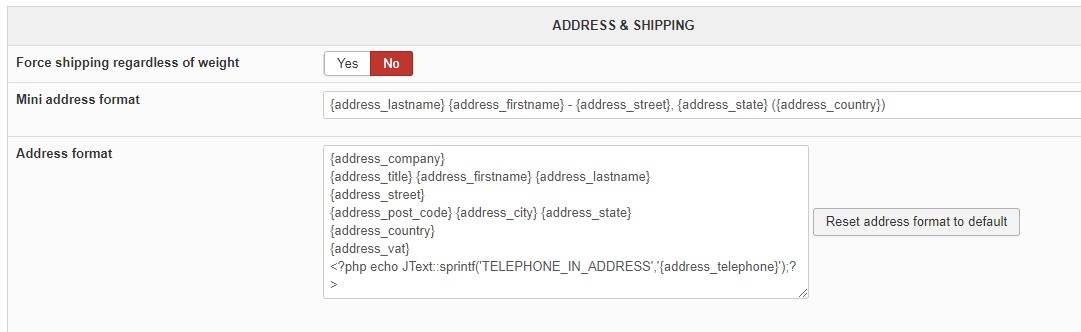
Replied by dutchaudio on topic Enclose VAT number in email notification
I checked it again and it's both in the front and backend of the address_template files.nicolas wrote: Hi,
There are two view files for the address format, one for the backend, and one for the frontend.
So both need to be modified.
However, since a few years back, you now have a setting "address format" understand the checkout tab of the HikaShop configuration.
So you should do the modification there (maybe it's already there) and save the configuration.
That will update / create automatically both view overrides for you and it should hopefully work fine after that.
I just see save buttons, no other options and the {address_vat} line is there already.
Am I still missing something? It still doesn't add it to the emails (both customer as admin), but it's there when i check the order/contact in the interface. :huh:
EDIT: I also checked the address format and this is what it looks like.
Last edit: 6 years 2 months ago by dutchaudio.
Please Log in or Create an account to join the conversation.
6 years 2 months ago #323396
by nicolas
Replied by nicolas on topic Enclose VAT number in email notification
Hi,
Did you click on the save button of the HikaShop configuration page ?
That will update all the the view overrides and make sure that the format is correct everywhere.
Did you click on the save button of the HikaShop configuration page ?
That will update all the the view overrides and make sure that the format is correct everywhere.
Please Log in or Create an account to join the conversation.
Less
More
- Posts: 22
- Thank you received: 0
6 years 2 months ago #323437
by dutchaudio
Attached is the address_vat in the custom fileds. It works everywhere (inclduing right calculations and evetrything), except for the confirmation emails.:dry:
Replied by dutchaudio on topic Enclose VAT number in email notification
I did, didnt matter. All other options that I made where saved and when I reopen the configuration, the line is there as well.'nicolas wrote: Hi,
Did you click on the save button of the HikaShop configuration page ?
That will update all the the view overrides and make sure that the format is correct everywhere.
Attached is the address_vat in the custom fileds. It works everywhere (inclduing right calculations and evetrything), except for the confirmation emails.:dry:
Please Log in or Create an account to join the conversation.
6 years 2 months ago #323438
by nicolas
Replied by nicolas on topic Enclose VAT number in email notification
Hi,
I don't see why it wouldn't work.
Could you provide a backend access and the order number of an order with the issue so that we can check on the situation ?
You can provide that via our contact form here:
www.hikashop.com/support/contact-us.html
I don't see why it wouldn't work.
Could you provide a backend access and the order number of an order with the issue so that we can check on the situation ?
You can provide that via our contact form here:
www.hikashop.com/support/contact-us.html
Please Log in or Create an account to join the conversation.
Time to create page: 0.324 seconds