

- Posts: 214
- Thank you received: 1
Adding Custom Fields to Product listing
12 years 8 months ago #146932
by matps
Adding Custom Fields to Product listing was created by matps
Hi There,
I was wondering if it was possible to be able to add custom fields into the Products listing in the backend orders.

What I've been asked to do, if possible, is to insert 2 additional colums after the Unit price called "Code" and "Delivered" which would essentially just be text boxes so we can fill in our couriers order number and whether or not the item has been delivered (since we send out the products from our orders in multiple deliveries so need to keep track of them individually)
I did view source and I can see <table class="hika_listing adminlist hika_table" id="hikashop_order_product_listing" style="width:100%"> which I assume is the right code to edit but I don't know where that is kept.
I was wondering if it was possible to be able to add custom fields into the Products listing in the backend orders.
What I've been asked to do, if possible, is to insert 2 additional colums after the Unit price called "Code" and "Delivered" which would essentially just be text boxes so we can fill in our couriers order number and whether or not the item has been delivered (since we send out the products from our orders in multiple deliveries so need to keep track of them individually)
I did view source and I can see <table class="hika_listing adminlist hika_table" id="hikashop_order_product_listing" style="width:100%"> which I assume is the right code to edit but I don't know where that is kept.
Please Log in or Create an account to join the conversation.

Less
More
- Posts: 12953
- Thank you received: 1778
12 years 8 months ago #146952
by Mohamed Thelji
Replied by Mohamed Thelji on topic Adding Custom Fields to Product listing
Hi,
That's possible but it will require some code customization through the file "show_products" of the "order" view of your back-end template through the page "Hikashop->Display->Views".
That's possible but it will require some code customization through the file "show_products" of the "order" view of your back-end template through the page "Hikashop->Display->Views".
Please Log in or Create an account to join the conversation.
12 years 8 months ago - 12 years 8 months ago #146958
by matps
Replied by matps on topic Adding Custom Fields to Product listing
Hi Mohamed, thanks for letting me know it can be done.
So I've added 2 custom fields in the Order table which have appeared under 'Additional information' which is a good start, but I need these two fields to appear next to each product under the Product list, could you suggest how I could do that?
By viewing the page source I can see my new code is
<tr class="hikashop_order_additional_customfield hikashop_order_additional_customfield_delivery_code">
<td class="key">Delivery Code</td>
<td><span></span></td>
</tr>
<tr class="hikashop_order_additional_customfield hikashop_order_additional_customfield_delivery_confirm">
<td class="key">Confirm Delivery</td>
<td><span></span></td>
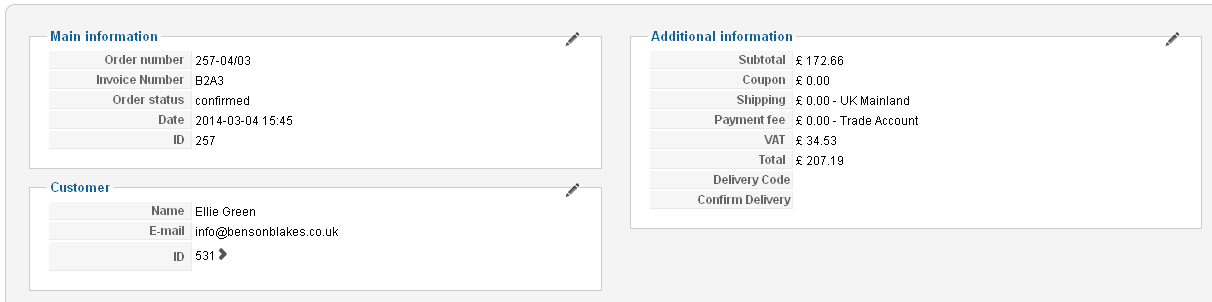
So I've added 2 custom fields in the Order table which have appeared under 'Additional information' which is a good start, but I need these two fields to appear next to each product under the Product list, could you suggest how I could do that?
By viewing the page source I can see my new code is
<tr class="hikashop_order_additional_customfield hikashop_order_additional_customfield_delivery_code">
<td class="key">Delivery Code</td>
<td><span></span></td>
</tr>
<tr class="hikashop_order_additional_customfield hikashop_order_additional_customfield_delivery_confirm">
<td class="key">Confirm Delivery</td>
<td><span></span></td>
Last edit: 12 years 8 months ago by matps.
Please Log in or Create an account to join the conversation.
12 years 8 months ago #147048
by matps
Replied by matps on topic Adding Custom Fields to Product listing
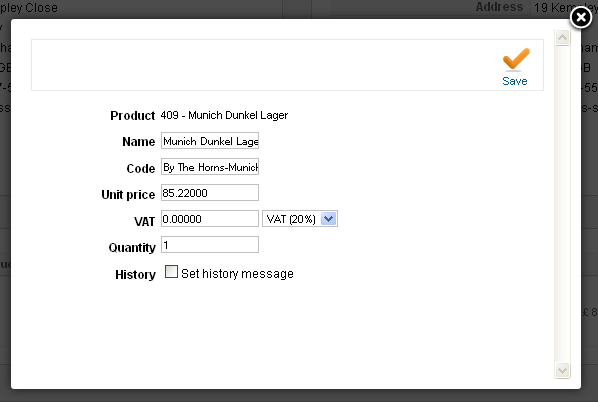
Alternatively, could these extra fields be added to the popup screen when you press the edit action button in the Product list?
Please Log in or Create an account to join the conversation.
Less
More
- Posts: 12953
- Thank you received: 1778
12 years 8 months ago #147101
by Mohamed Thelji
Replied by Mohamed Thelji on topic Adding Custom Fields to Product listing
Hi,
1. As I told you the solution will be to edit the file "show_products" of the "order" view of your back-end template through the page "Hikashop->Display->Views". The best way to do what you want will be to add these lines :
After that line :
And these lines :
After these lines :
2. To do that you'll have to edit the "edit_products" file of the "order" view of your back-end template through "Hikashop->Display->Views"
1. As I told you the solution will be to edit the file "show_products" of the "order" view of your back-end template through the page "Hikashop->Display->Views". The best way to do what you want will be to add these lines :
Code:
<th class="hikashop_order_item_price_title title"><?php echo 'Delivery Code'; ?></th>
<th class="hikashop_order_item_price_title title"><?php echo 'Confirm Delivery'; ?></th>
Code:
<th class="hikashop_order_item_price_title title"><?php echo JText::_('UNIT_PRICE'); ?></th>
Code:
<td class="key">Code to display : Delivery Code</td>
<td class="key">Code to display : Confirm Delivery</td>
Code:
<td class="hikashop_order_item_price_value"><?php
echo $this->currencyHelper->format($product->order_product_price, $this->order->order_currency_id);
if(bccomp($product->order_product_tax,0,5)) {
echo '<br/>'.JText::sprintf('PLUS_X_OF_VAT', $this->currencyHelper->format($product->order_product_tax, $this->order->order_currency_id));
}
?></td>
2. To do that you'll have to edit the "edit_products" file of the "order" view of your back-end template through "Hikashop->Display->Views"
The following user(s) said Thank You: matps
Please Log in or Create an account to join the conversation.
12 years 8 months ago #147109
by matps
Replied by matps on topic Adding Custom Fields to Product listing
Hi Mohamed, thanks for that. It worked a treat putting the code in the right place, but what I was after originally was for them to be editable based on what the custom fields were (Delivery Code is a text field and Confirm Delivery is a checkbox)

As you can see in the image it's just displaying the text you gave me in the code.
As you can see in the image it's just displaying the text you gave me in the code.
Please Log in or Create an account to join the conversation.

12 years 8 months ago #147144
by Eliot
Replied by Eliot on topic Adding Custom Fields to Product listing
Hi there,
You have to replace this by the code to display your custom field.
It should be something like <?php echo $product->nameofyourcustomfield; ?>
You have to replace this by the code to display your custom field.
It should be something like <?php echo $product->nameofyourcustomfield; ?>
Please Log in or Create an account to join the conversation.
12 years 8 months ago #147241
by matps
Replied by matps on topic Adding Custom Fields to Product listing
HI Eliot, thanks for your reply.
When you say "replace this by the code" do you mean have it like this,
<td class="key">Code to display : Delivery Code<?php echo $product->delivery_code; ?></td>
<td class="key">Code to display : Confirm Delivery<?php echo $product->delivery_confirm; ?></td>
as that hasn't seemed to do anything. Sorry for my lack of experience in PHP!
When you say "replace this by the code" do you mean have it like this,
<td class="key">Code to display : Delivery Code<?php echo $product->delivery_code; ?></td>
<td class="key">Code to display : Confirm Delivery<?php echo $product->delivery_confirm; ?></td>
as that hasn't seemed to do anything. Sorry for my lack of experience in PHP!
Please Log in or Create an account to join the conversation.

12 years 8 months ago #147245
by Xavier
Replied by Xavier on topic Adding Custom Fields to Product listing
Hi,
Yes that should be ok, can you give us a screenshot of your custom fields listing ?
Are they product custom fields or order custom fields ?
Yes that should be ok, can you give us a screenshot of your custom fields listing ?
Are they product custom fields or order custom fields ?
Please Log in or Create an account to join the conversation.
12 years 8 months ago #147284
by matps
Replied by matps on topic Adding Custom Fields to Product listing
They are orders so I changed it to the following to see if it worked but no,
<td class="key">Code to display : Delivery Code<?php echo $order->delivery_code; ?></td>
<td class="key">Code to display : Confirm Delivery<?php echo $order->delivery_confirm; ?></td>

<td class="key">Code to display : Delivery Code<?php echo $order->delivery_code; ?></td>
<td class="key">Code to display : Confirm Delivery<?php echo $order->delivery_confirm; ?></td>
Please Log in or Create an account to join the conversation.

12 years 8 months ago #147330
by Jerome
Jerome - Obsidev.com
HikaMarket & HikaSerial developer / HikaShop core dev team.
Replied by Jerome on topic Adding Custom Fields to Product listing
Hi,
Just one little modification to do !
To access to the order, you have to use the variable "$this->order", not "$order".
You can see above in the "order | show_products view" that to display the order_id, it uses "$this->order->order_id".
So the correct code will be:
Regards,
Just one little modification to do !
To access to the order, you have to use the variable "$this->order", not "$order".
You can see above in the "order | show_products view" that to display the order_id, it uses "$this->order->order_id".
So the correct code will be:
Code:
<td class="key">Code to display : Delivery Code<?php echo @$this->order->delivery_code; ?></td>
<td class="key">Code to display : Confirm Delivery<?php echo @$this->order->delivery_confirm; ?></td>
Regards,
Jerome - Obsidev.com
HikaMarket & HikaSerial developer / HikaShop core dev team.
Please Log in or Create an account to join the conversation.
12 years 7 months ago #147626
by matps
Replied by matps on topic Adding Custom Fields to Product listing
Hi, thanks again for all of your involved help!
Unfortunately I'm still not getting the exact results I was orginally after. So when I created the new custom fields, I can see them appear in Additional Information as show in the following screenshoot.
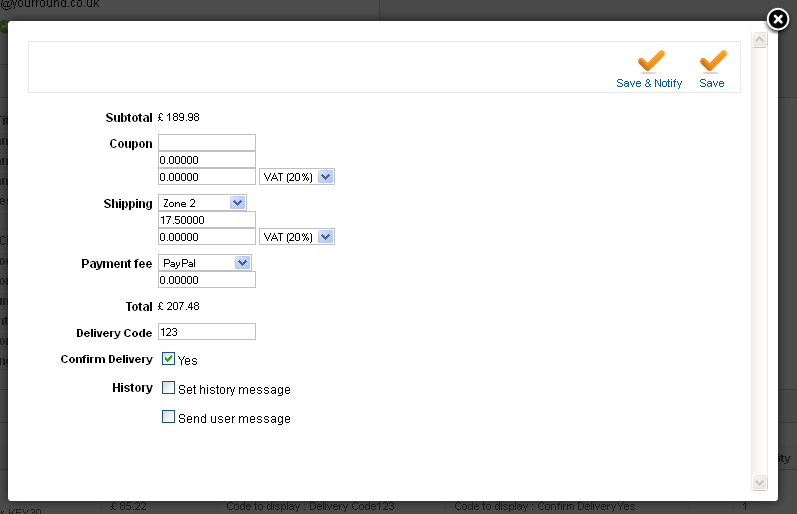
Now with the new code you've given me, I can see these fields appearing in the Products list, which you can see in this image.

What I was hoping to do was have these custom fields editable per product, so in this case I would be able to have a text field for delivery_code to fill in and a tick the checkbox for delivery_confirm next to each entry in the Product list, apologies if I haven't been clear and thanks again for all your help!
Unfortunately I'm still not getting the exact results I was orginally after. So when I created the new custom fields, I can see them appear in Additional Information as show in the following screenshoot.
Now with the new code you've given me, I can see these fields appearing in the Products list, which you can see in this image.
What I was hoping to do was have these custom fields editable per product, so in this case I would be able to have a text field for delivery_code to fill in and a tick the checkbox for delivery_confirm next to each entry in the Product list, apologies if I haven't been clear and thanks again for all your help!
Please Log in or Create an account to join the conversation.
Less
More
- Posts: 12953
- Thank you received: 1778
12 years 7 months ago #147660
by Mohamed Thelji
Replied by Mohamed Thelji on topic Adding Custom Fields to Product listing
This will be more complex than just displaying the text because it will require to handle the saving of the data with JavaScript/AJAX. So, this will be a lot more than 2 lines of modifications so we can't help you with that as part of our standard support
You'll have to find a third party developer in order to help you on that, I would recommend to contact our partners for a quote on the project:
polishedgeek.com/
tcp-innovation.fr/
www.makedifferent.fr/
Or to find a developer via our commercial jobs forum, joomlancers.com or resources.joomla.org
You'll have to find a third party developer in order to help you on that, I would recommend to contact our partners for a quote on the project:
polishedgeek.com/
tcp-innovation.fr/
www.makedifferent.fr/
Or to find a developer via our commercial jobs forum, joomlancers.com or resources.joomla.org
Please Log in or Create an account to join the conversation.
Time to create page: 0.096 seconds