
- Posts: 11
- Thank you received: 0
How to get admin confirmation emial for Confirmed
- southpaw3229
-
 Topic Author
- Offline
Less
More
12 years 5 months ago #156971
by southpaw3229
How to get admin confirmation emial for Confirmed was created by southpaw3229
-- url of the page with the problem -- :
mywebsite.com/mypage
-- HikaShop version -- : HikaShop [1405171505]
-- Joomla version -- : 3.1.1
-- PHP version -- : 5.3.24
-- Browser(s) name and version -- : XXXXX x.x.x
-- Error-message(debug-mod must be tuned on) -- : Error_message
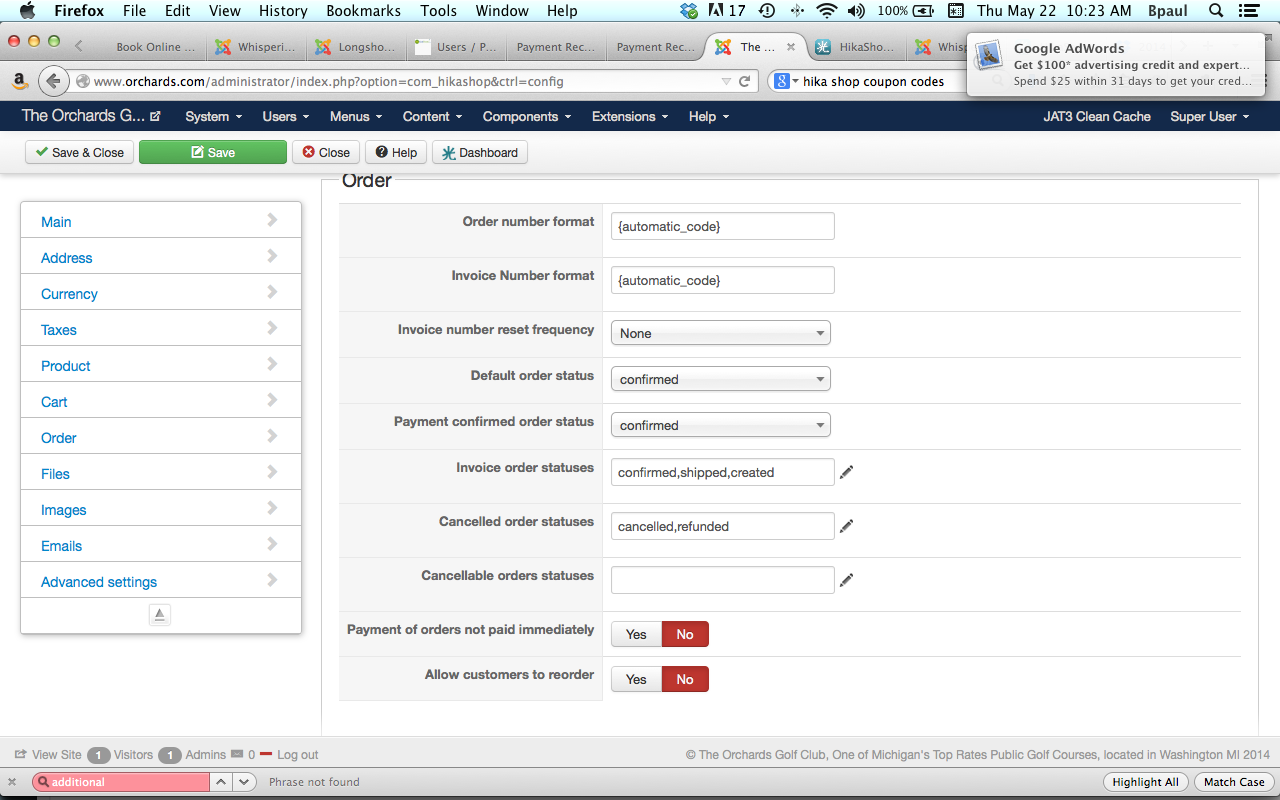
In the config screen i have the DEFAULT ORDER STATUS set to CONFIRMED and the PAYMENT ORDER CONFIRMED STATUS set to CONFIRMED also. My shop is using Auhtorize.net so all payments are instantly confirmed.
If i set the Default order status to Confirmed, i do not get an ADMIN CONFIRMATION EMAIL. Only when i set the Default Order Status to Created does the store admin get a confirmation email. Any advice. See screen shot of my config
-- HikaShop version -- : HikaShop [1405171505]
-- Joomla version -- : 3.1.1
-- PHP version -- : 5.3.24
-- Browser(s) name and version -- : XXXXX x.x.x
-- Error-message(debug-mod must be tuned on) -- : Error_message
In the config screen i have the DEFAULT ORDER STATUS set to CONFIRMED and the PAYMENT ORDER CONFIRMED STATUS set to CONFIRMED also. My shop is using Auhtorize.net so all payments are instantly confirmed.
If i set the Default order status to Confirmed, i do not get an ADMIN CONFIRMATION EMAIL. Only when i set the Default Order Status to Created does the store admin get a confirmation email. Any advice. See screen shot of my config
Please Log in or Create an account to join the conversation.

12 years 5 months ago #156976
by Xavier
Replied by Xavier on topic How to get admin confirmation emial for Confirmed
Hi,
This is a normal behavior.
What can be done is editing the email "order status notification" preload part and add "$mail->dst_email = array($mail->dst_email,'your@email.com');" at the end.
You can find this file in "media/com_hikashop/mail".
This is a normal behavior.
What can be done is editing the email "order status notification" preload part and add "$mail->dst_email = array($mail->dst_email,'your@email.com');" at the end.
You can find this file in "media/com_hikashop/mail".
Please Log in or Create an account to join the conversation.
Time to create page: 0.184 seconds