

- Posts: 8
- Thank you received: 0
Order cancelation for not registerd users
11 years 1 month ago #214078
by kamakura
Order cancelation for not registerd users was created by kamakura
-- HikaShop version -- : 2.5.0
-- Joomla version -- : 3.4.3
Hi all
at page I have enabled posibility to buy without registration. Is it possible to add cancellation link to the notification e-mail? (e-mail which customer receive after sucess order)
Thank you a lot for any answer.
Kind regards
Michal
-- Joomla version -- : 3.4.3
Hi all
at page I have enabled posibility to buy without registration. Is it possible to add cancellation link to the notification e-mail? (e-mail which customer receive after sucess order)
Thank you a lot for any answer.
Kind regards
Michal
Please Log in or Create an account to join the conversation.

11 years 1 month ago #214080
by nicolas
Replied by nicolas on topic Order cancelation for not registerd users
Hi,
Sure. You need to do two things:
1. Configure the "Cancellable orders statuses" setting of the HikaShop configuration page. So that you allow the customers to cancel orders only for some statuses.
2. You can edit your emails via the menu System>Emails. There, in the HTML version, you can add such code:
Sure. You need to do two things:
1. Configure the "Cancellable orders statuses" setting of the HikaShop configuration page. So that you allow the customers to cancel orders only for some statuses.
2. You can edit your emails via the menu System>Emails. There, in the HTML version, you can add such code:
Code:
<a href="<?php echo hikashop_completeLink('order&task=cancel_order&email=1&order_id='.$data->order_id); ?>">Cancel the order</a>
Please Log in or Create an account to join the conversation.
11 years 1 month ago #214090
by kamakura
Replied by kamakura on topic Order cancelation for not registerd users
Hi nicolas
thank you for quick reply.
I updated my page based on your recommendation.
Link is there, but after click on it, I have still just information about basked is empty.
Order is still in status opened. (Cancellable orders statuses are "created" and "confirmed")
KR
Michal
thank you for quick reply.
I updated my page based on your recommendation.
Link is there, but after click on it, I have still just information about basked is empty.
Order is still in status opened. (Cancellable orders statuses are "created" and "confirmed")
KR
Michal
Please Log in or Create an account to join the conversation.
11 years 1 month ago #214101
by nicolas
Replied by nicolas on topic Order cancelation for not registerd users
Hi,
Do you see the cancel button on your orders listing in the frontend ?
If you don't, it's normal that the link doesn't work. As it means that you don't have the right to use it.
And in that case, it means that the "Cancellable orders statuses" setting is not correctly configured for what you want to do.
Do you see the cancel button on your orders listing in the frontend ?
If you don't, it's normal that the link doesn't work. As it means that you don't have the right to use it.
And in that case, it means that the "Cancellable orders statuses" setting is not correctly configured for what you want to do.
Please Log in or Create an account to join the conversation.
11 years 1 month ago #214764
by kamakura
Replied by kamakura on topic Order cancelation for not registerd users
Hi Nicola
sorry for late response.
As I am using shop as "not registered" I do not see any orders listing in the frontend. (where from can system know which orders are mine if I am not registered - so also not logged in.
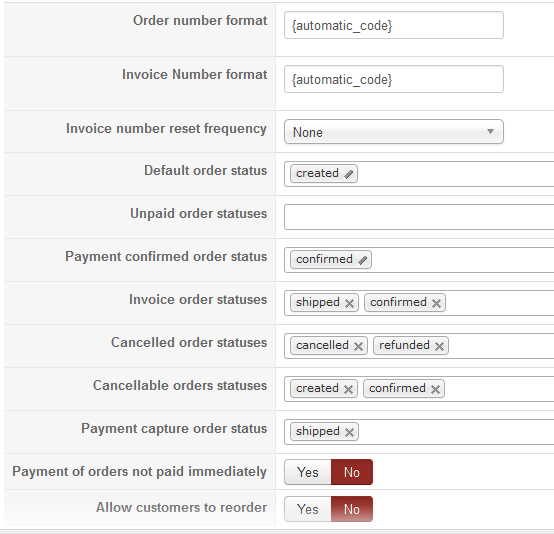
Below is screen from my orders settings. Do you have an idea how to move forward?
Thank you
Michal
sorry for late response.
As I am using shop as "not registered" I do not see any orders listing in the frontend. (where from can system know which orders are mine if I am not registered - so also not logged in.
Below is screen from my orders settings. Do you have an idea how to move forward?
Thank you
Michal
Please Log in or Create an account to join the conversation.
11 years 1 month ago #214767
by nicolas
Replied by nicolas on topic Order cancelation for not registerd users
Hi,
Create an order with the new button in the backend order listing and assign it to yourself.
Then, log on the frontend and access a menu item of the type hikashop order listing (that you would have created before via the Joomla menu manager) and there you'll see your order along with the cancel button.
Try to click on it and see if that works. Then, try the link in the notification email that you can send to the customer when you change the status of the order.
Based on what works and what doesn't, that should already narrow down the issue.
Create an order with the new button in the backend order listing and assign it to yourself.
Then, log on the frontend and access a menu item of the type hikashop order listing (that you would have created before via the Joomla menu manager) and there you'll see your order along with the cancel button.
Try to click on it and see if that works. Then, try the link in the notification email that you can send to the customer when you change the status of the order.
Based on what works and what doesn't, that should already narrow down the issue.
Please Log in or Create an account to join the conversation.
Time to create page: 0.221 seconds