

- Posts: 1
- Thank you received: 0
Add Shopping Cart Icon
10 years 9 months ago #225886
by 8boxmedia
Add Shopping Cart Icon was created by 8boxmedia
-- HikaShop version -- : 2.6.0
-- Joomla version -- : 3.4.3
Hi
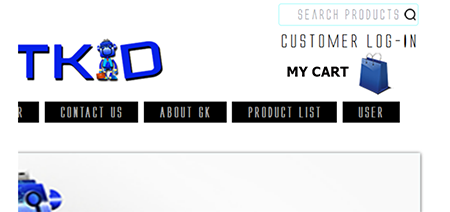
Kindly help me display a shopping cart icon, ideally inside my header. Attached is the layout I am trying to achieve.
Thank you.
Grace
-- Joomla version -- : 3.4.3
Hi
Kindly help me display a shopping cart icon, ideally inside my header. Attached is the layout I am trying to achieve.
Thank you.
Grace
Please Log in or Create an account to join the conversation.

10 years 9 months ago #225909
by lousyfool
Need help with customisations of layouts, style or other site development? PM me!
(Don't forget to turn on "E-mail notification of new messages" )
Replied by lousyfool on topic Add Shopping Cart Icon
Hi,
This thread should help you, too: www.hikashop.com/forum/4-how-to/878588-a...ge-on-mini-cart.html
This thread should help you, too: www.hikashop.com/forum/4-how-to/878588-a...ge-on-mini-cart.html
Need help with customisations of layouts, style or other site development? PM me!
(Don't forget to turn on "E-mail notification of new messages" )
Please Log in or Create an account to join the conversation.

10 years 9 months ago - 10 years 9 months ago #225896
by Philip
Replied by Philip on topic Add Shopping Cart Icon
Hello,
The most simple way is to use custom CSS and add image with an "after" order.
See here how to reach your CSS and be able to customize it.
Note : I recommend you to only edit your CSS file at the end, later that will be more easy to find and correct it.
For the code you must add, it looks something like that :
.header .sub-selector :before {
content: url(ImageUrl.png);
}
but note that checking these thread will probably help you :
www.hikashop.com/forum/4-how-to/21694-di...ge-in-mini-cart.html
www.hikashop.com/support/forum/4-how-to/...ge-on-mini-cart.html
Regards,
The most simple way is to use custom CSS and add image with an "after" order.
See here how to reach your CSS and be able to customize it.
Note : I recommend you to only edit your CSS file at the end, later that will be more easy to find and correct it.
For the code you must add, it looks something like that :
.header .sub-selector :before {
content: url(ImageUrl.png);
}
but note that checking these thread will probably help you :
www.hikashop.com/forum/4-how-to/21694-di...ge-in-mini-cart.html
www.hikashop.com/support/forum/4-how-to/...ge-on-mini-cart.html
Regards,
Last edit: 10 years 9 months ago by Mohamed Thelji.
Please Log in or Create an account to join the conversation.
Time to create page: 0.177 seconds