
- Posts: 515
- Thank you received: 22
strange filename after ajax upload
- jouwnaambord.nl
-
 Topic Author
- Offline
Less
More
10 years 8 months ago #232096
by jouwnaambord.nl
strange filename after ajax upload was created by jouwnaambord.nl
-- HikaShop version -- : 2.6.1
-- Joomla version -- : 3.4.8
Hi,
There seems to be a kind of bug in the ajax upload on the frontside. The file that's being uploaded is getting a strange name in the database, so the link to download the file in the backend gives an error (file not found). The name of the file in the folder upload/safe is the original one (in case of the screenshot eudata.eps). Can you please take a look at this? I think this occurs when a client uploads the same file twice (as it doesn't happen all the time).
www.jouwnaambord.nl/naamborden/aluminium-naambord-zakelijk
B.R.
Michel
-- Joomla version -- : 3.4.8
Hi,
There seems to be a kind of bug in the ajax upload on the frontside. The file that's being uploaded is getting a strange name in the database, so the link to download the file in the backend gives an error (file not found). The name of the file in the folder upload/safe is the original one (in case of the screenshot eudata.eps). Can you please take a look at this? I think this occurs when a client uploads the same file twice (as it doesn't happen all the time).
www.jouwnaambord.nl/naamborden/aluminium-naambord-zakelijk
B.R.
Michel
Please Log in or Create an account to join the conversation.

10 years 8 months ago #232113
by nicolas
Replied by nicolas on topic strange filename after ajax upload
Hi,
That's really strange.
I've tried on my end and we don't have that problem with the latest version.
And I've tried on your website and the problem is there even for new files.
I've also checked the log of changes on the AJAX upload of custom fields and it didn't change for quite a while.
Did you always had the problem ?
Did you install something recently which could have caused that ?
Are you using other extensions linked with HikaShop ? Or did you develop custom plugins for HikaShop ?
That's really strange.
I've tried on my end and we don't have that problem with the latest version.
And I've tried on your website and the problem is there even for new files.
I've also checked the log of changes on the AJAX upload of custom fields and it didn't change for quite a while.
Did you always had the problem ?
Did you install something recently which could have caused that ?
Are you using other extensions linked with HikaShop ? Or did you develop custom plugins for HikaShop ?
Please Log in or Create an account to join the conversation.
10 years 5 months ago - 10 years 5 months ago #241125
by csymmonds
Replied by csymmonds on topic strange filename after ajax upload
On our site the custom field type "file" doesn't work at all, so I changed this to "Ajax File" and I am seeing the same issue with a strange file name being displayed in the cart. This which would be confusing to the customer, and the name it causes the cart display to look odd.
In trying to determine if this may be caused by some other component on our site, I did a fresh installation of Joomla 3.x, upgraded it to 3.5.1, installed Hika 2.6.3 with sample data, added a custom item field of type "Ajax File" and noted the issue - screen capture of the cart below.
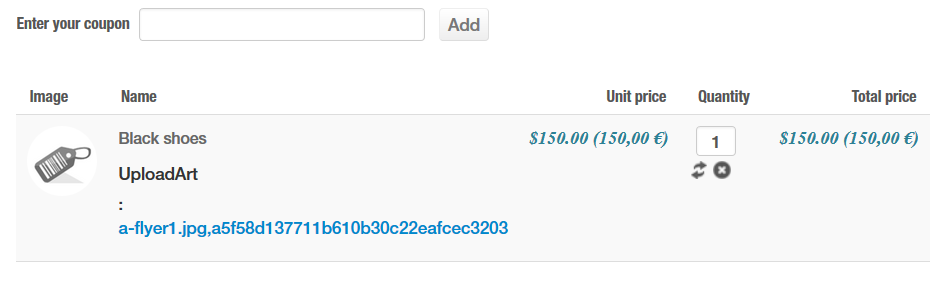
In trying to determine if this may be caused by some other component on our site, I did a fresh installation of Joomla 3.x, upgraded it to 3.5.1, installed Hika 2.6.3 with sample data, added a custom item field of type "Ajax File" and noted the issue - screen capture of the cart below.
Last edit: 10 years 5 months ago by csymmonds.
Please Log in or Create an account to join the conversation.
10 years 5 months ago #241168
by nicolas
Replied by nicolas on topic strange filename after ajax upload
Hi,
Thank you for your feedback. That's a bug of the 2.6.3
We've added a patch on our end to fix the problem. Download the install package on our website and install it on your website and try with a new add to cart and that should fix the problem.
Thank you for your feedback. That's a bug of the 2.6.3
We've added a patch on our end to fix the problem. Download the install package on our website and install it on your website and try with a new add to cart and that should fix the problem.
Please Log in or Create an account to join the conversation.
10 years 5 months ago #241239
by csymmonds
Replied by csymmonds on topic strange filename after ajax upload
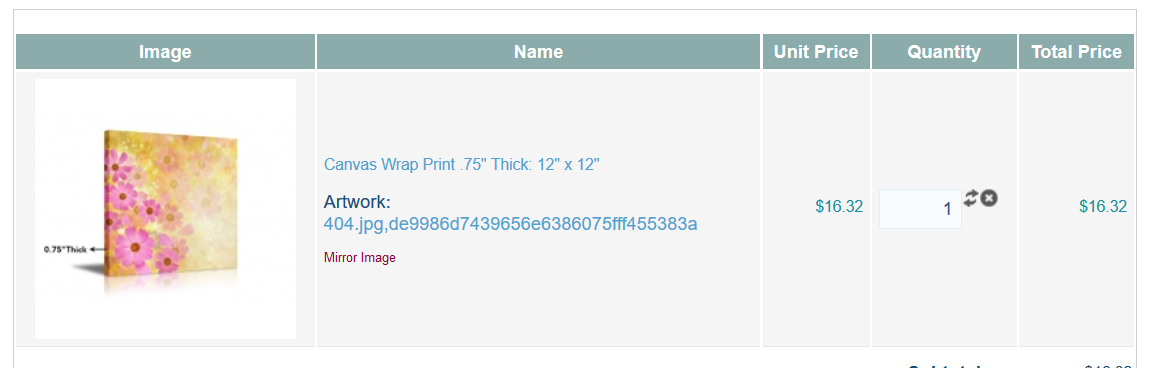
I upgraded, the regular File custom field type still doesn't work and the Ajax File field type still has a strange filename displayed in the cart.
Please Log in or Create an account to join the conversation.
10 years 5 months ago #241291
by nicolas
Replied by nicolas on topic strange filename after ajax upload
Hi,
Ok. We've tested on our end and added another patch to the package.
Please download it on our website again and install it on yours again.
Then, go in the backend, edit your custom field and save it once.
It should then work fine.
Ok. We've tested on our end and added another patch to the package.
Please download it on our website again and install it on yours again.
Then, go in the backend, edit your custom field and save it once.
It should then work fine.
The following user(s) said Thank You: csymmonds
Please Log in or Create an account to join the conversation.

9 years 6 months ago #267209
by gioxd
Replied by gioxd on topic strange filename after ajax upload
sorry if I open the thread, but I have the same problem that has occurred since I upgraded to version 3.0 of hikashop. The ajax uploaded files are renamed, and so it is impossible to download them.
I attach screenshots
Backend custom field
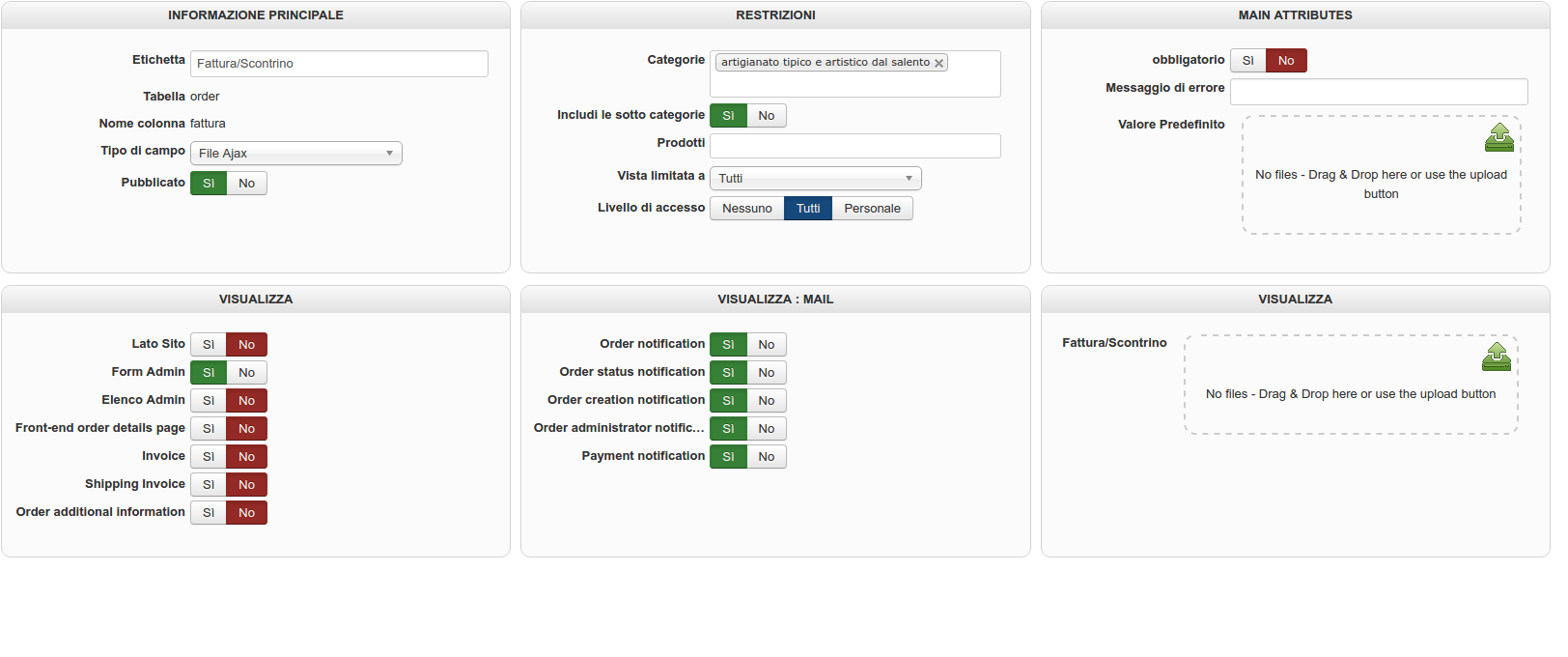
file name in the folder

file name in backend

You can see if it works? Thank you
I attach screenshots
Backend custom field
file name in the folder
file name in backend
You can see if it works? Thank you
Please Log in or Create an account to join the conversation.

9 years 6 months ago #267211
by Jerome
Jerome - Obsidev.com
HikaMarket & HikaSerial developer / HikaShop core dev team.
Replied by Jerome on topic strange filename after ajax upload
Hello,
Where that field is displayed exactly ?
It looks like the raw content of the field is displayed and it is not coming from the "display" function of the ajax upload file custom field.
The content that you can see is the filename and the security checksum which allow the system to be sure that the user is not trying to trick and access another file.
Regards,
Where that field is displayed exactly ?
It looks like the raw content of the field is displayed and it is not coming from the "display" function of the ajax upload file custom field.
The content that you can see is the filename and the security checksum which allow the system to be sure that the user is not trying to trick and access another file.
Regards,
Jerome - Obsidev.com
HikaMarket & HikaSerial developer / HikaShop core dev team.
Please Log in or Create an account to join the conversation.
9 years 6 months ago - 9 years 6 months ago #267268
by gioxd
Replied by gioxd on topic strange filename after ajax upload
the custom field is in the table "order" and only appears in the email view.
Load the file and then save. After saving the file is renamed. After I open and I see this error message:
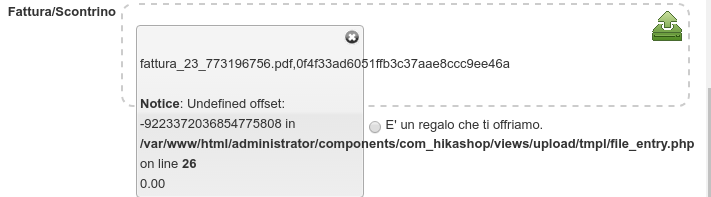
The field of custom settings are the same as always, but the problem occurs after I upgraded to version 3.0 of hikashop. In fact, I checked all the orders and the problem starts to occur after the update.
Thank you
Load the file and then save. After saving the file is renamed. After I open and I see this error message:
The field of custom settings are the same as always, but the problem occurs after I upgraded to version 3.0 of hikashop. In fact, I checked all the orders and the problem starts to occur after the update.
Thank you
Last edit: 9 years 6 months ago by gioxd.
Please Log in or Create an account to join the conversation.
9 years 6 months ago #267290
by Jerome
Jerome - Obsidev.com
HikaMarket & HikaSerial developer / HikaShop core dev team.
Replied by Jerome on topic strange filename after ajax upload
Hello,
Are you sure that the field haven't been edited in another place ?
While the internal value for the "ajax custom field" is an array of values (one for the filename and another for the security check) ; the data stored in the database is just the filename.
So, I am wondering how the field has been edited because you should have that in your database, unless the saving is made regardless of the custom field system ; that the raw data is stored in the database and the custom field system is not called to perform the various "checks" and the adjustment of the data before it is saved.
For now, I would recommend you to edit the field directly in your database to just let the filename (and remove the security check).
But the question around how that data arrived in your database remains.
Regards,
Are you sure that the field haven't been edited in another place ?
While the internal value for the "ajax custom field" is an array of values (one for the filename and another for the security check) ; the data stored in the database is just the filename.
So, I am wondering how the field has been edited because you should have that in your database, unless the saving is made regardless of the custom field system ; that the raw data is stored in the database and the custom field system is not called to perform the various "checks" and the adjustment of the data before it is saved.
For now, I would recommend you to edit the field directly in your database to just let the filename (and remove the security check).
But the question around how that data arrived in your database remains.
Regards,
Jerome - Obsidev.com
HikaMarket & HikaSerial developer / HikaShop core dev team.
Please Log in or Create an account to join the conversation.
9 years 6 months ago #267327
by gioxd
Replied by gioxd on topic strange filename after ajax upload
Hello Jerome,
Thank you for the reply.
the field do not haven edited in another place. It worked smoothly before February 12, the day in which I upgraded to version 3.0.
I attach screenshot of the database. What should I change to remove the security check?
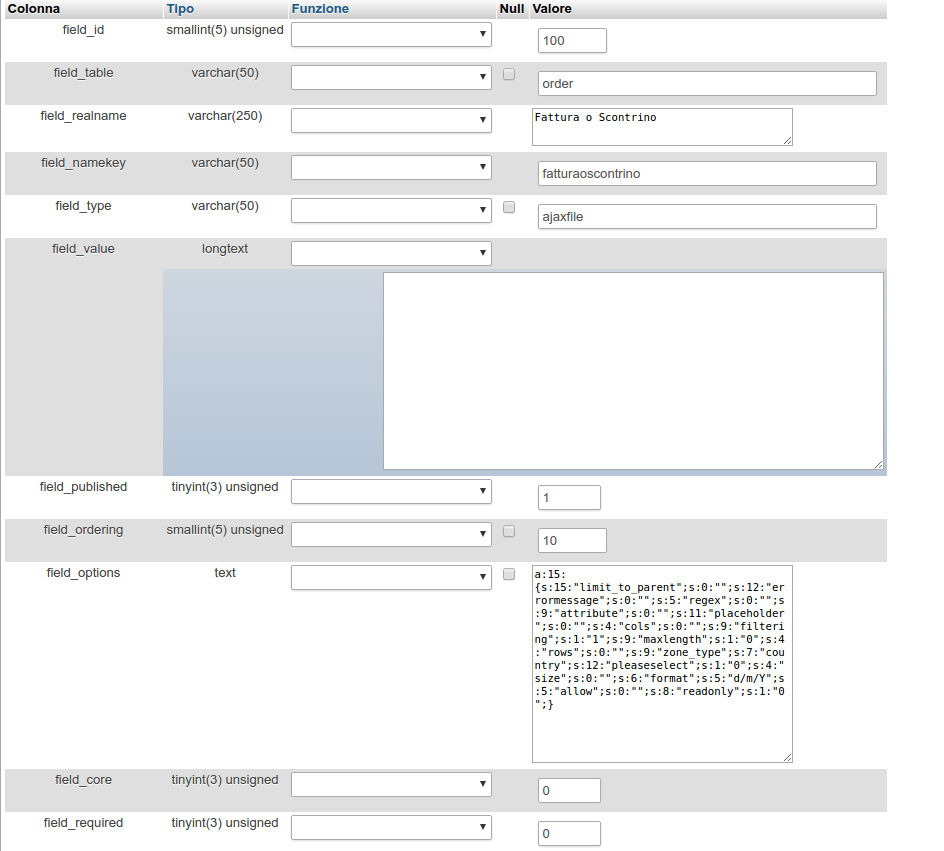
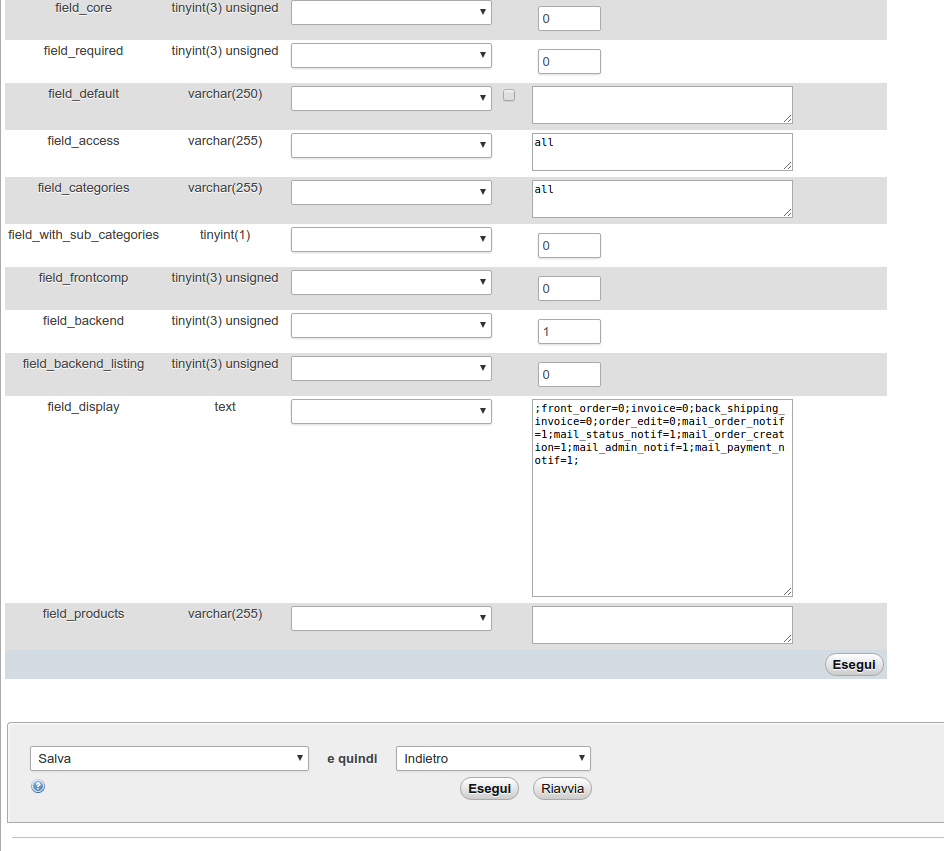
Thank you
Thank you for the reply.
the field do not haven edited in another place. It worked smoothly before February 12, the day in which I upgraded to version 3.0.
I attach screenshot of the database. What should I change to remove the security check?
Thank you
Please Log in or Create an account to join the conversation.
9 years 6 months ago #267329
by Jerome
Jerome - Obsidev.com
HikaMarket & HikaSerial developer / HikaShop core dev team.
Replied by Jerome on topic strange filename after ajax upload
Hello,
I wasn't clear enough.
You need to edit the field column where the data is stored.
So not the hikashop_field table ; but the table of the custom field: hikashop_order in your case because it's an order custom field.
Regards,
I wasn't clear enough.
You need to edit the field column where the data is stored.
So not the hikashop_field table ; but the table of the custom field: hikashop_order in your case because it's an order custom field.
Regards,
Jerome - Obsidev.com
HikaMarket & HikaSerial developer / HikaShop core dev team.
Please Log in or Create an account to join the conversation.
9 years 6 months ago #267409
by gioxd
Replied by gioxd on topic strange filename after ajax upload
I understand, but it is not a way to solve the problem. Every time I load a file I should get into the database and change the value? I think there's a code problem, because, I repeat, everything worked before the upgrade. Is there a way to remove the security check by changing the php code?
Please Log in or Create an account to join the conversation.
9 years 6 months ago #267414
by Jerome
Jerome - Obsidev.com
HikaMarket & HikaSerial developer / HikaShop core dev team.
Replied by Jerome on topic strange filename after ajax upload
Hello,
I gave you a temporally solution, as explained.
I told you that we still need to understand how the data is stored ; so we need to have details, information, workflow ; something to let us understand what is happening and also reproduce the issue in our end.
Regards,
While the internal value for the "ajax custom field" is an array of values (one for the filename and another for the security check) ; the data stored in the database is just the filename.
So, I am wondering how the field has been edited because you should have that in your database, unless the saving is made regardless of the custom field system ; that the raw data is stored in the database and the custom field system is not called to perform the various "checks" and the adjustment of the data before it is saved.
I gave you a temporally solution, as explained.
I told you that we still need to understand how the data is stored ; so we need to have details, information, workflow ; something to let us understand what is happening and also reproduce the issue in our end.
Regards,
Jerome - Obsidev.com
HikaMarket & HikaSerial developer / HikaShop core dev team.
Please Log in or Create an account to join the conversation.
9 years 6 months ago #267467
by gioxd
Replied by gioxd on topic strange filename after ajax upload
hi Jerome,
if you tell me what you need, I can provide all the information. I can give you the data of the site access? Or you need screenshots of the custom field settings?
if you tell me what you need, I can provide all the information. I can give you the data of the site access? Or you need screenshots of the custom field settings?
Please Log in or Create an account to join the conversation.
9 years 6 months ago #267503
by nicolas
Replied by nicolas on topic strange filename after ajax upload
Hi,
I spent some time today trying to reproduce the issue and I was able to.
Thus, I've added a patch which fixes the problem.
If you download again the install package via the menu My account>My subscriptions on our website and install it on yours it will add the patch and fix the issue.
I spent some time today trying to reproduce the issue and I was able to.
Thus, I've added a patch which fixes the problem.
If you download again the install package via the menu My account>My subscriptions on our website and install it on yours it will add the patch and fix the issue.
Please Log in or Create an account to join the conversation.
9 years 6 months ago #267528
by gioxd
Replied by gioxd on topic strange filename after ajax upload
Hi Nicolas,
Thank You for your help, now i fixed the issue. Great support!
Thank You for your help, now i fixed the issue. Great support!
Please Log in or Create an account to join the conversation.
9 years 6 months ago - 9 years 6 months ago #267764
by gioxd
Replied by gioxd on topic strange filename after ajax upload
hello Nicolas,
after installing the patch I can not upload, edit or delete images of products.
Error:
I attach screenshots.
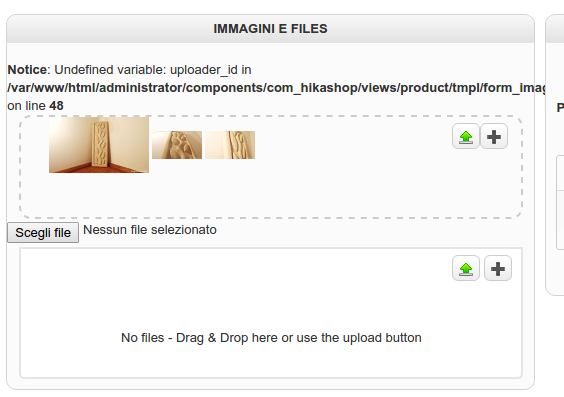
Thanks in advance!
after installing the patch I can not upload, edit or delete images of products.
Error:
Code:
Notice: Undefined variable: uploader_id in /var/www/html/administrator/components/com_hikashop/views/product/tmpl/form_image.php on line 48
Thanks in advance!
Last edit: 9 years 6 months ago by gioxd.
Please Log in or Create an account to join the conversation.
9 years 6 months ago #267765
by Jerome
Jerome - Obsidev.com
HikaMarket & HikaSerial developer / HikaShop core dev team.
Replied by Jerome on topic strange filename after ajax upload
Hello,
Please re-download HikaShop 3.0.1 ; when Nicolas integrated the patch and updated the package, one patch where missing and during a short period, the packages had the issue.
But we added the missing patch so it should be far better now !
Regards,
Please re-download HikaShop 3.0.1 ; when Nicolas integrated the patch and updated the package, one patch where missing and during a short period, the packages had the issue.
But we added the missing patch so it should be far better now !
Regards,
Jerome - Obsidev.com
HikaMarket & HikaSerial developer / HikaShop core dev team.
Please Log in or Create an account to join the conversation.
9 years 6 months ago #267796
by gioxd
Replied by gioxd on topic strange filename after ajax upload
Hi Jerome,
As always I appreciate your great support. Thanks again, now everything works well!
Regards
As always I appreciate your great support. Thanks again, now everything works well!
Regards
Please Log in or Create an account to join the conversation.
Time to create page: 0.135 seconds