

- Posts: 254
- Thank you received: 2
Ordering problem
10 years 5 months ago - 10 years 5 months ago #238227
by bigfoot
Ordering problem was created by bigfoot
-- url of the page with the problem -- :
www.beeswaxcandleshop.com/Order-Beeswax-...-pails-of-honey.html
-- HikaShop version -- : 2.6.2
-- Joomla version -- : 3.5.1
-- PHP version -- : 5.6.20
-- Browser(s) name and version -- : firefox, chrome, any
We seem to have developed some severe ordering problems. I do not know if this is the cause, but we recently updated joomla to 3.5.1 and hikashop to 2.6.2
Issue 1 = when someone checks out and submits their order, they get this message:
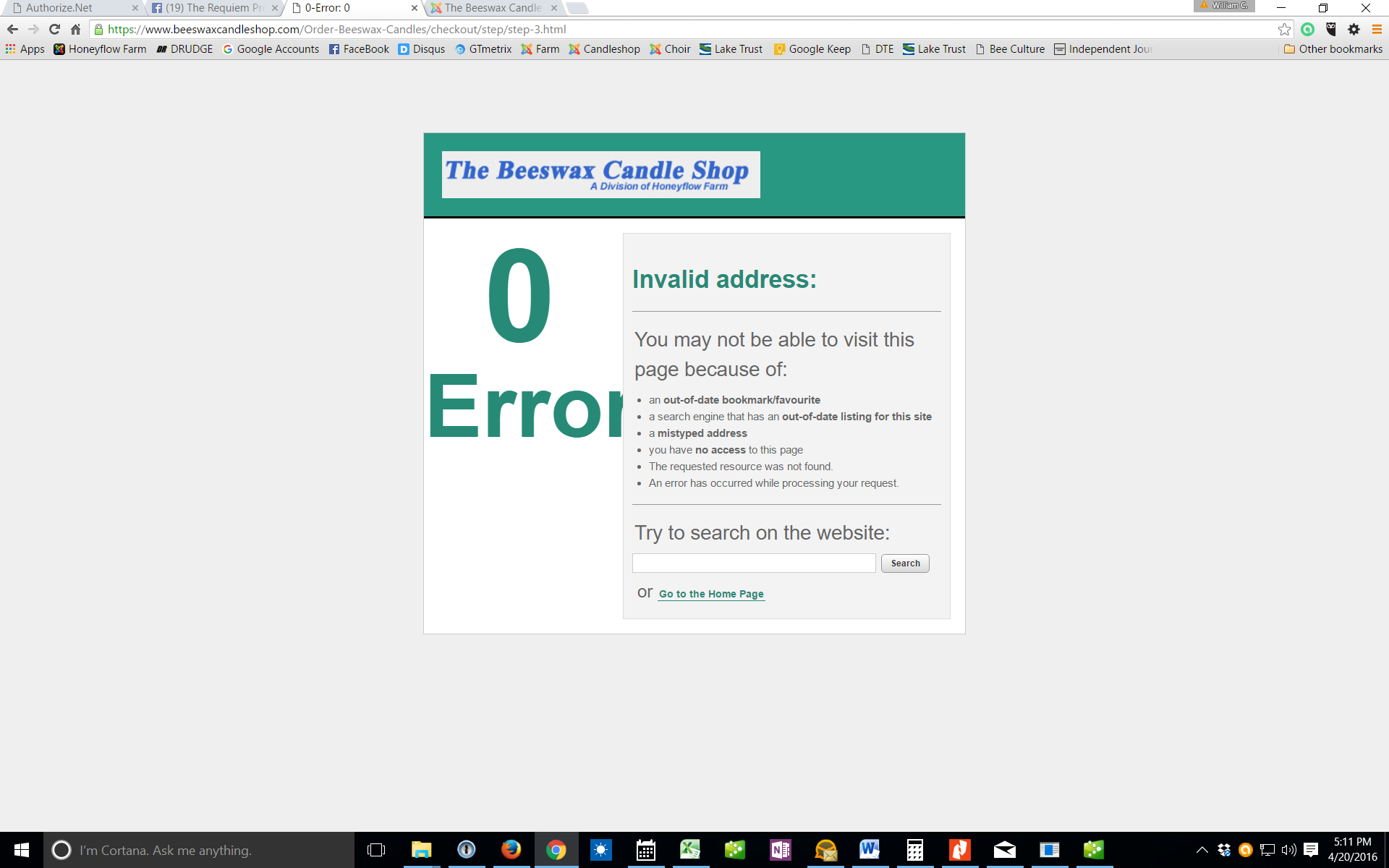
Also the order emails do not go through to the customer or the store - but the order is in the hikashop backkend ok.
Issue 2 = When something is added to the cart, a different product gets added. If something at the top of this list is selected, only the item at the bottom of the list gets added. (with a very different price) If you go to any page ( www.beeswaxcandleshop.com/Honey-Soap-Mor...ml?jsn_setmobile=yes ) and add an item at the top of the selection list you will see the action.
Issue 3 = The left side bar is not showing on hikashop products. (such as www.beeswaxcandleshop.com/Honey-Soap-Mor...ml?jsn_setmobile=yes ) Although if you scroll to the very bottom it shows up mostly off the screen on the far left side.
Any help you can give me to get my site back up would be welcome.
Bill
-- HikaShop version -- : 2.6.2
-- Joomla version -- : 3.5.1
-- PHP version -- : 5.6.20
-- Browser(s) name and version -- : firefox, chrome, any
We seem to have developed some severe ordering problems. I do not know if this is the cause, but we recently updated joomla to 3.5.1 and hikashop to 2.6.2
Issue 1 = when someone checks out and submits their order, they get this message:
Also the order emails do not go through to the customer or the store - but the order is in the hikashop backkend ok.
Issue 2 = When something is added to the cart, a different product gets added. If something at the top of this list is selected, only the item at the bottom of the list gets added. (with a very different price) If you go to any page ( www.beeswaxcandleshop.com/Honey-Soap-Mor...ml?jsn_setmobile=yes ) and add an item at the top of the selection list you will see the action.
Issue 3 = The left side bar is not showing on hikashop products. (such as www.beeswaxcandleshop.com/Honey-Soap-Mor...ml?jsn_setmobile=yes ) Although if you scroll to the very bottom it shows up mostly off the screen on the far left side.
Any help you can give me to get my site back up would be welcome.
Bill
Last edit: 10 years 5 months ago by bigfoot.
Please Log in or Create an account to join the conversation.

10 years 5 months ago #238234
by nicolas
Replied by nicolas on topic Ordering problem
Hi,
1. It looks similar to this one:
www.hikashop.com/forum/checkout/883603-4...-process.html#235445
However, it shouldn't happen as the 2.6.2 already includes the fix that it mentioned there.
So that means that you have somewhere an invalid email address configured.
It could be in the emails section of the HikaShop configuration, or in the settings of the emails when you edit them via the menu System>Emails.
Before the 3.5.1, Joomla didn't check the email addresses that much and now it's a bit too aggressive.
2. and 3. The problems come from the customizations of the product page layout in your template. Rename the folder templates/YOUR_TEMPLATE/html/com_hikashop/product via FTP and that will fix the problem.
Instead of renaming the whole folder, you can rename file by file and check which one is creating the problem.
1. It looks similar to this one:
www.hikashop.com/forum/checkout/883603-4...-process.html#235445
However, it shouldn't happen as the 2.6.2 already includes the fix that it mentioned there.
So that means that you have somewhere an invalid email address configured.
It could be in the emails section of the HikaShop configuration, or in the settings of the emails when you edit them via the menu System>Emails.
Before the 3.5.1, Joomla didn't check the email addresses that much and now it's a bit too aggressive.
2. and 3. The problems come from the customizations of the product page layout in your template. Rename the folder templates/YOUR_TEMPLATE/html/com_hikashop/product via FTP and that will fix the problem.
Instead of renaming the whole folder, you can rename file by file and check which one is creating the problem.
Please Log in or Create an account to join the conversation.
10 years 5 months ago #238396
by bigfoot
Replied by bigfoot on topic Ordering problem
So far I have not been able to find the offending email, but when looking in "order admin notification" section (that has been modified) I find them not upgraded to hika2.6.2 =
html version"<?php
/**
* @package HikaShop for Joomla!
* @version 2.6.0"
and
text version "<?php
/**
* @package HikaShop for Joomla!
* @version 2.6.0
* @author hikashop.com"
Could this be a problem?
On the 2 & 3 issue, I found the folder (product) -- but which file do I rename and what do I rename them to?
Thanks
html version"<?php
/**
* @package HikaShop for Joomla!
* @version 2.6.0"
and
text version "<?php
/**
* @package HikaShop for Joomla!
* @version 2.6.0
* @author hikashop.com"
Could this be a problem?
On the 2 & 3 issue, I found the folder (product) -- but which file do I rename and what do I rename them to?
Thanks
Please Log in or Create an account to join the conversation.
10 years 5 months ago #238406
by nicolas
Replied by nicolas on topic Ordering problem
Hi,
1. No, you should look at the "Sender information" tab of the emails when you edit them.
2. I don't know which one is causing the problem. So try to rename one and see if that helps, if not, rename it back and try with the next one, etc until you find the one with the issue.
1. No, you should look at the "Sender information" tab of the emails when you edit them.
2. I don't know which one is causing the problem. So try to rename one and see if that helps, if not, rename it back and try with the next one, etc until you find the one with the issue.
Please Log in or Create an account to join the conversation.
10 years 5 months ago - 10 years 5 months ago #238541
by bigfoot
Replied by bigfoot on topic Ordering problem
Progress on the second issue - I renamed the folder "product" to "product-renamed" (I was sure this would break something - but you were right) It fixed the problem - I understand what you mean about checking each one rather than renaming the folder - but is it ok to leave it like this? (or rename it to "products)?
One the first issue with the checkout error - I thought that maybe it was because I was using an "alias" email - so I changed emails to one that is listed in my cpanel and not an alias. (although the address was not the same domain as the site)
I changed them all in:
- system global config
-hika-config-main-email section
-hika-system-email section - I changed them all to same in "sender information" section - note - all these now show that they have been "customized"
Another issue maybe related that I have been having is that after submitting an order and getting the error page - I click on the area that says "Go to the Home Page" and the main page comes up showing like the image below.
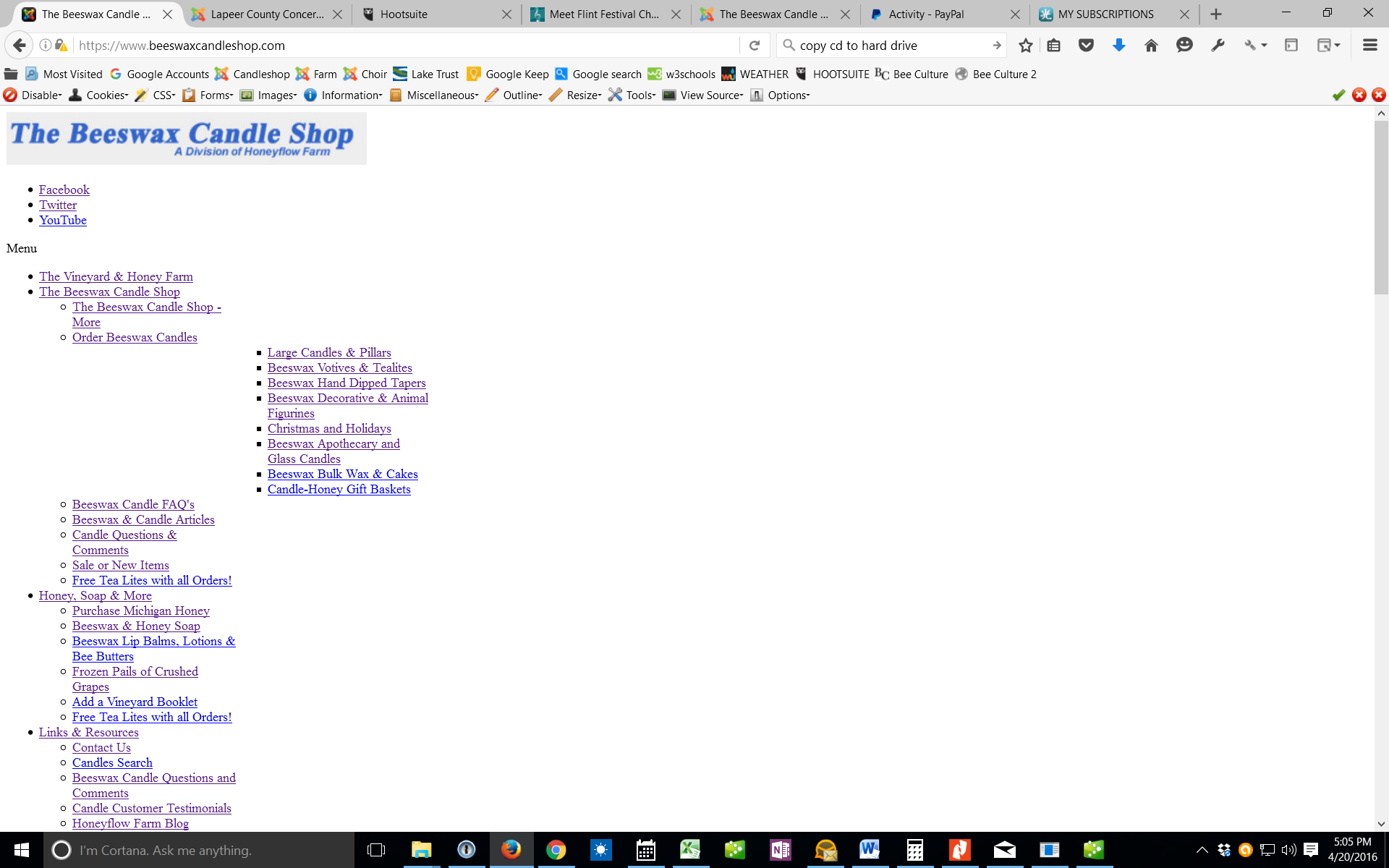
I have recently noticed that the address of this page is an https:// adresss and when I remove the "s" the page shows normal.
This is an issue I have had for a few months - It happens only occasionally but I have not been able to find the problem yet. This issue was occuring when the site was joom3.4.8 but the orders were going through ok.
One the first issue with the checkout error - I thought that maybe it was because I was using an "alias" email - so I changed emails to one that is listed in my cpanel and not an alias. (although the address was not the same domain as the site)
I changed them all in:
- system global config
-hika-config-main-email section
-hika-system-email section - I changed them all to same in "sender information" section - note - all these now show that they have been "customized"
Another issue maybe related that I have been having is that after submitting an order and getting the error page - I click on the area that says "Go to the Home Page" and the main page comes up showing like the image below.
I have recently noticed that the address of this page is an https:// adresss and when I remove the "s" the page shows normal.
This is an issue I have had for a few months - It happens only occasionally but I have not been able to find the problem yet. This issue was occuring when the site was joom3.4.8 but the orders were going through ok.
Last edit: 10 years 5 months ago by bigfoot.
Please Log in or Create an account to join the conversation.
10 years 5 months ago #238545
by nicolas
Replied by nicolas on topic Ordering problem
Hi,
2. These files are there usually because the template changes the layout of the product page. If you don't see a problem without them, you can leave them renamed.
1. What do you have at the bottom of that page when you have the "error reporting" setitng of the Joomla configuration activated ?
It should normally display an error message, providing more information on the issue.
2. These files are there usually because the template changes the layout of the product page. If you don't see a problem without them, you can leave them renamed.
1. What do you have at the bottom of that page when you have the "error reporting" setitng of the Joomla configuration activated ?
It should normally display an error message, providing more information on the issue.
Please Log in or Create an account to join the conversation.
10 years 5 months ago - 10 years 5 months ago #238790
by bigfoot
Replied by bigfoot on topic Ordering problem
Some progress - I disabled ALL of the emails and the error page went away and a test order went through. (But no emails of course) When I enabled the "Order creation notification" again the error came back. I could not find any bad emails in this section.
Below is an image of what I have now.
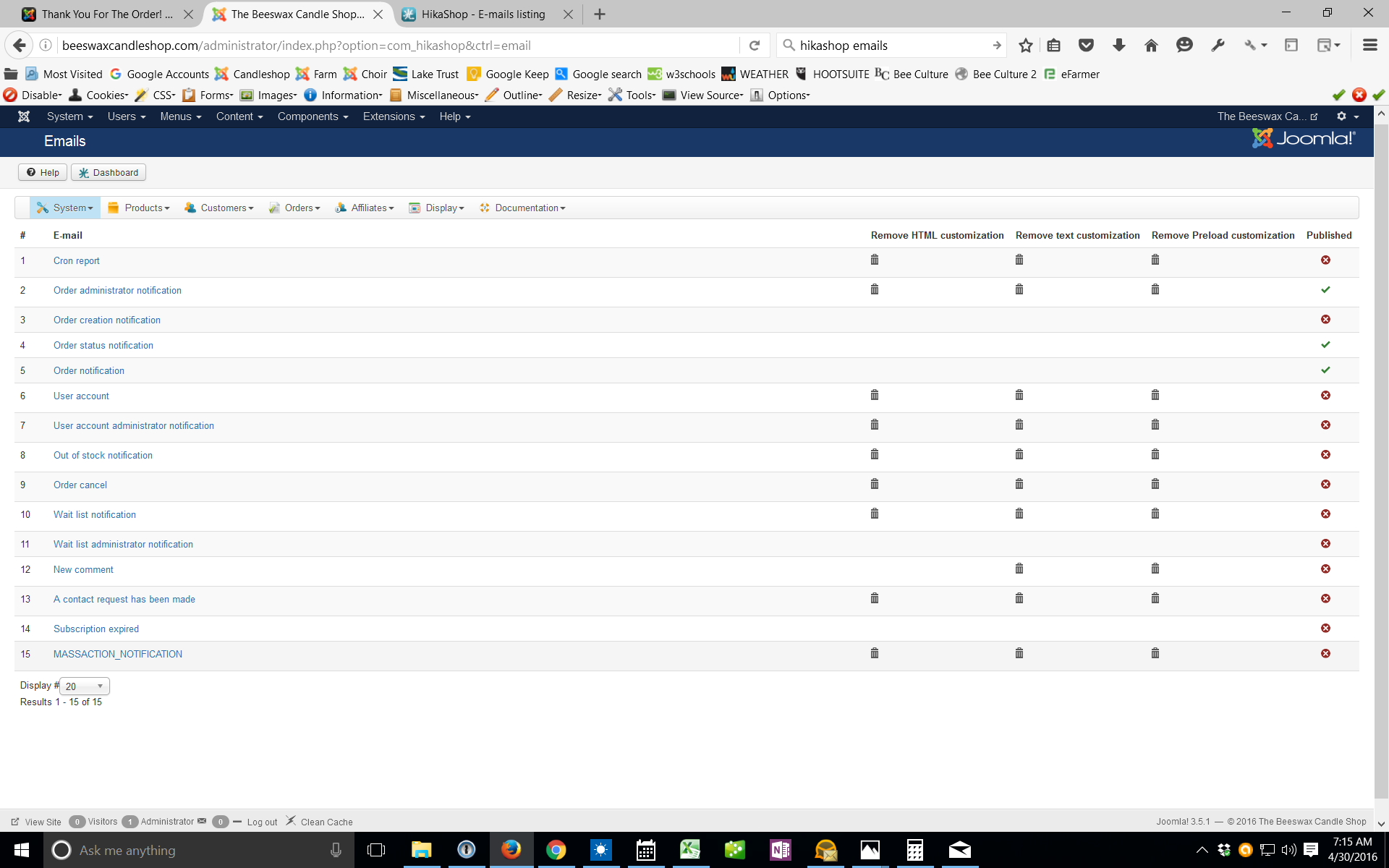
It shows lots of customizations - but they just appeared when I changed an email address - the only real customizations are in the Order administrator notification
Right now I am getting a good notification to the store, but the customer receives nothing.
Below is an image of what I have now.
It shows lots of customizations - but they just appeared when I changed an email address - the only real customizations are in the Order administrator notification
Right now I am getting a good notification to the store, but the customer receives nothing.
Last edit: 10 years 5 months ago by bigfoot.
Please Log in or Create an account to join the conversation.
10 years 5 months ago #238811
by nicolas
Replied by nicolas on topic Ordering problem
Hi,
Make sure that entered a valid email address in the "From email" setting of your Joomla configuration. If that field is not valid, Joomla can crash each time HikaShop sends an email.
Make sure that entered a valid email address in the "From email" setting of your Joomla configuration. If that field is not valid, Joomla can crash each time HikaShop sends an email.
Please Log in or Create an account to join the conversation.
10 years 5 months ago - 10 years 5 months ago #238829
by bigfoot
Replied by bigfoot on topic Ordering problem
It was a valid email - but I changed it to the same one in the other email section that was working and I still get the error page. There is something wrong with the system. Anyway Hikashop is sending the store an email every time but not the customer.
Last edit: 10 years 5 months ago by bigfoot.
Please Log in or Create an account to join the conversation.
10 years 5 months ago #238836
by nicolas
Replied by nicolas on topic Ordering problem
Hi,
Then edit the order creation notification email and check that the sender information is correct in there.
Then edit the order creation notification email and check that the sender information is correct in there.
Please Log in or Create an account to join the conversation.
10 years 5 months ago #238858
by bigfoot
Replied by bigfoot on topic Ordering problem
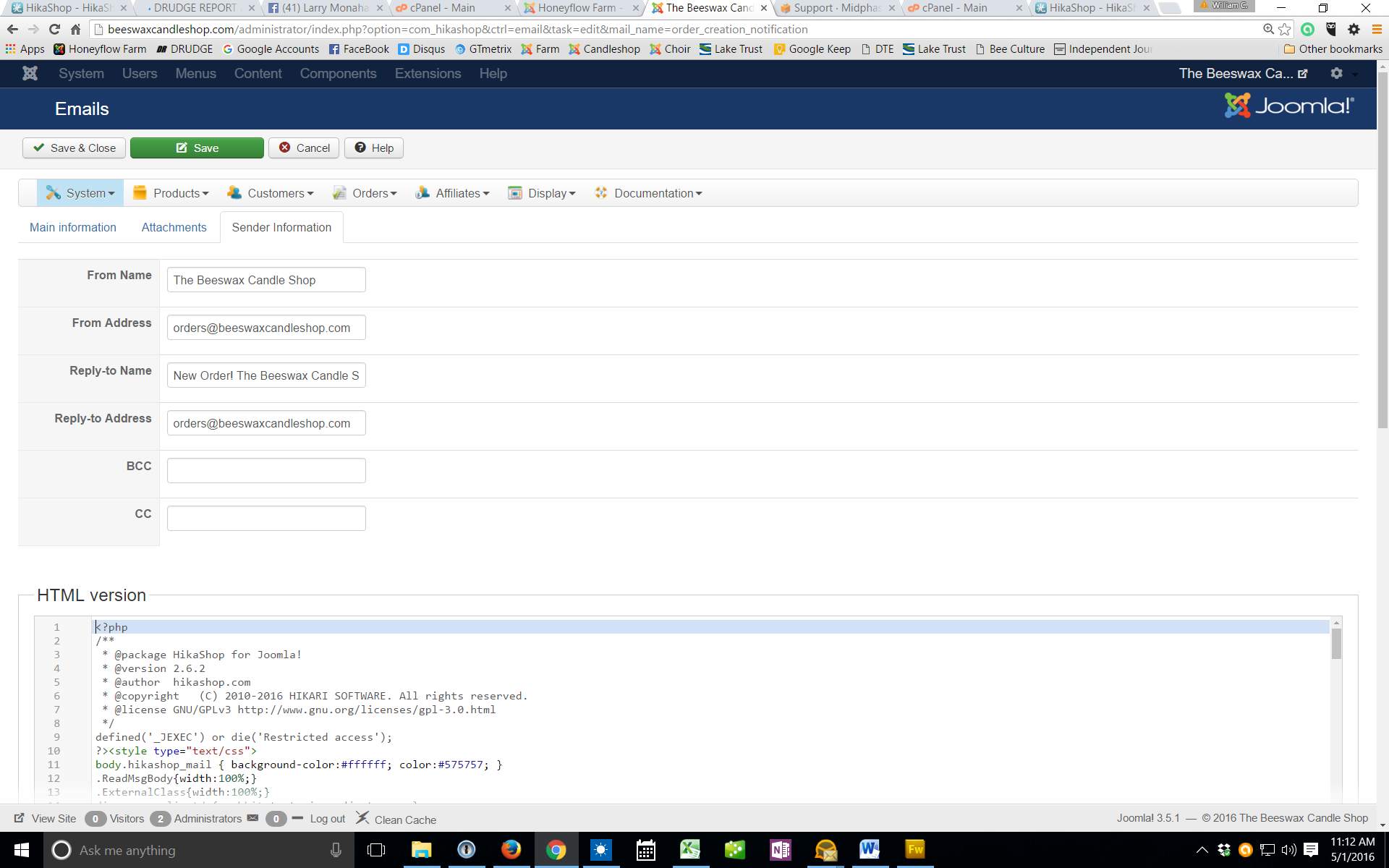
We are going in circles - I have done that many times - there is something else going on - attached is a screenshot showing the valid email
I am getting very frustrated - hikashop has always worked very good for me until now.
I am getting very frustrated - hikashop has always worked very good for me until now.
Please Log in or Create an account to join the conversation.
10 years 5 months ago #238905
by nicolas
Replied by nicolas on topic Ordering problem
Hi,
If the problem is not with the email data, then it might be with the emails customizations.
What if you rename the folder media/com_hikashop/mail/ to something else via FTP and install HikaShop again ?
That will allow HikaShop to use the standard email files automatically. And if it works, it means that the problem comes from the customizations done in the emails. In that case, you can redo your modifications to the new versions of the emails.
If that still doesn't help, I guess the best would be to look in the error log of the server. Normally, when you get such blank page, there is a fatal error logged and this gives information on where the problem is coming from. Once we know that, we can tell you what to do.
If the problem is not with the email data, then it might be with the emails customizations.
What if you rename the folder media/com_hikashop/mail/ to something else via FTP and install HikaShop again ?
That will allow HikaShop to use the standard email files automatically. And if it works, it means that the problem comes from the customizations done in the emails. In that case, you can redo your modifications to the new versions of the emails.
If that still doesn't help, I guess the best would be to look in the error log of the server. Normally, when you get such blank page, there is a fatal error logged and this gives information on where the problem is coming from. Once we know that, we can tell you what to do.
Please Log in or Create an account to join the conversation.
10 years 5 months ago #238937
by bigfoot
Replied by bigfoot on topic Ordering problem
I did as you suggested and renamed the file, re-installed hikashop and a test order still produced a bad page, disableing the "order creation" section and the order went through (with the notification of course)The only logg error file I could find in the cpanel files was an "error.php" file - I thing modified at the time I installed the update. Here are the last few lines:
2016-04-27T12:39:09+00:00 INFO 62.210.203.159 joomlafailure Username and password do not match or you do not have an account yet.
2016-04-27T12:39:12+00:00 INFO 62.210.203.159 joomlafailure Username and password do not match or you do not have an account yet.
2016-04-27T12:39:14+00:00 INFO 62.210.203.159 joomlafailure Username and password do not match or you do not have an account yet.
2016-04-27T12:39:17+00:00 INFO 62.210.203.159 joomlafailure Username and password do not match or you do not have an account yet.
2016-04-27T12:39:19+00:00 INFO 62.210.203.159 joomlafailure Username and password do not match or you do not have an account yet.
2016-04-27T12:39:22+00:00 INFO 62.210.203.159 joomlafailure Username and password do not match or you do not have an account yet.
2016-04-27T12:39:24+00:00 INFO 62.210.203.159 joomlafailure Username and password do not match or you do not have an account yet.
2016-04-27T12:39:27+00:00 INFO 62.210.203.159 joomlafailure Username and password do not match or you do not have an account yet.
2016-04-27T12:39:29+00:00 INFO 62.210.203.159 joomlafailure Username and password do not match or you do not have an account yet.
2016-04-27T12:39:31+00:00 INFO 62.210.203.159 joomlafailure Username and password do not match or you do not have an account yet.
2016-04-27T14:16:56+00:00 INFO 117.177.250.151 joomlafailure Username and password do not match or you do not have an account yet.
2016-04-27T18:19:38+00:00 INFO 117.177.250.151 joomlafailure Username and password do not match or you do not have an account yet.
2016-04-29T04:15:12+00:00 INFO 89.234.157.254 joomlafailure Username and password do not match or you do not have an account yet.
2016-04-29T10:41:45+00:00 INFO 176.126.252.12 joomlafailure Username and password do not match or you do not have an account yet.
2016-05-01T12:30:20+00:00 INFO 173.199.65.27 joomlafailure Username and password do not match or you do not have an account yet.
2016-05-02T12:53:34+00:00 INFO 134.249.141.24 joomlafailure Username and password do not match or you do not have an account yet.
2016-05-02T14:21:30+00:00 INFO 134.249.141.24 joomlafailure Username and password do not match or you do not have an account yet.
Or is this server log file something on my cpanel
2016-04-27T12:39:09+00:00 INFO 62.210.203.159 joomlafailure Username and password do not match or you do not have an account yet.
2016-04-27T12:39:12+00:00 INFO 62.210.203.159 joomlafailure Username and password do not match or you do not have an account yet.
2016-04-27T12:39:14+00:00 INFO 62.210.203.159 joomlafailure Username and password do not match or you do not have an account yet.
2016-04-27T12:39:17+00:00 INFO 62.210.203.159 joomlafailure Username and password do not match or you do not have an account yet.
2016-04-27T12:39:19+00:00 INFO 62.210.203.159 joomlafailure Username and password do not match or you do not have an account yet.
2016-04-27T12:39:22+00:00 INFO 62.210.203.159 joomlafailure Username and password do not match or you do not have an account yet.
2016-04-27T12:39:24+00:00 INFO 62.210.203.159 joomlafailure Username and password do not match or you do not have an account yet.
2016-04-27T12:39:27+00:00 INFO 62.210.203.159 joomlafailure Username and password do not match or you do not have an account yet.
2016-04-27T12:39:29+00:00 INFO 62.210.203.159 joomlafailure Username and password do not match or you do not have an account yet.
2016-04-27T12:39:31+00:00 INFO 62.210.203.159 joomlafailure Username and password do not match or you do not have an account yet.
2016-04-27T14:16:56+00:00 INFO 117.177.250.151 joomlafailure Username and password do not match or you do not have an account yet.
2016-04-27T18:19:38+00:00 INFO 117.177.250.151 joomlafailure Username and password do not match or you do not have an account yet.
2016-04-29T04:15:12+00:00 INFO 89.234.157.254 joomlafailure Username and password do not match or you do not have an account yet.
2016-04-29T10:41:45+00:00 INFO 176.126.252.12 joomlafailure Username and password do not match or you do not have an account yet.
2016-05-01T12:30:20+00:00 INFO 173.199.65.27 joomlafailure Username and password do not match or you do not have an account yet.
2016-05-02T12:53:34+00:00 INFO 134.249.141.24 joomlafailure Username and password do not match or you do not have an account yet.
2016-05-02T14:21:30+00:00 INFO 134.249.141.24 joomlafailure Username and password do not match or you do not have an account yet.
Or is this server log file something on my cpanel
Please Log in or Create an account to join the conversation.
10 years 5 months ago - 10 years 5 months ago #239264
by bigfoot
Replied by bigfoot on topic Ordering problem
Still looking for the problem - I turned in a ticket to the support people on our server. I triggered a bad order, then disabled the "order creation email" and check that the order was ok again. Then I had them check the server and looked at an "error_log" file and saw no reference to the issue. When error reporting is turned on and I trigger a bad order, There is no lower section with errors being reported on the front end when the error page is visible
.
I do see a lot of "duplicate database queiris" if that could be a problem.
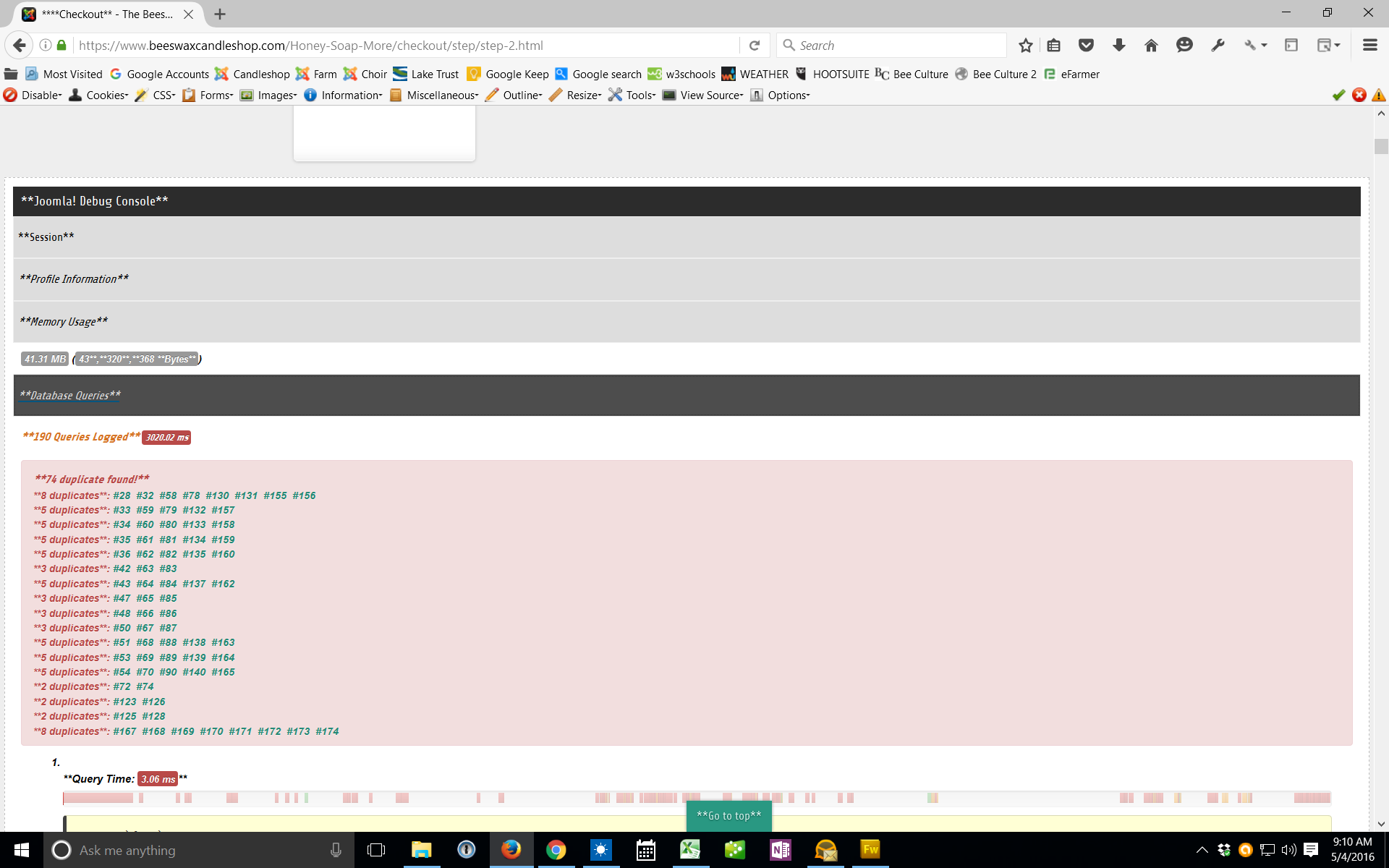
.
I do see a lot of "duplicate database queiris" if that could be a problem.
Last edit: 10 years 5 months ago by bigfoot.
Please Log in or Create an account to join the conversation.
10 years 4 months ago #239570
by bigfoot
Replied by bigfoot on topic Ordering problem
More info on problem:
I enabled every email except the "Order creation notification" and a test order went through ok. The "Order creation notification" is the only one causing a problem.
I also found that some of my Hikashop links no longer work:
This one:
beeswaxcandleshop.com/index.php?option=c...t=listing&Itemid=289
is shown in browser as: beeswaxcandleshop.com/Order-Beeswax-Candles/category.html (SEF SH404 settings)
And does not work.
This bad link is in the "order completed page" that may be in the hikashop system ("You can go back to the Candleshop by clicking on this link")
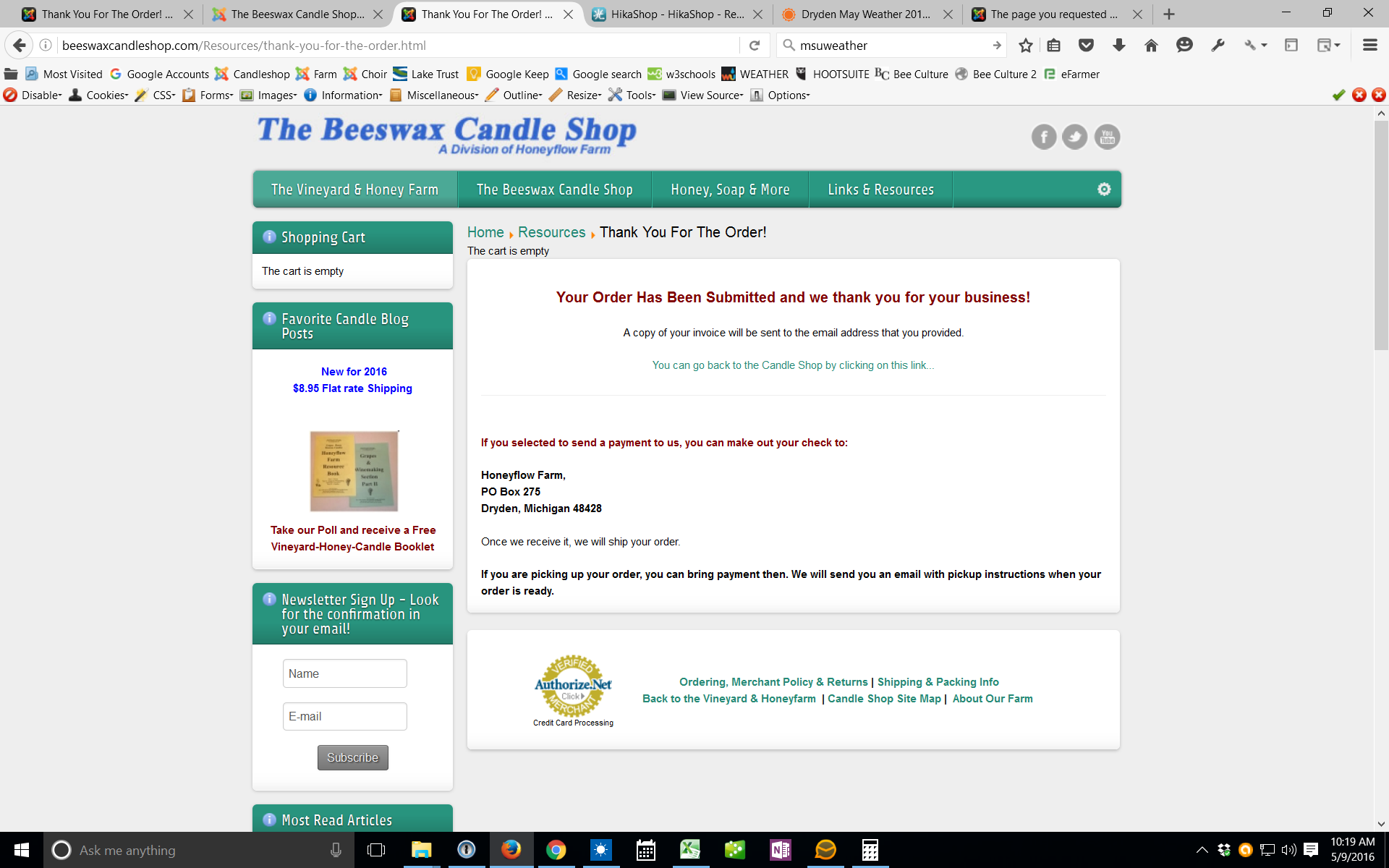
Could this be part of the problem?
Either way what would be the correct link to my catalog page.
I enabled every email except the "Order creation notification" and a test order went through ok. The "Order creation notification" is the only one causing a problem.
I also found that some of my Hikashop links no longer work:
This one:
beeswaxcandleshop.com/index.php?option=c...t=listing&Itemid=289
is shown in browser as: beeswaxcandleshop.com/Order-Beeswax-Candles/category.html (SEF SH404 settings)
And does not work.
This bad link is in the "order completed page" that may be in the hikashop system ("You can go back to the Candleshop by clicking on this link")
Could this be part of the problem?
Either way what would be the correct link to my catalog page.
Please Log in or Create an account to join the conversation.
10 years 4 months ago #239705
by bigfoot
Replied by bigfoot on topic Ordering problem
I just got the category links working again. I do not know what caused it - it was ok on joomla3.4.8? But anyway I made totally new ones in the menu and disabled bad ones and that part is ok now.
I just did another test order with the "Order creation notification" enabled and it failed. With this turned off the system works.
Is there any way to make an email go to the customer? Some kind of WorkAround? This is the main problem.
I just did another test order with the "Order creation notification" enabled and it failed. With this turned off the system works.
Is there any way to make an email go to the customer? Some kind of WorkAround? This is the main problem.
Please Log in or Create an account to join the conversation.
Time to create page: 0.256 seconds