
- Posts: 26
- Thank you received: 0
Order confirmation emails billing / shipping addr
- edizioniromena
-
 Topic Author
- Offline
Less
More
10 years 4 months ago #243605
by edizioniromena
Order confirmation emails billing / shipping addr was created by edizioniromena
-- HikaShop version -- : 2.6.3
-- Joomla version -- : 3.5.1
Hi,
I wanted to know how to display correctly the shipping address in my order confirmation emails.
I attach to this message two screenshots to explain what's happening in my admin: when a customer has specified a shipping address different than the billing address, in the order confirmation emails the shipping address is not displayed. Instead of that is displayed the billing address.
Please refer to the screenshots for a better understanding.
Thank you
-- Joomla version -- : 3.5.1
Hi,
I wanted to know how to display correctly the shipping address in my order confirmation emails.
I attach to this message two screenshots to explain what's happening in my admin: when a customer has specified a shipping address different than the billing address, in the order confirmation emails the shipping address is not displayed. Instead of that is displayed the billing address.
Please refer to the screenshots for a better understanding.
Thank you
Please Log in or Create an account to join the conversation.

10 years 4 months ago - 10 years 4 months ago #243611
by Philip
Replied by Philip on topic Order confirmation emails billing / shipping addr
Hello,
Do you have some custom on your email because by default email adrress shouldn't work like this.
Have a look there, in Components => HikaShop => Configuration, in System dropdown select Emails.
If you see a little trash icon that means that there is some custom on your emails AND maybe the root issue is there.
Awaiting news from you.
Regards.
Do you have some custom on your email because by default email adrress shouldn't work like this.
Have a look there, in Components => HikaShop => Configuration, in System dropdown select Emails.
If you see a little trash icon that means that there is some custom on your emails AND maybe the root issue is there.
Awaiting news from you.
Regards.
Last edit: 10 years 4 months ago by Philip.
Please Log in or Create an account to join the conversation.
- edizioniromena
-
Topic Author
- Offline
Less
More
- Posts: 26
- Thank you received: 0
10 years 4 months ago #243707
by edizioniromena
Replied by edizioniromena on topic Order confirmation emails billing / shipping addr
Thank you for your answer.
I think i've located the part of the code that displays shipping addresses and billing addresses, could you please tell if it's correct?
This is part of the template "ORDER_NOTIFICATION_SUBJECT". I've checked also the "ORDER_CREATION_NOTIFICATION_SUBJECT" and the "ORDER_STATUS_NOTIFICATION_SUBJECT", and the code is pretty much the same:
The specific template has been changed, but i don't think we touched that part. We changed only some texts and little parts of the layout.
If you aren't sure if something important has been changed, can you please send me a correct, unchanged email template?
Thank you again
I think i've located the part of the code that displays shipping addresses and billing addresses, could you please tell if it's correct?
This is part of the template "ORDER_NOTIFICATION_SUBJECT". I've checked also the "ORDER_CREATION_NOTIFICATION_SUBJECT" and the "ORDER_STATUS_NOTIFICATION_SUBJECT", and the code is pretty much the same:
Code:
<table class="w550" border="0" cellspacing="0" cellpadding="0" width="550" style="margin-top:10px;font-family: Arial, Helvetica, sans-serif;font-size:12px;line-height:18px;">
<tr>
<!--{IF:BILLING_ADDRESS}--><td style="color:#1c8faf !important;font-size:12px;font-weight:bold;">{TXT:BILLING_ADDRESS}</td><!--{ENDIF:BILLING_ADDRESS}-->
<!--{IF:SHIPPING}--><!--{IF:SHIPPING_ADDRESS}--><td style="color:#1c8faf !important;font-size:12px;font-weight:bold;">{TXT:SHIPPING_ADDRESS}</td><!--{ENDIF:SHIPPING_ADDRESS}--><!--{ENDIF:SHIPPING}-->
</tr>
<tr>
<!--{IF:BILLING_ADDRESS}--><td>{VAR:BILLING_ADDRESS}</td><!--{ENDIF:BILLING_ADDRESS}-->
<!--{IF:SHIPPING}--><!--{IF:SHIPPING_ADDRESS}--><td>{VAR:SHIPPING_ADDRESS}</td><!--{ENDIF:SHIPPING_ADDRESS}--><!--{ENDIF:SHIPPING}-->
</tr>
</table>
If you aren't sure if something important has been changed, can you please send me a correct, unchanged email template?
Thank you again
Please Log in or Create an account to join the conversation.

10 years 4 months ago - 10 years 4 months ago #243741
by nicolas
Replied by nicolas on topic Order confirmation emails billing / shipping addr
Hi,
This part is not the problem. The problem must come from the "preload version" part, not the HTML version.
If you didn't do any change in the preload version of the email, click on the delete icon for the preload version and that should fix your problem.
And if you want the unchanged email template, preload, or a view file, copy/paste your modified version in a notepad on your computer, click on the delete button to remove the customization and when you open it, you'll get the latest unchanged version. You can then compare it with the modified version in your notepad and reapply your changes to the new version.
This part is not the problem. The problem must come from the "preload version" part, not the HTML version.
If you didn't do any change in the preload version of the email, click on the delete icon for the preload version and that should fix your problem.
And if you want the unchanged email template, preload, or a view file, copy/paste your modified version in a notepad on your computer, click on the delete button to remove the customization and when you open it, you'll get the latest unchanged version. You can then compare it with the modified version in your notepad and reapply your changes to the new version.
Last edit: 10 years 4 months ago by nicolas.
Please Log in or Create an account to join the conversation.
- edizioniromena
-
Topic Author
- Offline
Less
More
- Posts: 26
- Thank you received: 0
10 years 4 months ago #243844
by edizioniromena
Replied by edizioniromena on topic Order confirmation emails billing / shipping addr
Hi,
I need to ask you three questions:
1. Could you please tell me which email template is used when i click on the "Email" icon, inside the order detail page?
The ORDER_STATUS_NOTIFICATION_SUBJECT, or the ORDER_NOTIFICATION_SUBJECT?
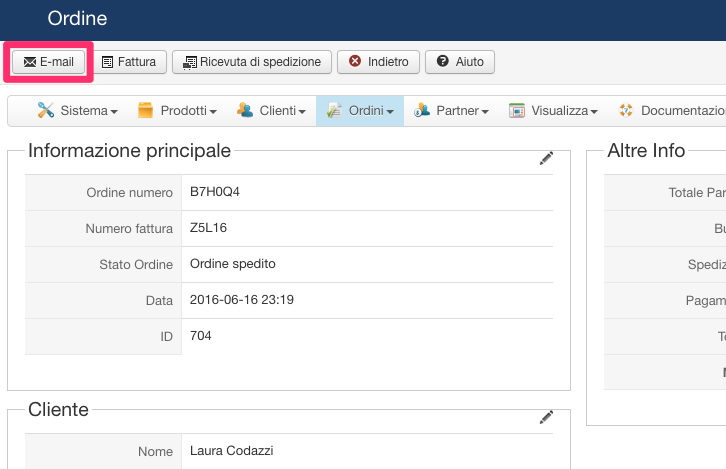
This is the button i'm referring to:
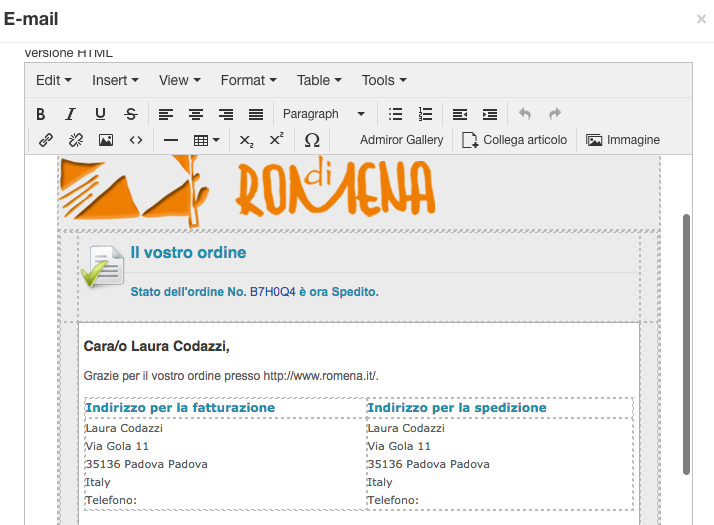
And this is the output when i click it:
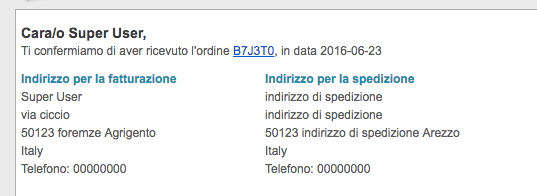
This is because i've found out that the ORDER_CREATION_NOTIFICATION_SUBJECT (which i think is the email template used when the customer finalize the order) displays correctly the "shipping address" and the "billing address", as in the picture below (i've tested with my admin user):
2. The other question is: which part of the code (in the preload version) displays the shipping and the billing address as in the picture above?
Thank you
I need to ask you three questions:
1. Could you please tell me which email template is used when i click on the "Email" icon, inside the order detail page?
The ORDER_STATUS_NOTIFICATION_SUBJECT, or the ORDER_NOTIFICATION_SUBJECT?
This is the button i'm referring to:
And this is the output when i click it:
This is because i've found out that the ORDER_CREATION_NOTIFICATION_SUBJECT (which i think is the email template used when the customer finalize the order) displays correctly the "shipping address" and the "billing address", as in the picture below (i've tested with my admin user):
2. The other question is: which part of the code (in the preload version) displays the shipping and the billing address as in the picture above?
Thank you
Please Log in or Create an account to join the conversation.
10 years 4 months ago #243845
by nicolas
Replied by nicolas on topic Order confirmation emails billing / shipping addr
Hi,
1. It's the "order notification" email which is used there.
2. It's this code at the end:
1. It's the "order notification" email which is used there.
2. It's this code at the end:
Code:
$vars['BILLING_ADDRESS'] = '';
$vars['SHIPPING_ADDRESS'] = '';
$addressClass = hikashop_get('class.address');
if(!empty($data->cart->billing_address) && !empty($data->cart->fields)){
$vars['BILLING_ADDRESS'] = $addressClass->displayAddress($data->cart->fields,$data->cart->billing_address,$view);
}
if(!empty($data->cart->override_shipping_address)) {
$vars['SHIPPING_ADDRESS'] = $data->cart->override_shipping_address;
} elseif(!empty($data->cart->order_shipping_id) && !empty($data->cart->shipping_address) && !empty($data->cart->fields)) {
$vars['SHIPPING_ADDRESS'] = $addressClass->displayAddress($data->cart->fields,$data->cart->shipping_address,$view);
} else {
$vars['SHIPPING_ADDRESS'] = $vars['BILLING_ADDRESS'];
}
The following user(s) said Thank You: edizioniromena
Please Log in or Create an account to join the conversation.
- edizioniromena
-
Topic Author
- Offline
Less
More
- Posts: 26
- Thank you received: 0
10 years 4 months ago #243882
by edizioniromena
Replied by edizioniromena on topic Order confirmation emails billing / shipping addr
Hi,
Thank you, this solved our issue.
One more question: since we are quite sure we didn't change anything on the "Preload version" (we changed surely something on the HTML version, though) why that part is changed?
I know it's a very difficult question (if not impossible), and i accept an "i don't know" answer but i'm just wondering.
Is it possible - i'm speculating - that if i change something on the HTML version, the email template is blocked from future updates, in its entirety (HTML version, Text version and Preload version)?
Thank you again
Thank you, this solved our issue.
One more question: since we are quite sure we didn't change anything on the "Preload version" (we changed surely something on the HTML version, though) why that part is changed?
I know it's a very difficult question (if not impossible), and i accept an "i don't know" answer
but i'm just wondering.Is it possible - i'm speculating - that if i change something on the HTML version, the email template is blocked from future updates, in its entirety (HTML version, Text version and Preload version)?
Thank you again
Please Log in or Create an account to join the conversation.
Time to create page: 0.284 seconds