

- Posts: 52
- Thank you received: 2
Order Summary Display in Email
9 years 11 months ago - 9 years 11 months ago #256685
by ozwest
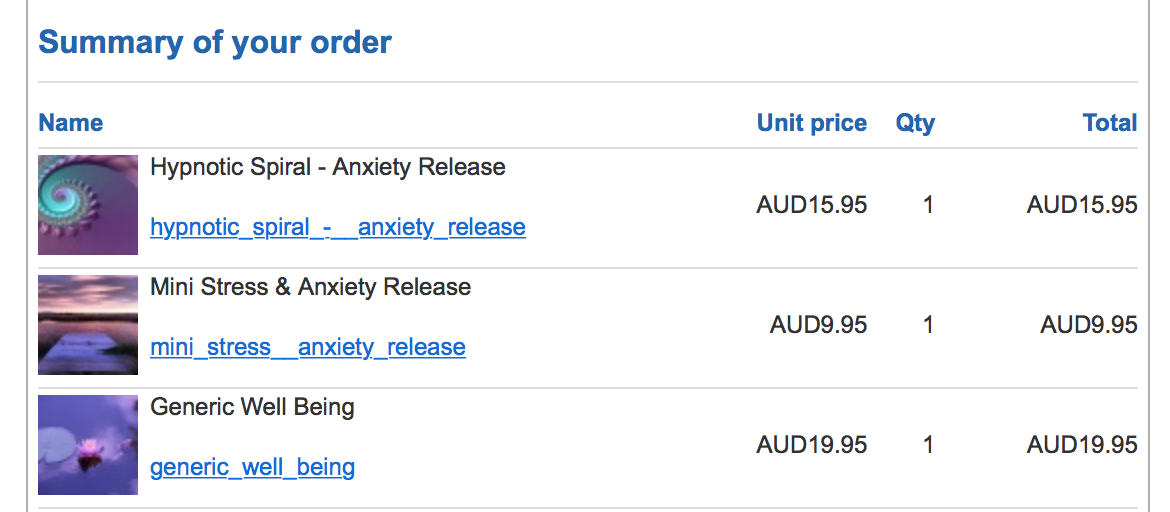
-- HikaShop version -- : 2.6.4
-- Joomla version -- : 3.6.4
Some customers are confused and are asking where they download the files they purchased.
How can I add a sentence in the ORDER EMAIL to say:
To download your file, please click on the link ...?
Order Summary Display in Email was created by ozwest
-- HikaShop version -- : 2.6.4
-- Joomla version -- : 3.6.4
Some customers are confused and are asking where they download the files they purchased.
How can I add a sentence in the ORDER EMAIL to say:
To download your file, please click on the link ...?
Last edit: 9 years 11 months ago by ozwest.
Please Log in or Create an account to join the conversation.

9 years 11 months ago #256719
by nicolas
Replied by nicolas on topic Order Summary Display in Email
Hi,
You can use a translation override to change the texts of the emails:
www.hikashop.com/download/languages.html#modify
That way you can add the sentence with the link.
Also, I would recommend to change the name of the files when you edit the files in the products to have something more descriptive.
You can use a translation override to change the texts of the emails:
www.hikashop.com/download/languages.html#modify
That way you can add the sentence with the link.
Also, I would recommend to change the name of the files when you edit the files in the products to have something more descriptive.
The following user(s) said Thank You: ozwest
Please Log in or Create an account to join the conversation.
9 years 11 months ago #256777
by ozwest
Replied by ozwest on topic Order Summary Display in Email
Thank you very much, I opted to put CLICK TO DOWNLOAD in front of a better file description. Looks much better now.
Please Log in or Create an account to join the conversation.
Time to create page: 0.071 seconds