
- Posts: 6
- Thank you received: 0
display a custom product field in email
- vectoronline
-
 Topic Author
- Offline
Less
More
9 years 3 months ago #272896
by vectoronline
display a custom product field in email was created by vectoronline
-- HikaShop version -- : 2.6.3
-- Joomla version -- : 3.7.2
-- PHP version -- : 5.6
-- Browser(s) name and version -- : latest Firefox
-- Error-message(debug-mod must be tuned on) -- : none
Hi,
I created a custom field 'productlabel' in the product table, to add some product properties.
But when I insert {LINEVAR:product.productlabel} in the admin mail section, nothing is displayed in the mail.
When I test with {LINEVAR:product.product_id} it works.
So how do I display a custom product field in email?
Rhanks in advance,
Eric
-- Joomla version -- : 3.7.2
-- PHP version -- : 5.6
-- Browser(s) name and version -- : latest Firefox
-- Error-message(debug-mod must be tuned on) -- : none
Hi,
I created a custom field 'productlabel' in the product table, to add some product properties.
But when I insert {LINEVAR:product.productlabel} in the admin mail section, nothing is displayed in the mail.
When I test with {LINEVAR:product.product_id} it works.
So how do I display a custom product field in email?
Rhanks in advance,
Eric
Please Log in or Create an account to join the conversation.

9 years 3 months ago #272900
by Jerome
Jerome - Obsidev.com
HikaMarket & HikaSerial developer / HikaShop core dev team.
Replied by Jerome on topic display a custom product field in email
Hello,
Please be sure to enter the custom field "namekey" and not a "label".
It's also called the "column name" in the custom field configuration :
www.hikashop.com/support/documentation/1...ield-form.html#infos
Regards,
Please be sure to enter the custom field "namekey" and not a "label".
It's also called the "column name" in the custom field configuration :
www.hikashop.com/support/documentation/1...ield-form.html#infos
Regards,
Jerome - Obsidev.com
HikaMarket & HikaSerial developer / HikaShop core dev team.
Please Log in or Create an account to join the conversation.
- vectoronline
-
Topic Author
- Offline
Less
More
- Posts: 6
- Thank you received: 0
9 years 3 months ago - 9 years 3 months ago #272975
by vectoronline
Replied by vectoronline on topic display a custom product field in email
Hi Jerome
In my case they are identical. The 'Label' = 'Productlabel' and the 'Column name' = 'productlabel'.
That's why i tried to display it in the mails with {LINEVAR:product.productlabel}.
But nothing shows.
Are those custom fields from the product table being read by the "Preload version"?
Regards,
Eric
In my case they are identical. The 'Label' = 'Productlabel' and the 'Column name' = 'productlabel'.
That's why i tried to display it in the mails with {LINEVAR:product.productlabel}.
But nothing shows.
Are those custom fields from the product table being read by the "Preload version"?
Regards,
Eric
Last edit: 9 years 3 months ago by vectoronline.
Please Log in or Create an account to join the conversation.

9 years 3 months ago #272977
by nicolas
Replied by nicolas on topic display a custom product field in email
Hi,
I don't see why it wouldn't work.
The custom fields are loaded like the other fields of the hikashop_product table for the tags.
Can you provide a screenshot of the settings of your custom field ?
I don't see why it wouldn't work.
The custom fields are loaded like the other fields of the hikashop_product table for the tags.
Can you provide a screenshot of the settings of your custom field ?
Please Log in or Create an account to join the conversation.
- vectoronline
-
Topic Author
- Offline
Less
More
- Posts: 6
- Thank you received: 0
9 years 3 months ago - 9 years 3 months ago #273049
by vectoronline
Replied by vectoronline on topic display a custom product field in email
Hi,
Here is the screenshot.
Just to be sure I turned eveything on.
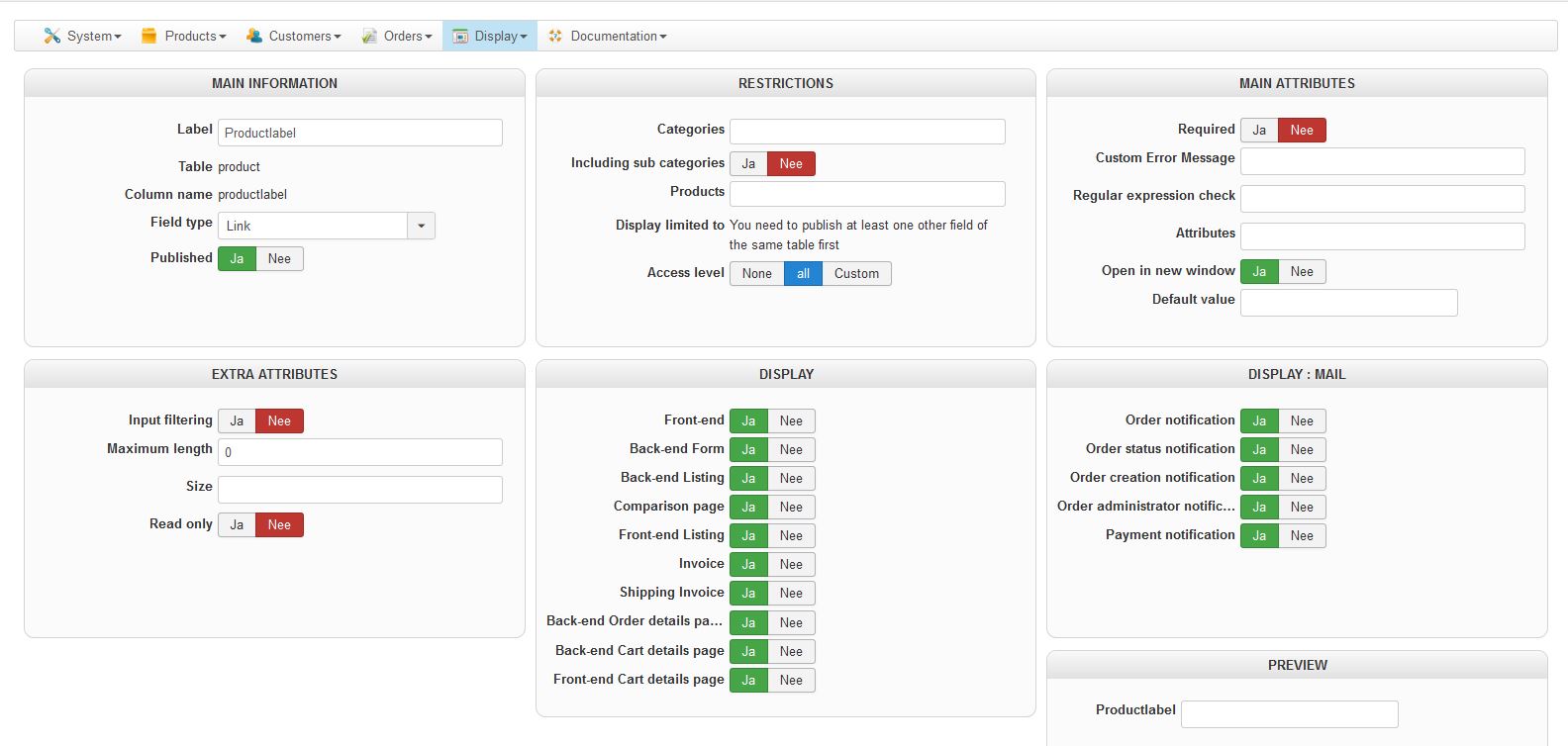
Here is the screenshot.
Just to be sure I turned eveything on.
Last edit: 9 years 3 months ago by vectoronline.
Please Log in or Create an account to join the conversation.
- vectoronline
-
Topic Author
- Offline
Less
More
- Posts: 6
- Thank you received: 0
9 years 3 months ago - 9 years 3 months ago #273066
by vectoronline
Replied by vectoronline on topic display a custom product field in email
Hi,
I just found it! It works for the main product without variants.
And it does NOT work for variants! I checked the database and the custom field of all variants are empty.
So the question now is: how can I display a custom field of a variant product in the mails?
I just found it! It works for the main product without variants.
And it does NOT work for variants! I checked the database and the custom field of all variants are empty.
So the question now is: how can I display a custom field of a variant product in the mails?
Last edit: 9 years 3 months ago by vectoronline.
Please Log in or Create an account to join the conversation.
9 years 3 months ago #273082
by nicolas
Replied by nicolas on topic display a custom product field in email
Hi,
That's the same tag. You just need to fill the custom field value in the variant itself.
If your question is "how can I display the value of the custom field of the main product when a variant is bought but the code of the product when it's not a variant but a product", that would require some custom coding in the "preload" section of the email.
It would be better to have a developer do it for you, because while it's not so complex, it will require proper development and debugging to make sure it works and I can't give you the code to add as I don't know without spending some time doing that development work, but that's outside of standard support.
That's the same tag. You just need to fill the custom field value in the variant itself.
If your question is "how can I display the value of the custom field of the main product when a variant is bought but the code of the product when it's not a variant but a product", that would require some custom coding in the "preload" section of the email.
It would be better to have a developer do it for you, because while it's not so complex, it will require proper development and debugging to make sure it works and I can't give you the code to add as I don't know without spending some time doing that development work, but that's outside of standard support.
Please Log in or Create an account to join the conversation.
- vectoronline
-
Topic Author
- Offline
Less
More
- Posts: 6
- Thank you received: 0
9 years 3 months ago #273125
by vectoronline
Replied by vectoronline on topic display a custom product field in email
Hi Nicolas,
Thanks for your answer. I think we will have to fill all variants manually. I just did not realize that that is possible!
I had assumed that the only 'extra' in a variant is what you add in the variant itself, like sizes, colours, etc.
But it turns out that a variant is a full copy of the 'master product' record in the datanase.
Best regards,
Eric
Thanks for your answer. I think we will have to fill all variants manually. I just did not realize that that is possible!
I had assumed that the only 'extra' in a variant is what you add in the variant itself, like sizes, colours, etc.
But it turns out that a variant is a full copy of the 'master product' record in the datanase.
Best regards,
Eric
Please Log in or Create an account to join the conversation.
9 years 3 months ago #273128
by Jerome
Jerome - Obsidev.com
HikaMarket & HikaSerial developer / HikaShop core dev team.
Replied by Jerome on topic display a custom product field in email
Hello,
Variants are products in the database ; but they might not contain all information and when there are some "blanks", HikaShop can load the information from the parent product (also called "main product").
In the email, because you have access to the raw data, the information from the parent product is not directly available.
You can see to customize the email preload in order to process the data and copy what you need for the variant products ; the other solution is like you wrote, to also have the information in the variant product.
Regards,
Variants are products in the database ; but they might not contain all information and when there are some "blanks", HikaShop can load the information from the parent product (also called "main product").
In the email, because you have access to the raw data, the information from the parent product is not directly available.
You can see to customize the email preload in order to process the data and copy what you need for the variant products ; the other solution is like you wrote, to also have the information in the variant product.
Regards,
Jerome - Obsidev.com
HikaMarket & HikaSerial developer / HikaShop core dev team.
Please Log in or Create an account to join the conversation.
Time to create page: 0.212 seconds