

- Posts: 62
- Thank you received: 1
Tax of product not shown correctly in order items
8 years 11 months ago #281825
by nuntius
Tax of product not shown correctly in order items was created by nuntius
-- HikaShop version -- : 3.2.1
-- Joomla version -- : 3.8.1
-- PHP version -- : 7.0
-- Browser(s) name and version -- : Chrome 69
-- Error-message(debug-mod must be tuned on) -- : None
Moved from here: www.hikashop.com/support/forum/19-hikama...-in-order-items.html
When I order an item with the 6% TAX associated with it, it shows correctly in the checkout and in the order itself in the back-end. See the screenshots attached.
When I edit the order in the back-end it selects the 0% Tax category, but I am not sure why. (See screenshots).
When I look into the database, the initial value of "order_product_tax_info" is this:
When I alter the value to the 6% Tax category manually, the value of "order_product_tax_info" changes to:
It seems the initial value is not stored correctly for some reason, even though the amount is registered correctly.
Is there a way to correct this? I hope you can help me out here!
-- Joomla version -- : 3.8.1
-- PHP version -- : 7.0
-- Browser(s) name and version -- : Chrome 69
-- Error-message(debug-mod must be tuned on) -- : None
Moved from here: www.hikashop.com/support/forum/19-hikama...-in-order-items.html
When I order an item with the 6% TAX associated with it, it shows correctly in the checkout and in the order itself in the back-end. See the screenshots attached.
When I edit the order in the back-end it selects the 0% Tax category, but I am not sure why. (See screenshots).
When I look into the database, the initial value of "order_product_tax_info" is this:
Code:
a:1:{s:13:"0000_00000001";O:8:"stdClass":18:{s:11:"taxation_id";s:1:"1";s:12:"zone_namekey";a:1:{i:0;s:23:"country_Netherlands_150";}s:16:"category_namekey";s:11:"default_tax";s:11:"tax_namekey";s:8:"BTW Laag";s:18:"taxation_published";s:1:"1";s:13:"taxation_type";s:0:"";s:15:"taxation_access";s:3:"all";s:19:"taxation_cumulative";s:1:"0";s:18:"taxation_post_code";s:0:"";s:19:"taxation_date_start";s:1:"0";s:17:"taxation_date_end";s:1:"0";s:22:"taxation_internal_code";s:1:"0";s:13:"taxation_note";s:0:"";s:16:"taxation_site_id";s:0:"";s:17:"taxation_ordering";s:1:"0";s:8:"tax_rate";s:7:"0.06000";s:9:"zone_type";s:7:"country";s:10:"tax_amount";d:0.68999999999999995;}}
When I alter the value to the 6% Tax category manually, the value of "order_product_tax_info" changes to:
Code:
a:1:{i:0;O:8:"stdClass":18:{s:11:"taxation_id";s:1:"1";s:12:"zone_namekey";a:1:{i:0;s:23:"country_Netherlands_150";}s:16:"category_namekey";s:11:"default_tax";s:11:"tax_namekey";s:8:"BTW Laag";s:18:"taxation_published";s:1:"1";s:13:"taxation_type";s:0:"";s:15:"taxation_access";s:3:"all";s:19:"taxation_cumulative";s:1:"0";s:18:"taxation_post_code";s:0:"";s:19:"taxation_date_start";s:1:"0";s:17:"taxation_date_end";s:1:"0";s:22:"taxation_internal_code";s:1:"0";s:13:"taxation_note";s:0:"";s:16:"taxation_site_id";s:0:"";s:17:"taxation_ordering";s:1:"0";s:8:"tax_rate";s:7:"0.06000";s:9:"zone_type";s:7:"country";s:10:"tax_amount";s:7:"0.69000";}}
It seems the initial value is not stored correctly for some reason, even though the amount is registered correctly.
Is there a way to correct this? I hope you can help me out here!
Please Log in or Create an account to join the conversation.

8 years 11 months ago - 8 years 11 months ago #282007
by Philip
Replied by Philip on topic Tax of product not shown correctly in order items
Hello,
First I have to say that answer you was quite difficult to understand because we don't see the issue you wanted to show us.
Now, I think I get it, but maybe I'm wrong, let's see this together with screenshot :
- Here, an order from my localhost test site :

You can see that as you have yourself good tax name, and value is associated to order.
But if you go for edit your order, you have a form with some options, and among this you have pre-selected tax option, like any form you can have in other setting page, and of course this pre-selected option isn't associated with your order.
Hope this will make you thing clear for you.
Regards
First I have to say that answer you was quite difficult to understand because we don't see the issue you wanted to show us.
Now, I think I get it, but maybe I'm wrong, let's see this together with screenshot :
- Here, an order from my localhost test site :
You can see that as you have yourself good tax name, and value is associated to order.
But if you go for edit your order, you have a form with some options, and among this you have pre-selected tax option, like any form you can have in other setting page, and of course this pre-selected option isn't associated with your order.
Hope this will make you thing clear for you.
Regards
Last edit: 8 years 11 months ago by Philip.
Please Log in or Create an account to join the conversation.
8 years 10 months ago #282047
by nuntius
Replied by nuntius on topic Tax of product not shown correctly in order items
Hello Philip,
Perhaps I am not explaining it correctly. But it seems something is wrong with the Tax association.
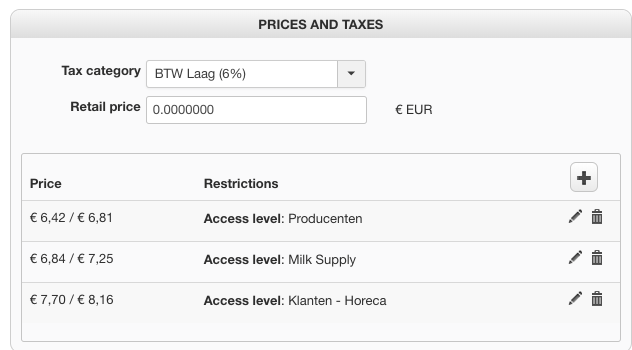
This is my product:
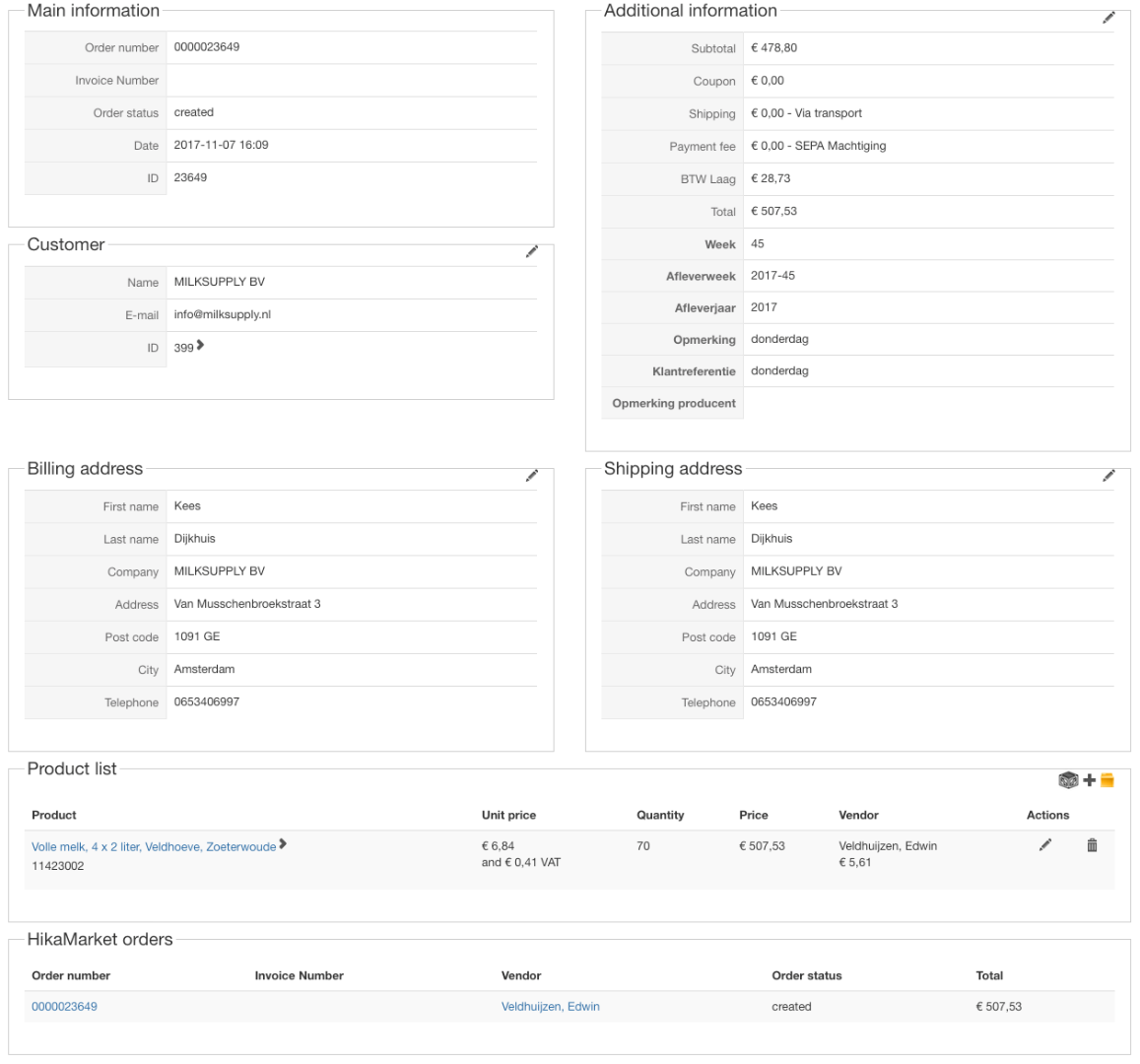
When a customer orders this product, this is the order:
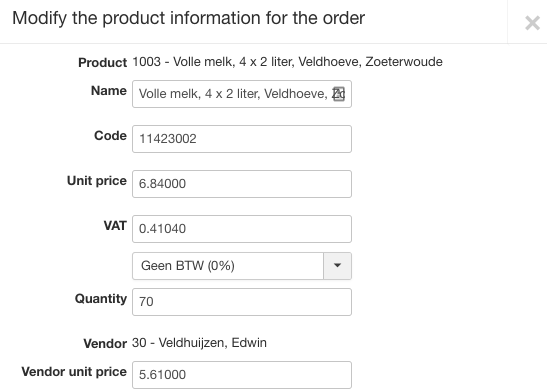
It looks correct, but when I edit the item in the product list it shows different tax selected (0% instead of 6%)
In the database it shows:
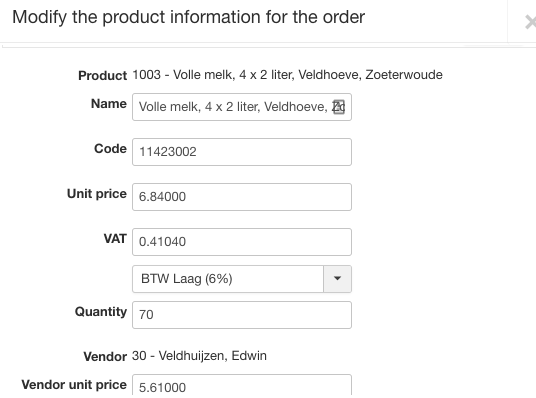
The VAT number is correct, but the selection is wrong (should be 6%. When I change it to 6% and save it, it shows correctly:
In the database:
The difference of the database-field "order_product_tax_info" value is that the 0 has been changed to "0000_00000001" and that is probably the cause why it's not selected correctly in the edit form.
I guess this is a bug?
Cheers,
Teeuwis
Perhaps I am not explaining it correctly. But it seems something is wrong with the Tax association.
This is my product:
When a customer orders this product, this is the order:
It looks correct, but when I edit the item in the product list it shows different tax selected (0% instead of 6%)
In the database it shows:
Code:
a:1:{s:13:"0000_00000001";O:8:"stdClass":18:{s:11:"taxation_id";s:1:"1";s:12:"zone_namekey";a:1:{i:0;s:23:"country_Netherlands_150";}s:16:"category_namekey";s:11:"default_tax";s:11:"tax_namekey";s:8:"BTW Laag";s:18:"taxation_published";s:1:"1";s:13:"taxation_type";s:0:"";s:15:"taxation_access";s:3:"all";s:19:"taxation_cumulative";s:1:"0";s:18:"taxation_post_code";s:0:"";s:19:"taxation_date_start";s:1:"0";s:17:"taxation_date_end";s:1:"0";s:22:"taxation_internal_code";s:1:"0";s:13:"taxation_note";s:0:"";s:16:"taxation_site_id";s:0:"";s:17:"taxation_ordering";s:1:"0";s:8:"tax_rate";s:7:"0.06000";s:9:"zone_type";s:7:"country";s:10:"tax_amount";d:0.68999999999999995;}}
The VAT number is correct, but the selection is wrong (should be 6%. When I change it to 6% and save it, it shows correctly:
In the database:
Code:
a:1:{i:0;O:8:"stdClass":18:{s:11:"taxation_id";s:1:"1";s:12:"zone_namekey";a:1:{i:0;s:23:"country_Netherlands_150";}s:16:"category_namekey";s:11:"default_tax";s:11:"tax_namekey";s:8:"BTW Laag";s:18:"taxation_published";s:1:"1";s:13:"taxation_type";s:0:"";s:15:"taxation_access";s:3:"all";s:19:"taxation_cumulative";s:1:"0";s:18:"taxation_post_code";s:0:"";s:19:"taxation_date_start";s:1:"0";s:17:"taxation_date_end";s:1:"0";s:22:"taxation_internal_code";s:1:"0";s:13:"taxation_note";s:0:"";s:16:"taxation_site_id";s:0:"";s:17:"taxation_ordering";s:1:"0";s:8:"tax_rate";s:7:"0.06000";s:9:"zone_type";s:7:"country";s:10:"tax_amount";s:7:"0.69000";}}
The difference of the database-field "order_product_tax_info" value is that the 0 has been changed to "0000_00000001" and that is probably the cause why it's not selected correctly in the edit form.
I guess this is a bug?
Cheers,
Teeuwis
Please Log in or Create an account to join the conversation.

8 years 10 months ago #282110
by nicolas
Replied by nicolas on topic Tax of product not shown correctly in order items
Hi,
It looks like a bug yes.
Try changing the line:
to:
in the file administrator/components/com_hikashop/views/order/tmpl/edit_products.php and that should help.
Let us know how it goes.
It looks like a bug yes.
Try changing the line:
Code:
<?php echo $this->ratesType->display( "data[order][product][tax_namekey]" , @$this->orderProduct->order_product_tax_info[0]->tax_namekey ); ?>
Code:
<?php echo $this->ratesType->display( "data[order][product][tax_namekey]" , reset($this->orderProduct->order_product_tax_info)->tax_namekey ); ?>
Let us know how it goes.
Please Log in or Create an account to join the conversation.
8 years 8 months ago #286097
by nuntius
Replied by nuntius on topic Tax of product not shown correctly in order items
Just quick note, it seems to fix the issue!
Cheers,
Teeuwis
Cheers,
Teeuwis
Please Log in or Create an account to join the conversation.
8 years 8 months ago #286105
by nuntius
Replied by nuntius on topic Tax of product not shown correctly in order items
Thanks Nicolas, that fixed the problem!
Please Log in or Create an account to join the conversation.
8 years 8 months ago #286098
by nicolas
Replied by nicolas on topic Tax of product not shown correctly in order items
Thanks for the feedback !
Please Log in or Create an account to join the conversation.
Time to create page: 0.232 seconds