

- Posts: 93
- Thank you received: 1
Data protection and form message Mandatory field
8 years 4 months ago #292887
by Kurt
Data protection and form message Mandatory field was created by Kurt
-- HikaShop version -- : 3.4.0
-- Joomla version -- : 3.8.7
-- PHP version -- : 7.1
-- Browser(s) name and version -- : Firefox 60.0.1
Hello,
my first question, where I can change the language for the form required message (Product not added to the card)?
2.) Privacy statement, which states that must be confirmed in the form that the privacy policy has been read.
No problem, I have create new field in the form!
My problem that in the text a link to the privacy policy must be included. How can I do this?
Best regards Kurt
-- Joomla version -- : 3.8.7
-- PHP version -- : 7.1
-- Browser(s) name and version -- : Firefox 60.0.1
Hello,
my first question, where I can change the language for the form required message (Product not added to the card)?
2.) Privacy statement, which states that must be confirmed in the form that the privacy policy has been read.
No problem, I have create new field in the form!
My problem that in the text a link to the privacy policy must be included. How can I do this?
Best regards Kurt
Please Log in or Create an account to join the conversation.
8 years 4 months ago #292894
by Kurt
Replied by Kurt on topic Data protection and form message Mandatory field
Hello,
Only the translation is missing (Product not added to the card)?
I found a solution for privacy link . (Extra field with custom text)
custom text:
<a href=" xxxxxxx.de/data protection">Read the privacy policy!
Best regards Kurt
Only the translation is missing (Product not added to the card)?
I found a solution for privacy link . (Extra field with custom text)
custom text:
<a href=" xxxxxxx.de/data protection">Read the privacy policy!
Best regards Kurt
Please Log in or Create an account to join the conversation.

8 years 4 months ago #292889
by nicolas
Replied by nicolas on topic Data protection and form message Mandatory field
Hi,
1. In each custom field, when you edit them via the menu Display>Custom fields, you can enter a custom error message that will be displayed if you try to submit the form while you didn't fill that field if it is required.
2. You can use a translation key in the label of your custom field values (I suppose that you're using a checkbox custom field).
Then, you can add a link for the text of the translation key when you add the translation to the translation override:
www.hikashop.com/download/languages.html#modify
For example:
1. In each custom field, when you edit them via the menu Display>Custom fields, you can enter a custom error message that will be displayed if you try to submit the form while you didn't fill that field if it is required.
2. You can use a translation key in the label of your custom field values (I suppose that you're using a checkbox custom field).
Then, you can add a link for the text of the translation key when you add the translation to the translation override:
www.hikashop.com/download/languages.html#modify
For example:
Code:
MY_TRANSLATION_KEY="<a href='URL of the T&C' target='_blank'>check the checkbox if you read and agree to the T&C</a>"
The following user(s) said Thank You: Kurt
Please Log in or Create an account to join the conversation.
8 years 4 months ago #292914
by Kurt
Replied by Kurt on topic Data protection and form message Mandatory field
Hi nicolas,
thank you for the information!
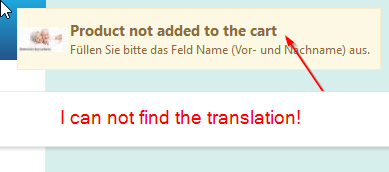
I'm still missing the TRANSLATION_KEY for "Product not added to the card". (Message when a required field needs to be filled in the form)
I can not find the translation, it lacks in the German translation.
Best regards Kurt
thank you for the information!
I'm still missing the TRANSLATION_KEY for "Product not added to the card". (Message when a required field needs to be filled in the form)
I can not find the translation, it lacks in the German translation.
Best regards Kurt
Please Log in or Create an account to join the conversation.
8 years 4 months ago #292943
by nicolas
Replied by nicolas on topic Data protection and form message Mandatory field
Hi,
It's in the translation file. The translation is this:
PRODUCT_NOT_ADDED_TO_CART="Product not added to the cart"
It's in the translation file. The translation is this:
PRODUCT_NOT_ADDED_TO_CART="Product not added to the cart"
The following user(s) said Thank You: Kurt
Please Log in or Create an account to join the conversation.
Time to create page: 0.160 seconds