
- Posts: 34
- Thank you received: 1
Sender information in emails neglected
- sandvalley2019
-
 Topic Author
- Offline
Less
More
6 years 8 months ago #314459
by sandvalley2019
Sender information in emails neglected was created by sandvalley2019
-- HikaShop version -- : 4.2.2
-- Joomla version -- : 3.9.14
-- PHP version -- : 7.3.13
-- Browser(s) name and version -- : all browsers
-- Error-message(debug-mod must be tuned on) -- : no error message
Hi,
I want the e-mail "A contact request has been made" to go to another email-address (voorlichting@go2lean.nl) then the other mails ( like order notification etc).
Therefor I filled the "Sender information" with different "From Name" and "From Address", but the contact request is still going tot the default e-mail address (inschrijvingen@go2lean.nl).
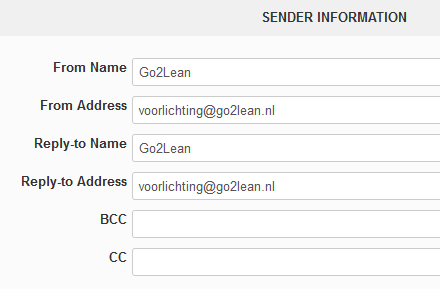
Is this the right place to modify the e-mail address or do I need to do something else?
Thanks,
Peter
-- Joomla version -- : 3.9.14
-- PHP version -- : 7.3.13
-- Browser(s) name and version -- : all browsers
-- Error-message(debug-mod must be tuned on) -- : no error message
Hi,
I want the e-mail "A contact request has been made" to go to another email-address (voorlichting@go2lean.nl) then the other mails ( like order notification etc).
Therefor I filled the "Sender information" with different "From Name" and "From Address", but the contact request is still going tot the default e-mail address (inschrijvingen@go2lean.nl).
Is this the right place to modify the e-mail address or do I need to do something else?
Thanks,
Peter
Please Log in or Create an account to join the conversation.

6 years 8 months ago #314471
by nicolas
Replied by nicolas on topic Sender information in emails neglected
Hi,
The "from" is the sender of the email, not the receiver.
What you want to change is the "to".
The contact request is actually sent to the "From Address" that you configured in the HikaShop configuration, in the "email" section.
If you don't want to change that setting but still want to change the email address receiving the contact requests, you would have to edit the email via the menu System>Emails, and add such code at the beginning of the HTML or preload:
<?php $mail->dst_email = array('XXX'); ?>
where XXX is the email address you want to receive the email.
The "from" is the sender of the email, not the receiver.
What you want to change is the "to".
The contact request is actually sent to the "From Address" that you configured in the HikaShop configuration, in the "email" section.
If you don't want to change that setting but still want to change the email address receiving the contact requests, you would have to edit the email via the menu System>Emails, and add such code at the beginning of the HTML or preload:
<?php $mail->dst_email = array('XXX'); ?>
where XXX is the email address you want to receive the email.
The following user(s) said Thank You: sandvalley2019
Please Log in or Create an account to join the conversation.
- sandvalley2019
-
Topic Author
- Offline
Less
More
- Posts: 34
- Thank you received: 1
6 years 8 months ago #314563
by sandvalley2019
Replied by sandvalley2019 on topic Sender information in emails neglected
Thanks again, it works!
Regards,
Peter
Regards,
Peter
Please Log in or Create an account to join the conversation.
Less
More
- Posts: 20
- Thank you received: 0
6 years 2 months ago #322403
by transmetra
Replied by transmetra on topic Sender information in emails neglected
Hello
I need to send it to another address. It would be great if there would be an additional field in "Sender Information" section for setting up this:
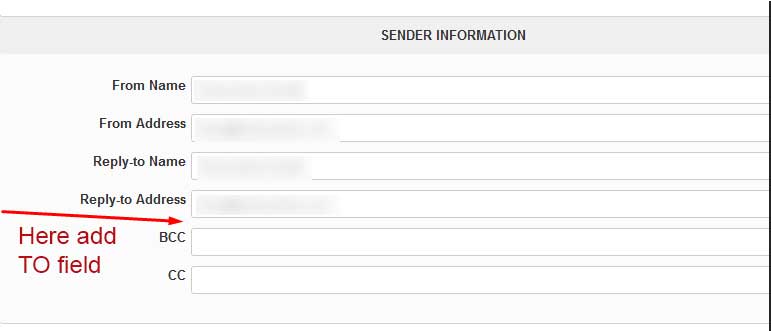
There are CC and BCC present, why not TO as well?
Thanks.
nicolas wrote: What you want to change is the "to".
The contact request is actually sent to the "From Address" that you configured in the HikaShop configuration, in the "email" section.
I need to send it to another address. It would be great if there would be an additional field in "Sender Information" section for setting up this:
There are CC and BCC present, why not TO as well?
Thanks.
Please Log in or Create an account to join the conversation.
6 years 2 months ago #322406
by nicolas
Replied by nicolas on topic Sender information in emails neglected
Hi,
There is no To because for most emails, you don't want one. For example, the order status notification is sent to the customer so the To has to be set dynamically by HikaShop and you don't want the shop owner to set something for it.
Now I agree that it would be better to have a setting for that email's To somewhere.
In the mean time, the solution I gave before is still the one I would recommend.
There is no To because for most emails, you don't want one. For example, the order status notification is sent to the customer so the To has to be set dynamically by HikaShop and you don't want the shop owner to set something for it.
Now I agree that it would be better to have a setting for that email's To somewhere.
In the mean time, the solution I gave before is still the one I would recommend.
Please Log in or Create an account to join the conversation.
Time to create page: 0.200 seconds