

- Posts: 15
- Thank you received: 0
State & County Fields display with incorrectly
6 years 9 months ago #314534
by soliver
State & County Fields display with incorrectly was created by soliver
-- url of the page with the problem -- :
exaxol.com
-- HikaShop version -- : 4.2.2
-- Joomla version -- : 3.9.1.4
-- PHP version -- : 7.2.26
-- Browser(s) name and version -- : safari 13.0.4
-- Error-message(debug-mod must be tuned on) -- : No Error Message
All of a sudden, the state field displays as "state_Florida_4270" and the Country field displays as "country_United_States_of_America_223. This is new as it has always displayed correctly until a couple of days a go.. Any suggestions on how to correct? The address_template.php is set to the following: This is the ways it has always been so no changes have been made to this. I appreciate any help.
I have an attachment so you can see what i am talking about.
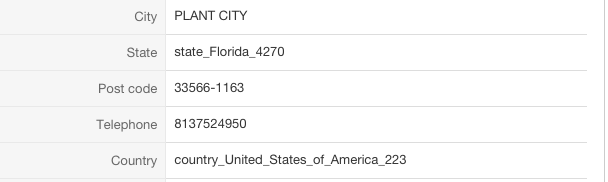
Scott
<?php
/**
* @package HikaShop for Joomla!
* @version 3.4.0
* @author hikashop.com
* @copyright (C) 2010-2018 HIKARI SOFTWARE. All rights reserved.
* @license GNU/GPLv3 www.gnu.org/licenses/gpl-3.0.html
*/
defined('_JEXEC') or die('Restricted access');
?>{address_company}
{address_title} {address_firstname} {address_lastname}
{address_street}
{address_city} {address_state} {address_post_code}
{address_country}
<?php
$address = $this->params->get('address');
echo JText::sprintf('TELEPHONE_IN_ADDRESS',preg_replace("/^1?(\d{3})(\d{3})(\d{4})$/", "$1-$2-$3", preg_replace("/[^\d]/", "", $address->address_telephone))); ?>
-- HikaShop version -- : 4.2.2
-- Joomla version -- : 3.9.1.4
-- PHP version -- : 7.2.26
-- Browser(s) name and version -- : safari 13.0.4
-- Error-message(debug-mod must be tuned on) -- : No Error Message
All of a sudden, the state field displays as "state_Florida_4270" and the Country field displays as "country_United_States_of_America_223. This is new as it has always displayed correctly until a couple of days a go.. Any suggestions on how to correct? The address_template.php is set to the following: This is the ways it has always been so no changes have been made to this. I appreciate any help.
I have an attachment so you can see what i am talking about.
Scott
<?php
/**
* @package HikaShop for Joomla!
* @version 3.4.0
* @author hikashop.com
* @copyright (C) 2010-2018 HIKARI SOFTWARE. All rights reserved.
* @license GNU/GPLv3 www.gnu.org/licenses/gpl-3.0.html
*/
defined('_JEXEC') or die('Restricted access');
?>{address_company}
{address_title} {address_firstname} {address_lastname}
{address_street}
{address_city} {address_state} {address_post_code}
{address_country}
<?php
$address = $this->params->get('address');
echo JText::sprintf('TELEPHONE_IN_ADDRESS',preg_replace("/^1?(\d{3})(\d{3})(\d{4})$/", "$1-$2-$3", preg_replace("/[^\d]/", "", $address->address_telephone))); ?>
Please Log in or Create an account to join the conversation.

6 years 9 months ago #314535
by nicolas
Replied by nicolas on topic State & County Fields display with incorrectly
Hi,
This indicates that the state/country corresponding has been deleted from the table hikashop_zone in the database (or via the delete button in the menu System->Zones).
As these are default zones, you can download again the install package of HikaShop on our website and install it on yours. It will add back all the default zones that have been deleted.
This indicates that the state/country corresponding has been deleted from the table hikashop_zone in the database (or via the delete button in the menu System->Zones).
As these are default zones, you can download again the install package of HikaShop on our website and install it on yours. It will add back all the default zones that have been deleted.
Please Log in or Create an account to join the conversation.
Time to create page: 0.112 seconds