
- Posts: 69
- Thank you received: 5
Discount not calculated
- politikchronist
-
 Topic Author
- Offline
Less
More
4 years 10 months ago #337174
by politikchronist
Discount not calculated was created by politikchronist
-- url of the page with the problem -- :
www.politikchronist.org
-- HikaShop version -- : 4.4.4
-- Joomla version -- : 3.10.3
-- PHP version -- : 7.4.20
-- Browser(s) name and version -- : Firefox 93.0
-- Error-message(debug-mod must be tuned on) -- : Warning: trim() expects parameter 1 to be string, array given in /var/www/html/joomla/administrator/components/com_hikashop/classes/discount.php on line 157
When trying to order with discount, the discount is not calculated. The following error message is shown.
Warning: trim() expects parameter 1 to be string, array given in /var/www/html/joomla/administrator/components/com_hikashop/classes/discount.php on line 157
Thanks for help
-- HikaShop version -- : 4.4.4
-- Joomla version -- : 3.10.3
-- PHP version -- : 7.4.20
-- Browser(s) name and version -- : Firefox 93.0
-- Error-message(debug-mod must be tuned on) -- : Warning: trim() expects parameter 1 to be string, array given in /var/www/html/joomla/administrator/components/com_hikashop/classes/discount.php on line 157
When trying to order with discount, the discount is not calculated. The following error message is shown.
Warning: trim() expects parameter 1 to be string, array given in /var/www/html/joomla/administrator/components/com_hikashop/classes/discount.php on line 157
Thanks for help
Please Log in or Create an account to join the conversation.
- politikchronist
-
Topic Author
- Offline
Less
More
- Posts: 69
- Thank you received: 5
4 years 10 months ago #337175
by politikchronist
Replied by politikchronist on topic Discount not calculated
Please help, no type of discount is working any more.
Please Log in or Create an account to join the conversation.

4 years 10 months ago #337176
by nicolas
Replied by nicolas on topic Discount not calculated
Hi,
I don't see why it would do that. I'm not able to reproduce the problem on my end.
Where do you get that warning ?
Could you temporarily add the line of code below:
Just before that line 157 in /administrator/components/com_hikashop/classes/discount.php and reproduce the error ?
That should display a callstack of the situation until where the error happens so that we can better understand why it's displaying that error.
Also, could you provide the screenshot of a discount which doesn't work so that we can better understand the situation ?
Finally, maybe you're talking about coupons not discounts ?
We actually fixed today an issue with coupons not working when only one of the min/max of the quantity or amount restrictions were applied:
www.hikashop.com/support/forum/discount-...-working.html#337142
So if that's your issue, then just downloading again the install package on our website and installing it on yours will fix the problem.
I don't see why it would do that. I'm not able to reproduce the problem on my end.
Where do you get that warning ?
Could you temporarily add the line of code below:
Code:
echo '<pre>';var_dump(debug_backtrace(DEBUG_BACKTRACE_IGNORE_ARGS));echo '</pre>';
That should display a callstack of the situation until where the error happens so that we can better understand why it's displaying that error.
Also, could you provide the screenshot of a discount which doesn't work so that we can better understand the situation ?
Finally, maybe you're talking about coupons not discounts ?
We actually fixed today an issue with coupons not working when only one of the min/max of the quantity or amount restrictions were applied:
www.hikashop.com/support/forum/discount-...-working.html#337142
So if that's your issue, then just downloading again the install package on our website and installing it on yours will fix the problem.
Please Log in or Create an account to join the conversation.
- politikchronist
-
Topic Author
- Offline
Less
More
- Posts: 69
- Thank you received: 5
4 years 10 months ago #337177
by politikchronist
Replied by politikchronist on topic Discount not calculated
Thanks a lot for the fast reply.
Sorry, I am only the administrator, not programmer, and I need more information into what file at what position to enter the code line you mention. Sorry again.
The error happens in both areas. It first occurred in coupons. Then I changed and entered a discount for some customer. But got the same result.
The error message appears on top of the summary of the shopping cart.
(We are a non-profit organization and sell books. Bookstores can order with discount. But we cannot proceed the orders right now.)
The discount function worked well for weeks.
Thanks in advance.
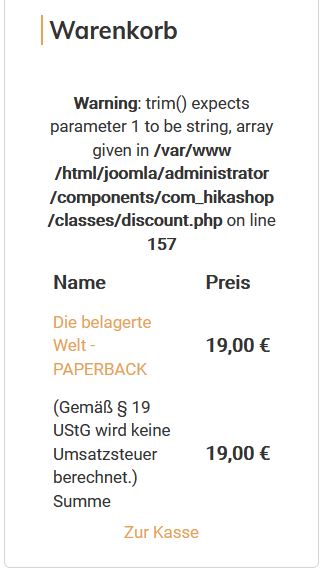
Sorry, I am only the administrator, not programmer, and I need more information into what file at what position to enter the code line you mention. Sorry again.
The error happens in both areas. It first occurred in coupons. Then I changed and entered a discount for some customer. But got the same result.
The error message appears on top of the summary of the shopping cart.
(We are a non-profit organization and sell books. Bookstores can order with discount. But we cannot proceed the orders right now.)
The discount function worked well for weeks.
Thanks in advance.
Please Log in or Create an account to join the conversation.
- politikchronist
-
Topic Author
- Offline
Less
More
- Posts: 69
- Thank you received: 5
4 years 10 months ago #337178
by politikchronist
Replied by politikchronist on topic Discount not calculated
P.S.
If you prefer to take a look into the admin side, I could install a super-user right for you.
If you prefer to take a look into the admin side, I could install a super-user right for you.
Please Log in or Create an account to join the conversation.
4 years 10 months ago #337182
by nicolas
Replied by nicolas on topic Discount not calculated
Hi,
Well, I told you to add the code just before the line number 157 in the file /administrator/components/com_hikashop/classes/discount.php
So I don't know what more information I can give you regarding the "what file at what position", since that's precisely what I gave you.
But before all that, as I said before, we've added a fix regarding the discount system. So I would first recommend you reinstall your HikaShop to get the fix. That might be enough.
Unfortunately, a backend access won't allow me to add the debug in the file as it needs to be done with the FTP access provided by your hosting.
Well, I told you to add the code just before the line number 157 in the file /administrator/components/com_hikashop/classes/discount.php
So I don't know what more information I can give you regarding the "what file at what position", since that's precisely what I gave you.
But before all that, as I said before, we've added a fix regarding the discount system. So I would first recommend you reinstall your HikaShop to get the fix. That might be enough.
Unfortunately, a backend access won't allow me to add the debug in the file as it needs to be done with the FTP access provided by your hosting.
Please Log in or Create an account to join the conversation.
- politikchronist
-
Topic Author
- Offline
Less
More
- Posts: 69
- Thank you received: 5
4 years 10 months ago #337191
by politikchronist
Replied by politikchronist on topic Discount not calculated
Thanks for the explanation. I will try ...
Please Log in or Create an account to join the conversation.
- politikchronist
-
Topic Author
- Offline
Less
More
- Posts: 69
- Thank you received: 5
4 years 10 months ago - 4 years 10 months ago #337196
by politikchronist
Replied by politikchronist on topic Discount not calculated
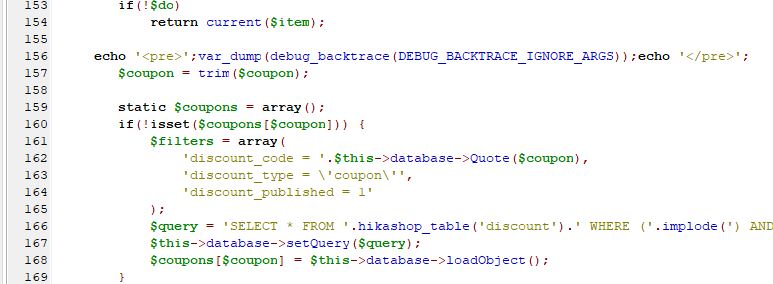
OK, first I tried to implement the newest version of the shop. But this did not change the situation. Then I added the line mentioned before line 157 in discount.php see pic.
And the result was:
popping up over the error message
Warning: trim() expects parameter 1 to be string, array given in /var/www/html/joomla/administrator/components/com_hikashop/classes/discount.php on line 157
Is this helpful?
And the result was:
Code:
array(16) {
[0]=>
array(5) {
["file"]=>
string(79) "/var/www/html/joomla/administrator/components/com_hikashop/classes/discount.php"
["line"]=>
int(174)
["function"]=>
string(4) "load"
["class"]=>
string(21) "hikashopDiscountClass"
["type"]=>
string(2) "->"
}
[1]=>
array(5) {
["file"]=>
string(75) "/var/www/html/joomla/administrator/components/com_hikashop/classes/cart.php"
["line"]=>
int(1290)
["function"]=>
string(12) "loadAndCheck"
["class"]=>
string(21) "hikashopDiscountClass"
["type"]=>
string(2) "->"
}
[2]=>
array(5) {
["file"]=>
string(72) "/var/www/html/joomla/components/com_hikashop/views/product/view.html.php"
["line"]=>
int(2313)
["function"]=>
string(11) "getFullCart"
["class"]=>
string(17) "hikashopCartClass"
["type"]=>
string(2) "->"
}
[3]=>
array(5) {
["file"]=>
string(72) "/var/www/html/joomla/components/com_hikashop/views/product/view.html.php"
["line"]=>
int(28)
["function"]=>
string(4) "cart"
["class"]=>
string(18) "ProductViewProduct"
["type"]=>
string(2) "->"
}
[4]=>
array(5) {
["file"]=>
string(77) "/var/www/html/joomla/administrator/components/com_hikashop/helpers/helper.php"
["line"]=>
int(864)
["function"]=>
string(7) "display"
["class"]=>
string(18) "ProductViewProduct"
["type"]=>
string(2) "->"
}
[5]=>
array(3) {
["file"]=>
string(68) "/var/www/html/joomla/modules/mod_hikashop_cart/mod_hikashop_cart.php"
["line"]=>
int(70)
["function"]=>
string(18) "hikashop_getLayout"
}
[6]=>
array(4) {
["file"]=>
string(96) "/var/www/html/joomla/plugins/system/sunfw/includes/overwrite/j3x/libraries/cms/module/helper.php"
["line"]=>
int(197)
["args"]=>
array(1) {
[0]=>
string(68) "/var/www/html/joomla/modules/mod_hikashop_cart/mod_hikashop_cart.php"
}
["function"]=>
string(7) "include"
}
[7]=>
array(5) {
["file"]=>
string(76) "/var/www/html/joomla/libraries/src/Document/Renderer/Html/ModuleRenderer.php"
["line"]=>
int(98)
["function"]=>
string(12) "renderModule"
["class"]=>
string(13) "JModuleHelper"
["type"]=>
string(2) "::"
}
[8]=>
array(5) {
["file"]=>
string(77) "/var/www/html/joomla/libraries/src/Document/Renderer/Html/ModulesRenderer.php"
["line"]=>
int(47)
["function"]=>
string(6) "render"
["class"]=>
string(48) "Joomla\CMS\Document\Renderer\Html\ModuleRenderer"
["type"]=>
string(2) "->"
}
[9]=>
array(5) {
["file"]=>
string(60) "/var/www/html/joomla/libraries/src/Document/HtmlDocument.php"
["line"]=>
int(501)
["function"]=>
string(6) "render"
["class"]=>
string(49) "Joomla\CMS\Document\Renderer\Html\ModulesRenderer"
["type"]=>
string(2) "->"
}
[10]=>
array(5) {
["file"]=>
string(60) "/var/www/html/joomla/libraries/src/Document/HtmlDocument.php"
["line"]=>
int(793)
["function"]=>
string(9) "getBuffer"
["class"]=>
string(32) "Joomla\CMS\Document\HtmlDocument"
["type"]=>
string(2) "->"
}
[11]=>
array(5) {
["file"]=>
string(60) "/var/www/html/joomla/libraries/src/Document/HtmlDocument.php"
["line"]=>
int(567)
["function"]=>
string(15) "_renderTemplate"
["class"]=>
string(32) "Joomla\CMS\Document\HtmlDocument"
["type"]=>
string(2) "->"
}
[12]=>
array(5) {
["file"]=>
string(65) "/var/www/html/joomla/libraries/src/Application/CMSApplication.php"
["line"]=>
int(1140)
["function"]=>
string(6) "render"
["class"]=>
string(32) "Joomla\CMS\Document\HtmlDocument"
["type"]=>
string(2) "->"
}
[13]=>
array(5) {
["file"]=>
string(66) "/var/www/html/joomla/libraries/src/Application/SiteApplication.php"
["line"]=>
int(778)
["function"]=>
string(6) "render"
["class"]=>
string(37) "Joomla\CMS\Application\CMSApplication"
["type"]=>
string(2) "->"
}
[14]=>
array(5) {
["file"]=>
string(65) "/var/www/html/joomla/libraries/src/Application/CMSApplication.php"
["line"]=>
int(231)
["function"]=>
string(6) "render"
["class"]=>
string(38) "Joomla\CMS\Application\SiteApplication"
["type"]=>
string(2) "->"
}
[15]=>
array(5) {
["file"]=>
string(30) "/var/www/html/joomla/index.php"
["line"]=>
int(49)
["function"]=>
string(7) "execute"
["class"]=>
string(37) "Joomla\CMS\Application\CMSApplication"
["type"]=>
string(2) "->"
}
}
and
array(16) {
[0]=>
array(5) {
["file"]=>
string(79) "/var/www/html/joomla/administrator/components/com_hikashop/classes/discount.php"
["line"]=>
int(174)
["function"]=>
string(4) "load"
["class"]=>
string(21) "hikashopDiscountClass"
["type"]=>
string(2) "->"
}
[1]=>
array(5) {
["file"]=>
string(75) "/var/www/html/joomla/administrator/components/com_hikashop/classes/cart.php"
["line"]=>
int(1299)
["function"]=>
string(12) "loadAndCheck"
["class"]=>
string(21) "hikashopDiscountClass"
["type"]=>
string(2) "->"
}
[2]=>
array(5) {
["file"]=>
string(72) "/var/www/html/joomla/components/com_hikashop/views/product/view.html.php"
["line"]=>
int(2313)
["function"]=>
string(11) "getFullCart"
["class"]=>
string(17) "hikashopCartClass"
["type"]=>
string(2) "->"
}
[3]=>
array(5) {
["file"]=>
string(72) "/var/www/html/joomla/components/com_hikashop/views/product/view.html.php"
["line"]=>
int(28)
["function"]=>
string(4) "cart"
["class"]=>
string(18) "ProductViewProduct"
["type"]=>
string(2) "->"
}
[4]=>
array(5) {
["file"]=>
string(77) "/var/www/html/joomla/administrator/components/com_hikashop/helpers/helper.php"
["line"]=>
int(864)
["function"]=>
string(7) "display"
["class"]=>
string(18) "ProductViewProduct"
["type"]=>
string(2) "->"
}
[5]=>
array(3) {
["file"]=>
string(68) "/var/www/html/joomla/modules/mod_hikashop_cart/mod_hikashop_cart.php"
["line"]=>
int(70)
["function"]=>
string(18) "hikashop_getLayout"
}
[6]=>
array(4) {
["file"]=>
string(96) "/var/www/html/joomla/plugins/system/sunfw/includes/overwrite/j3x/libraries/cms/module/helper.php"
["line"]=>
int(197)
["args"]=>
array(1) {
[0]=>
string(68) "/var/www/html/joomla/modules/mod_hikashop_cart/mod_hikashop_cart.php"
}
["function"]=>
string(7) "include"
}
[7]=>
array(5) {
["file"]=>
string(76) "/var/www/html/joomla/libraries/src/Document/Renderer/Html/ModuleRenderer.php"
["line"]=>
int(98)
["function"]=>
string(12) "renderModule"
["class"]=>
string(13) "JModuleHelper"
["type"]=>
string(2) "::"
}
[8]=>
array(5) {
["file"]=>
string(77) "/var/www/html/joomla/libraries/src/Document/Renderer/Html/ModulesRenderer.php"
["line"]=>
int(47)
["function"]=>
string(6) "render"
["class"]=>
string(48) "Joomla\CMS\Document\Renderer\Html\ModuleRenderer"
["type"]=>
string(2) "->"
}
[9]=>
array(5) {
["file"]=>
string(60) "/var/www/html/joomla/libraries/src/Document/HtmlDocument.php"
["line"]=>
int(501)
["function"]=>
string(6) "render"
["class"]=>
string(49) "Joomla\CMS\Document\Renderer\Html\ModulesRenderer"
["type"]=>
string(2) "->"
}
[10]=>
array(5) {
["file"]=>
string(60) "/var/www/html/joomla/libraries/src/Document/HtmlDocument.php"
["line"]=>
int(793)
["function"]=>
string(9) "getBuffer"
["class"]=>
string(32) "Joomla\CMS\Document\HtmlDocument"
["type"]=>
string(2) "->"
}
[11]=>
array(5) {
["file"]=>
string(60) "/var/www/html/joomla/libraries/src/Document/HtmlDocument.php"
["line"]=>
int(567)
["function"]=>
string(15) "_renderTemplate"
["class"]=>
string(32) "Joomla\CMS\Document\HtmlDocument"
["type"]=>
string(2) "->"
}
[12]=>
array(5) {
["file"]=>
string(65) "/var/www/html/joomla/libraries/src/Application/CMSApplication.php"
["line"]=>
int(1140)
["function"]=>
string(6) "render"
["class"]=>
string(32) "Joomla\CMS\Document\HtmlDocument"
["type"]=>
string(2) "->"
}
[13]=>
array(5) {
["file"]=>
string(66) "/var/www/html/joomla/libraries/src/Application/SiteApplication.php"
["line"]=>
int(778)
["function"]=>
string(6) "render"
["class"]=>
string(37) "Joomla\CMS\Application\CMSApplication"
["type"]=>
string(2) "->"
}
[14]=>
array(5) {
["file"]=>
string(65) "/var/www/html/joomla/libraries/src/Application/CMSApplication.php"
["line"]=>
int(231)
["function"]=>
string(6) "render"
["class"]=>
string(38) "Joomla\CMS\Application\SiteApplication"
["type"]=>
string(2) "->"
}
[15]=>
array(5) {
["file"]=>
string(30) "/var/www/html/joomla/index.php"
["line"]=>
int(49)
["function"]=>
string(7) "execute"
["class"]=>
string(37) "Joomla\CMS\Application\CMSApplication"
["type"]=>
string(2) "->"
}
}
Warning: trim() expects parameter 1 to be string, array given in /var/www/html/joomla/administrator/components/com_hikashop/classes/discount.php on line 157
Is this helpful?
Last edit: 4 years 10 months ago by nicolas.
Please Log in or Create an account to join the conversation.
- politikchronist
-
Topic Author
- Offline
Less
More
- Posts: 69
- Thank you received: 5
4 years 10 months ago #337201
by politikchronist
Replied by politikchronist on topic Discount not calculated
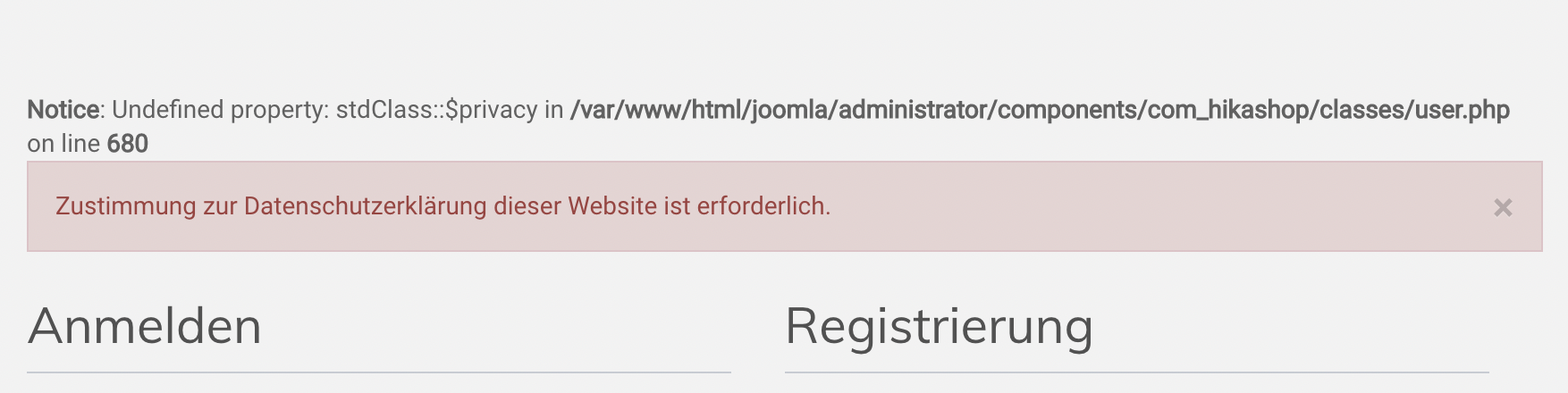
Since yesterday, we get complaints from customer that registration or shopping failed. I could not really understand what happened, but they sent me the attached screenshots.
Please Log in or Create an account to join the conversation.
- politikchronist
-
Topic Author
- Offline
Less
More
- Posts: 69
- Thank you received: 5
4 years 10 months ago #337221
by politikchronist
Replied by politikchronist on topic Discount not calculated
In the meantime I have deleted the line which had been added in order to not disturb too much the workflow, and now the discount is correctly calculcated, only that the error message still appears on the site. .... Well what should I say. After one hour the message disappeared. ... I have no cache activated. So I have to excuse for the embarrassment. Now it seems to work fine.
Thanks for your attention.
Thanks for your attention.
Please Log in or Create an account to join the conversation.
4 years 10 months ago #337231
by nicolas
Replied by nicolas on topic Discount not calculated
Hi,
Thanks for the details. Maybe you have something like opcache on your hosting server ( wp-rocket.me/blog/what-is-opcache/ ). This will make PHP automatically cache the compiled versions of the PHP files for a while so that it saves resources.
But in that case, it's possible that after an update the cached version of the files are not taken into account immediately.
It's possible to manually flush the opcache cache : ma.ttias.be/how-to-clear-php-opcache/
I looked at the code but besides the fix I was talking in my previous message, I don't see any reason for these to happen.
So if it's now working properly, it just mean that the update fixed the problem.
The red error message upon registration indicates that you've activated the privacy consent plugin in the Joomla plugins manager but that for some reason you didn't agree to the privacy consent when asked on the registration form.
It could be that you missed it, or it could be that it wasn't added to the registration form.
This last case could happen if you have an override of the sub_block_login_registration.php view file via the menu Display>Views based on an old version of HikaShop which didn't support the privacy settings.
Thanks for the details. Maybe you have something like opcache on your hosting server ( wp-rocket.me/blog/what-is-opcache/ ). This will make PHP automatically cache the compiled versions of the PHP files for a while so that it saves resources.
But in that case, it's possible that after an update the cached version of the files are not taken into account immediately.
It's possible to manually flush the opcache cache : ma.ttias.be/how-to-clear-php-opcache/
I looked at the code but besides the fix I was talking in my previous message, I don't see any reason for these to happen.
So if it's now working properly, it just mean that the update fixed the problem.
The red error message upon registration indicates that you've activated the privacy consent plugin in the Joomla plugins manager but that for some reason you didn't agree to the privacy consent when asked on the registration form.
It could be that you missed it, or it could be that it wasn't added to the registration form.
This last case could happen if you have an override of the sub_block_login_registration.php view file via the menu Display>Views based on an old version of HikaShop which didn't support the privacy settings.
The following user(s) said Thank You: politikchronist
Please Log in or Create an account to join the conversation.
- politikchronist
-
Topic Author
- Offline
Less
More
- Posts: 69
- Thank you received: 5
4 years 10 months ago #337232
by politikchronist
Thanks again for your efforts to answer to my questions.
Replied by politikchronist on topic Discount not calculated
Am I right to expect that if this was the case, it should not happen with the last version updated?nicolas wrote: Hi,
This last case could happen if you have an override of the sub_block_login_registration.php view file via the menu Display>Views based on an old version of HikaShop which didn't support the privacy settings.
Thanks again for your efforts to answer to my questions.
Please Log in or Create an account to join the conversation.
4 years 10 months ago #337235
by nicolas
Replied by nicolas on topic Discount not calculated
Hi,
No, this could happen even after the update since view overrides are not deleted during updates (it's the whole point of creating overrides that you keep them during updates).
So I would recommend you to check if you can find an override for that view file in the Display>Views menu. If you do, you can backup the code and delete the override so that it uses the default view file and if it fixes the problem, then it means it indeed came from that view override and you can create a new view override and port the modifications from the backup to the new version of the view file.
No, this could happen even after the update since view overrides are not deleted during updates (it's the whole point of creating overrides that you keep them during updates).
So I would recommend you to check if you can find an override for that view file in the Display>Views menu. If you do, you can backup the code and delete the override so that it uses the default view file and if it fixes the problem, then it means it indeed came from that view override and you can create a new view override and port the modifications from the backup to the new version of the view file.
The following user(s) said Thank You: politikchronist
Please Log in or Create an account to join the conversation.
- politikchronist
-
Topic Author
- Offline
Less
More
- Posts: 69
- Thank you received: 5
4 years 10 months ago #337238
by politikchronist
Replied by politikchronist on topic Discount not calculated
uups. I may have a problem. I used JSN_Bookstore template, and now I see that they did many modifications. And I fear to change anything in here.
The nice guys, who helped a lot from Vietnam, announced just a few weeks after I was proud having realized the site, that they are only giving support for some more month. So may be soon I need to switch to a new template. May be we will be in a mess without a Joomla specialist. But as a non-profit organization, we might need to collect money to finance it.
I liked the easy way of defining the pages very well. But now may be I have to switch soon to another template. If you have any proposal what template might make the less issues when changing from JSN_Bookstore, I would appreciate your mentioning it.
My own small overrides were only on the language file.
The nice guys, who helped a lot from Vietnam, announced just a few weeks after I was proud having realized the site, that they are only giving support for some more month. So may be soon I need to switch to a new template. May be we will be in a mess without a Joomla specialist. But as a non-profit organization, we might need to collect money to finance it.
I liked the easy way of defining the pages very well. But now may be I have to switch soon to another template. If you have any proposal what template might make the less issues when changing from JSN_Bookstore, I would appreciate your mentioning it.
My own small overrides were only on the language file.
Please Log in or Create an account to join the conversation.
4 years 10 months ago #337246
by nicolas
Replied by nicolas on topic Discount not calculated
Hi,
So you confirm that you don't see the privacy consent area on the registration form of the checkout and that the red error message says that you need to validate the privacy consent option ?
If so, then yes, yt's probably linked to an override in your template.
Search for the file templates/YOUR_TEMPLATE/html/com_hikashop/checkout/sub_block_login_registration.php via FTP.
If you find it, rename it in order to deactivate it and check your checkout registration form. You should now see the privacy consent area. Hopefully, the registration form still looks the same without the customized override and so you can keep the view file override renamed.
So you confirm that you don't see the privacy consent area on the registration form of the checkout and that the red error message says that you need to validate the privacy consent option ?
If so, then yes, yt's probably linked to an override in your template.
Search for the file templates/YOUR_TEMPLATE/html/com_hikashop/checkout/sub_block_login_registration.php via FTP.
If you find it, rename it in order to deactivate it and check your checkout registration form. You should now see the privacy consent area. Hopefully, the registration form still looks the same without the customized override and so you can keep the view file override renamed.
Please Log in or Create an account to join the conversation.
- politikchronist
-
Topic Author
- Offline
Less
More
- Posts: 69
- Thank you received: 5
4 years 10 months ago #337247
by politikchronist
Replied by politikchronist on topic Discount not calculated
Thank you very much. I found it, renamed it, tried it, and it showed up in firefox as expected. So hopefully this will solve this problem.
Thanks again!
Thanks again!
Please Log in or Create an account to join the conversation.
Time to create page: 0.250 seconds