

- Posts: 240
- Thank you received: 13
Orders Calendar filter
4 years 9 months ago #338718
by khashiz
Orders Calendar filter was created by khashiz
-- HikaShop version -- : 4.4.4
-- Joomla version -- : 4.0.6
-- PHP version -- : 7.4
Hi
I'm using Hikashop for persian website. the admin language is Persian
In my orders list in filter section, the calendar data is invalid and can not filter the orders for a specific persian date
what should i do ?
-- Joomla version -- : 4.0.6
-- PHP version -- : 7.4
Hi
I'm using Hikashop for persian website. the admin language is Persian
In my orders list in filter section, the calendar data is invalid and can not filter the orders for a specific persian date
what should i do ?
Please Log in or Create an account to join the conversation.

4 years 9 months ago #338720
by Philip
Replied by Philip on topic Orders Calendar filter
Hello,
This subject is unfortunately a little redundant... In the sense that we have several times people like you wanting to work from the Persian calendar.
But we don't have solutions because we do not quite understand the basic principle of this Persian calendar.
As we don't use the Persian calendar at all, the best way will be to have a Persia developer to work on it in order to allow Joomla & HikaShop too be able to process through the Persian Calendar.
Once again sorry for this return.
Regards
This subject is unfortunately a little redundant... In the sense that we have several times people like you wanting to work from the Persian calendar.
But we don't have solutions because we do not quite understand the basic principle of this Persian calendar.
As we don't use the Persian calendar at all, the best way will be to have a Persia developer to work on it in order to allow Joomla & HikaShop too be able to process through the Persian Calendar.
Once again sorry for this return.
Regards
The following user(s) said Thank You: khashiz
Please Log in or Create an account to join the conversation.
4 years 9 months ago #338745
by lorus
Replied by lorus on topic Orders Calendar filter
Hello
The problem may be related to the solar date, but in the date selection box in the order filter section, there is a problem that has confused us by selecting from the pop-up window or entering the day or month manually, the order page is refreshed and practically Does not allow date selection. That is, by selecting the start date, the page filter is refreshed and does not allow the next date.
Thanks.
The problem may be related to the solar date, but in the date selection box in the order filter section, there is a problem that has confused us by selecting from the pop-up window or entering the day or month manually, the order page is refreshed and practically Does not allow date selection. That is, by selecting the start date, the page filter is refreshed and does not allow the next date.
Thanks.
Please Log in or Create an account to join the conversation.
4 years 9 months ago #338748
by khashiz
Replied by khashiz on topic Orders Calendar filter
The problem of the Persian calendar will be solved once for all if Hikashop use default joomla calendar everywhere a calendar is needed ...
The following user(s) said Thank You: lorus
Please Log in or Create an account to join the conversation.

4 years 9 months ago - 4 years 9 months ago #338756
by nicolas
Replied by nicolas on topic Orders Calendar filter
Hi,
I invite you to look at the file administrator/components/com_hikashop/views/order/tmpl/listing.php
You'll find this line of code:
As you can see there, we call JHTML::_('calandar', ...) to display the date selector for the filter of the orders listing. This is the standard Joomla calendar selector.
So we're already using the "default joomla calendar everywhere a calendar is needed".
The problem is elsewhere and more complex than you make it seems.
I invite you to look at the file administrator/components/com_hikashop/views/order/tmpl/listing.php
You'll find this line of code:
Code:
echo JHTML::_('calendar', hikashop_getDate((@$this->pageInfo->filter->filter_start?@$this->pageInfo->filter->filter_start:''),'%Y-%m-%d'), 'filter_start','period_start',hikashop_getDateFormat('%d %B %Y'),array('size'=>'10','onchange'=>'document.adminForm.submit();', 'onChange'=>'document.adminForm.submit();'));
So we're already using the "default joomla calendar everywhere a calendar is needed".
The problem is elsewhere and more complex than you make it seems.
Last edit: 4 years 9 months ago by nicolas.
Please Log in or Create an account to join the conversation.
4 years 9 months ago #338776
by khashiz
Replied by khashiz on topic Orders Calendar filter
Yes you are right.
I'm wondering why joomla calendar works very well in joomla content and modules but not here ..
I'm wondering why joomla calendar works very well in joomla content and modules but not here ..
Please Log in or Create an account to join the conversation.
4 years 9 months ago #338777
by khashiz
Replied by khashiz on topic Orders Calendar filter
since Hikashop's Calendar custom field uses another calender than Joomla's default, I thought the orders list doesnt use default calendar too
Please Log in or Create an account to join the conversation.
4 years 9 months ago #338790
by nicolas
Replied by nicolas on topic Orders Calendar filter
Hi,
We use another calendar for the custom fields so that we can have more advanced options like limiting the days you can select, etc because custom field date pickers are often used to select a delivery date, and thus it is crutial that the selection can be restricted in many different ways to accomodate with the reality of the deliveries.
Otherwise, we try to use Joomla's calendar everywhere else.
I have looked several times at the issue with the Persian language. However, I'm not familiar with your calendar and even looking online for more information and looking into the code of Joomla to understand how it all works, I couldn't find out why the calendar doesn't display properly for the Persian language.
I suppose it is linked to the date conversion we do between unix timestamp and the date selected. However, this works for all the other languages and even takes into account the timezone. So I don't know why it does that, nor what needs to be done.
If I knew, I would have already fixed the problem. I'm sorry for the situation.
We use another calendar for the custom fields so that we can have more advanced options like limiting the days you can select, etc because custom field date pickers are often used to select a delivery date, and thus it is crutial that the selection can be restricted in many different ways to accomodate with the reality of the deliveries.
Otherwise, we try to use Joomla's calendar everywhere else.
I have looked several times at the issue with the Persian language. However, I'm not familiar with your calendar and even looking online for more information and looking into the code of Joomla to understand how it all works, I couldn't find out why the calendar doesn't display properly for the Persian language.
I suppose it is linked to the date conversion we do between unix timestamp and the date selected. However, this works for all the other languages and even takes into account the timezone. So I don't know why it does that, nor what needs to be done.
If I knew, I would have already fixed the problem. I'm sorry for the situation.
The following user(s) said Thank You: khashiz
Please Log in or Create an account to join the conversation.
4 years 9 months ago #338797
by lorus
Replied by lorus on topic Orders Calendar filter
Please Log in or Create an account to join the conversation.
4 years 9 months ago #338804
by khashiz
Replied by khashiz on topic Orders Calendar filter
Thank you Nicolas.
Just want to thank your great support and responsebility.
Keep up the good work
Just want to thank your great support and responsebility.
Keep up the good work
The following user(s) said Thank You: Philip
Please Log in or Create an account to join the conversation.
4 years 9 months ago #338815
by lorus
Replied by lorus on topic Orders Calendar filter
Hi
Scanning the order filtering pages, I found an interesting point
By selecting the local day, month and solar year: 10/27/1400
data-alt-value is calculated as half-year and half-solar, which causes the problem
As you can see in the attached image. Blue is the menu selection Red is the system selection
In choosing the system instead of January 2022, it is stated that April 2022 17 means half solar solar half year.
2022-01-17 is equal to 1400/10/27, not April 17, which is the first solar month.
I hope I was able to convey the problem clearly
Thanks
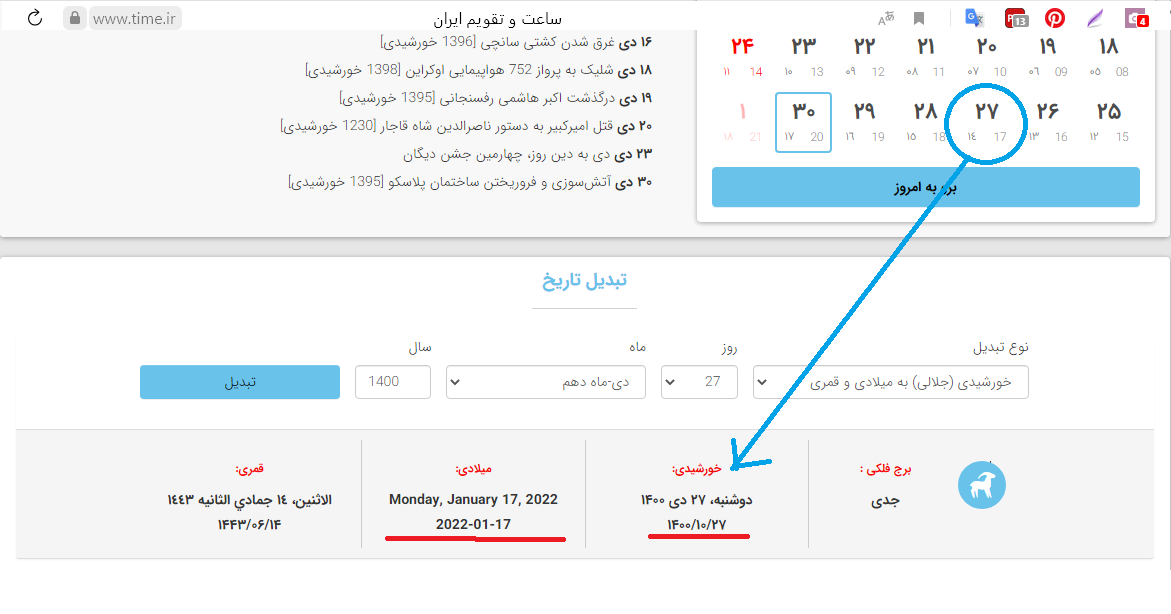
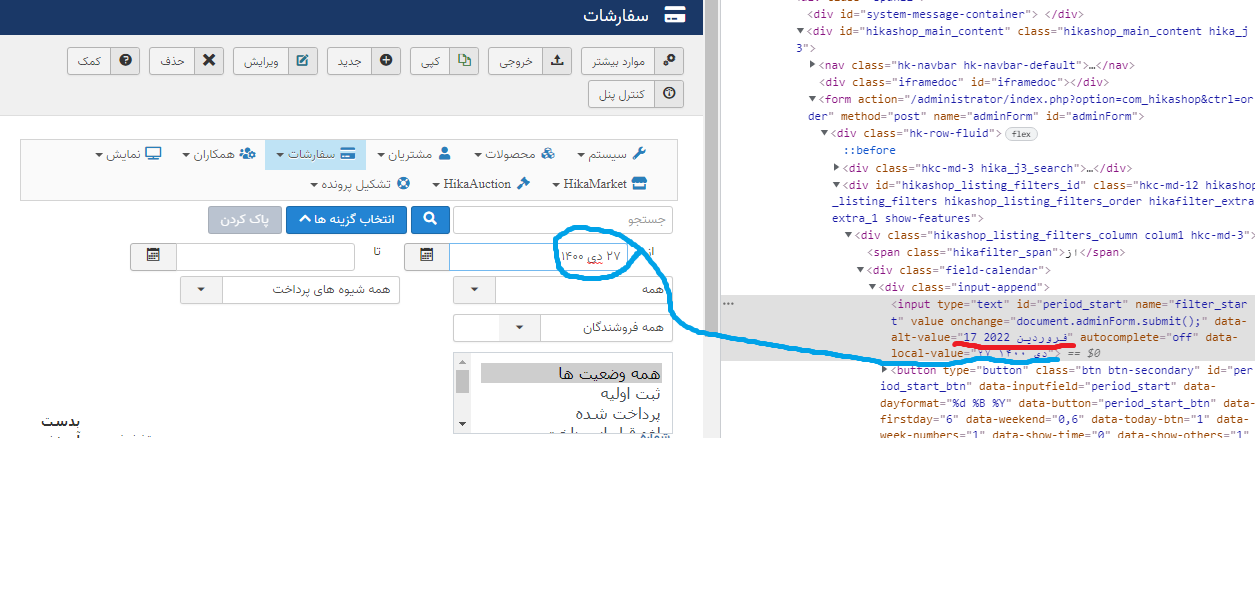
Scanning the order filtering pages, I found an interesting point
By selecting the local day, month and solar year: 10/27/1400
data-alt-value is calculated as half-year and half-solar, which causes the problem
As you can see in the attached image. Blue is the menu selection Red is the system selection
In choosing the system instead of January 2022, it is stated that April 2022 17 means half solar solar half year.
2022-01-17 is equal to 1400/10/27, not April 17, which is the first solar month.
I hope I was able to convey the problem clearly
Thanks
Please Log in or Create an account to join the conversation.
Time to create page: 0.106 seconds