
- Posts: 10
- Thank you received: 0
Unable to get the size of the image (Plugin attachinvoice)
- aulavirtualmusica
-
 Topic Author
- Offline
Less
More
3 years 4 months ago #352572
by aulavirtualmusica
-- HikaShop version -- : 4.7.3
-- Joomla version -- : 4.3.2
-- PHP version -- : 8.0.29
-- Browser(s) name and version -- : Chrome
-- Error-message(debug-mod must be tuned on) -- : # Function Location
1 () JROOT/plugins/hikashop/attachinvoice/vendor/spipu/html2pdf/src/Html2Pdf.php:1526
2 Spipu\Html2Pdf\Html2Pdf->_drawImage() JROOT/plugins/hikashop/attachinvoice/vendor/spipu/html2pdf/src/Html2Pdf.php:5782
3 Spipu\Html2Pdf\Html2Pdf->_tag_open_IMG() JROOT/plugins/hikashop/attachinvoice/vendor/spipu/html2pdf/src/Html2Pdf.php:1444
4 Spipu\Html2Pdf\Html2Pdf->_executeAction() JROOT/plugins/hikashop/attachinvoice/vendor/spipu/html2pdf/src/Html2Pdf.php:1412
5 Spipu\Html2Pdf\Html2Pdf->_makeHTMLcode() JROOT/plugins/hikashop/attachinvoice/vendor/spipu/html2pdf/src/Html2Pdf.php:3136
6 Spipu\Html2Pdf\Html2Pdf->_tag_open_DIV() JROOT/plugins/hikashop/attachinvoice/vendor/spipu/html2pdf/src/Html2Pdf.php:1444
7 Spipu\Html2Pdf\Html2Pdf->_executeAction() JROOT/plugins/hikashop/attachinvoice/vendor/spipu/html2pdf/src/Html2Pdf.php:1412
8 Spipu\Html2Pdf\Html2Pdf->_makeHTMLcode() JROOT/plugins/hikashop/attachinvoice/vendor/spipu/html2pdf/src/Html2Pdf.php:600
9 Spipu\Html2Pdf\Html2Pdf->writeHTML() JROOT/plugins/hikashop/attachinvoice/attachinvoice.php:120
10 plgHikashopAttachinvoice->_getPDFInvoice() JROOT/plugins/hikashop/attachinvoice/attachinvoice.php:237
11 plgHikashopAttachinvoice->onHikashopBeforeDisplayView() JROOT/libraries/src/Plugin/CMSPlugin.php:284
12 Joomla\CMS\Plugin\CMSPlugin->Joomla\CMS\Plugin\{closure}() JROOT/libraries/vendor/joomla/event/src/Dispatcher.php:486
13 Joomla\Event\Dispatcher->dispatch() JROOT/libraries/src/Application/EventAware.php:111
14 Joomla\CMS\Application\WebApplication->triggerEvent() JROOT/administrator/components/com_hikashop/helpers/helper.php:2697
15 hikashopView->display() JROOT/administrator/components/com_hikashop/views/order/view.html.php:30
16 OrderViewOrder->display() JROOT/libraries/src/MVC/Controller/BaseController.php:645
17 Joomla\CMS\MVC\Controller\BaseController->display() JROOT/administrator/components/com_hikashop/helpers/helper.php:2459
18 hikashopController->display() JROOT/administrator/components/com_hikashop/controllers/order.php:305
19 OrderController->invoice() JROOT/libraries/src/MVC/Controller/BaseController.php:678
20 Joomla\CMS\MVC\Controller\BaseController->execute() JROOT/administrator/components/com_hikashop/helpers/helper.php:2437
21 hikashopController->execute() JROOT/administrator/components/com_hikashop/hikashop.php:73
22 require_once() JROOT/libraries/src/Dispatcher/LegacyComponentDispatcher.php:71
23 Joomla\CMS\Dispatcher\LegacyComponentDispatcher::Joomla\CMS\Dispatcher\{closure}() JROOT/libraries/src/Dispatcher/LegacyComponentDispatcher.php:73
24 Joomla\CMS\Dispatcher\LegacyComponentDispatcher->dispatch() JROOT/libraries/src/Component/ComponentHelper.php:361
25 Joomla\CMS\Component\ComponentHelper::renderComponent() JROOT/libraries/src/Application/AdministratorApplication.php:143
26 Joomla\CMS\Application\AdministratorApplication->dispatch() JROOT/libraries/src/Application/AdministratorApplication.php:186
27 Joomla\CMS\Application\AdministratorApplication->doExecute() JROOT/libraries/src/Application/CMSApplication.php:293
28 Joomla\CMS\Application\CMSApplication->execute() JROOT/administrator/includes/app.php:61
29 require_once() JROOT/administrator/index.php:32
Hello, after installing the attachinvoice plugin to attach the invoice by mail, when clicking Send Invoice from the order screen, "Unable to get the size of the image" appears and nothing is sent. If I disable the plugin it works. I've done the tests locally and it works, so it must be a PHP configuration, but I don't know what the problem is. Thank you.
-- Joomla version -- : 4.3.2
-- PHP version -- : 8.0.29
-- Browser(s) name and version -- : Chrome
-- Error-message(debug-mod must be tuned on) -- : # Function Location
1 () JROOT/plugins/hikashop/attachinvoice/vendor/spipu/html2pdf/src/Html2Pdf.php:1526
2 Spipu\Html2Pdf\Html2Pdf->_drawImage() JROOT/plugins/hikashop/attachinvoice/vendor/spipu/html2pdf/src/Html2Pdf.php:5782
3 Spipu\Html2Pdf\Html2Pdf->_tag_open_IMG() JROOT/plugins/hikashop/attachinvoice/vendor/spipu/html2pdf/src/Html2Pdf.php:1444
4 Spipu\Html2Pdf\Html2Pdf->_executeAction() JROOT/plugins/hikashop/attachinvoice/vendor/spipu/html2pdf/src/Html2Pdf.php:1412
5 Spipu\Html2Pdf\Html2Pdf->_makeHTMLcode() JROOT/plugins/hikashop/attachinvoice/vendor/spipu/html2pdf/src/Html2Pdf.php:3136
6 Spipu\Html2Pdf\Html2Pdf->_tag_open_DIV() JROOT/plugins/hikashop/attachinvoice/vendor/spipu/html2pdf/src/Html2Pdf.php:1444
7 Spipu\Html2Pdf\Html2Pdf->_executeAction() JROOT/plugins/hikashop/attachinvoice/vendor/spipu/html2pdf/src/Html2Pdf.php:1412
8 Spipu\Html2Pdf\Html2Pdf->_makeHTMLcode() JROOT/plugins/hikashop/attachinvoice/vendor/spipu/html2pdf/src/Html2Pdf.php:600
9 Spipu\Html2Pdf\Html2Pdf->writeHTML() JROOT/plugins/hikashop/attachinvoice/attachinvoice.php:120
10 plgHikashopAttachinvoice->_getPDFInvoice() JROOT/plugins/hikashop/attachinvoice/attachinvoice.php:237
11 plgHikashopAttachinvoice->onHikashopBeforeDisplayView() JROOT/libraries/src/Plugin/CMSPlugin.php:284
12 Joomla\CMS\Plugin\CMSPlugin->Joomla\CMS\Plugin\{closure}() JROOT/libraries/vendor/joomla/event/src/Dispatcher.php:486
13 Joomla\Event\Dispatcher->dispatch() JROOT/libraries/src/Application/EventAware.php:111
14 Joomla\CMS\Application\WebApplication->triggerEvent() JROOT/administrator/components/com_hikashop/helpers/helper.php:2697
15 hikashopView->display() JROOT/administrator/components/com_hikashop/views/order/view.html.php:30
16 OrderViewOrder->display() JROOT/libraries/src/MVC/Controller/BaseController.php:645
17 Joomla\CMS\MVC\Controller\BaseController->display() JROOT/administrator/components/com_hikashop/helpers/helper.php:2459
18 hikashopController->display() JROOT/administrator/components/com_hikashop/controllers/order.php:305
19 OrderController->invoice() JROOT/libraries/src/MVC/Controller/BaseController.php:678
20 Joomla\CMS\MVC\Controller\BaseController->execute() JROOT/administrator/components/com_hikashop/helpers/helper.php:2437
21 hikashopController->execute() JROOT/administrator/components/com_hikashop/hikashop.php:73
22 require_once() JROOT/libraries/src/Dispatcher/LegacyComponentDispatcher.php:71
23 Joomla\CMS\Dispatcher\LegacyComponentDispatcher::Joomla\CMS\Dispatcher\{closure}() JROOT/libraries/src/Dispatcher/LegacyComponentDispatcher.php:73
24 Joomla\CMS\Dispatcher\LegacyComponentDispatcher->dispatch() JROOT/libraries/src/Component/ComponentHelper.php:361
25 Joomla\CMS\Component\ComponentHelper::renderComponent() JROOT/libraries/src/Application/AdministratorApplication.php:143
26 Joomla\CMS\Application\AdministratorApplication->dispatch() JROOT/libraries/src/Application/AdministratorApplication.php:186
27 Joomla\CMS\Application\AdministratorApplication->doExecute() JROOT/libraries/src/Application/CMSApplication.php:293
28 Joomla\CMS\Application\CMSApplication->execute() JROOT/administrator/includes/app.php:61
29 require_once() JROOT/administrator/index.php:32
Hello, after installing the attachinvoice plugin to attach the invoice by mail, when clicking Send Invoice from the order screen, "Unable to get the size of the image" appears and nothing is sent. If I disable the plugin it works. I've done the tests locally and it works, so it must be a PHP configuration, but I don't know what the problem is. Thank you.
Please Log in or Create an account to join the conversation.

3 years 4 months ago #352573
by nicolas
Replied by nicolas on topic Unable to get the size of the image (Plugin attachinvoice)
Hi,
This error means that the library the plugin uses to retrieve the image to include it in the PDF is not able to download it.
So it's a server configuration issue.
It could be that file_get_contents or cURL is not available on the hosting, or allow_url_fopen or allow_url_include are turned off:
stackoverflow.com/a/28007106
I would recommend checking with your hosting support what can be done. Unfortunately, since it's a server configuration issue, there is not much we can do on our end.
This error means that the library the plugin uses to retrieve the image to include it in the PDF is not able to download it.
So it's a server configuration issue.
It could be that file_get_contents or cURL is not available on the hosting, or allow_url_fopen or allow_url_include are turned off:
stackoverflow.com/a/28007106
I would recommend checking with your hosting support what can be done. Unfortunately, since it's a server configuration issue, there is not much we can do on our end.
Please Log in or Create an account to join the conversation.
- aulavirtualmusica
-
Topic Author
- Offline
Less
More
- Posts: 10
- Thank you received: 0
3 years 4 months ago #353066
by aulavirtualmusica
Replied by aulavirtualmusica on topic Unable to get the size of the image (Plugin attachinvoice)
Hello, we have been doing tests to reproduce the problem with an external script and test the server configuration and in the end the solution has been to disable the SSL verification in the code.
$context = stream_context_create(array('ssl' => array( 'verify_peer' => false, 'verify_peer_name' => false,), ));
$contents = file_get_contents('https://remote_server...', false, $context);
The problem is that in hickashop I don't know how to implement this.
$context = stream_context_create(array('ssl' => array( 'verify_peer' => false, 'verify_peer_name' => false,), ));
$contents = file_get_contents('https://remote_server...', false, $context);
The problem is that in hickashop I don't know how to implement this.
Please Log in or Create an account to join the conversation.
3 years 4 months ago #353068
by nicolas
Replied by nicolas on topic Unable to get the size of the image (Plugin attachinvoice)
Hi,
The error "Unable to get the size of the image" comes from the function _drawImage in the file /plugins/hikashop/attachinvoice/vendor/spipu/html2pdf/src/Html2Pdf.php as per your callstack report in your first message.
The error is not displayed by HikaShop, it's displayed by the HTML2PDF/TCPDF library included in the PDF invoice plugin to be able to generated PDF files from HTML code.
You can edit that file via the FTP access provided by your hosting.
In that file, you'll see the line:
$infos = @getimagesize($src);
That's the line which tries to download the image but fails to do so.
Supposing that what you say it true, you'll have to register a stream wrapper to allow getimagesize to not verify the HTTPS certificate.
Researching a bit based on this, there is actually someone who had the same issue as you and posted the code to do just that:
stackoverflow.com/a/55653750
I think you can just copy his code somewhere loaded before the plugin generates the PDF and it should then work.
For example, you could add it at the beginning of the /plugins/hikashop/attachinvoice/attachinvoice/invoice.php file (or flat_invoice.php or grid_invoice.php or corporate_invoice.php based on the layout you've selected in the plugin).
The error "Unable to get the size of the image" comes from the function _drawImage in the file /plugins/hikashop/attachinvoice/vendor/spipu/html2pdf/src/Html2Pdf.php as per your callstack report in your first message.
The error is not displayed by HikaShop, it's displayed by the HTML2PDF/TCPDF library included in the PDF invoice plugin to be able to generated PDF files from HTML code.
You can edit that file via the FTP access provided by your hosting.
In that file, you'll see the line:
$infos = @getimagesize($src);
That's the line which tries to download the image but fails to do so.
Supposing that what you say it true, you'll have to register a stream wrapper to allow getimagesize to not verify the HTTPS certificate.
Researching a bit based on this, there is actually someone who had the same issue as you and posted the code to do just that:
stackoverflow.com/a/55653750
Code:
<?php
// Unregister existing https handling
stream_wrapper_unregister('https');
// Register the custom handler
stream_wrapper_register('https', "HttpsInsecureStream", STREAM_IS_URL);
/**
* Content is read with CURL into a tmpfile that is deleted as soon as the stream is closed
*/
class HttpsInsecureStream {
public $context = null;
public function __construct() {
$this->context = tmpfile();
}
public function stream_open($path,$mode,$options,&$opened_path){
$curl = curl_init();
curl_setopt($curl, CURLOPT_URL, $path);
curl_setopt($curl, CURLOPT_RETURNTRANSFER, 1);
curl_setopt($curl, CURLOPT_FOLLOWLOCATION, 1);
curl_setopt($curl, CURLOPT_SSL_VERIFYHOST, 0);
curl_setopt($curl, CURLOPT_SSL_VERIFYPEER, 0);
fwrite($this->context, curl_exec($curl));
rewind($this->context);
curl_close($curl);
return true;
}
public function stream_stat() {
return fstat($this->context);
}
public function stream_seek($seek_offset, $seek_whence) {
return (fseek($this->context, $seek_offset, $seek_whence) === 0);
}
public function stream_tell(){
return ftell($this->context);
}
public function stream_read($read_buffer_size){
$result = fread($this->context, $read_buffer_size);
return $result;
}
public function stream_write($write_data){
return fwrite($this->context, $write_data);
}
public function stream_eof(){
return feof($this->context);
}
public function stream_close () {
return fclose($this->context);
}
public function stream_flush () {
return fflush($this->context);
}
public function url_stat ($path ,$flags ) {
return $this->stream_stat();
}
/* These functions are not implemented in this example, not sure if
* any of them make sense in the context of an HTTPS request.
* Including them as a reference for the other handler functions that
* are possible to implement in custom stream handler classes.
*/
/*
public function dir_closedir() { echo 1; return true; }
public function dir_opendir ($path , $options ) { echo 2; return true; }
public function dir_readdir () { echo 3; return true; }
public function dir_rewinddir () { echo 4; return true; }
public function mkdir ($path ,$mode ,$options ) { echo 5; return true; }
public function rename ($path_from ,$path_to ) { echo 6; return true; }
public function rmdir ($path ,$options ) { echo 7; return true; }
public function stream_cast ($cast_as ) { echo 8; return $this->resource; }
public function stream_lock ($operation ) { echo 'A'; return true; }
public function stream_metadata ($path ,$option , mixed $value ) { echo 'B'; return true; }
public function stream_set_option ($option ,$arg1 ,$arg2 ) { echo 'C'; return true; }
public function stream_truncate ($new_size ) { echo 'D'; return true; }
public function unlink ($path ) { echo 'E'; return true; }
*/
}
?>
For example, you could add it at the beginning of the /plugins/hikashop/attachinvoice/attachinvoice/invoice.php file (or flat_invoice.php or grid_invoice.php or corporate_invoice.php based on the layout you've selected in the plugin).
The following user(s) said Thank You: aulavirtualmusica
Please Log in or Create an account to join the conversation.
Less
More
- Posts: 140
- Thank you received: 21
3 years 1 week ago - 3 years 1 week ago #356108
by easyconnect83
Replied by easyconnect83 on topic Unable to get the size of the image (Plugin attachinvoice)
Hello i have the same problem.
I tried the solution indicated. I copy/pasted the code into the invoice.php file (default template that I use) in the attachinvoice plugin folder. And I still get the error "Unable to get the size of the image" when downloading the invoice and/or delivery note in PDF format in the back office.
An idea ?
Thanks
HikaShop 5.0 / Joomla 4.3.4
PHP 8.2.9
allow_url_fopen - allow_url_include On/On
file_get_contents - cURL Ok/Ok
Plugin HikaShop - generate PDF invoice 2.0.4
I tried the solution indicated. I copy/pasted the code into the invoice.php file (default template that I use) in the attachinvoice plugin folder. And I still get the error "Unable to get the size of the image" when downloading the invoice and/or delivery note in PDF format in the back office.
An idea ?
Thanks
HikaShop 5.0 / Joomla 4.3.4
PHP 8.2.9
allow_url_fopen - allow_url_include On/On
file_get_contents - cURL Ok/Ok
Plugin HikaShop - generate PDF invoice 2.0.4
Last edit: 3 years 1 week ago by easyconnect83.
Please Log in or Create an account to join the conversation.
3 years 1 week ago #356115
by nicolas
Replied by nicolas on topic Unable to get the size of the image (Plugin attachinvoice)
Hi,
Note that this code only handle cases where the image URL uses HTTPS. If the URL of your image uses HTTP, or something else, then this code won't be used.
What is the URL of the image you're trying to add to the invoice ?
Note that this code only handle cases where the image URL uses HTTPS. If the URL of your image uses HTTP, or something else, then this code won't be used.
What is the URL of the image you're trying to add to the invoice ?
Please Log in or Create an account to join the conversation.
Less
More
- Posts: 140
- Thank you received: 21
3 years 1 week ago - 3 years 1 week ago #356140
by easyconnect83
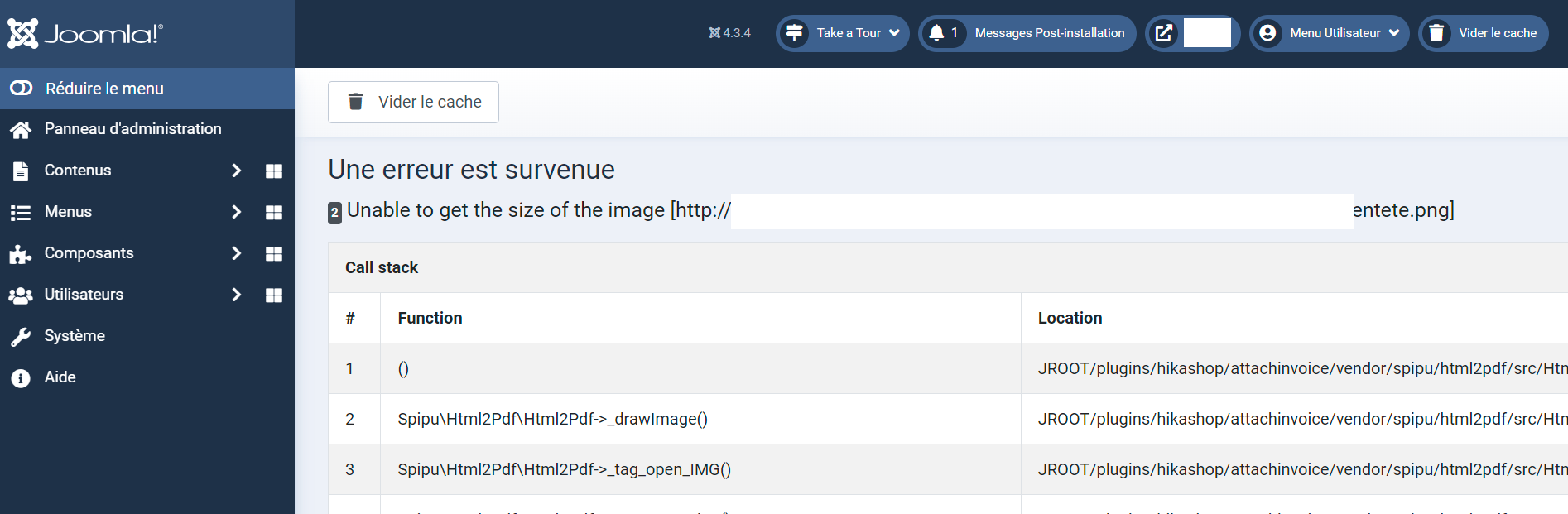 In the HikaShop configuration I put a relative URL to access the image images/.../xxx.png. So in the end the call to this image was made over HTTPS.
I modified this parameter to call the image in HTTP by indicating the absolute URL to the image and I got the same error message: Unable to get the size of the image.
Call stack
# Function Location
1 () JROOT/plugins/hikashop/attachinvoice/vendor/spipu/html2pdf/src/Html2Pdf.php:1526
2 Spipu\Html2Pdf\Html2Pdf->_drawImage() JROOT/plugins/hikashop/attachinvoice/vendor/spipu/html2pdf/src/Html2Pdf.php:5782
3 Spipu\Html2Pdf\Html2Pdf->_tag_open_IMG() JROOT/plugins/hikashop/attachinvoice/vendor/spipu/html2pdf/src/Html2Pdf.php:1444
4 Spipu\Html2Pdf\Html2Pdf->_executeAction() JROOT/plugins/hikashop/attachinvoice/vendor/spipu/html2pdf/src/Html2Pdf.php:1412
5 Spipu\Html2Pdf\Html2Pdf->_makeHTMLcode() JROOT/plugins/hikashop/attachinvoice/vendor/spipu/html2pdf/src/Html2Pdf.php:3136
6 Spipu\Html2Pdf\Html2Pdf->_tag_open_DIV() JROOT/plugins/hikashop/attachinvoice/vendor/spipu/html2pdf/src/Html2Pdf.php:1444
7 Spipu\Html2Pdf\Html2Pdf->_executeAction() JROOT/plugins/hikashop/attachinvoice/vendor/spipu/html2pdf/src/Html2Pdf.php:1412
8 Spipu\Html2Pdf\Html2Pdf->_makeHTMLcode() JROOT/plugins/hikashop/attachinvoice/vendor/spipu/html2pdf/src/Html2Pdf.php:600
9 Spipu\Html2Pdf\Html2Pdf->writeHTML() JROOT/plugins/hikashop/attachinvoice/attachinvoice.php:502
10 plgHikashopAttachinvoice->_Html2Pdf() JROOT/plugins/hikashop/attachinvoice/attachinvoice.php:112
11 plgHikashopAttachinvoice->_getPDFInvoice() JROOT/plugins/hikashop/attachinvoice/attachinvoice.php:229
12 plgHikashopAttachinvoice->onHikashopBeforeDisplayView() JROOT/libraries/src/Plugin/CMSPlugin.php:284
13 Joomla\CMS\Plugin\CMSPlugin->Joomla\CMS\Plugin\{closure}() JROOT/libraries/vendor/joomla/event/src/Dispatcher.php:486
14 Joomla\Event\Dispatcher->dispatch() JROOT/libraries/src/Application/EventAware.php:111
15 Joomla\CMS\Application\WebApplication->triggerEvent() JROOT/administrator/components/com_hikashop/helpers/helper.php:2805
16 hikashopView->display() JROOT/administrator/components/com_hikashop/views/order/view.html.php:30
17 OrderViewOrder->display() JROOT/libraries/src/MVC/Controller/BaseController.php:645
18 Joomla\CMS\MVC\Controller\BaseController->display() JROOT/administrator/components/com_hikashop/helpers/helper.php:2557
19 hikashopController->display() JROOT/administrator/components/com_hikashop/controllers/order.php:305
20 OrderController->invoice() JROOT/libraries/src/MVC/Controller/BaseController.php:678
21 Joomla\CMS\MVC\Controller\BaseController->execute() JROOT/administrator/components/com_hikashop/helpers/helper.php:2535
22 hikashopController->execute() JROOT/administrator/components/com_hikashop/hikashop.php:73
23 require_once() JROOT/libraries/src/Dispatcher/LegacyComponentDispatcher.php:71
24 Joomla\CMS\Dispatcher\LegacyComponentDispatcher::Joomla\CMS\Dispatcher\{closure}() JROOT/libraries/src/Dispatcher/LegacyComponentDispatcher.php:73
25 Joomla\CMS\Dispatcher\LegacyComponentDispatcher->dispatch() JROOT/libraries/src/Component/ComponentHelper.php:361
26 Joomla\CMS\Component\ComponentHelper::renderComponent() JROOT/libraries/src/Application/AdministratorApplication.php:143
27 Joomla\CMS\Application\AdministratorApplication->dispatch() JROOT/libraries/src/Application/AdministratorApplication.php:186
28 Joomla\CMS\Application\AdministratorApplication->doExecute() JROOT/libraries/src/Application/CMSApplication.php:293
29 Joomla\CMS\Application\CMSApplication->execute() JROOT/administrator/includes/app.php:61
30 require_once() JROOT/administrator/index.php:32
Replied by easyconnect83 on topic Unable to get the size of the image (Plugin attachinvoice)
I modified this parameter to call the image in HTTP by indicating the absolute URL to the image and I got the same error message: Unable to get the size of the image.
Call stack
# Function Location
1 () JROOT/plugins/hikashop/attachinvoice/vendor/spipu/html2pdf/src/Html2Pdf.php:1526
2 Spipu\Html2Pdf\Html2Pdf->_drawImage() JROOT/plugins/hikashop/attachinvoice/vendor/spipu/html2pdf/src/Html2Pdf.php:5782
3 Spipu\Html2Pdf\Html2Pdf->_tag_open_IMG() JROOT/plugins/hikashop/attachinvoice/vendor/spipu/html2pdf/src/Html2Pdf.php:1444
4 Spipu\Html2Pdf\Html2Pdf->_executeAction() JROOT/plugins/hikashop/attachinvoice/vendor/spipu/html2pdf/src/Html2Pdf.php:1412
5 Spipu\Html2Pdf\Html2Pdf->_makeHTMLcode() JROOT/plugins/hikashop/attachinvoice/vendor/spipu/html2pdf/src/Html2Pdf.php:3136
6 Spipu\Html2Pdf\Html2Pdf->_tag_open_DIV() JROOT/plugins/hikashop/attachinvoice/vendor/spipu/html2pdf/src/Html2Pdf.php:1444
7 Spipu\Html2Pdf\Html2Pdf->_executeAction() JROOT/plugins/hikashop/attachinvoice/vendor/spipu/html2pdf/src/Html2Pdf.php:1412
8 Spipu\Html2Pdf\Html2Pdf->_makeHTMLcode() JROOT/plugins/hikashop/attachinvoice/vendor/spipu/html2pdf/src/Html2Pdf.php:600
9 Spipu\Html2Pdf\Html2Pdf->writeHTML() JROOT/plugins/hikashop/attachinvoice/attachinvoice.php:502
10 plgHikashopAttachinvoice->_Html2Pdf() JROOT/plugins/hikashop/attachinvoice/attachinvoice.php:112
11 plgHikashopAttachinvoice->_getPDFInvoice() JROOT/plugins/hikashop/attachinvoice/attachinvoice.php:229
12 plgHikashopAttachinvoice->onHikashopBeforeDisplayView() JROOT/libraries/src/Plugin/CMSPlugin.php:284
13 Joomla\CMS\Plugin\CMSPlugin->Joomla\CMS\Plugin\{closure}() JROOT/libraries/vendor/joomla/event/src/Dispatcher.php:486
14 Joomla\Event\Dispatcher->dispatch() JROOT/libraries/src/Application/EventAware.php:111
15 Joomla\CMS\Application\WebApplication->triggerEvent() JROOT/administrator/components/com_hikashop/helpers/helper.php:2805
16 hikashopView->display() JROOT/administrator/components/com_hikashop/views/order/view.html.php:30
17 OrderViewOrder->display() JROOT/libraries/src/MVC/Controller/BaseController.php:645
18 Joomla\CMS\MVC\Controller\BaseController->display() JROOT/administrator/components/com_hikashop/helpers/helper.php:2557
19 hikashopController->display() JROOT/administrator/components/com_hikashop/controllers/order.php:305
20 OrderController->invoice() JROOT/libraries/src/MVC/Controller/BaseController.php:678
21 Joomla\CMS\MVC\Controller\BaseController->execute() JROOT/administrator/components/com_hikashop/helpers/helper.php:2535
22 hikashopController->execute() JROOT/administrator/components/com_hikashop/hikashop.php:73
23 require_once() JROOT/libraries/src/Dispatcher/LegacyComponentDispatcher.php:71
24 Joomla\CMS\Dispatcher\LegacyComponentDispatcher::Joomla\CMS\Dispatcher\{closure}() JROOT/libraries/src/Dispatcher/LegacyComponentDispatcher.php:73
25 Joomla\CMS\Dispatcher\LegacyComponentDispatcher->dispatch() JROOT/libraries/src/Component/ComponentHelper.php:361
26 Joomla\CMS\Component\ComponentHelper::renderComponent() JROOT/libraries/src/Application/AdministratorApplication.php:143
27 Joomla\CMS\Application\AdministratorApplication->dispatch() JROOT/libraries/src/Application/AdministratorApplication.php:186
28 Joomla\CMS\Application\AdministratorApplication->doExecute() JROOT/libraries/src/Application/CMSApplication.php:293
29 Joomla\CMS\Application\CMSApplication->execute() JROOT/administrator/includes/app.php:61
30 require_once() JROOT/administrator/index.php:32
Last edit: 3 years 1 week ago by easyconnect83.
Please Log in or Create an account to join the conversation.
3 years 1 week ago #356141
by nicolas
Replied by nicolas on topic Unable to get the size of the image (Plugin attachinvoice)
Hi,
The code change above is only for images with a HTTPS URL. Are you able to use HTTPS on your website ?
Otherwise, you can modify the code:
to:
That should allow the rest of the code to support http URLs for your images in the invoice.
The code change above is only for images with a HTTPS URL. Are you able to use HTTPS on your website ?
Otherwise, you can modify the code:
Code:
stream_wrapper_unregister('https');
// Register the custom handler
stream_wrapper_register('https', "HttpsInsecureStream", STREAM_IS_URL);
Code:
stream_wrapper_unregister('http');
// Register the custom handler
stream_wrapper_register('http', "HttpInsecureStream", STREAM_IS_URL);
Please Log in or Create an account to join the conversation.
Less
More
- Posts: 140
- Thank you received: 21
3 years 1 week ago - 3 years 1 week ago #356151
by easyconnect83
Replied by easyconnect83 on topic Unable to get the size of the image (Plugin attachinvoice)
Hi i replace the code with this :
but i have this error stream_wrapper_register(): Argument #2 ($class) must be a valid class name, HttpInsecureStream given
the class mentioned in the second argument is not recognized
The website is configured in HTTPS whether on the front or back office side.
Code:
stream_wrapper_unregister('http');
// Register the custom handler
stream_wrapper_register('http', "HttpInsecureStream", STREAM_IS_URL);
but i have this error stream_wrapper_register(): Argument #2 ($class) must be a valid class name, HttpInsecureStream given
the class mentioned in the second argument is not recognized
The website is configured in HTTPS whether on the front or back office side.
Last edit: 3 years 1 week ago by easyconnect83.
Please Log in or Create an account to join the conversation.
3 years 1 week ago #356153
by nicolas
Replied by nicolas on topic Unable to get the size of the image (Plugin attachinvoice)
Hi,
Then keep the code as provided before and change the URL of your image to use https instead of http. It will be simpler.
Then keep the code as provided before and change the URL of your image to use https instead of http. It will be simpler.
Please Log in or Create an account to join the conversation.
Less
More
- Posts: 140
- Thank you received: 21
3 years 1 week ago #356189
by easyconnect83
Replied by easyconnect83 on topic Unable to get the size of the image (Plugin attachinvoice)
Hello,
I tried by putting your code in the header of the invoice.php file and I still get the error Unable to get the size of the image.
OR
If I put the image URL in HTTP or HTTPS format it's the same error.
If I use the second code I get the following message: error stream_wrapper_register(): Argument #2 ($class) must be a valid class name, HttpInsecureStream given
as indicated previously.
Thanks
I tried by putting your code in the header of the invoice.php file and I still get the error Unable to get the size of the image.
Code:
stream_wrapper_unregister('https');
// Register the custom handler
stream_wrapper_register('https', "HttpsInsecureStream", STREAM_IS_URL);
Code:
stream_wrapper_unregister('http');
// Register the custom handler
stream_wrapper_register('http', "HttpInsecureStream", STREAM_IS_URL);
If I put the image URL in HTTP or HTTPS format it's the same error.
If I use the second code I get the following message: error stream_wrapper_register(): Argument #2 ($class) must be a valid class name, HttpInsecureStream given
as indicated previously.
Thanks
Please Log in or Create an account to join the conversation.
3 years 1 week ago #356214
by nicolas
Replied by nicolas on topic Unable to get the size of the image (Plugin attachinvoice)
Hi,
Well, I'm afraid I don't have a solution for you.
The plugin basically says that it can't read the image file.
And the only potential solution I could find in order to circumvent that limitation of your hosting is this code, which you says doesn't for you.
Of course, you could add the line:
$html2pdf->setTestIsImage(false);
before the line:
$html2pdf->writeHTML($content);
in the file plugins/hikashop/attachinvoice/attachinvoice.php so that the plugin wouldn't generate an error when it can't read an image file. But it won't help you achieve your goal to add an image to the PDF.
In the end, that's something your hosting support should be able to help you with.
Well, I'm afraid I don't have a solution for you.
The plugin basically says that it can't read the image file.
And the only potential solution I could find in order to circumvent that limitation of your hosting is this code, which you says doesn't for you.
Of course, you could add the line:
$html2pdf->setTestIsImage(false);
before the line:
$html2pdf->writeHTML($content);
in the file plugins/hikashop/attachinvoice/attachinvoice.php so that the plugin wouldn't generate an error when it can't read an image file. But it won't help you achieve your goal to add an image to the PDF.
In the end, that's something your hosting support should be able to help you with.
Please Log in or Create an account to join the conversation.
Less
More
- Posts: 140
- Thank you received: 21
2 years 11 months ago #356424
by easyconnect83
Replied by easyconnect83 on topic Unable to get the size of the image (Plugin attachinvoice)
Hello, by mentioning the address in HTTP it works intermittently.
Let me explain :
I manage to generate 4/5 invoices or delivery notes and at some point the error returns and is triggered for all other requests.
Here is the response from the Infomaniak network administrator:
This is completely normal, because the PHP_PDF extension is not available on Debian 11 "Bullseye".
You will not be able to use your PDF generation.
The server underwent a migration and we were on another Linux distribution.
If the PHP_PDF extension is not present on the server, how come it works randomly?
Thanks
Let me explain :
I manage to generate 4/5 invoices or delivery notes and at some point the error returns and is triggered for all other requests.
Here is the response from the Infomaniak network administrator:
This is completely normal, because the PHP_PDF extension is not available on Debian 11 "Bullseye".
You will not be able to use your PDF generation.
The server underwent a migration and we were on another Linux distribution.
If the PHP_PDF extension is not present on the server, how come it works randomly?
Thanks
Please Log in or Create an account to join the conversation.
2 years 11 months ago #356426
by nicolas
Replied by nicolas on topic Unable to get the size of the image (Plugin attachinvoice)
Hi,
That's strange.
The HTML2PDF library ( www.html2pdf.fr/ ) we use in the plugin uses the TCPDF library to generate the PDF. I'm not sure, but I don't think it requires PHP_PDF.
If you check the page tcpdf.org/ it says
Also, if you check the web for the error, you'll find many pages like this one:
stackoverflow.com/questions/27060947/tcp...he-size-of-the-image
And they all point to a limitation of cURL or file_get_contents, which are included in PHP by default, but can be limited by firewalls, or restrictions put in place by the hosting (like forbidding the use of file_get_contents, having the allow_url_fopen parameter turned off in the php.ini , etc).
So I think your hosting provider support didn't understand the situation correctly.
That's strange.
The HTML2PDF library ( www.html2pdf.fr/ ) we use in the plugin uses the TCPDF library to generate the PDF. I'm not sure, but I don't think it requires PHP_PDF.
If you check the page tcpdf.org/ it says
no external libraries are required for the basic functions;
Also, if you check the web for the error, you'll find many pages like this one:
stackoverflow.com/questions/27060947/tcp...he-size-of-the-image
And they all point to a limitation of cURL or file_get_contents, which are included in PHP by default, but can be limited by firewalls, or restrictions put in place by the hosting (like forbidding the use of file_get_contents, having the allow_url_fopen parameter turned off in the php.ini , etc).
So I think your hosting provider support didn't understand the situation correctly.
Please Log in or Create an account to join the conversation.
2 years 2 weeks ago #364032
by Bprak
Replied by Bprak on topic Unable to get the size of the image (Plugin attachinvoice)
I had the same problem. I found reason. In Hikashop -> system -> configuration -> your logos url -> url was wrong. Now it is ok.
The following user(s) said Thank You: nicolas
Please Log in or Create an account to join the conversation.
Time to create page: 0.159 seconds