

- Posts: 2
- Thank you received: 0
Tracking ID
2 years 10 months ago #357320
by flocke
Tracking ID was created by flocke
-- url of the page with the problem -- : aroma-algarve.com
-- HikaShop version -- : 5.0.2
-- Joomla version -- : 4.4
-- PHP version -- : 8.1
-- Browser(s) name and version -- : Chrome
Hello,
I am using the Hika manual shipping plugin, which works fine for me.
I have only a few orders a week, therefore I go by myself to the post office and send the orders - really old fashione, I know.
But I get a tracking ID, which I would like to send to the customer within
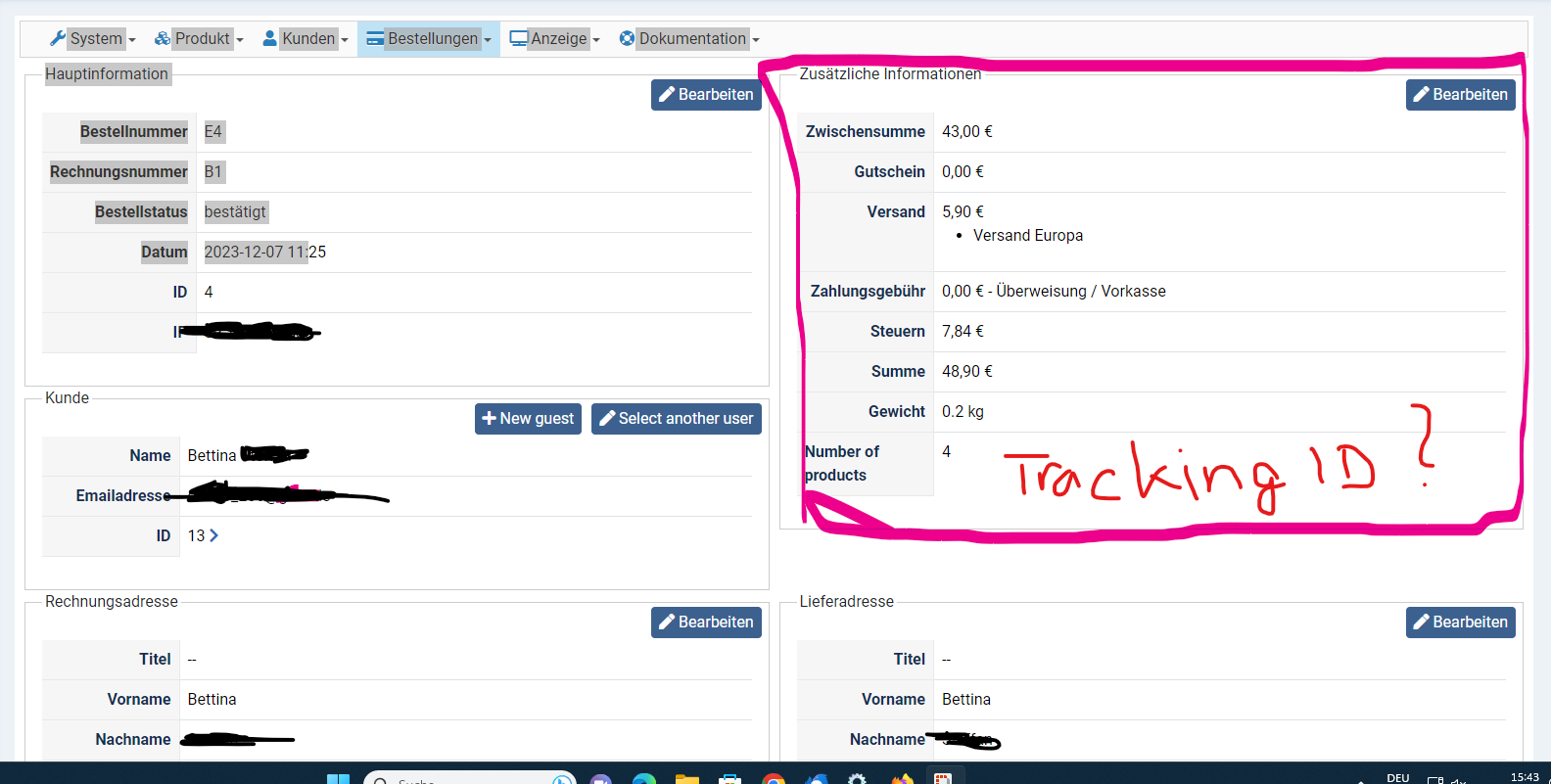 the shipping email.
I need an idea where I can create and put a custom field which I can use for this case. For example, in the backend where I can open the order, there is an area with additional information (total amount, shipping, taxes, weight...) this would be ideal for editing the tracking ID.
It would be also nice if the customer can see the tracking ID in his order overview.
Kind regards,
Bettina
-- HikaShop version -- : 5.0.2
-- Joomla version -- : 4.4
-- PHP version -- : 8.1
-- Browser(s) name and version -- : Chrome
Hello,
I am using the Hika manual shipping plugin, which works fine for me.
I have only a few orders a week, therefore I go by myself to the post office and send the orders - really old fashione, I know.
But I get a tracking ID, which I would like to send to the customer within
I need an idea where I can create and put a custom field which I can use for this case. For example, in the backend where I can open the order, there is an area with additional information (total amount, shipping, taxes, weight...) this would be ideal for editing the tracking ID.
It would be also nice if the customer can see the tracking ID in his order overview.
Kind regards,
Bettina
Please Log in or Create an account to join the conversation.
2 years 10 months ago #357325
by flocke
Replied by flocke on topic Tracking ID
Hello,
I just figured out it would be possible with the business edition? I only have the essential edition installed. Could anyone confirm this, please?
Kind regards,
Bettina
I just figured out it would be possible with the business edition? I only have the essential edition installed. Could anyone confirm this, please?
Kind regards,
Bettina
Please Log in or Create an account to join the conversation.

2 years 10 months ago - 2 years 10 months ago #357323
by nicolas
Replied by nicolas on topic Tracking ID
Hi,
There is indeed such capability with the Business edition.
With it, you can create a custom field of the table "order" and of the type "text" via the menu Display>Custom fields.
Once you save it once, you'll have many display settings available for it. So you can have it in the order details page in the backend, edit it there, have it in the email notifications and in the invoice and the order overview of the customer, etc.
There is indeed such capability with the Business edition.
With it, you can create a custom field of the table "order" and of the type "text" via the menu Display>Custom fields.
Once you save it once, you'll have many display settings available for it. So you can have it in the order details page in the backend, edit it there, have it in the email notifications and in the invoice and the order overview of the customer, etc.
Last edit: 2 years 10 months ago by nicolas.
Please Log in or Create an account to join the conversation.

2 years 10 months ago #357559
by natselection
Replied by natselection on topic Tracking ID
With the business edition, after setting the custom field up, where can I edit the email notification (where the custom field value is inserted). For example I want to make it linked to USPS.
Please Log in or Create an account to join the conversation.
2 years 10 months ago #357565
by nicolas
Replied by nicolas on topic Tracking ID
Hi,
Edit the settings of the custom field via the menu Display>Custom fields.
There, you have a setting "format".
In there you can enter:
You can also find there display options for the emails.
That way, you can have it done all automated.
Now, if you want to edit the emails, you can do so in the menu System>Emails of HikaShop.
Edit the settings of the custom field via the menu Display>Custom fields.
There, you have a setting "format".
In there you can enter:
Code:
<a href="https://tools.usps.com/go/TrackConfirmAction_input?strOrigTrackNum={value}">{value}</a>
That way, you can have it done all automated.
Now, if you want to edit the emails, you can do so in the menu System>Emails of HikaShop.
The following user(s) said Thank You: natselection
Please Log in or Create an account to join the conversation.
Time to create page: 0.057 seconds