

- Posts: 30
- Thank you received: 1
Suggest for Price Per Unit
2 years 3 months ago #361924
by foo0z0ool
Suggest for Price Per Unit was created by foo0z0ool
hi
i have some suggest for make hikashop better
i see many people ask this
i have A product
i want show price in A and Sell Product as minimum Box or Cartons or so
atm people just can choice minimum or maximum per unit for sell
for example : i can choice sell product A as minimum 10
but this make some problem if this product in Box 10 and customer choice 11 i have problem because i can sell 11, i must sell 10 20 30 40 or...
so you can add fields
Minimum sell Product per Box
Minimum sell Product per carton
or etc
and me set minimum sell = Box ( sell unil per box 10 )
or set minimum sell = Cartons ( sell unil per Catons 50 )
so customer can just choice 1 box 2 box or... or 1 cartons 2 cartons
so we need 1 setting like this in product page
Check Box : Sell Type ( if i active this check box sell per unit disable and group sell active )
add Field : ( so i can add something like this )
Box - 10
Carton - 50
Bag - 40
or...
from now in front end product page customer can just choice ( box, carton, bag )
and price = box * price ( my product 1$ per unit * 10 in box = 10$ )
at the end you are developer and i know you can better handle this
thanks for make best of the best component
i have some suggest for make hikashop better
i see many people ask this
i have A product
i want show price in A and Sell Product as minimum Box or Cartons or so
atm people just can choice minimum or maximum per unit for sell
for example : i can choice sell product A as minimum 10
but this make some problem if this product in Box 10 and customer choice 11 i have problem because i can sell 11, i must sell 10 20 30 40 or...
so you can add fields
Minimum sell Product per Box
Minimum sell Product per carton
or etc
and me set minimum sell = Box ( sell unil per box 10 )
or set minimum sell = Cartons ( sell unil per Catons 50 )
so customer can just choice 1 box 2 box or... or 1 cartons 2 cartons
so we need 1 setting like this in product page
Check Box : Sell Type ( if i active this check box sell per unit disable and group sell active )
add Field : ( so i can add something like this )
Box - 10
Carton - 50
Bag - 40
or...
from now in front end product page customer can just choice ( box, carton, bag )
and price = box * price ( my product 1$ per unit * 10 in box = 10$ )
at the end you are developer and i know you can better handle this
thanks for make best of the best component
Please Log in or Create an account to join the conversation.

2 years 3 months ago - 2 years 3 months ago #361931
by Philip
Replied by Philip on topic Suggest for Price Per Unit
Hello,
You can already via some settings directly in your relative product backend page.
Follow me screenshot configuration in order to have a special quantity selector :

Regards
You can already via some settings directly in your relative product backend page.
Follow me screenshot configuration in order to have a special quantity selector :
Regards
Last edit: 2 years 3 months ago by Philip.
The following user(s) said Thank You: foo0z0ool
Please Log in or Create an account to join the conversation.
2 years 1 month ago #363282
by foo0z0ool
Replied by foo0z0ool on topic Suggest for Price Per Unit
you right about it but problem is here
i cant sell 1 box + 1
mean customer must not buy 11, must buy 10-20-30-40 from box
and my mean from this suggest is this
sell option ( box = 10 , bag = 50, Carton = 100)
customer can just choice 1 bag, 3 box and 1 carton
this mean customer buying : 100 + 30 + 50 = 180
so i choice quantity per order 10 for unlimited
then : customer come and choice 11 this is allow... this is wronge...
i cant sell 1 box + 1
mean customer must not buy 11, must buy 10-20-30-40 from box
and my mean from this suggest is this
sell option ( box = 10 , bag = 50, Carton = 100)
customer can just choice 1 bag, 3 box and 1 carton
this mean customer buying : 100 + 30 + 50 = 180
so i choice quantity per order 10 for unlimited
then : customer come and choice 11 this is allow... this is wronge...
Please Log in or Create an account to join the conversation.

2 years 1 month ago #363288
by nicolas
Replied by nicolas on topic Suggest for Price Per Unit
Hi,
No. If you set the "quantity input" to "show select" in your product, as Philip mentioned in his message, then the quantity input field will change from an input field to a dropdown select and the values in the select will be based on what you have configured in the minimum per order field.
So, if you set "quantity input" to "show select" and a minimum quantity of 10, the customer will only be able to choose 10, 20, 30, 40, 50, etc.
No. If you set the "quantity input" to "show select" in your product, as Philip mentioned in his message, then the quantity input field will change from an input field to a dropdown select and the values in the select will be based on what you have configured in the minimum per order field.
So, if you set "quantity input" to "show select" and a minimum quantity of 10, the customer will only be able to choose 10, 20, 30, 40, 50, etc.
Please Log in or Create an account to join the conversation.
2 years 3 weeks ago #363367
by foo0z0ool
Replied by foo0z0ool on topic Suggest for Price Per Unit
yes you right and i know this
but this is give me just 1 choice for sell
Product XXX
Sell Restrict 100 for unlimited
Show Select
i Can sell product XXX just for 100, 200, 300, 400
if i want sell 100 ( 1 carton ) + 30 ( 3 box ) then ? i cant because i have not option for it
but if i can make Box = 10 , Cartoon = 100 , Bag = 25 , or etc
Customer can choice 1 box + 2 carton + 1 bag = 10+200+25
just think i can some industrial : i make Ampoule
i can sell Ampoule 1 by 1
other company ask me :
X company i want 100 carton
Y company i want 1 Pallet ( 250 carton )
Z company i want 50 cartoon + 30 bag
W Company i want 50 Box...
Ampoule = 1$
Front End Show
Type of sale ( Some Menu added to Hikashop Product Page )
Cartoon
Quantity
Bag
Quantity
Pallet
Quantity
Price XXXX$
Back End
New
Cartoon = 1200 Ampoule
Bag = 25 Ampoule
Box = 300 Ampoule
sorry my english not good but i Hope i can tell it better
i try make some graphic example
and attack here
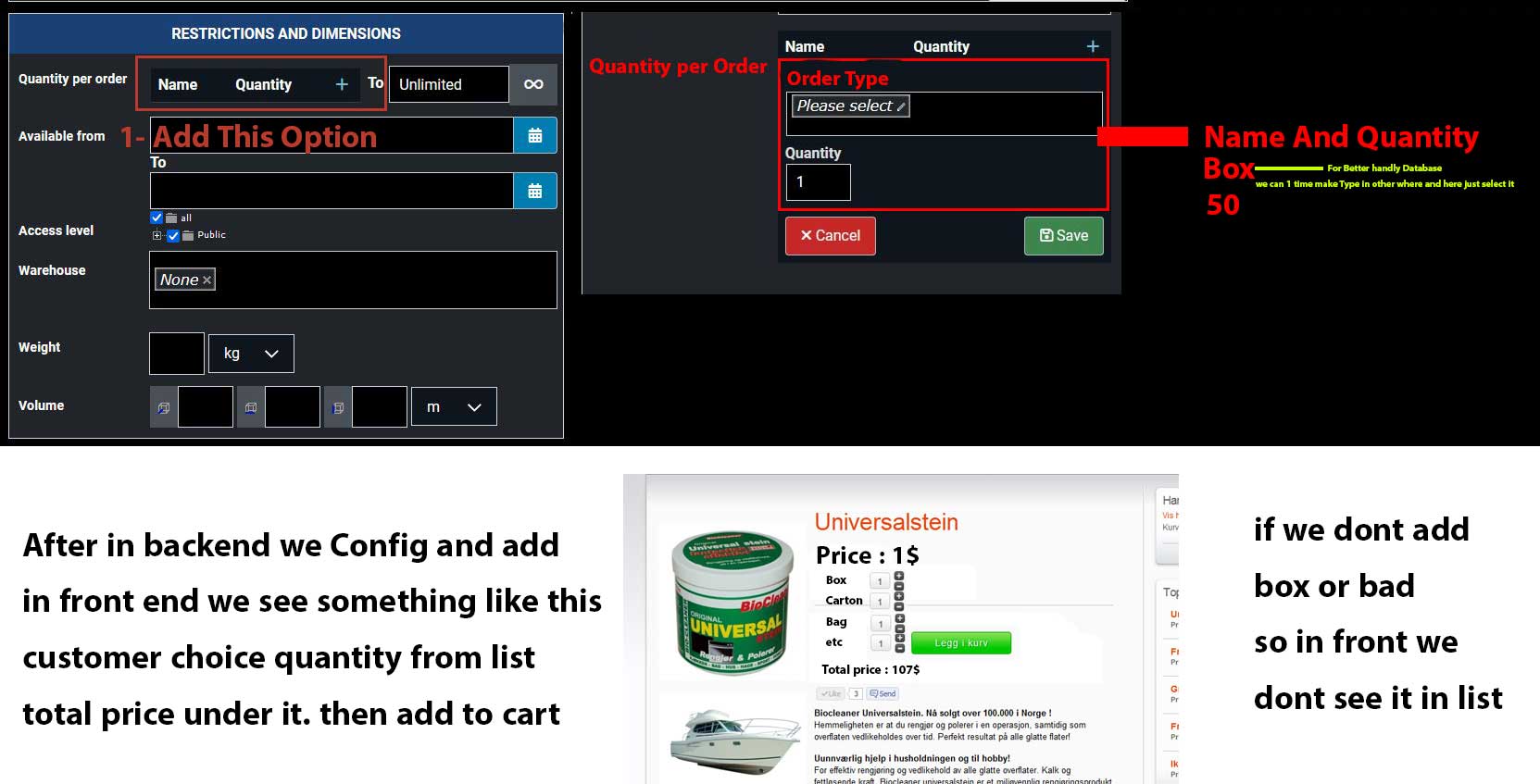
but this is give me just 1 choice for sell
Product XXX
Sell Restrict 100 for unlimited
Show Select
i Can sell product XXX just for 100, 200, 300, 400
if i want sell 100 ( 1 carton ) + 30 ( 3 box ) then ? i cant because i have not option for it
but if i can make Box = 10 , Cartoon = 100 , Bag = 25 , or etc
Customer can choice 1 box + 2 carton + 1 bag = 10+200+25
just think i can some industrial : i make Ampoule
i can sell Ampoule 1 by 1
other company ask me :
X company i want 100 carton
Y company i want 1 Pallet ( 250 carton )
Z company i want 50 cartoon + 30 bag
W Company i want 50 Box...
Ampoule = 1$
Front End Show
Type of sale ( Some Menu added to Hikashop Product Page )
Cartoon
Quantity
Bag
Quantity
Pallet
Quantity
Price XXXX$
Back End
New
Cartoon = 1200 Ampoule
Bag = 25 Ampoule
Box = 300 Ampoule
sorry my english not good but i Hope i can tell it better
i try make some graphic example
and attack here
Please Log in or Create an account to join the conversation.
2 years 3 weeks ago #363372
by nicolas
Replied by nicolas on topic Suggest for Price Per Unit
Hi,
In that case, you want to create a characteristic "type" with the values "box", "carton", "bag", etc. Add that characteristic in your product, and add the variants.
On the frontend, by default, you'll get a dropdown where the customer can choose the type and the quantity of the selected type, and click on add to cart. And if he wants to purchase 2 boxes and 3 cartons, he can:
- select the "box" type
- enter the quantity of 2
- click on add to cart
- select the "carton" type
- enter the quantity of 3
- click on add to cart
And if you want to have different rows, one per type, each one with its own quantity input field and an global add to cart button, like on your screenshot, that's also possible:
Set the "Characteristics selection method" setting to "list" and the "Add to cart on listings" setting to "global" in the HikaShop configuration.
In that case, you want to create a characteristic "type" with the values "box", "carton", "bag", etc. Add that characteristic in your product, and add the variants.
On the frontend, by default, you'll get a dropdown where the customer can choose the type and the quantity of the selected type, and click on add to cart. And if he wants to purchase 2 boxes and 3 cartons, he can:
- select the "box" type
- enter the quantity of 2
- click on add to cart
- select the "carton" type
- enter the quantity of 3
- click on add to cart
And if you want to have different rows, one per type, each one with its own quantity input field and an global add to cart button, like on your screenshot, that's also possible:
Set the "Characteristics selection method" setting to "list" and the "Add to cart on listings" setting to "global" in the HikaShop configuration.
Please Log in or Create an account to join the conversation.
2 years 3 weeks ago #363381
by foo0z0ool
Replied by foo0z0ool on topic Suggest for Price Per Unit
no thats not characteristic ( because if i choice characteristic for all my product i must set price per characteristic and characteristic can understand my max quantity !
10 box = 1200 for example ( but my max quantity is 1000 ) ...
this Type of Order must something relation with Quantity and Price
if some my product go high from 1$ to 1.1$ ( so i must manualy change all of my characteristic price in all products... ) and this is not update automatic.
but with my way i told u, if i import new price and quantity to shop... nothing change for example 1 carton = 1 * 1000 * price (- quantity )
bro im programmer if you want i cant think about code and write it for you.
just tell me ( where is
restriction and dimensions - quantity per order code
so i change it and send it to you )
10 box = 1200 for example ( but my max quantity is 1000 ) ...
this Type of Order must something relation with Quantity and Price
if some my product go high from 1$ to 1.1$ ( so i must manualy change all of my characteristic price in all products... ) and this is not update automatic.
but with my way i told u, if i import new price and quantity to shop... nothing change for example 1 carton = 1 * 1000 * price (- quantity )
bro im programmer if you want i cant think about code and write it for you.
just tell me ( where is
restriction and dimensions - quantity per order code
so i change it and send it to you )
Please Log in or Create an account to join the conversation.
2 years 3 weeks ago - 2 years 3 weeks ago #363385
by nicolas
Replied by nicolas on topic Suggest for Price Per Unit
Hi,
No, you do need to set the price in each variant with what I propose. In each variant, you have the setting "main product price percentage" which allows you to provide a percentage so that the system will automatically calculate the price of the variant based on the price set in the main product.
So updating the price would be as easy as if you had no variants since you would only have to update the main product price and all the variants would then get their price calculated off of the new price.
A similar solution could be implemented to handle the stock by having the stock only on the main product and a multiplier in each variant which would be taken into account by the system where needed.
I think this would be much simpler than modifying everything to add a new interface to configure types and the corresponding quantity and then adapt the interfaces on the frontend to be able to take this into account.
With what you want to do, I can see many problems you'll have to deal with on the frontend to adapt it to your solution.
For example, you want to have several quantity input fields on the product details page. However, there is no mechanism in the add to cart system to take this into account. Where should that information be stored in the cart or cart_product tables of the database ? And then, when the cart is loaded, this need to be taken into account. What if someone add the product with different quantities and different types in the cart ? This needs to be taken into account.
And on the checkout, what happens with the quantity input field ?
And how this is transferred to the order ? To the shipping plugins ? To the payment plugins ?
Now, if you want to try, I won't stop you. If you want to know which view file is used for which area of HikaShop, you can use the "Display view files" setting of the HikaShop configuration. Then, you can edit the view files via the menu Display>Views :
www.hikashop.com/support/documentation/1...-display.html#layout
No, you do need to set the price in each variant with what I propose. In each variant, you have the setting "main product price percentage" which allows you to provide a percentage so that the system will automatically calculate the price of the variant based on the price set in the main product.
So updating the price would be as easy as if you had no variants since you would only have to update the main product price and all the variants would then get their price calculated off of the new price.
A similar solution could be implemented to handle the stock by having the stock only on the main product and a multiplier in each variant which would be taken into account by the system where needed.
I think this would be much simpler than modifying everything to add a new interface to configure types and the corresponding quantity and then adapt the interfaces on the frontend to be able to take this into account.
With what you want to do, I can see many problems you'll have to deal with on the frontend to adapt it to your solution.
For example, you want to have several quantity input fields on the product details page. However, there is no mechanism in the add to cart system to take this into account. Where should that information be stored in the cart or cart_product tables of the database ? And then, when the cart is loaded, this need to be taken into account. What if someone add the product with different quantities and different types in the cart ? This needs to be taken into account.
And on the checkout, what happens with the quantity input field ?
And how this is transferred to the order ? To the shipping plugins ? To the payment plugins ?
Now, if you want to try, I won't stop you. If you want to know which view file is used for which area of HikaShop, you can use the "Display view files" setting of the HikaShop configuration. Then, you can edit the view files via the menu Display>Views :
www.hikashop.com/support/documentation/1...-display.html#layout
Last edit: 2 years 3 weeks ago by nicolas.
Please Log in or Create an account to join the conversation.
Time to create page: 0.139 seconds