
- Posts: 82
- Thank you received: 5
Sending invoice after payment
- designer71
-
 Topic Author
- Offline
Less
More
1 year 6 months ago #366944
by designer71
Sending invoice after payment was created by designer71
-- HikaShop version -- : 5.1.5
-- Joomla version -- : 5.3.0
-- PHP version -- : 8.1
-- Browser(s) name and version -- : Chrome
Hi.
Is this possible to sent invoice to client by mail after payment?
thank you.
-- Joomla version -- : 5.3.0
-- PHP version -- : 8.1
-- Browser(s) name and version -- : Chrome
Hi.
Is this possible to sent invoice to client by mail after payment?
thank you.
Please Log in or Create an account to join the conversation.

1 year 6 months ago #366945
by nicolas
Replied by nicolas on topic Sending invoice after payment
Hi,
Yes. The PDF invoice plugin was developed for that specific purpose:
www.hikashop.com/marketplace/product/18-plugin-pdf.html
Yes. The PDF invoice plugin was developed for that specific purpose:
www.hikashop.com/marketplace/product/18-plugin-pdf.html
Please Log in or Create an account to join the conversation.
- designer71
-
Topic Author
- Offline
Less
More
- Posts: 82
- Thank you received: 5
1 year 6 months ago #366966
by designer71
Replied by designer71 on topic Sending invoice after payment
Hi, Nicolas, thank you.
Small question: every invoice will it be sent to the buyer automatically or should I send it myself ?
Small question: every invoice will it be sent to the buyer automatically or should I send it myself ?
Please Log in or Create an account to join the conversation.
1 year 6 months ago #366969
by nicolas
Replied by nicolas on topic Sending invoice after payment
Hi,
This plugin will automatically generate the PDF of the invoice and include it in the "order status notification" email which is automatically sent by HikaShop.
So you won't have to do it manually.
This plugin will automatically generate the PDF of the invoice and include it in the "order status notification" email which is automatically sent by HikaShop.
So you won't have to do it manually.
Please Log in or Create an account to join the conversation.
- designer71
-
Topic Author
- Offline
Less
More
- Posts: 82
- Thank you received: 5
1 year 6 months ago #366970
by designer71
Replied by designer71 on topic Sending invoice after payment
thank you
Please Log in or Create an account to join the conversation.
- designer71
-
Topic Author
- Offline
Less
More
- Posts: 82
- Thank you received: 5
1 year 5 months ago #367315
by designer71
Replied by designer71 on topic Sending invoice after payment
Hi, Nicolas
I bought for your great attach PDF invoice plugin.
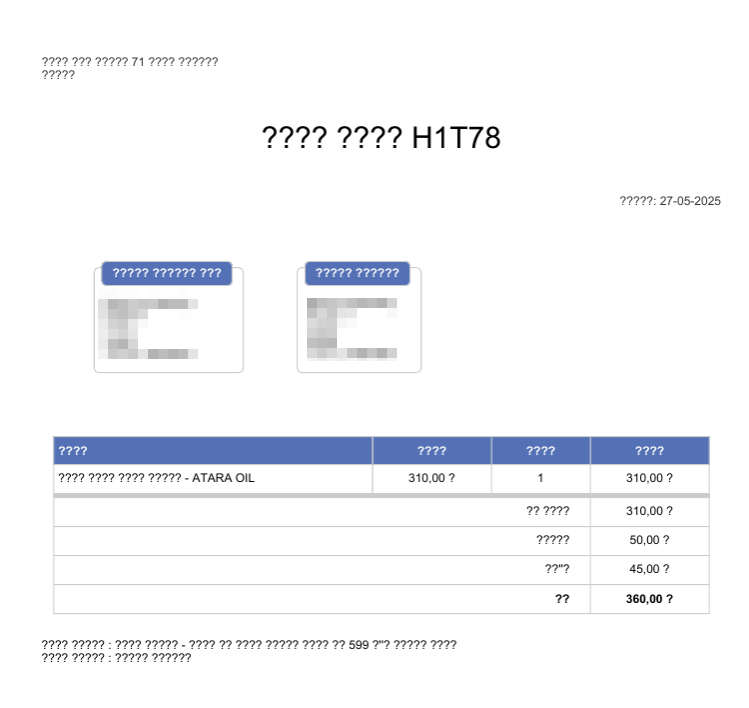
All is cool, I get invoices, but our site on hebrew language, and I get many???????????? in PDF.
I tried to change fonts - but it not help me.
Any solution please?
thank you.
I bought for your great attach PDF invoice plugin.
All is cool, I get invoices, but our site on hebrew language, and I get many???????????? in PDF.
I tried to change fonts - but it not help me.
Any solution please?
thank you.
Please Log in or Create an account to join the conversation.
1 year 5 months ago #367317
by nicolas
Replied by nicolas on topic Sending invoice after payment
Hi,
The freemono / freesans / freeserif fonts seletable in the font setting of the plugin should support hebrew from what I can read here:
github.com/tecnickcom/TCPDF/blob/main/fo...font-20100919/README
Did you try any of these ?
The freemono / freesans / freeserif fonts seletable in the font setting of the plugin should support hebrew from what I can read here:
github.com/tecnickcom/TCPDF/blob/main/fo...font-20100919/README
Did you try any of these ?
Please Log in or Create an account to join the conversation.
- designer71
-
Topic Author
- Offline
Less
More
- Posts: 82
- Thank you received: 5
1 year 5 months ago #367326
by designer71
Replied by designer71 on topic Sending invoice after payment
Thank you!
Now it work perfect.
Additional question: how I can change number of Invoice? Now it H1W80.
I need for example 0001
Thank you!
Now it work perfect.
Additional question: how I can change number of Invoice? Now it H1W80.
I need for example 0001
Thank you!
Please Log in or Create an account to join the conversation.
1 year 5 months ago #367327
by nicolas
Replied by nicolas on topic Sending invoice after payment
Hi,
You want to change the setting "order number format":
www.hikashop.com/support/documentation/5...nfig.html#main_order
For example:
{id size="5"}
You want to change the setting "order number format":
www.hikashop.com/support/documentation/5...nfig.html#main_order
For example:
{id size="5"}
Please Log in or Create an account to join the conversation.
- designer71
-
Topic Author
- Offline
Less
More
- Posts: 82
- Thank you received: 5
1 year 5 months ago - 1 year 5 months ago #367346
by designer71
Replied by designer71 on topic Sending invoice after payment
Hi, thank you.
Additional questions:
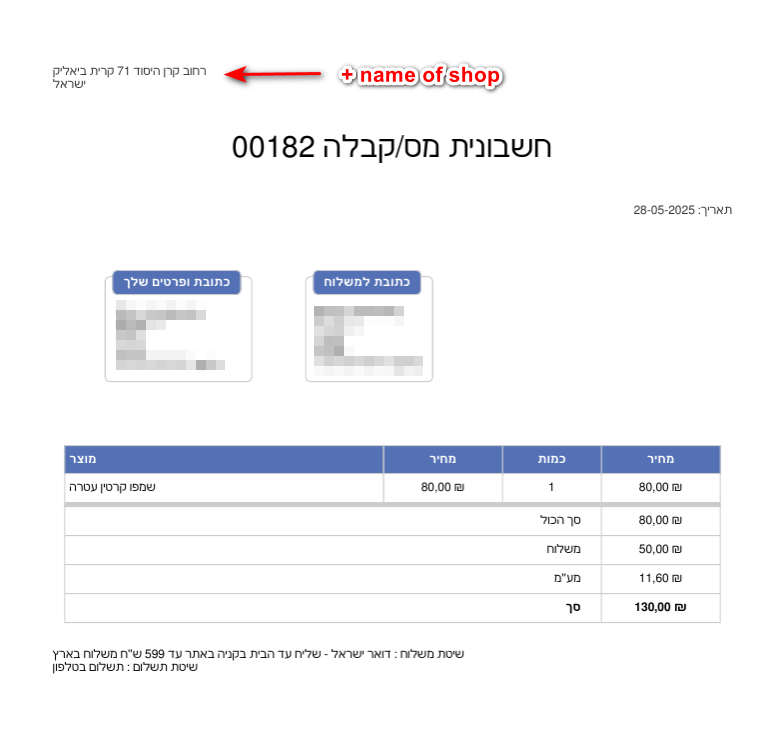
1. it must to be RTL (how to?)
2. I need to reset number of invoice (for example now is 182 - must to reset to 001)
3. need to add name of shop
thank you for your patience
Additional questions:
1. it must to be RTL (how to?)
2. I need to reset number of invoice (for example now is 182 - must to reset to 001)
3. need to add name of shop
thank you for your patience
Last edit: 1 year 5 months ago by designer71.
Please Log in or Create an account to join the conversation.

1 year 5 months ago #367356
by oxido
Replied by oxido on topic Sending invoice after payment
2. In Hikashop Configuration -> Main (tab) -> Order (section), you have this option: Invoice number reset frequency, set that for 1 day, create one order to reset it and after that change the setting back to None  .
But maybe nicolas it will give you a better solution then mine.
3. {id size="5"} - Shop Name , set it like this Hikashop Configuration -> Main (tab) -> Order (section)
.But maybe nicolas it will give you a better solution then mine.
3. {id size="5"} - Shop Name , set it like this Hikashop Configuration -> Main (tab) -> Order (section)
Please Log in or Create an account to join the conversation.
1 year 5 months ago - 1 year 5 months ago #367350
by nicolas
Replied by nicolas on topic Sending invoice after payment
Hi,
1. I'm not sure. Based on github.com/spipu/html2pdf/issues/93 it seems that the HTML2PDF library used by the plugin to generate the PDF file added support for RTL in 2016.
Edit the file plugins/hikashop/attachinvoice/attachinvoice.php via FTP and before the line:
add the code:
This should tell the library to handle the RTL when the language of the website requires it.
Please let me know how it goes.
2. You can run the MySQL query below via your PHPMyAdmin:
UPDATE #__hikashop_order SET order_invoice_id = 0;
where #__ needs to be replaced by your tables prefix (from the Joomla configuration).
Then, the next order with an invoice will start at 00001
@oxido if you set the reset frequency to every day, the next day, the invoice number will indeed start at 1 again. However, if you then switch back to no reset frequency, the system will take into account the max number on all orders again and will restart where it had left at 182. So I don't think that what you recommend will work.
3. I would recommend filling the "Your logo URL" setting in the HikaShop configuration:
www.hikashop.com/support/documentation/5...onfig.html#main_main
That way, it will be added automatically to the PDF.
1. I'm not sure. Based on github.com/spipu/html2pdf/issues/93 it seems that the HTML2PDF library used by the plugin to generate the PDF file added support for RTL in 2016.
Edit the file plugins/hikashop/attachinvoice/attachinvoice.php via FTP and before the line:
Code:
$html2pdf->writeHTML($content);
Code:
$lang = JFactory::getLanguage();
if($lang->isRTL())
$html2pdf->pdf->setRTL(true);
Please let me know how it goes.
2. You can run the MySQL query below via your PHPMyAdmin:
UPDATE #__hikashop_order SET order_invoice_id = 0;
where #__ needs to be replaced by your tables prefix (from the Joomla configuration).
Then, the next order with an invoice will start at 00001
@oxido if you set the reset frequency to every day, the next day, the invoice number will indeed start at 1 again. However, if you then switch back to no reset frequency, the system will take into account the max number on all orders again and will restart where it had left at 182. So I don't think that what you recommend will work.
3. I would recommend filling the "Your logo URL" setting in the HikaShop configuration:
www.hikashop.com/support/documentation/5...onfig.html#main_main
That way, it will be added automatically to the PDF.
Last edit: 1 year 5 months ago by nicolas.
Please Log in or Create an account to join the conversation.
- designer71
-
Topic Author
- Offline
Less
More
- Posts: 82
- Thank you received: 5
1 year 5 months ago #367369
by designer71
Replied by designer71 on topic Sending invoice after payment
Hi, Nicolas.
1. - no changes
2. - I need to ask from my client firstly.
3. Perfect
1. - no changes
2. - I need to ask from my client firstly.
3. Perfect
Please Log in or Create an account to join the conversation.
1 year 5 months ago #367390
by nicolas
Replied by nicolas on topic Sending invoice after payment
Hi,
1. Then I don't know.
I would need a backend and a FTP access to the website in order to check the situation and see if there is something that can be done for this. Could you provide this via our contact form ?
www.hikashop.com/support/contact-us.html
1. Then I don't know.
I would need a backend and a FTP access to the website in order to check the situation and see if there is something that can be done for this. Could you provide this via our contact form ?
www.hikashop.com/support/contact-us.html
Please Log in or Create an account to join the conversation.
Time to create page: 0.097 seconds