

- Posts: 39
- Thank you received: 4
Order Mail: Quantity is stuck in the right-hand column, how can I center it?
1 year 4 weeks ago #369122
by spike252
Order Mail: Quantity is stuck in the right-hand column, how can I center it? was created by spike252
-- HikaShop version -- : 6.1.0
-- Joomla version -- : 5.4.0
-- PHP version -- : 8.3
-- Browser(s) name and version -- : Firefox
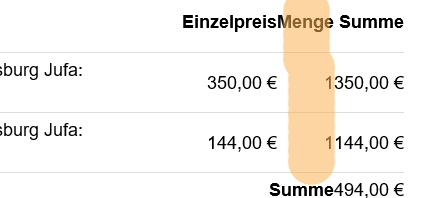
In the order email, the quantity is stuck in the right-hand column. This looks confusing, along with the price. How can I center the contents of the Quantity column to solve the visual problem?
-- Joomla version -- : 5.4.0
-- PHP version -- : 8.3
-- Browser(s) name and version -- : Firefox
In the order email, the quantity is stuck in the right-hand column. This looks confusing, along with the price. How can I center the contents of the Quantity column to solve the visual problem?
Please Log in or Create an account to join the conversation.

1 year 4 weeks ago #369124
by nicolas
Replied by nicolas on topic Order Mail: Quantity is stuck in the right-hand column, how can I center it?
Hi,
You want to edit the order notification emails via the System>Emails menu of HikaShop. There, in the HTML area, you'll find this line:
You can change the "right" to "center" and it should do it.
You want to edit the order notification emails via the System>Emails menu of HikaShop. There, in the HTML area, you'll find this line:
Code:
<td style="border-bottom:1px solid #ddd;padding-bottom:3px;text-align:right">{LINEVAR:PRODUCT_QUANTITY}</td>
The following user(s) said Thank You: spike252
Please Log in or Create an account to join the conversation.
Time to create page: 0.042 seconds