

- Posts: 7
- Thank you received: 0
how to setting hikashop dashboard
9 years 8 months ago #263133
by sayasani
how to setting hikashop dashboard was created by sayasani
-- HikaShop version -- : 3.0.0
-- Joomla version -- : 3.6.5
-- PHP version -- : 5.4.45
-- Error-message(debug-mod must be tuned on) -- : no error msg
hai, i try to enable hikashop plugin for backend dashboard. but the report didnt show any data.. the report not syc as shown on dashboard inside hikashop extension. please refer to the attachment for more understanding
-- Joomla version -- : 3.6.5
-- PHP version -- : 5.4.45
-- Error-message(debug-mod must be tuned on) -- : no error msg
hai, i try to enable hikashop plugin for backend dashboard. but the report didnt show any data.. the report not syc as shown on dashboard inside hikashop extension. please refer to the attachment for more understanding
Please Log in or Create an account to join the conversation.

9 years 8 months ago - 9 years 8 months ago #263164
by Philip
Replied by Philip on topic how to setting hikashop dashboard
Hello,
I hope you can have some answer in this documentation , if not can you provide concerned screenshot configuration page and any elements to better understand situation ?
Awaiting news from you.
Regards
I hope you can have some answer in this documentation , if not can you provide concerned screenshot configuration page and any elements to better understand situation ?
Awaiting news from you.
Regards
Last edit: 9 years 8 months ago by Philip.
Please Log in or Create an account to join the conversation.

9 years 8 months ago #263185
by kernel64
Kind regards,
Cornel
Replied by kernel64 on topic how to setting hikashop dashboard
I have the same error at a website that is been updated from hikashop 2.6.4.
Newly installed sites with fresh Hikashop 3.0.0 do not have these messages.
When you select ALL at the Order settings in the Dashboard the message is "Table has no columns."
Perhaps this will give more info about the root cause....
Newly installed sites with fresh Hikashop 3.0.0 do not have these messages.
When you select ALL at the Order settings in the Dashboard the message is "Table has no columns."
Perhaps this will give more info about the root cause....
Kind regards,
Cornel
Please Log in or Create an account to join the conversation.

9 years 8 months ago #263191
by nicolas
Replied by nicolas on topic how to setting hikashop dashboard
Hi,
Could you do a screenshot of the dashboard in the HikaShop dashboard screen so that we can compare what you have ?
On our end, the dashboard module works just fine:
monosnap.com/file/VTCh96kirTdEViwTE4j5bCLwZOK5Ps
Could you do a screenshot of the dashboard in the HikaShop dashboard screen so that we can compare what you have ?
On our end, the dashboard module works just fine:
monosnap.com/file/VTCh96kirTdEViwTE4j5bCLwZOK5Ps
Please Log in or Create an account to join the conversation.
9 years 8 months ago #263469
by kernel64
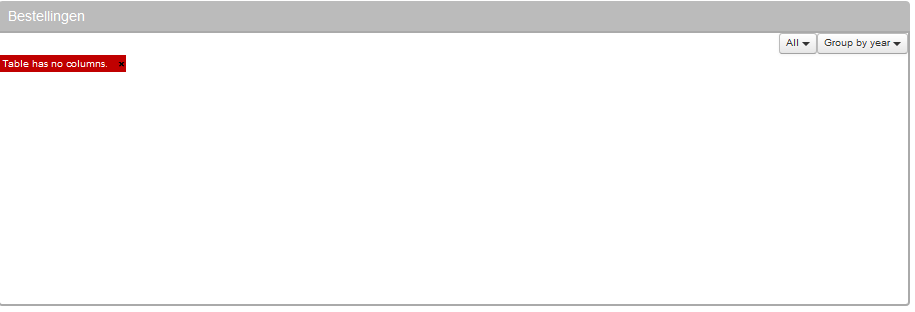
Got this error "Table has no columns." at the sites that were started at hika 2.6.x and that are upgraded to hika 3.x
There are several orders but they are not there at the dashboard.
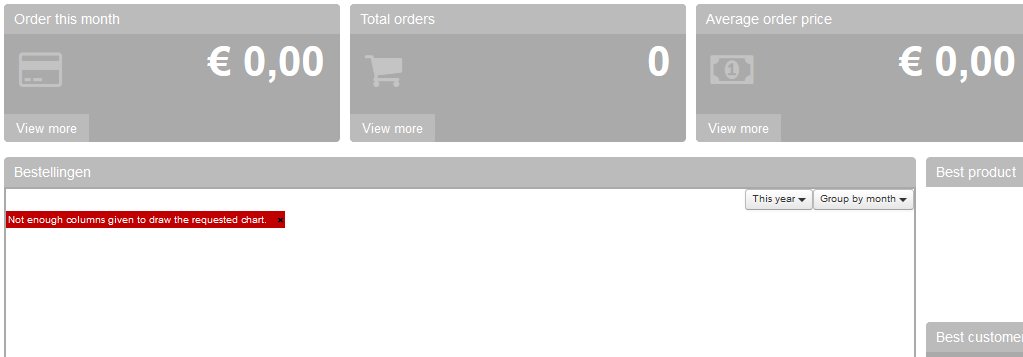
The reports are all default. No change has been made ever.
What table needs to be there ?
Kind regards,
Cornel
Replied by kernel64 on topic how to setting hikashop dashboard
Got this error "Table has no columns." at the sites that were started at hika 2.6.x and that are upgraded to hika 3.x
There are several orders but they are not there at the dashboard.
The reports are all default. No change has been made ever.
What table needs to be there ?
Kind regards,
Cornel
Please Log in or Create an account to join the conversation.

9 years 8 months ago #263471
by Jerome
Jerome - Obsidev.com
HikaMarket & HikaSerial developer / HikaShop core dev team.
Replied by Jerome on topic how to setting hikashop dashboard
Hi,
Does your orders have "invoice number" ?
The dashboard is based on the information "order_invoice_created" which is the date when the order has been confirmed for the first time.
If you do not have invoice number, you do not have that date either and it means that the stats system do not find any order.
Nicolas added the setting "stats_valid_order_statuses" in the columns available in the backend order status listing.
So you should now be able to select which order statuses are use for the stats.
If you put the "created" status in that list, the system will base his search on "order_created" instead of "order_invoice_created".
Regards,
Does your orders have "invoice number" ?
The dashboard is based on the information "order_invoice_created" which is the date when the order has been confirmed for the first time.
If you do not have invoice number, you do not have that date either and it means that the stats system do not find any order.
Nicolas added the setting "stats_valid_order_statuses" in the columns available in the backend order status listing.
So you should now be able to select which order statuses are use for the stats.
If you put the "created" status in that list, the system will base his search on "order_created" instead of "order_invoice_created".
Regards,
Jerome - Obsidev.com
HikaMarket & HikaSerial developer / HikaShop core dev team.
Please Log in or Create an account to join the conversation.
9 years 8 months ago #263497
by jvstratum
Replied by jvstratum on topic how to setting hikashop dashboard
Hi,
I was following this thread since I have the same issue (also update ftom 2.64. to 3.0.0). You can create any report you want in Orders/Reports. the all come up with a nice table, list or graph. Only in the Dashboard nothing changes. The message "not enough collumns" remains and the other stats still display zero.
Just tested it with the latest build 1702251124.
Best regards,
Joep
I was following this thread since I have the same issue (also update ftom 2.64. to 3.0.0). You can create any report you want in Orders/Reports. the all come up with a nice table, list or graph. Only in the Dashboard nothing changes. The message "not enough collumns" remains and the other stats still display zero.
Just tested it with the latest build 1702251124.
Best regards,
Joep
Please Log in or Create an account to join the conversation.
9 years 8 months ago #263508
by kernel64
Kind regards,
Cornel
Replied by kernel64 on topic how to setting hikashop dashboard
Just updated to HikaShop Business 3.0.0 [1702261535] but i see no changes. Still get the Table has no columns." and "Not enough colomns" errors......
What parameter(s) do I have to change additionally to see something in the dashboard.
What parameter(s) do I have to change additionally to see something in the dashboard.
Kind regards,
Cornel
Please Log in or Create an account to join the conversation.
9 years 8 months ago #263503
by Jerome
Jerome - Obsidev.com
HikaMarket & HikaSerial developer / HikaShop core dev team.
Replied by Jerome on topic how to setting hikashop dashboard
Hi,
For the new dashboard, please read and follow the instruction in my previous message.
If you want to display the legacy reports, please modify your HIkaShop configuration to use the legacy dashboard.
www.hikashop.com/support/documentation/5...html#advanced_legacy
Regards,
For the new dashboard, please read and follow the instruction in my previous message.
If you want to display the legacy reports, please modify your HIkaShop configuration to use the legacy dashboard.
www.hikashop.com/support/documentation/5...html#advanced_legacy
Regards,
Jerome - Obsidev.com
HikaMarket & HikaSerial developer / HikaShop core dev team.
Please Log in or Create an account to join the conversation.
9 years 8 months ago #263530
by kernel64
Kind regards,
Cornel
Replied by kernel64 on topic how to setting hikashop dashboard
I want to see stats in the dashboard.... i do not want to use the legacy dashboard.
No i am using the new dashboard but see no stats. What do i have to change in the configuration to see stats in the new dashboard ?
No i am using the new dashboard but see no stats. What do i have to change in the configuration to see stats in the new dashboard ?
Kind regards,
Cornel
Please Log in or Create an account to join the conversation.
9 years 8 months ago #263531
by kernel64
Kind regards,
Cornel
Replied by kernel64 on topic how to setting hikashop dashboard
I changed the order statuses ( /administrator/index.php?option=com_hikashop&ctrl=orderstatus ) to create the invoice when a order is confirmed and shipped...... see current table:
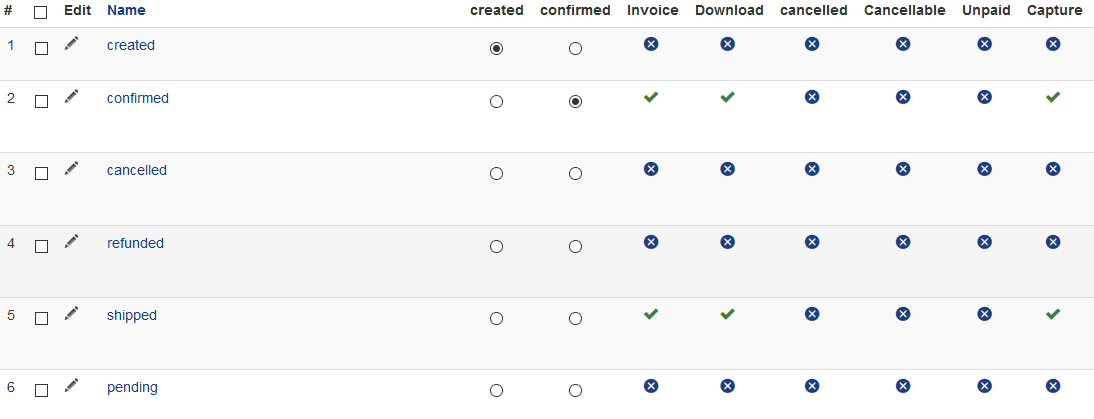
No the stats are being displayed in the new dashboard and this topic can be closed.
No the stats are being displayed in the new dashboard and this topic can be closed.
Kind regards,
Cornel
Please Log in or Create an account to join the conversation.
9 years 8 months ago #263865
by sayasani
Replied by sayasani on topic how to setting hikashop dashboard
oh my, i still dont understand where to to add stats_valid_order_statuses. which column?
all my new dashboard didint generate any report. only show last order correctly. other than that still no data. can u please provide some kind of video tutorial to solve this new dashboard problem? thank you
all my new dashboard didint generate any report. only show last order correctly. other than that still no data. can u please provide some kind of video tutorial to solve this new dashboard problem? thank you
Please Log in or Create an account to join the conversation.
9 years 8 months ago #263870
by nicolas
Replied by nicolas on topic how to setting hikashop dashboard
Hi,
It should be in this "statistic" column:
monosnap.com/file/fZSLMRgp9ObGONdwOOm8DnHA2AzT6M
You'll only see it if you have the "dashboard legacy" setting turned off in the HikaShop configuration and that you have a recent enough build of HikaShop 3.0.0. So check that setting and download again the install package on our website and install it on yours to get the patch to get that column.
It should be in this "statistic" column:
monosnap.com/file/fZSLMRgp9ObGONdwOOm8DnHA2AzT6M
You'll only see it if you have the "dashboard legacy" setting turned off in the HikaShop configuration and that you have a recent enough build of HikaShop 3.0.0. So check that setting and download again the install package on our website and install it on yours to get the patch to get that column.
Please Log in or Create an account to join the conversation.
9 years 8 months ago #263939
by kernel64
Kind regards,
Cornel
Replied by kernel64 on topic how to setting hikashop dashboard
I installed the build from today HikaShop Business 3.0.0 [1703021451] but i see not a Statistics columnin the order status (/administrator/index.php?option=com_hikashop&ctrl=orderstatus) window.....
Kind regards,
Cornel
Please Log in or Create an account to join the conversation.
9 years 8 months ago #263947
by Jerome
Jerome - Obsidev.com
HikaMarket & HikaSerial developer / HikaShop core dev team.
Replied by Jerome on topic how to setting hikashop dashboard
Hi,
It looks like the Nicolas modifications where ready for HikaShop 3.0.1 but was not merged into HikaShop 3.0.0
We just fixed that, so you should be able to get the patch now.
Regards,
It looks like the Nicolas modifications where ready for HikaShop 3.0.1 but was not merged into HikaShop 3.0.0
We just fixed that, so you should be able to get the patch now.
Regards,
Jerome - Obsidev.com
HikaMarket & HikaSerial developer / HikaShop core dev team.
Please Log in or Create an account to join the conversation.
9 years 7 months ago #264330
by sayasani
Replied by sayasani on topic how to setting hikashop dashboard
Hai, i already install the Latest 3.0.1 but as you can see in the image attachment there is no data for total order, average order, best product, best customer, best category and geographical sale. For order, it still show Not enough columns given to draw the requested chart.
it only show the conversion rate and last order data. How to make it display the data?
Pleas guide step by step to solve this problem as im so damn noob. tq
it only show the conversion rate and last order data. How to make it display the data?
Pleas guide step by step to solve this problem as im so damn noob. tq
Please Log in or Create an account to join the conversation.
9 years 7 months ago #264333
by nicolas
Replied by nicolas on topic how to setting hikashop dashboard
Hi,
As we said earlier, you need to make sure that the "statistics" settings in the menu System>Order statuses correspond to what you want to display.
So if your orders are created and not confirmed, you want to activate "created" there. If your orders are confirmed, you want to activate "confirmed" there. Etc.
As we said earlier, you need to make sure that the "statistics" settings in the menu System>Order statuses correspond to what you want to display.
So if your orders are created and not confirmed, you want to activate "created" there. If your orders are confirmed, you want to activate "confirmed" there. Etc.
Please Log in or Create an account to join the conversation.
Time to create page: 0.186 seconds