
- Posts: 2
- Thank you received: 0
Remove Reports From Dashboard
- mark.johnson
-
 Topic Author
- Offline
Less
More
9 years 3 months ago - 9 years 3 months ago #274691
by mark.johnson
Remove Reports From Dashboard was created by mark.johnson
How do I remove reports from the Hikashop dashboard on the site administrative backend?
I want to remove many of the reports on the Hikashop dashboard.
I have searched the documentation, but cannot find an answer to my question.
See attached image (PNG image).
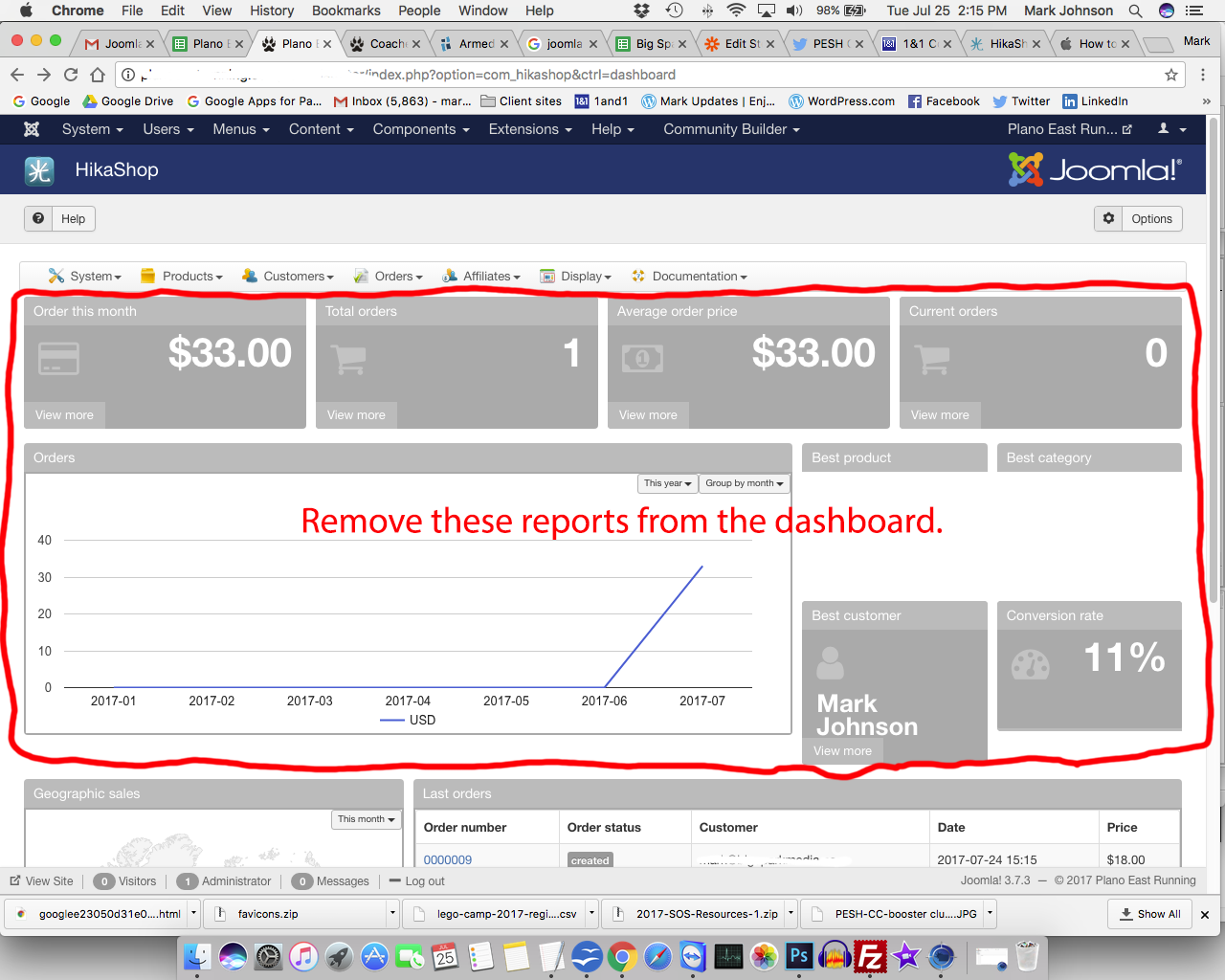
Thanks for the help.
I want to remove many of the reports on the Hikashop dashboard.
I have searched the documentation, but cannot find an answer to my question.
See attached image (PNG image).
Thanks for the help.
Last edit: 9 years 3 months ago by mark.johnson.
Please Log in or Create an account to join the conversation.

9 years 3 months ago #274694
by Jerome
Jerome - Obsidev.com
HikaMarket & HikaSerial developer / HikaShop core dev team.
Replied by Jerome on topic Remove Reports From Dashboard
Hello,
There is no option for the moment to deactivate modules in the report.
But, if you activate the legacy dashboard, you will get the old report interface and you will be able to unpublish the old modules.
Otherwise, if you just want to hide some specific blocks, you can see to use some CSS rules using IDs.
monosnap.com/file/ymct1PUIGlANfYzSsJH5T5NpWB5qXB
Regards,
There is no option for the moment to deactivate modules in the report.
But, if you activate the legacy dashboard, you will get the old report interface and you will be able to unpublish the old modules.
Otherwise, if you just want to hide some specific blocks, you can see to use some CSS rules using IDs.
monosnap.com/file/ymct1PUIGlANfYzSsJH5T5NpWB5qXB
Regards,
Jerome - Obsidev.com
HikaMarket & HikaSerial developer / HikaShop core dev team.
Please Log in or Create an account to join the conversation.
- mark.johnson
-
Topic Author
- Offline
Less
More
- Posts: 2
- Thank you received: 0
9 years 3 months ago #274775
by mark.johnson
Replied by mark.johnson on topic Remove Reports From Dashboard
Jerome - thanks for the reply - exactly what I needed!
I removed all the reports by...
1) Activating the legacy dashboard...
www.hikashop.com/support/documentation/5...html#advanced_legacy
2) Unpublishing all the reports that I did not want to appear on the dashboard.
A future product recommendation: create the ability for admins to create/add/delete reports from the new dashboard (the non-legacy dashboard) with the same ease as in the legacy dashboard.
I removed all the reports by...
1) Activating the legacy dashboard...
www.hikashop.com/support/documentation/5...html#advanced_legacy
2) Unpublishing all the reports that I did not want to appear on the dashboard.
A future product recommendation: create the ability for admins to create/add/delete reports from the new dashboard (the non-legacy dashboard) with the same ease as in the legacy dashboard.
Please Log in or Create an account to join the conversation.
9 years 3 months ago #274777
by Jerome
Jerome - Obsidev.com
HikaMarket & HikaSerial developer / HikaShop core dev team.
Replied by Jerome on topic Remove Reports From Dashboard
Hello,
Yes, it's already in our TODO list
Regards,
Yes, it's already in our TODO list
Regards,
Jerome - Obsidev.com
HikaMarket & HikaSerial developer / HikaShop core dev team.
Please Log in or Create an account to join the conversation.
Time to create page: 0.065 seconds