

- Posts: 94
- Thank you received: 0
Dashboard not showing correctly
9 years 1 month ago #275893
by GB11
Dashboard not showing correctly was created by GB11
-- HikaShop version -- : 3.1.1
-- Joomla version -- : 3.7.4
Hi,
My dashboard is not showing the correct figures for "Best Product" .
It is still just showing the first item sold when the site went live
If I go to 'reports' and main stats, it is showing correctly.
Thank you
-- Joomla version -- : 3.7.4
Hi,
My dashboard is not showing the correct figures for "Best Product" .
It is still just showing the first item sold when the site went live
If I go to 'reports' and main stats, it is showing correctly.
Thank you
Please Log in or Create an account to join the conversation.

9 years 1 month ago #275903
by Jerome
Jerome - Obsidev.com
HikaMarket & HikaSerial developer / HikaShop core dev team.
Replied by Jerome on topic Dashboard not showing correctly
Hello,
Are you sure that your order statuses are right configured ?
Because the statistics base its queries depending the order statuses and if you do not include the "created" orders, it will check for the date of the order invoice number creation (the moment when the order has been first confirmed).
If your orders do not have the invoice number, the statistics cannot organize the orders correctly and the result might look like incorrect.
Regards,
Are you sure that your order statuses are right configured ?
Because the statistics base its queries depending the order statuses and if you do not include the "created" orders, it will check for the date of the order invoice number creation (the moment when the order has been first confirmed).
If your orders do not have the invoice number, the statistics cannot organize the orders correctly and the result might look like incorrect.
Regards,
Jerome - Obsidev.com
HikaMarket & HikaSerial developer / HikaShop core dev team.
Please Log in or Create an account to join the conversation.
9 years 1 month ago #275954
by GB11
Replied by GB11 on topic Dashboard not showing correctly
Hi Jerome, thank you.
I do have both order numbers and invoiced numbers generated when the order is paid.
I have additional statuses for my own house-keeping - processing - when the order is being packed, and shipped when it has been despatched. I used these on my old site too, but of course the dashboard was different. Here's my set up, as this is different too perhaps I have something wrong here?
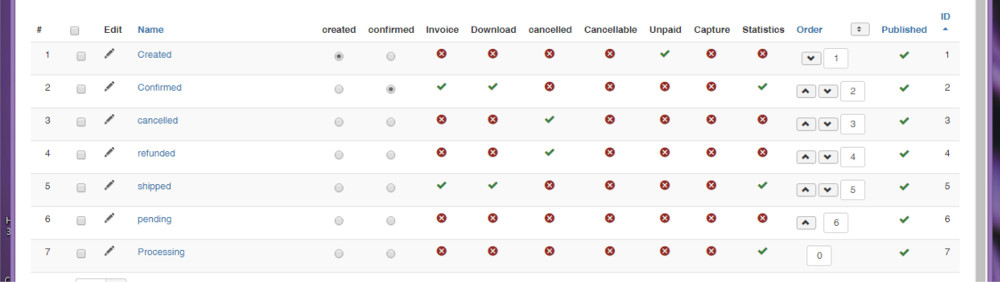
I do have both order numbers and invoiced numbers generated when the order is paid.
I have additional statuses for my own house-keeping - processing - when the order is being packed, and shipped when it has been despatched. I used these on my old site too, but of course the dashboard was different. Here's my set up, as this is different too perhaps I have something wrong here?
Please Log in or Create an account to join the conversation.
9 years 1 month ago #275977
by Jerome
Jerome - Obsidev.com
HikaMarket & HikaSerial developer / HikaShop core dev team.
Replied by Jerome on topic Dashboard not showing correctly
Hello,
Here the code from the HikaShop statistics class (I just remove content related to the loading of the product image)
So basically, the query is made to select the product with the highest cumulative sold price within the month.
To select the orders, it based the search on the "order_invoice_created" field which is fill with the timestamp when the invoice number is generated. And your latest screenshot indicate that it should be good.
Afterwards, you still have the possibility to activate the Joomla debug mode to see the list of your SQL queries and repeat the query in your end to see the raw values.
Regards,
Here the code from the HikaShop statistics class (I just remove content related to the loading of the product image)
Code:
'vars' => array(
'DATE_RANGE' => 'this.month',
),
'query' => array(
'get' => 'object',
'select' => array(
'key' => 'hk_product.product_id AS id',
'name' => 'hk_product.order_product_name AS name',
'value' => 'ROUND(SUM(hk_product.order_product_price * hk_product.order_product_quantity),2) AS value',
'counter' => 'COUNT(hk_order.order_id) AS counter'
),
'tables' => array(
hikashop_table('order_product') . ' AS hk_product',
'INNER JOIN ' . hikashop_table('order') . ' AS hk_order ON hk_order.order_id = hk_product.order_id',
),
'filters' => array(
'order_type' => 'hk_order.order_type = '.$order_type.'',
'order_status' => ('hk_order.order_status IN ('.implode(',', $valid_order_statuses).')'),
'order_created' => ($created_status ?
'hk_order.order_created >= {DATE_START} AND ({DATE_END} <= 0 OR hk_order.order_created <= {DATE_END})' :
'hk_order.order_invoice_created >= {DATE_START} AND ({DATE_END} <= 0 OR hk_order.order_invoice_created <= {DATE_END})'),
),
'order' => 'value DESC',
To select the orders, it based the search on the "order_invoice_created" field which is fill with the timestamp when the invoice number is generated. And your latest screenshot indicate that it should be good.
Afterwards, you still have the possibility to activate the Joomla debug mode to see the list of your SQL queries and repeat the query in your end to see the raw values.
Regards,
Jerome - Obsidev.com
HikaMarket & HikaSerial developer / HikaShop core dev team.
The following user(s) said Thank You: GB11
Please Log in or Create an account to join the conversation.
9 years 1 month ago #276052
by GB11
Replied by GB11 on topic Dashboard not showing correctly
Thank you. I think that like my other issue, it stems from having the processing status. I think that by changing the confirmed order to processing, it messed up what was being read.
Please Log in or Create an account to join the conversation.
9 years 1 month ago #276329
by GB11
Replied by GB11 on topic Dashboard not showing correctly
Well, as an update here, my best product, category and customer has not updated all week.
Even the items that I have not changed the stauts beyond confirmed have not worked in the dashboard.
Even the items that I have not changed the stauts beyond confirmed have not worked in the dashboard.
Please Log in or Create an account to join the conversation.
9 years 1 month ago #276333
by Jerome
Jerome - Obsidev.com
HikaMarket & HikaSerial developer / HikaShop core dev team.
Replied by Jerome on topic Dashboard not showing correctly
Hello,
Regards,
So basically, the query is made to select the product with the highest cumulative sold price within the month.
To select the orders, it based the search on the "order_invoice_created" field which is fill with the timestamp when the invoice number is generated. And your latest screenshot indicate that it should be good.
Afterwards, you still have the possibility to activate the Joomla debug mode to see the list of your SQL queries and repeat the query in your end to see the raw values.
Regards,
Jerome - Obsidev.com
HikaMarket & HikaSerial developer / HikaShop core dev team.
The following user(s) said Thank You: GB11
Please Log in or Create an account to join the conversation.
9 years 1 month ago #276514
by GB11
Replied by GB11 on topic Dashboard not showing correctly
Thank you.
Yes, I will put it into debug mode and attempt a purchase when I next take the site offline for maintenance. As it has just gone live, it will not instill confidence with my customers to take it offline right now - especially as the admin dashboard is not something that has anything to do with my customers' experience.
The legacy dashboard works perfectly - I have decided to use that instead, and hopefully on my next maintenance run will be able to discover where I have gone wrong myself.
Yes, I will put it into debug mode and attempt a purchase when I next take the site offline for maintenance. As it has just gone live, it will not instill confidence with my customers to take it offline right now - especially as the admin dashboard is not something that has anything to do with my customers' experience.
The legacy dashboard works perfectly - I have decided to use that instead, and hopefully on my next maintenance run will be able to discover where I have gone wrong myself.
Please Log in or Create an account to join the conversation.
Time to create page: 0.194 seconds