

- Posts: 100
- Thank you received: 1
Analytics Plugin - am I missing a step to get this working?
8 years 11 months ago #282504
by reders
-- HikaShop version -- : 3.2.1
-- Joomla version -- : 3.7
-- PHP version -- : 7
-- Error-message(debug-mod must be tuned on) -- : No error - this is a different query.
Hi,
I've enabled the Ecommerce features in Google Analytics, and enabled the plugin in Joomla and also added my tracking ID into the plugin with the correct currency.
I set this up two weeks ago - and have had orders through the site but Analytics is still not tracking the data.
Am I missing a step? Is there anything I need to add inside the <head> tags for example?
Many thanks.
-- Joomla version -- : 3.7
-- PHP version -- : 7
-- Error-message(debug-mod must be tuned on) -- : No error - this is a different query.
Hi,
I've enabled the Ecommerce features in Google Analytics, and enabled the plugin in Joomla and also added my tracking ID into the plugin with the correct currency.
I set this up two weeks ago - and have had orders through the site but Analytics is still not tracking the data.
Am I missing a step? Is there anything I need to add inside the <head> tags for example?
Many thanks.
Please Log in or Create an account to join the conversation.

8 years 11 months ago #282521
by nicolas
Replied by nicolas on topic Analytics Plugin - am I missing a step to get this working?
Hi,
There is nothing else to do normally.
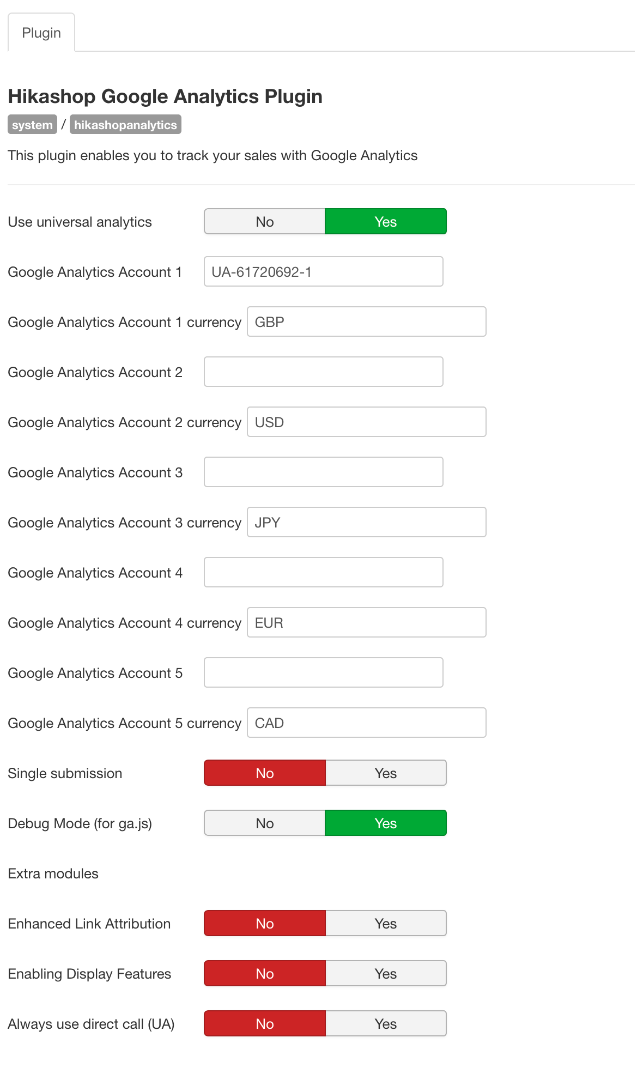
Can you provide a screenshot of the settings of the plugin (you can blur the sensitive data) ?
There is nothing else to do normally.
Can you provide a screenshot of the settings of the plugin (you can blur the sensitive data) ?
Please Log in or Create an account to join the conversation.
8 years 11 months ago #282580
by reders
Replied by reders on topic Analytics Plugin - am I missing a step to get this working?
Hi,
Sure, I've attached a screenshot. Could it be an issue with the settings?
Thanks again.
Sure, I've attached a screenshot. Could it be an issue with the settings?
Thanks again.
Please Log in or Create an account to join the conversation.
8 years 11 months ago - 8 years 11 months ago #282585
by nicolas
Replied by nicolas on topic Analytics Plugin - am I missing a step to get this working?
Hi,
Try activating the "Always use direct call" setting.
Sometimes, based on how your shop is configured, the data cannot be sent to GA with that option turned off.
Try activating the "Always use direct call" setting.
Sometimes, based on how your shop is configured, the data cannot be sent to GA with that option turned off.
Last edit: 8 years 11 months ago by nicolas. Reason: typo
Please Log in or Create an account to join the conversation.
8 years 11 months ago #282634
by reders
Thanks. I've turned this setting on so will wait a few days to see if it starts tracking data.
Replied by reders on topic Analytics Plugin - am I missing a step to get this working?
nicolas wrote: Hi,
Try activating the "Always use direct call" setting.
Something based on how your shop is configured, the data cannot be sent to GA with that option turned off.
Thanks. I've turned this setting on so will wait a few days to see if it starts tracking data.
Please Log in or Create an account to join the conversation.
8 years 11 months ago #282673
by reders
Replied by reders on topic Analytics Plugin - am I missing a step to get this working?
It worked. Many thanks.
Please Log in or Create an account to join the conversation.
Time to create page: 0.072 seconds