
- Posts: 90
- Thank you received: 2
Edit confirmation Email "Additional Information"
- BounceHouseOwner
-
 Topic Author
- Offline
Less
More
8 years 9 months ago #286480
by BounceHouseOwner
Edit confirmation Email "Additional Information" was created by BounceHouseOwner
-- HikaShop version -- : 3.2.2 Business
-- Joomla version -- : 3.8.3
-- PHP version -- : 5.6/7.1
-- Browser(s) name and version -- : chrome / firefox
-- Error-message(debug-mod must be tuned on) -- : n/a
Where do I edit the output for "additional Information" in the admin confirmation email?
Currently it is only passing through the date field, but there are 6 other custom fields that are not showing up.

-- Joomla version -- : 3.8.3
-- PHP version -- : 5.6/7.1
-- Browser(s) name and version -- : chrome / firefox
-- Error-message(debug-mod must be tuned on) -- : n/a
Where do I edit the output for "additional Information" in the admin confirmation email?
Currently it is only passing through the date field, but there are 6 other custom fields that are not showing up.
Please Log in or Create an account to join the conversation.

8 years 9 months ago #286485
by Jerome
Jerome - Obsidev.com
HikaMarket & HikaSerial developer / HikaShop core dev team.
Replied by Jerome on topic Edit confirmation Email "Additional Information"
Hello,
You should edit these fields in the backend and configure them to be display in the email.
Regards,
You should edit these fields in the backend and configure them to be display in the email.
Regards,
Jerome - Obsidev.com
HikaMarket & HikaSerial developer / HikaShop core dev team.
Please Log in or Create an account to join the conversation.
- BounceHouseOwner
-
Topic Author
- Offline
Less
More
- Posts: 90
- Thank you received: 2
8 years 9 months ago #287880
by BounceHouseOwner
Replied by BounceHouseOwner on topic Edit confirmation Email "Additional Information"
I have them added.
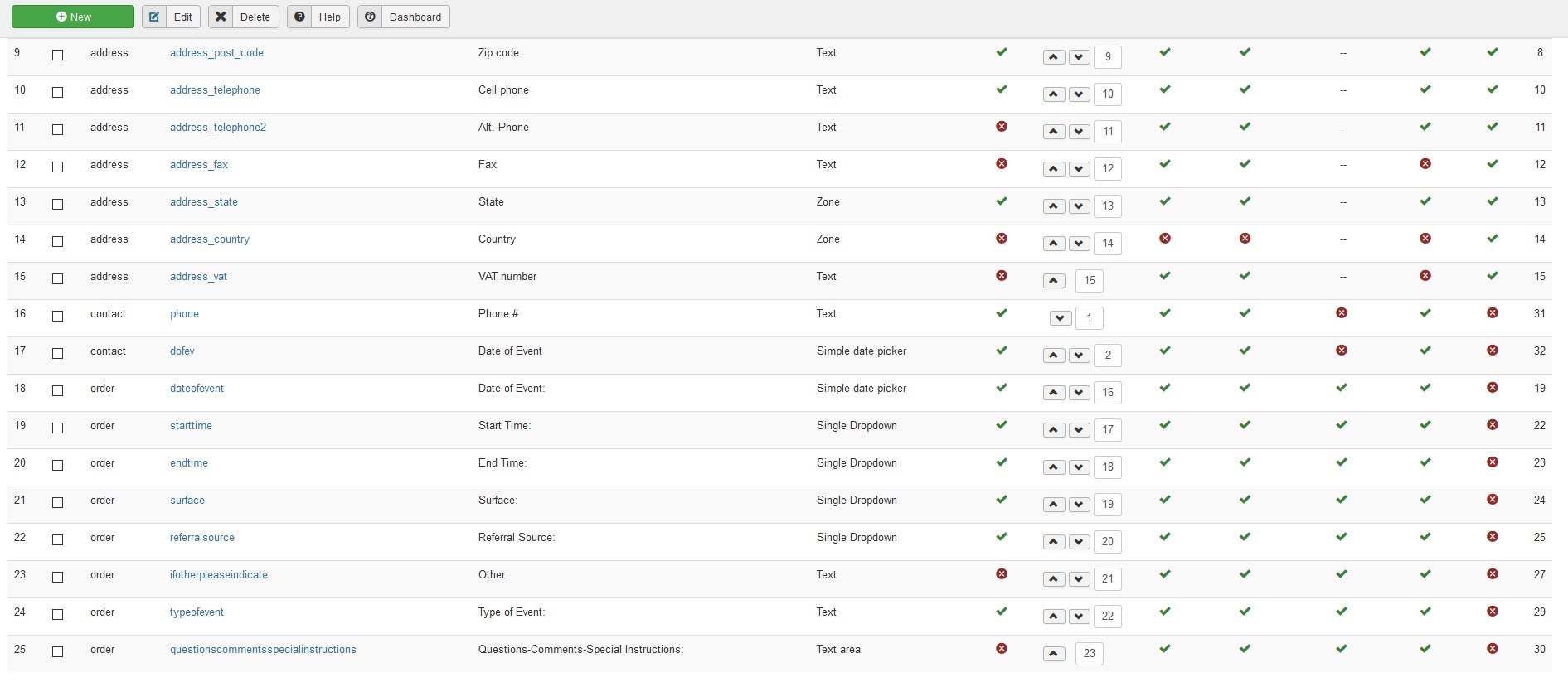
How do I get these "Order" ones to display in the email?
Also, Why is a "date of event" showing up under additional information and not the other? (from 1st email)
How do I get these "Order" ones to display in the email?
Also, Why is a "date of event" showing up under additional information and not the other? (from 1st email)
Please Log in or Create an account to join the conversation.
8 years 9 months ago #287910
by Jerome
Jerome - Obsidev.com
HikaMarket & HikaSerial developer / HikaShop core dev team.
Replied by Jerome on topic Edit confirmation Email "Additional Information"
Hello,
Can you please follow the previous instructions and edit your custom field for the display setting ?
www.hikashop.com/support/documentation/1...form.html#additional
Regards,
Can you please follow the previous instructions and edit your custom field for the display setting ?
www.hikashop.com/support/documentation/1...form.html#additional
Regards,
Jerome - Obsidev.com
HikaMarket & HikaSerial developer / HikaShop core dev team.
Please Log in or Create an account to join the conversation.
Time to create page: 0.048 seconds