
- Posts: 303
- Thank you received: 18
Sales breakdown by Category broken
- mojooutdoors-holden
-
 Topic Author
- Offline
Less
More
7 years 11 months ago - 7 years 11 months ago #299359
by mojooutdoors-holden
Sales breakdown by Category broken was created by mojooutdoors-holden
-- HikaShop version -- : 3.5.0
-- Joomla version -- : 3.8.12
-- PHP version -- : 7.1
Situation:
I am trying to show the yearly sales for two master categories. However, some products exist within multiple subcategories. For example, Product A might exist in Master A - > Subcategory A and Master A -> subcategory B. In the reports, i would think that it would filter through this and calculate the total for a given product no matter if it exist in multiple categories. However, this is what displays for the total yearly breakdown (no category filter) and is the correct total for each month:
Is this just a config error or is something broken? Odd that the category specific case shows MUCH HIGHER totals and is definitely incorrect.
I would like to just break down the monthly sales into "products" and "parts" which are both main categories. I should also note we may have one or two products that exist in both "products" and "parts" but that shouldn't skew the data too much.
-- Joomla version -- : 3.8.12
-- PHP version -- : 7.1
Situation:
I am trying to show the yearly sales for two master categories. However, some products exist within multiple subcategories. For example, Product A might exist in Master A - > Subcategory A and Master A -> subcategory B. In the reports, i would think that it would filter through this and calculate the total for a given product no matter if it exist in multiple categories. However, this is what displays for the total yearly breakdown (no category filter) and is the correct total for each month:
This message contains confidential information
with the following settings (no category filter):This message contains confidential information
Now if i choose the first master category (products in this case):This message contains confidential information
with settings (only thing different is "Products" selected as the category):This message contains confidential information
Is this just a config error or is something broken? Odd that the category specific case shows MUCH HIGHER totals and is definitely incorrect.
I would like to just break down the monthly sales into "products" and "parts" which are both main categories. I should also note we may have one or two products that exist in both "products" and "parts" but that shouldn't skew the data too much.
Last edit: 7 years 11 months ago by mojooutdoors-holden.
Please Log in or Create an account to join the conversation.

7 years 11 months ago #299404
by nicolas
Replied by nicolas on topic Sales breakdown by Category broken
Hi,
The fact that the products are in several categories is probably what's messing the amounts as the sales must be counted once for each category of the products in that case.
Could you turn on the "debug mode" setting of the Joomla configuration and look at the report again ?
Then, at the bottom of the page, could you search for the MySQL queries with the text hikashop_order_product in it and provide them ?
The fact that the products are in several categories is probably what's messing the amounts as the sales must be counted once for each category of the products in that case.
Could you turn on the "debug mode" setting of the Joomla configuration and look at the report again ?
Then, at the bottom of the page, could you search for the MySQL queries with the text hikashop_order_product in it and provide them ?
Please Log in or Create an account to join the conversation.
- mojooutdoors-holden
-
Topic Author
- Offline
Less
More
- Posts: 303
- Thank you received: 18
7 years 11 months ago #299441
by mojooutdoors-holden
Replied by mojooutdoors-holden on topic Sales breakdown by Category broken
Here are the query results:
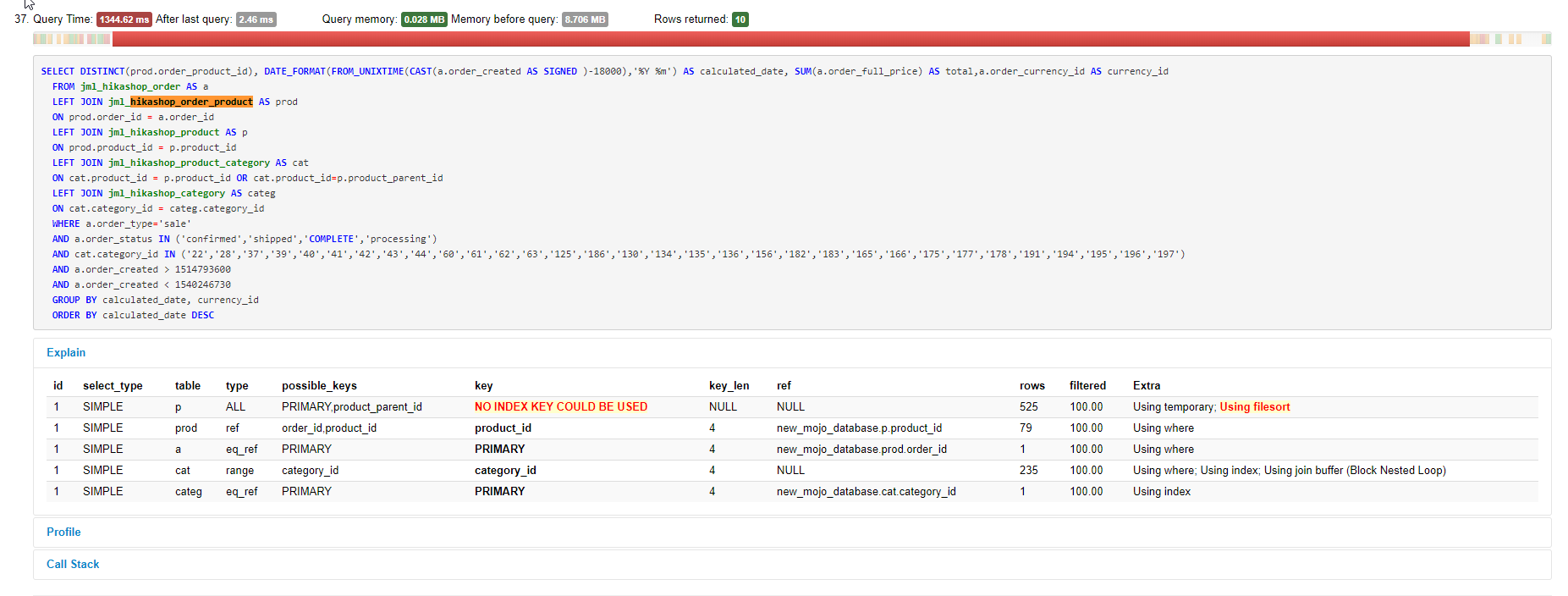

Let me know if you need any further information.
Let me know if you need any further information.
Please Log in or Create an account to join the conversation.
7 years 11 months ago #299477
by nicolas
Replied by nicolas on topic Sales breakdown by Category broken
Hi,
Thank you for that.
From what I can see, the issue is that the code:
should be added after the code:
in the file administrator/components/com_hikashop/classes/widget.php
That way, it will calculate the sales based on the amounts of the individual products in the order instead of the whole order amount.
Thank you for that.
From what I can see, the issue is that the code:
Code:
if($widget->widget_params->content=='orders'){
$selectAdd='prod.order_product_quantity';
}else if($widget->widget_params->content=='sales'){
$selectAdd='(prod.order_product_price+prod.order_product_tax)*prod.order_product_quantity';
}
Code:
if(!isset($leftjoin['order_product'])){ $leftjoin['order_product'] = ' LEFT JOIN '.hikashop_table('order_product').' AS prod ON prod.order_id = a.order_id '; }
if(!isset($leftjoin['product_category'])){ $leftjoin['product_category'] = ' LEFT JOIN '.hikashop_table('product_category').' AS cat ON cat.product_id = prod.product_id '; }
$leftjoin['category'] = ' LEFT JOIN '.hikashop_table('category').' AS c ON c.category_id = cat.category_id ';
That way, it will calculate the sales based on the amounts of the individual products in the order instead of the whole order amount.
Please Log in or Create an account to join the conversation.
- mojooutdoors-holden
-
Topic Author
- Offline
Less
More
- Posts: 303
- Thank you received: 18
7 years 11 months ago #299510
by mojooutdoors-holden
Replied by mojooutdoors-holden on topic Sales breakdown by Category broken
I added the code provided and observed similar behavior.

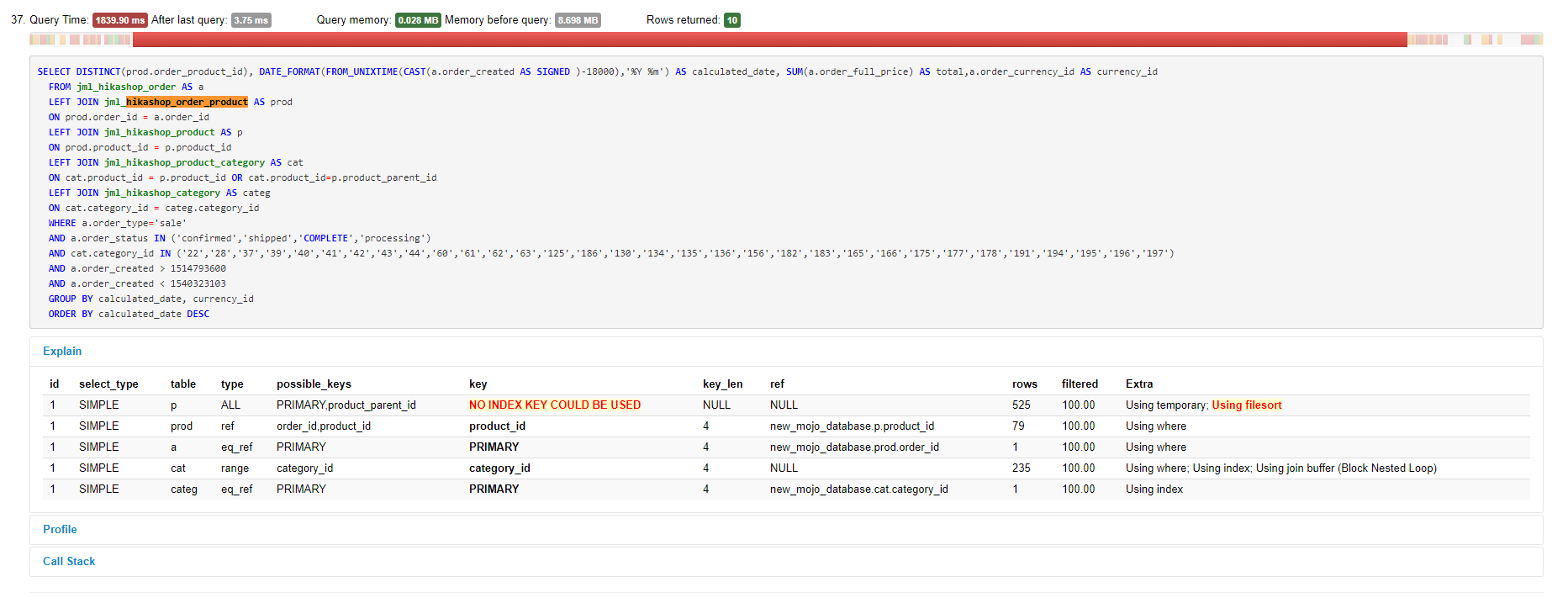
Please Log in or Create an account to join the conversation.
7 years 11 months ago #299536
by nicolas
Replied by nicolas on topic Sales breakdown by Category broken
Hi,
Ok, then try to add the same code, but after the code:
in that same file.
That should help better.
Ok, then try to add the same code, but after the code:
Code:
$leftjoin['product'] = ' LEFT JOIN '.hikashop_table('product').' AS p ON prod.product_id = p.product_id ';
$select .= 'DISTINCT(prod.order_product_id), ';
That should help better.
Please Log in or Create an account to join the conversation.
- mojooutdoors-holden
-
Topic Author
- Offline
Less
More
- Posts: 303
- Thank you received: 18
7 years 11 months ago #299581
by mojooutdoors-holden
Replied by mojooutdoors-holden on topic Sales breakdown by Category broken
That addition broke the page.
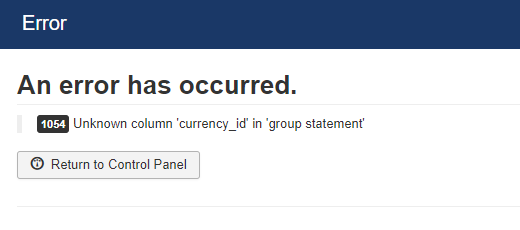
Any other suggestions?
Any other suggestions?
Please Log in or Create an account to join the conversation.
7 years 11 months ago #299586
by nicolas
Replied by nicolas on topic Sales breakdown by Category broken
Hi,
This modification will not create that error.
So I don't see why you would get that error.
First, I would recommend to revert the change and see if your still have the error.
Then, turn on the error reporting and debug mode settings of the Joomla configuration and try again. If you get that error again, you should get more information on the issue.
This modification will not create that error.
So I don't see why you would get that error.
First, I would recommend to revert the change and see if your still have the error.
Then, turn on the error reporting and debug mode settings of the Joomla configuration and try again. If you get that error again, you should get more information on the issue.
Please Log in or Create an account to join the conversation.
- mojooutdoors-holden
-
Topic Author
- Offline
Less
More
- Posts: 303
- Thank you received: 18
7 years 11 months ago #299664
by mojooutdoors-holden
Replied by mojooutdoors-holden on topic Sales breakdown by Category broken
Here's more info on the error:
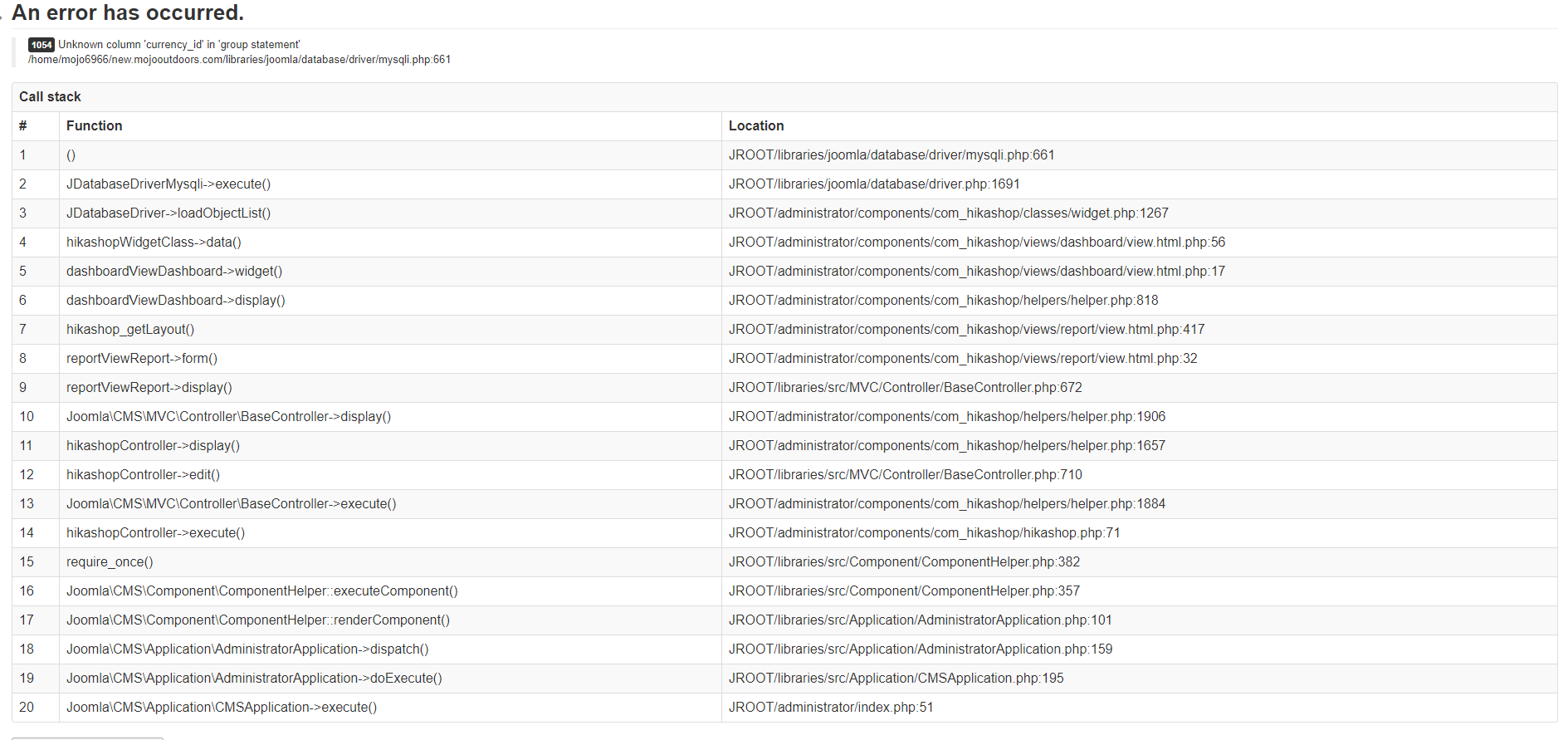
For now I have removed the code. I added it to the requested location in administrator/components/com_hikashop/classes/widget.php which was around line 646.
For now I have removed the code. I added it to the requested location in administrator/components/com_hikashop/classes/widget.php which was around line 646.
Code:
if($setFilters){
if(isset($widget->widget_params->filters['cat.category_id'])){
if(($widget->widget_params->content=='customers' || $widget->widget_params->content=='partners')){
$leftjoin['order'] = ' LEFT JOIN '.hikashop_table('order').' AS o ON o.order_user_id = a.user_id ';
$leftjoin['order_product'] = ' LEFT JOIN '.hikashop_table('order_product').' AS prod ON prod.order_id = o.order_id ';
}else{
$leftjoin['order_product'] = ' LEFT JOIN '.hikashop_table('order_product').' AS prod ON prod.order_id = a.order_id ';
}
$leftjoin['product'] = ' LEFT JOIN '.hikashop_table('product').' AS p ON prod.product_id = p.product_id ';
$select .= 'DISTINCT(prod.order_product_id), ';
if($widget->widget_params->content=='orders'){
$selectAdd='prod.order_product_quantity';
}else if($widget->widget_params->content=='sales'){
$selectAdd='(prod.order_product_price+prod.order_product_tax)*prod.order_product_quantity';
}
$leftjoin['product_category'] = ' LEFT JOIN '.hikashop_table('product_category').' AS cat ON cat.product_id = p.product_id OR cat.product_id=p.product_parent_id';
if($widget->widget_params->category_childs){
$leftjoin['category'] = ' LEFT JOIN '.hikashop_table('category').' AS categ ON cat.category_id = categ.category_id ';
$widget->widget_params->filters['cat.category_id']=array_merge($widget->widget_params->filters['cat.category_id'], $widget->widget_params->childs);
}
}
if(isset($widget->widget_params->filters['prod.product_id'])){
if(($widget->widget_params->content=='customers' || $widget->widget_params->content=='partners')){
$leftjoin['order'] = ' LEFT JOIN '.hikashop_table('order').' AS o ON o.order_user_id = a.user_id ';
$leftjoin['order_product'] = ' LEFT JOIN '.hikashop_table('order_product').' AS prod ON prod.order_id = o.order_id ';
}else{
$leftjoin['order_product'] = ' LEFT JOIN '.hikashop_table('order_product').' AS prod ON prod.order_id = a.order_id ';
}
}
}
Please Log in or Create an account to join the conversation.
7 years 11 months ago #299700
by nicolas
Replied by nicolas on topic Sales breakdown by Category broken
Hi,
So you need to keep that change but also change the line:
$pie= 'SUM('.$selectAdd.') AS total';
to:
$pie= 'SUM('.$selectAdd.') AS total, a.order_currency_id AS currency_id';
in that same file. That will avoid that query error which happens because the way the calculations are done changed with the modification I proposed.
So you need to keep that change but also change the line:
$pie= 'SUM('.$selectAdd.') AS total';
to:
$pie= 'SUM('.$selectAdd.') AS total, a.order_currency_id AS currency_id';
in that same file. That will avoid that query error which happens because the way the calculations are done changed with the modification I proposed.
Please Log in or Create an account to join the conversation.
- mojooutdoors-holden
-
Topic Author
- Offline
Less
More
- Posts: 303
- Thank you received: 18
7 years 10 months ago #300350
by mojooutdoors-holden
Replied by mojooutdoors-holden on topic Sales breakdown by Category broken
No error now, but the report is still incorrect. Seems to be double counting since they are in multiple categories. The amount of products in both master categories is very small and would not explain the discrepancy.
I should also note that some products inside "Products" and "replacement parts" are also in multiple subcategories. For example, Part 1a might be in 4 subcategories of "replacement parts."
Does this make sense?
I should also note that some products inside "Products" and "replacement parts" are also in multiple subcategories. For example, Part 1a might be in 4 subcategories of "replacement parts."
Does this make sense?
Please Log in or Create an account to join the conversation.
7 years 10 months ago - 7 years 10 months ago #300408
by nicolas
Replied by nicolas on topic Sales breakdown by Category broken
Hi,
Yes, the fix until now what to take the sum of the product amount for all matched orders instead of using the total amount of the order.
Now, it doesn't help if the product is in several categories of the categories selected in the "category" setting of the report as it will sum it once per category matching in that setting.
So if you select there the main category with all it's sub categories, it will sum the amount for each sub categories.
Since you're selected there the main category, I would recommend instead to not select it and leave the field empty. That way, the problem won't happen. Alternatively, you could select only the categories so that no doublon happens.
I've added a fix on our end to avoid that. However, it's a big patch so I can't just give you the lines to change as there are 30 lines at different places.
Here is a zip of the widget.php with the patch:
So you can unzip it and replace the file. Note however that you're using HikaShop 3.5.0 and this file is the one from HikaShop 4.0.0. It should be ok but it might create some unforseen issues.
Yes, the fix until now what to take the sum of the product amount for all matched orders instead of using the total amount of the order.
Now, it doesn't help if the product is in several categories of the categories selected in the "category" setting of the report as it will sum it once per category matching in that setting.
So if you select there the main category with all it's sub categories, it will sum the amount for each sub categories.
Since you're selected there the main category, I would recommend instead to not select it and leave the field empty. That way, the problem won't happen. Alternatively, you could select only the categories so that no doublon happens.
This attachment is hidden for guests.
Please log in or register to see it.
Please log in or register to see it.
I've added a fix on our end to avoid that. However, it's a big patch so I can't just give you the lines to change as there are 30 lines at different places.
Here is a zip of the widget.php with the patch:
So you can unzip it and replace the file. Note however that you're using HikaShop 3.5.0 and this file is the one from HikaShop 4.0.0. It should be ok but it might create some unforseen issues.
Last edit: 7 years 10 months ago by nicolas.
Please Log in or Create an account to join the conversation.
- mojooutdoors-holden
-
Topic Author
- Offline
Less
More
- Posts: 303
- Thank you received: 18
7 years 10 months ago #300482
by mojooutdoors-holden
Replied by mojooutdoors-holden on topic Sales breakdown by Category broken
Broke the report, but it's probably because of the change from 3.5.0 to 4.0.0. I will have to wait until after our busy season to upgrade.
In the meantime, I think I might just manually select all of the products. Surely that will prevent double counting?
In the meantime, I think I might just manually select all of the products. Surely that will prevent double counting?
Please Log in or Create an account to join the conversation.
7 years 10 months ago #300487
by nicolas
Replied by nicolas on topic Sales breakdown by Category broken
Hi,
If you don't set a category, it will work properly, yes. That's what I said in my previous message.
If you don't set a category, it will work properly, yes. That's what I said in my previous message.
The following user(s) said Thank You: mojooutdoors-holden
Please Log in or Create an account to join the conversation.
- mojooutdoors-holden
-
Topic Author
- Offline
Less
More
- Posts: 303
- Thank you received: 18
7 years 9 months ago #301150
by mojooutdoors-holden
Replied by mojooutdoors-holden on topic Sales breakdown by Category broken
Gotcha. I misunderstood. It took some time to manually select each individual product, but the report now displays properly. Thanks for your help!
Hopefully, I will be able to upgrade our hikashop version after the first of the year.
Hopefully, I will be able to upgrade our hikashop version after the first of the year.
Please Log in or Create an account to join the conversation.
Time to create page: 0.266 seconds