

- Posts: 161
- Thank you received: 4
Dashboard Information
6 years 10 months ago #314626
by phiddius
Dashboard Information was created by phiddius
-- url of the page with the problem -- :
11plus-exam.co.uk/administrator/index.ph...ashop&ctrl=dashboard
-- HikaShop version -- : 4.2.2
-- Joomla version -- : 3.9.8
-- PHP version -- : 7.2
-- Browser(s) name and version -- : various
-- Error-message(debug-mod must be tuned on) -- : none
Hi,
In Hikashop Dashboard View.
I have a widget to show the total of each payment type (e.g. paypal / bank transfer).
I also have a widget to list each order that is confirmed during each month.
As I only opened this site for 2020 yesterday, I have just 1 order, which makes it simple to see the problem.
A customer purchased £320 of product. As he purchased over x amount he got a discount.
Therefore he actually only paid £280 for it.
Widget 1 - Payment Type shows £320
Widget 2 - customer orders - he spent £280
I cannot find a way to produce £280 in the payment type widget. This is important as it will calculate the gross income over time, and that information needs to be actual income not the initial no-discount amount of the goods.
thanks
-- HikaShop version -- : 4.2.2
-- Joomla version -- : 3.9.8
-- PHP version -- : 7.2
-- Browser(s) name and version -- : various
-- Error-message(debug-mod must be tuned on) -- : none
Hi,
In Hikashop Dashboard View.
I have a widget to show the total of each payment type (e.g. paypal / bank transfer).
I also have a widget to list each order that is confirmed during each month.
As I only opened this site for 2020 yesterday, I have just 1 order, which makes it simple to see the problem.
A customer purchased £320 of product. As he purchased over x amount he got a discount.
Therefore he actually only paid £280 for it.
Widget 1 - Payment Type shows £320
Widget 2 - customer orders - he spent £280
I cannot find a way to produce £280 in the payment type widget. This is important as it will calculate the gross income over time, and that information needs to be actual income not the initial no-discount amount of the goods.
thanks
Please Log in or Create an account to join the conversation.

6 years 10 months ago #314629
by nicolas
Replied by nicolas on topic Dashboard Information
Hi,
For some widgets/reports the calculations are based on the total amount of the order, while in some cases, it's based on the amount of the products (the sub total).
For example, if you restrict the widget/report to some categories or some products, then it calculate itself the amount as you don't want to use the total amount of the order since otherwise the calculated amount would take into account other products from the orders matching.
So basically, we would first need you to provide a screenshot of the settings of the widget to be able to check the situation and see if it's normal and why or if something can be done.
For some widgets/reports the calculations are based on the total amount of the order, while in some cases, it's based on the amount of the products (the sub total).
For example, if you restrict the widget/report to some categories or some products, then it calculate itself the amount as you don't want to use the total amount of the order since otherwise the calculated amount would take into account other products from the orders matching.
So basically, we would first need you to provide a screenshot of the settings of the widget to be able to check the situation and see if it's normal and why or if something can be done.
Please Log in or Create an account to join the conversation.
6 years 10 months ago - 6 years 10 months ago #314642
by phiddius
Replied by phiddius on topic Dashboard Information
Hi nicolas, thanks for your speedy reply.
I feel that I understand how the widget function works, but .. maybe Ive missed something
here are 2 screenshots,
1 - settings showing how the payment widget shows he full price of the product, even though a coupon was used and the customer paid less.
2- what happens when I activate "include coupon"
I am happy to provide access if you are able to look
thanks
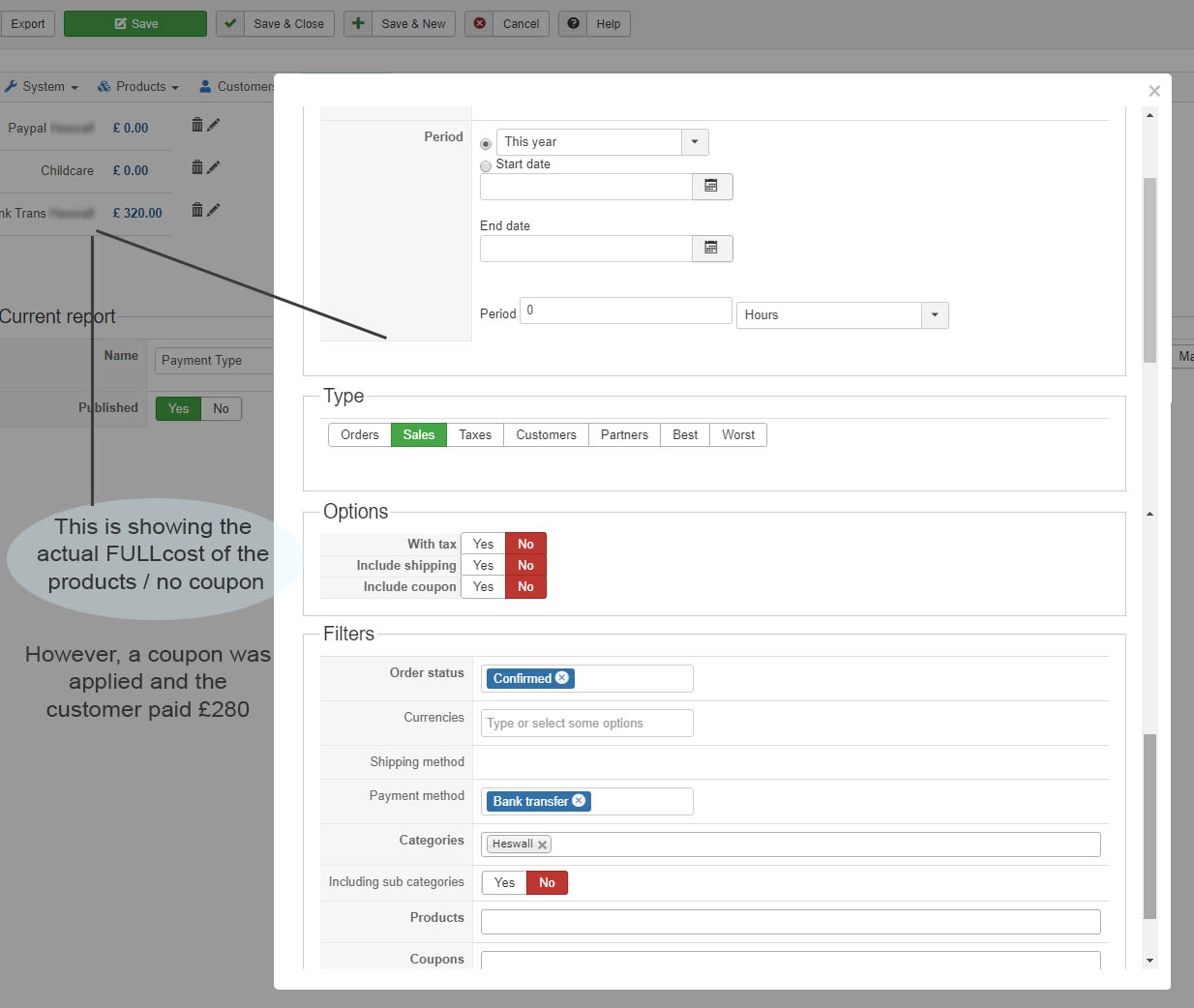
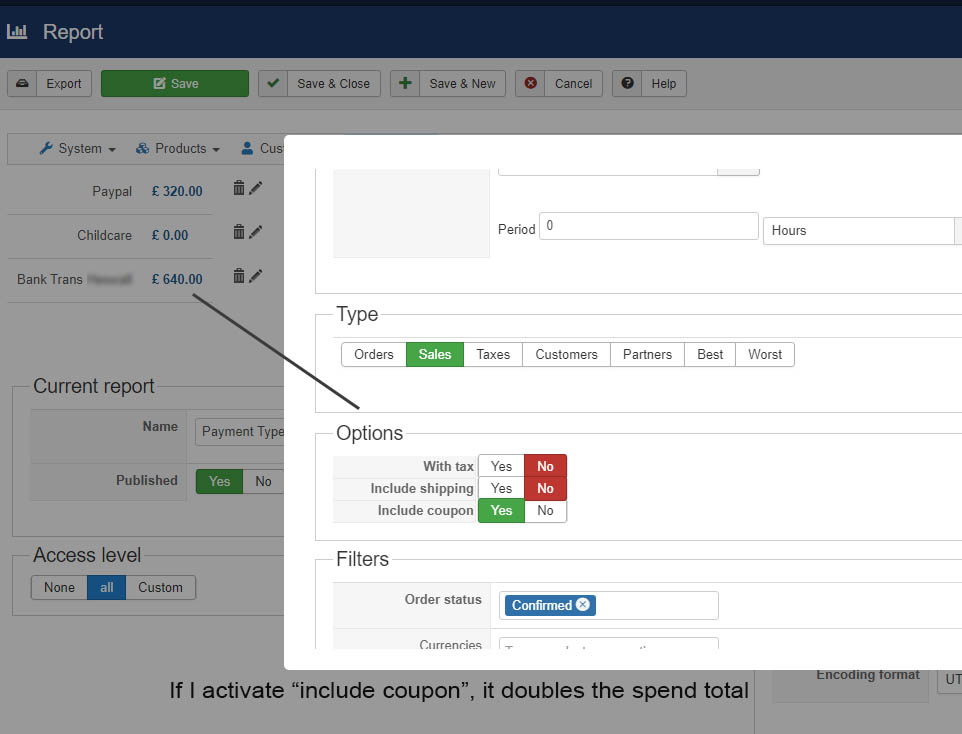
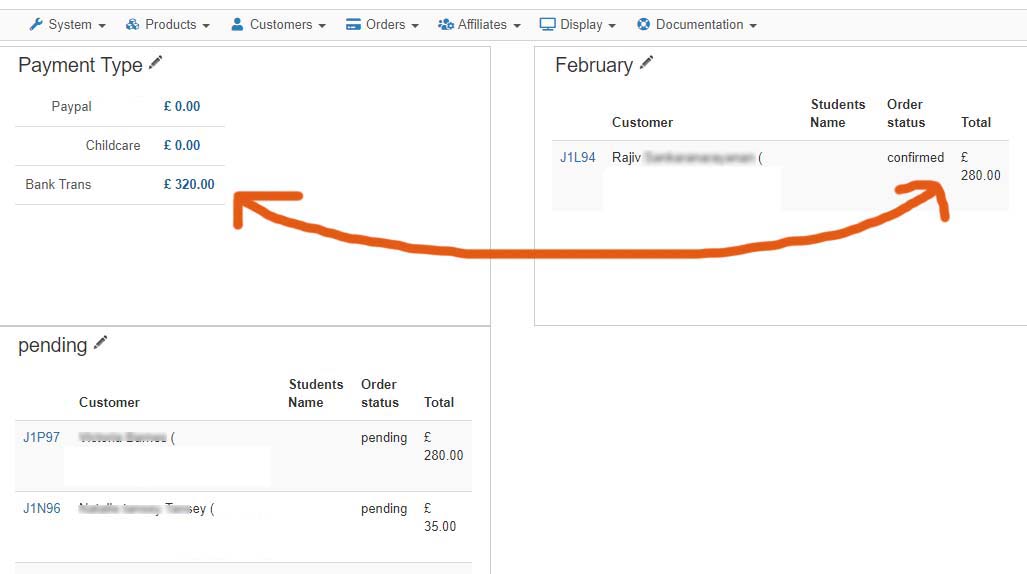
I feel that I understand how the widget function works, but .. maybe Ive missed something
here are 2 screenshots,
1 - settings showing how the payment widget shows he full price of the product, even though a coupon was used and the customer paid less.
2- what happens when I activate "include coupon"
I am happy to provide access if you are able to look
thanks
Last edit: 6 years 10 months ago by phiddius.
Please Log in or Create an account to join the conversation.

Less
More
- Posts: 12953
- Thank you received: 1778
6 years 9 months ago #314687
by Mohamed Thelji
Replied by Mohamed Thelji on topic Dashboard Information
Hello,
Thank you for all of these information, we finally succeed to reproduce it on our end and will come back with a fix as soon as possible !
Kind regards,
Mohamed.
Thank you for all of these information, we finally succeed to reproduce it on our end and will come back with a fix as soon as possible !
Kind regards,
Mohamed.
Please Log in or Create an account to join the conversation.
6 years 9 months ago #314691
by phiddius
Replied by phiddius on topic Dashboard Information
ok thanks
Please Log in or Create an account to join the conversation.
Less
More
- Posts: 12953
- Thank you received: 1778
6 years 9 months ago #314706
by Mohamed Thelji
Replied by Mohamed Thelji on topic Dashboard Information
Hello,
Can you download the last Hikashop version through our website, install it and test it again ? Thank you.
Kind regards,
Mohamed.
Can you download the last Hikashop version through our website, install it and test it again ? Thank you.
Kind regards,
Mohamed.
Please Log in or Create an account to join the conversation.
6 years 9 months ago - 6 years 9 months ago #314718
by phiddius
Replied by phiddius on topic Dashboard Information
Hi Mohamed, thanks for your reply.
I installed the update, and I have a screenshot of the result.
Nothing appears to have changed for me .. We just need to show the total actual income (later in the year) from the 3 payment types.
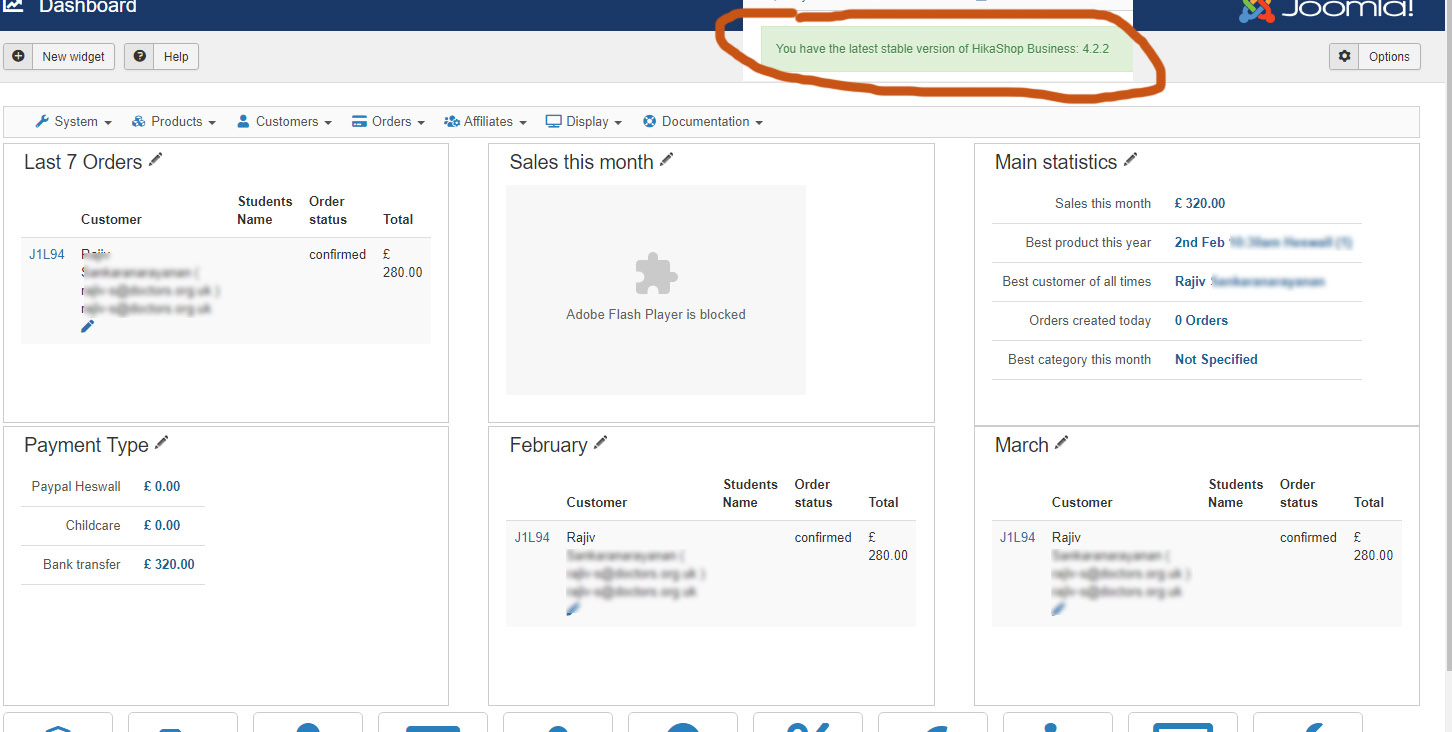
p.s. I copied to a dev site for now..
I installed the update, and I have a screenshot of the result.
Nothing appears to have changed for me .. We just need to show the total actual income (later in the year) from the 3 payment types.
p.s. I copied to a dev site for now..
Last edit: 6 years 9 months ago by phiddius.
Please Log in or Create an account to join the conversation.
6 years 9 months ago #314719
by nicolas
Replied by nicolas on topic Dashboard Information
Hi,
I checked your website and I can see that you have the 4.2.2 build from the 7th of January which doesn't contain the patch Mohamed made today. So if you want the fix, you need to download again the install package of the 4.2.2 on our website and install it again on yours. Only then will it add the fix for that issue.
I checked your website and I can see that you have the 4.2.2 build from the 7th of January which doesn't contain the patch Mohamed made today. So if you want the fix, you need to download again the install package of the 4.2.2 on our website and install it again on yours. Only then will it add the fix for that issue.
Please Log in or Create an account to join the conversation.
6 years 9 months ago #314746
by phiddius
Replied by phiddius on topic Dashboard Information
Hi nicolas, that is correct, I did not install it on the live site.
"p.s. I copied to a dev site for now.."
I cloned the site onto a dev domain - mediamonsters.co.uk/11plus because the live site is taking business each day.
please can you look there?
I tried both of these, is this correct?
com_hikashop_business_v4.2.2_2020-01-16_14-01-53
com_hikashop_business_v4.2.2_2020-01-17_12-28-22
"p.s. I copied to a dev site for now.."
I cloned the site onto a dev domain - mediamonsters.co.uk/11plus because the live site is taking business each day.
please can you look there?
I tried both of these, is this correct?
com_hikashop_business_v4.2.2_2020-01-16_14-01-53
com_hikashop_business_v4.2.2_2020-01-17_12-28-22
Please Log in or Create an account to join the conversation.
6 years 9 months ago #314748
by nicolas
Replied by nicolas on topic Dashboard Information
Hi,
We don't have the issue anymore on our end with the patch Mohamed made.
So if you still have the problem even though you updated the website, then I can only think that you might have a slightly different problem.
I think we'll need to get a backend and FTP access to the website (the dev website i suppose) so that we can check things out.
Could you provide such access along with a link to this thread via our contact form ?
www.hikashop.com/support/contact-us.html
We don't have the issue anymore on our end with the patch Mohamed made.
So if you still have the problem even though you updated the website, then I can only think that you might have a slightly different problem.
I think we'll need to get a backend and FTP access to the website (the dev website i suppose) so that we can check things out.
Could you provide such access along with a link to this thread via our contact form ?
www.hikashop.com/support/contact-us.html
Please Log in or Create an account to join the conversation.
6 years 9 months ago #314782
by phiddius
Replied by phiddius on topic Dashboard Information
Hi nicolas, I sent the details, please let me know if theres any problem with access, thanks.
Please Log in or Create an account to join the conversation.
Less
More
- Posts: 12953
- Thank you received: 1778
6 years 9 months ago #314848
by Mohamed Thelji
Replied by Mohamed Thelji on topic Dashboard Information
Hello,
The issue was coming because a "category" was set through the report, we'll try to debug and test it on our end to see if we can improve it.
Kind regards,
Mohamed.
The issue was coming because a "category" was set through the report, we'll try to debug and test it on our end to see if we can improve it.
Kind regards,
Mohamed.
Please Log in or Create an account to join the conversation.
6 years 9 months ago #314859
by phiddius
Replied by phiddius on topic Dashboard Information
Thank you for looking Mohamed,
just incase it is of any use to you, I also tried setting that up by selecting multiple products, I had the same result.
thanks.
just incase it is of any use to you, I also tried setting that up by selecting multiple products, I had the same result.
thanks.
Please Log in or Create an account to join the conversation.
6 years 9 months ago #315171
by phiddius
Replied by phiddius on topic Dashboard Information
Hi
just wondering - did you find any solution to this?
thanks
just wondering - did you find any solution to this?
thanks
Please Log in or Create an account to join the conversation.
Less
More
- Posts: 12953
- Thank you received: 1778
6 years 9 months ago #315198
by Mohamed Thelji
Replied by Mohamed Thelji on topic Dashboard Information
Hello,
No matter how I test it on my end with the last Hikashop version, I'm not able to reproduce the issue you are having with the "Category" option, can you download the last Hikashop version through our website, install it and test it again so that I can be sure that we have the same files ? Thank you.
If your still having your issue, can you also send us a temporary access to your database (phpmyadmin) so that we can easily test and debug it ? You'll be able to do it by using our contact form :
www.hikashop.com/support/contact-us.html
Kind regards,
Mohamed.
No matter how I test it on my end with the last Hikashop version, I'm not able to reproduce the issue you are having with the "Category" option, can you download the last Hikashop version through our website, install it and test it again so that I can be sure that we have the same files ? Thank you.
If your still having your issue, can you also send us a temporary access to your database (phpmyadmin) so that we can easily test and debug it ? You'll be able to do it by using our contact form :
www.hikashop.com/support/contact-us.html
Kind regards,
Mohamed.
Please Log in or Create an account to join the conversation.
6 years 9 months ago #315386
by phiddius
Replied by phiddius on topic Dashboard Information
Hi Mohamed
ok so I created a fresh joomla and hikashop install on a new server.
Created dummy products and coupons.
Applied them, and it works fine.
This means obviously that something has gone wrong on my main site, maybe during an update or whatever,
I could rebuild it.
I have exported the products - all fine.
I can export joomla users, but can I export hikashop user data ? I need all transactions payments and invoice numbers to remain the same.
is this possible?
thanks
ok so I created a fresh joomla and hikashop install on a new server.
Created dummy products and coupons.
Applied them, and it works fine.
This means obviously that something has gone wrong on my main site, maybe during an update or whatever,
I could rebuild it.
I have exported the products - all fine.
I can export joomla users, but can I export hikashop user data ? I need all transactions payments and invoice numbers to remain the same.
is this possible?
thanks
Please Log in or Create an account to join the conversation.
6 years 9 months ago #315387
by nicolas
Replied by nicolas on topic Dashboard Information
Hi,
Yes. What you can do is export the hikashop tables you want via PHPMyAdmin and import them back on the other website via the PHPMyAdmin. If the table prefix is different, you'll have to edit the file to change that. and you want to rename the tables before the import so that the tables from your old website can replace the ones already there.
However, if the issue comes from the orders data in your database and you move the orders data on the new website, you might end up with the same issue again.
Yes. What you can do is export the hikashop tables you want via PHPMyAdmin and import them back on the other website via the PHPMyAdmin. If the table prefix is different, you'll have to edit the file to change that. and you want to rename the tables before the import so that the tables from your old website can replace the ones already there.
However, if the issue comes from the orders data in your database and you move the orders data on the new website, you might end up with the same issue again.
Please Log in or Create an account to join the conversation.
Time to create page: 0.113 seconds