

- Posts: 22
- Thank you received: 0
Issue Importing From Virtuemart
13 years 3 weeks ago #126681
by walter
Issue Importing From Virtuemart was created by walter
-- url of the page with the problem -- :
todo-aerografia.eu
-- HikaShop version -- : 2.2.2
-- Joomla version -- : 1.5.26
-- PHP version -- : 5.3.27
-- Browser(s) name and version -- : XXXXX x.x.x
-- Error-message(debug-mod must be tuned on) -- : Error_message
Hi,
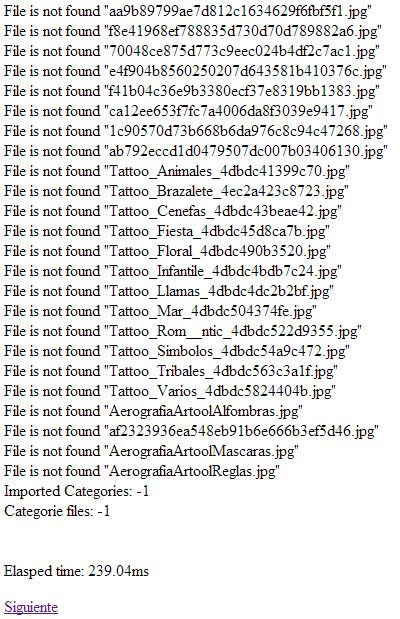
I'm trying to migrate from VM 1.1.9 but gets into a endless loop when importing categories. Here's a image of the message shown:
Thanks in advance for your help
Walter
-- HikaShop version -- : 2.2.2
-- Joomla version -- : 1.5.26
-- PHP version -- : 5.3.27
-- Browser(s) name and version -- : XXXXX x.x.x
-- Error-message(debug-mod must be tuned on) -- : Error_message
Hi,
I'm trying to migrate from VM 1.1.9 but gets into a endless loop when importing categories. Here's a image of the message shown:
Thanks in advance for your help
Walter
Please Log in or Create an account to join the conversation.

Less
More
- Posts: 12953
- Thank you received: 1778
13 years 3 weeks ago #126726
by Mohamed Thelji
Replied by Mohamed Thelji on topic Issue Importing From Virtuemart
Hi,
The problem is maybe coming from an access rights issue, can you check your access rights for your images folder ?
The problem is maybe coming from an access rights issue, can you check your access rights for your images folder ?
Please Log in or Create an account to join the conversation.
13 years 3 weeks ago #126751
by walter
Replied by walter on topic Issue Importing From Virtuemart
the image folders (/media/com_hikashop/.....) have the 775 rights. any other clue where i can look into?
Please Log in or Create an account to join the conversation.
Less
More
- Posts: 12953
- Thank you received: 1778
13 years 3 weeks ago #126762
by Mohamed Thelji
Replied by Mohamed Thelji on topic Issue Importing From Virtuemart
Ok, and does your VM images are in the file "YourWEBSITE/components/com_virtuemart/shop_image/categories/" ? if not can you put them in it and try again ?
Please Log in or Create an account to join the conversation.
13 years 3 weeks ago #126774
by walter
Replied by walter on topic Issue Importing From Virtuemart
yes, all the images are there
Please Log in or Create an account to join the conversation.

13 years 3 weeks ago #126811
by Jerome
Jerome - Obsidev.com
HikaMarket & HikaSerial developer / HikaShop core dev team.
Replied by Jerome on topic Issue Importing From Virtuemart
Hi,
In categories or in category folder ?
It might be an error in the import system so please check the right folder name.
Regards,
In categories or in category folder ?
It might be an error in the import system so please check the right folder name.
Regards,
Jerome - Obsidev.com
HikaMarket & HikaSerial developer / HikaShop core dev team.
Please Log in or Create an account to join the conversation.
13 years 3 weeks ago #126845
by walter
Replied by walter on topic Issue Importing From Virtuemart
components/com_virtuemart/shop_image/category/
Please Log in or Create an account to join the conversation.
13 years 3 weeks ago #126847
by walter
Replied by walter on topic Issue Importing From Virtuemart
I had this one:
components/com_virtuemart/shop_image/category/
and created this one just in case:
components/com_virtuemart/shop_image/categories/
both with 755 rights, and still the same problem.
components/com_virtuemart/shop_image/category/
and created this one just in case:
components/com_virtuemart/shop_image/categories/
both with 755 rights, and still the same problem.
Please Log in or Create an account to join the conversation.
13 years 3 weeks ago #126856
by Jerome
Jerome - Obsidev.com
HikaMarket & HikaSerial developer / HikaShop core dev team.
Replied by Jerome on topic Issue Importing From Virtuemart
Hi,
So please redownload HikaShop 2.2.2
The import system tried to open files into the "categories" folder but the real (default) one is "category".
The new package that I just upload fix this problem. So the import should find the images for the categories.
Regards,
So please redownload HikaShop 2.2.2
The import system tried to open files into the "categories" folder but the real (default) one is "category".
The new package that I just upload fix this problem. So the import should find the images for the categories.
Regards,
Jerome - Obsidev.com
HikaMarket & HikaSerial developer / HikaShop core dev team.
Please Log in or Create an account to join the conversation.
13 years 3 weeks ago #126861
by walter
Replied by walter on topic Issue Importing From Virtuemart
Hi Jerome,
I've downloaded hikashop and something has changed but the issue persists. The import process still gets stuck in categories. This time the error is [Categories] File already exists ........
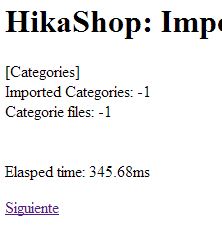

I've downloaded hikashop and something has changed but the issue persists. The import process still gets stuck in categories. This time the error is [Categories] File already exists ........
Please Log in or Create an account to join the conversation.
13 years 3 weeks ago #126865
by Jerome
Jerome - Obsidev.com
HikaMarket & HikaSerial developer / HikaShop core dev team.
Replied by Jerome on topic Issue Importing From Virtuemart
Hi,
If the file already exists it's not a problem.
It just to inform you that you already have the file in your HikaShop folder so it does not copy it.
If it is possible that you have a different version in virtuemart, it alerts you that you might copy it manually (the import system can't know when a file is different which has to be kept or not, so we didn't put any test for it and we just warning the user).
Regards,
If the file already exists it's not a problem.
It just to inform you that you already have the file in your HikaShop folder so it does not copy it.
If it is possible that you have a different version in virtuemart, it alerts you that you might copy it manually (the import system can't know when a file is different which has to be kept or not, so we didn't put any test for it and we just warning the user).
Regards,
Jerome - Obsidev.com
HikaMarket & HikaSerial developer / HikaShop core dev team.
Please Log in or Create an account to join the conversation.
13 years 3 weeks ago #126927
by walter
Replied by walter on topic Issue Importing From Virtuemart
the problem is that it goes into an endless loop, there is no way to continue the process
Please Log in or Create an account to join the conversation.
13 years 3 weeks ago #126999
by Jerome
Jerome - Obsidev.com
HikaMarket & HikaSerial developer / HikaShop core dev team.
Replied by Jerome on topic Issue Importing From Virtuemart
Hi,
Do you think we could have an accesso to your database (a phpmyadmin) in order to take a look of what have been imported or not ?
If the imported data is right, I could unblock the loop by making an increment on the import step. Bu tI have to be sure that it is safe to do it.
Regards,
Do you think we could have an accesso to your database (a phpmyadmin) in order to take a look of what have been imported or not ?
If the imported data is right, I could unblock the loop by making an increment on the import step. Bu tI have to be sure that it is safe to do it.
Regards,
Jerome - Obsidev.com
HikaMarket & HikaSerial developer / HikaShop core dev team.
Please Log in or Create an account to join the conversation.
Time to create page: 0.182 seconds