

- Posts: 11
- Thank you received: 0
Removal of Products when importing CSV
12 years 11 months ago #133709
by Prodessa
Removal of Products when importing CSV was created by Prodessa
Hi,
Currently we are using Hikashop Products Cron Update Plugin to process our articles/products.
As we enabled the option delete products not in CSV you would expect that products will be removed/deleted from our shop.
The current format of the CSV is:
product_code|price_value|categories|categories_namekey|images|product_quantity|product_description|cxp_merknaam|product_name|product_sale_end|cxp_toepassing|cxp_materiaal|product_published|cxp_levertijd|cxp_normale_prijs
The importing is working as it should be!
The removal is however not working despite the configuration of the column names configurations:
Configuration of column names:
product_code:product_code|price_value:price_value|categories:categories|categories_namekey:categories_namekey|images:images|product_quantity:product_quantity|product_description:product_description|cxp_merknaam:cxp_merknaam|product_name:product_name|product_sale_end:product_sale_end|cxp_toepassing:cxp_toepassing|cxp_materiaal:cxp_materiaal|product_published:product_published|cxp_levertijd:cxp_levertijd|cxp_normale_prijs:cxp_normale_prijs
It's rather difficult to troubleshoot or find documentation/examples.
What are the criteria to get is working successful?
Currently we are using Hikashop Products Cron Update Plugin to process our articles/products.
As we enabled the option delete products not in CSV you would expect that products will be removed/deleted from our shop.
The current format of the CSV is:
product_code|price_value|categories|categories_namekey|images|product_quantity|product_description|cxp_merknaam|product_name|product_sale_end|cxp_toepassing|cxp_materiaal|product_published|cxp_levertijd|cxp_normale_prijs
The importing is working as it should be!
The removal is however not working despite the configuration of the column names configurations:
Configuration of column names:
product_code:product_code|price_value:price_value|categories:categories|categories_namekey:categories_namekey|images:images|product_quantity:product_quantity|product_description:product_description|cxp_merknaam:cxp_merknaam|product_name:product_name|product_sale_end:product_sale_end|cxp_toepassing:cxp_toepassing|cxp_materiaal:cxp_materiaal|product_published:product_published|cxp_levertijd:cxp_levertijd|cxp_normale_prijs:cxp_normale_prijs
It's rather difficult to troubleshoot or find documentation/examples.
What are the criteria to get is working successful?
Please Log in or Create an account to join the conversation.

12 years 11 months ago #133753
by nicolas
Replied by nicolas on topic Removal of Products when importing CSV
Hi,
Which version of HikaShop are you using ?
Which version of HikaShop are you using ?
Please Log in or Create an account to join the conversation.
12 years 11 months ago #133767
by Prodessa
Replied by Prodessa on topic Removal of Products when importing CSV
Versie HikaShop [1310121420]
Please Log in or Create an account to join the conversation.
12 years 11 months ago #133853
by nicolas
Replied by nicolas on topic Removal of Products when importing CSV
Can you try to change the line:
$query ='SELECT product_id FROM '.hikashop_table('product').' WHERE product_id IN ('.implode(',',$ids).') AND product_type=\'main\';';
to:
$query ='SELECT product_id FROM '.hikashop_table('product').' WHERE product_id NOT IN ('.implode(',',$ids).') AND product_type=\'main\';';
in the file plugins/hikashop/datafeed/datafeed.php and try again ?
$query ='SELECT product_id FROM '.hikashop_table('product').' WHERE product_id IN ('.implode(',',$ids).') AND product_type=\'main\';';
to:
$query ='SELECT product_id FROM '.hikashop_table('product').' WHERE product_id NOT IN ('.implode(',',$ids).') AND product_type=\'main\';';
in the file plugins/hikashop/datafeed/datafeed.php and try again ?
Please Log in or Create an account to join the conversation.
12 years 11 months ago - 12 years 11 months ago #134036
by Prodessa
Replied by Prodessa on topic Removal of Products when importing CSV
Hi Nicolas,
I'm sorry but that doesn't remove the articles that are not in the CSV?
The function uses product_id to check but that is not in my csv file, I have change it to product_code.
What can we check more?
The image attached in first message shows configuration is that correct?
Does the PIPE separator/delimiter influence the behavior?
I'm sorry but that doesn't remove the articles that are not in the CSV?
The function uses product_id to check but that is not in my csv file, I have change it to product_code.
What can we check more?
The image attached in first message shows configuration is that correct?
Does the PIPE separator/delimiter influence the behavior?
Last edit: 12 years 11 months ago by Prodessa.
Please Log in or Create an account to join the conversation.
12 years 11 months ago - 12 years 11 months ago #134046
by Prodessa
Replied by Prodessa on topic Removal of Products when importing CSV
I have check the code step by step and he never access the highlighted part.
Somehow the contentfile is treated as object but is not.
Should the helper convert it?
Somehow the contentfile is treated as object but is not.
Should the helper convert it?
Code:
$contentFile = file_get_contents($path);
if(empty($contentFile)){
$messages[] = 'Could not retrieve the CSV file '. $path;
}else{
if(!$helper->handleContent($contentFile)){
return false;
}
if(!empty($plugin->params['delete']) && [u]!empty($contentFile->products)){[/u]
$ids = array();
foreach($contentFile->products as $product){
var_dump($product);
$ids[$product->product_id] = $product->product_id;
}
$query ='SELECT product_id FROM '.hikashop_table('product').' WHERE product_id NOT IN ('.implode(',',$ids).') AND product_type=\'main\';';
$db = JFactory::getDBO();
$db->query($query);
$prods = $db->loadObjectlist('product_id');
$todelete = array_keys($prods);
$class = hikashop_get('class.product');
$class->delete($todelete);
Last edit: 12 years 11 months ago by Prodessa.
Please Log in or Create an account to join the conversation.
12 years 10 months ago #134674
by Prodessa
Replied by Prodessa on topic Removal of Products when importing CSV
Nicolas?
Any help?
Any help?
Please Log in or Create an account to join the conversation.

12 years 10 months ago #134760
by Xavier
Replied by Xavier on topic Removal of Products when importing CSV
Hi,
Can you try to do this thing thanks to the hikashop mass actions ?
In System > Mass Actions, configure a mass action like on this screenshot:
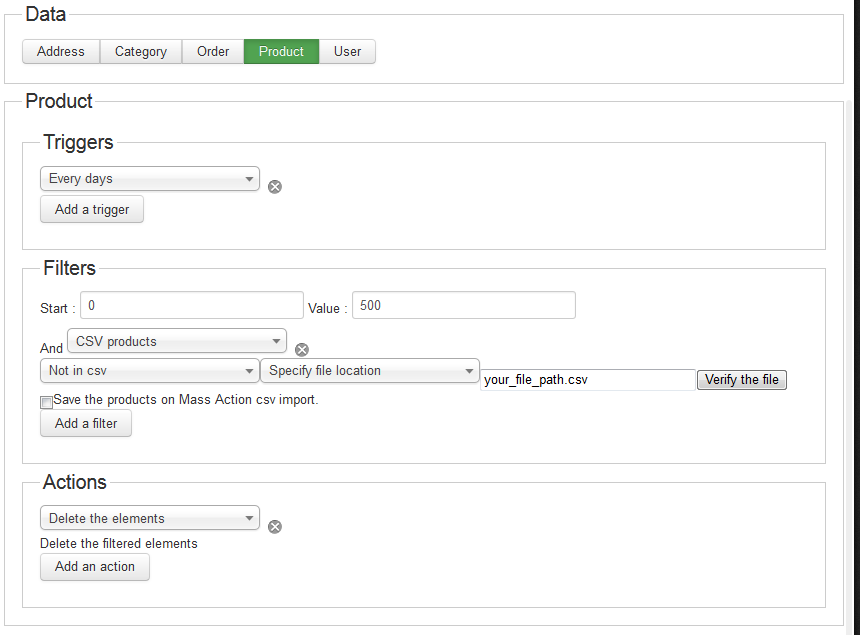
Can you try to do this thing thanks to the hikashop mass actions ?
In System > Mass Actions, configure a mass action like on this screenshot:
Please Log in or Create an account to join the conversation.
12 years 10 months ago #134772
by Prodessa
Replied by Prodessa on topic Removal of Products when importing CSV
I've get a timeout of the browser, should I change something?

Please Log in or Create an account to join the conversation.
12 years 10 months ago #134818
by Xavier
Replied by Xavier on topic Removal of Products when importing CSV
Hi,
Have you set a limit in the filters ? like on the example start:0 and limit:500 ?
Then execute again the mass action with start:500 and limit:500.
Else if there is too many data, the servers can't process the action.
Have you set a limit in the filters ? like on the example start:0 and limit:500 ?
Then execute again the mass action with start:500 and limit:500.
Else if there is too many data, the servers can't process the action.
Please Log in or Create an account to join the conversation.
12 years 10 months ago #134843
by Prodessa
Replied by Prodessa on topic Removal of Products when importing CSV
The file is about 380KB
The server responds with limit 500:500 =
Fatal error: Allowed memory size of 268435456 bytes exhausted (tried to allocate 251396073 bytes) in C:\domains\website.nl\wwwroot\administrator\components\com_hikashop\classes\massaction.php on line 1555
Warning: mysqli_ping() [function.mysqli-ping]: MySQL server has gone away in C:\domains\website.nl\wwwroot\libraries\joomla\database\database\mysqli.php on line 190
Is there still a option?
Is it also posible to point to a URL in the massaction?
The server responds with limit 500:500 =
Fatal error: Allowed memory size of 268435456 bytes exhausted (tried to allocate 251396073 bytes) in C:\domains\website.nl\wwwroot\administrator\components\com_hikashop\classes\massaction.php on line 1555
Warning: mysqli_ping() [function.mysqli-ping]: MySQL server has gone away in C:\domains\website.nl\wwwroot\libraries\joomla\database\database\mysqli.php on line 190
Is there still a option?
Is it also posible to point to a URL in the massaction?
Please Log in or Create an account to join the conversation.
12 years 9 months ago #138262
by Xavier
Replied by Xavier on topic Removal of Products when importing CSV
Hi,
Sorry for the late reply, have you solved your problem ?
Do you have the latest version (2.2.3) ?
Thanks to reduce the limit, could you give me the concerned lines regarding the Fatal Error ?
Sorry for the late reply, have you solved your problem ?
Do you have the latest version (2.2.3) ?
Thanks to reduce the limit, could you give me the concerned lines regarding the Fatal Error ?
Please Log in or Create an account to join the conversation.
12 years 9 months ago #138263
by Prodessa
Replied by Prodessa on topic Removal of Products when importing CSV
I found a way arround it by removing the products directly from the database by a seperate routine.
Did you have a look at the code what I mentioned in my earlier response?
Currently I'm not able to provide but i will try this week.
Did you have a look at the code what I mentioned in my earlier response?
Currently I'm not able to provide but i will try this week.
Please Log in or Create an account to join the conversation.
12 years 9 months ago #138294
by Xavier
Replied by Xavier on topic Removal of Products when importing CSV
We had made few changes on the mass actions.
But not sure that they fix this problem.
But not sure that they fix this problem.
Please Log in or Create an account to join the conversation.
Time to create page: 0.204 seconds