

- Posts: 18
- Thank you received: 0
Import of products and variants price not working
12 years 3 months ago - 12 years 3 months ago #163391
by cefnllys
Import of products and variants price not working was created by cefnllys
-- HikaShop version -- : 2.3.1
-- Joomla version -- : 3.3.1
-- PHP version -- : 5.4.3
Hi there I am trying to import a .csv with my products and their variants/characteristics and while I have managed to get the product in and its variants are there, there is no price being associated to each variant and the product code is changing on import and we have specific codes setup for each variant of each product already and would like them to stay the same, I have been testing with a single product my .csv for this product is attached.
Please could someone help as I am running close to my deadline for getting this done now.
also I can't add 'gm' to the 'Weight symbols' field any one know why?
Thanks David.
-- Joomla version -- : 3.3.1
-- PHP version -- : 5.4.3
Hi there I am trying to import a .csv with my products and their variants/characteristics and while I have managed to get the product in and its variants are there, there is no price being associated to each variant and the product code is changing on import and we have specific codes setup for each variant of each product already and would like them to stay the same, I have been testing with a single product my .csv for this product is attached.
This attachment is hidden for guests.
Please log in or register to see it.
Please log in or register to see it.
Please could someone help as I am running close to my deadline for getting this done now.
also I can't add 'gm' to the 'Weight symbols' field any one know why?
Thanks David.
Last edit: 12 years 3 months ago by cefnllys.
Please Log in or Create an account to join the conversation.

12 years 3 months ago #163408
by Xavier
Replied by Xavier on topic Import of products and variants price not working
Hi,
Few fixes have been made recently and are available in the version 2.3.2 of HikaShop, thanks to download it from our website and test with this new version.
Few fixes have been made recently and are available in the version 2.3.2 of HikaShop, thanks to download it from our website and test with this new version.
Please Log in or Create an account to join the conversation.
12 years 3 months ago #163495
by cefnllys
Replied by cefnllys on topic Import of products and variants price not working
Hi, thanks for the reply. but I have tested on the new version of hika shop and unfourtunatly I still get the same results e.g no price being entered for variants and also the product code does not stay the same as what is in my .csv. did you look over my .csv? is it formatted correctly? I referred to the documentation and as many posts as I could find on the subject of importing variants and as far as I can tell my .csv should work.
Can someone please clarify? I'm starting to get close to my deadline for getting this working. So a prompt reply would be greatly appreciated.
Thanks in advance
Can someone please clarify? I'm starting to get close to my deadline for getting this working. So a prompt reply would be greatly appreciated.
Thanks in advance
Please Log in or Create an account to join the conversation.
12 years 3 months ago #163516
by Xavier
Replied by Xavier on topic Import of products and variants price not working
Hi,
When looking at it the first time it seemed to be correct but there is few errors.
- The first variant "Amyris0" got the same product code than the main product.
- You have to use the product code of the main product and not its name for the parent_product_id column
- The file was not correctly formatted, probably the breakline which were not correct.
Thanks to try that file:
When looking at it the first time it seemed to be correct but there is few errors.
- The first variant "Amyris0" got the same product code than the main product.
- You have to use the product code of the main product and not its name for the parent_product_id column
- The file was not correctly formatted, probably the breakline which were not correct.
Thanks to try that file:
This attachment is hidden for guests.
Please log in or register to see it.
Please log in or register to see it.
Please Log in or Create an account to join the conversation.
12 years 3 months ago #163824
by cefnllys
Replied by cefnllys on topic Import of products and variants price not working
Hi Xavier, thanks for the reply yes that file works correctly and from it I have formatted the rest of my products in the same way and almost everything works perfectly except now my products are not being assigned to a category but the variants and prices are all correct. could you have a look at this file and tell me what I might be doing wrong? Thanks and even though I'm having these few hold ups I'm still impressed by your software much better than VM
This attachment is hidden for guests.
Please log in or register to see it.
Please log in or register to see it.
Please Log in or Create an account to join the conversation.

12 years 3 months ago #163826
by Jerome
Jerome - Obsidev.com
HikaMarket & HikaSerial developer / HikaShop core dev team.
Replied by Jerome on topic Import of products and variants price not working
Hi,
Regarding your CSV file, the category name is """Essential Oils""" (in CSV format).
It result a name "Essential Oils"" (quotes included).
I don't think you have a category with the quotes, so I suggest to try an import with another value for the category (using one quote instead of three).
More than that, when you make an export in HikaShop, you will see that the product export will also give information for categories. If the category can't be found, the CSV will give enough details to re-create it.
In your case I think that the category can't be found and because there is no category in the CSV file, HikaShop use the default product category for the import.
Regards,
Regarding your CSV file, the category name is """Essential Oils""" (in CSV format).
It result a name "Essential Oils"" (quotes included).
I don't think you have a category with the quotes, so I suggest to try an import with another value for the category (using one quote instead of three).
More than that, when you make an export in HikaShop, you will see that the product export will also give information for categories. If the category can't be found, the CSV will give enough details to re-create it.
In your case I think that the category can't be found and because there is no category in the CSV file, HikaShop use the default product category for the import.
Regards,
Jerome - Obsidev.com
HikaMarket & HikaSerial developer / HikaShop core dev team.
Please Log in or Create an account to join the conversation.
12 years 3 months ago #164380
by cefnllys
Replied by cefnllys on topic Import of products and variants price not working
Hi thanks for the reply, I've managed to get the import sorted now, so thank you very much for that. But I'm having trouble setting up the filters for the store now. I simply need a filter that searches all products on their name, description and product_code no matter what page/category i am in. is there a simple way to do this? i have read the documentation and forum posts but am striggling to get it to display products, whenever i filter i get a list of categorys.
Thanks
Thanks
Please Log in or Create an account to join the conversation.

12 years 3 months ago #164427
by nicolas
Replied by nicolas on topic Import of products and variants price not working
Hi,
If you get a list of categories when you use the filter, it means that in the HikaShop filter module's "menu" option, you entered the id of a menu of the type HikaShop categories listing, instead of the id of a menu of the type HikaShop products listing.
If you get a list of categories when you use the filter, it means that in the HikaShop filter module's "menu" option, you entered the id of a menu of the type HikaShop categories listing, instead of the id of a menu of the type HikaShop products listing.
Please Log in or Create an account to join the conversation.
12 years 3 months ago #164827
by cefnllys
Replied by cefnllys on topic Import of products and variants price not working
Hi thanks for the reply, Unfortunately I have tried to do as you suggested but now I just get a completely blank page no matter what I search for. I could do with help getting this sorted as its the last thing I need to do before going live.
Thanks
Thanks
Please Log in or Create an account to join the conversation.
12 years 3 months ago #164850
by cefnllys
Replied by cefnllys on topic Import of products and variants price not working
Hi so i got a list of products showing and the search works on the name field and product description, but when i search on the product code it doesn't show products who's variants/characteristics are the same as the product code i search for any way to change this?
Please Log in or Create an account to join the conversation.
12 years 3 months ago #164848
by Xavier
Replied by Xavier on topic Import of products and variants price not working
Hi,
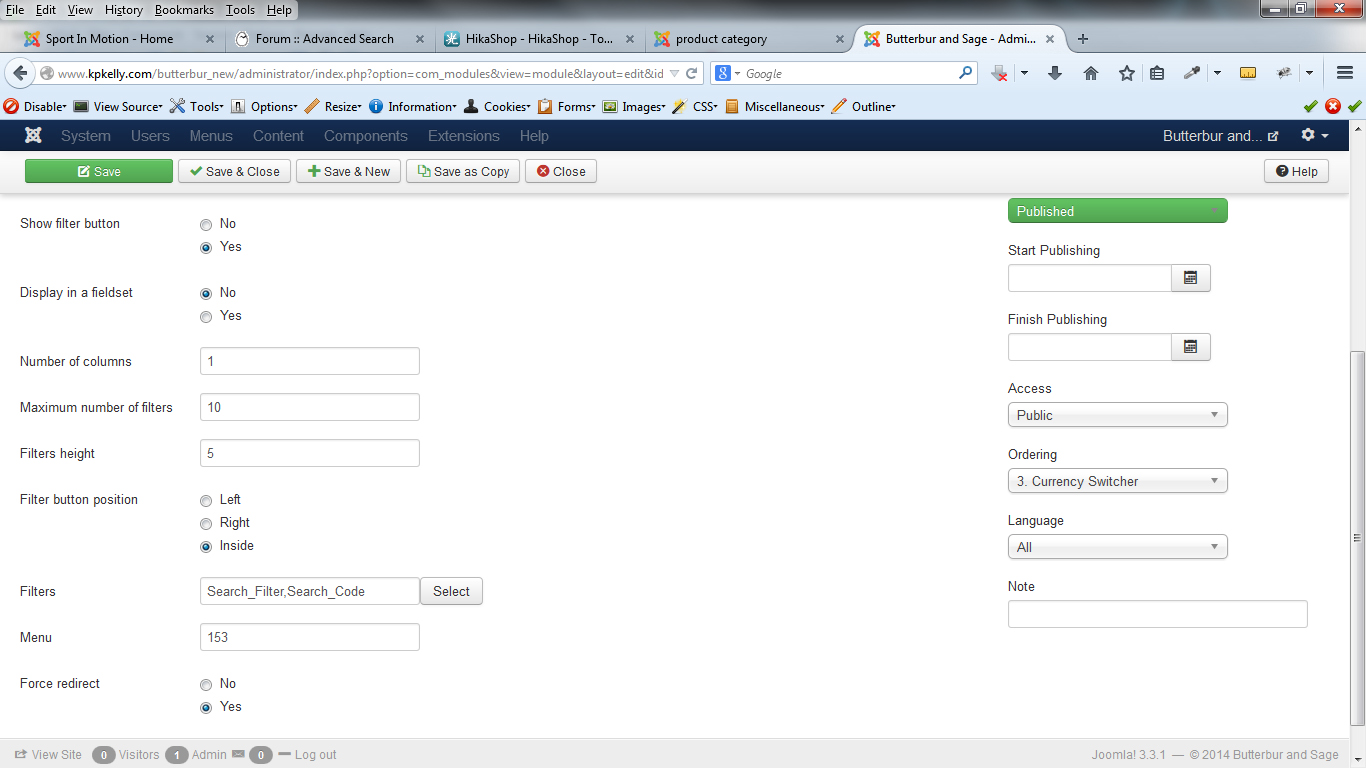
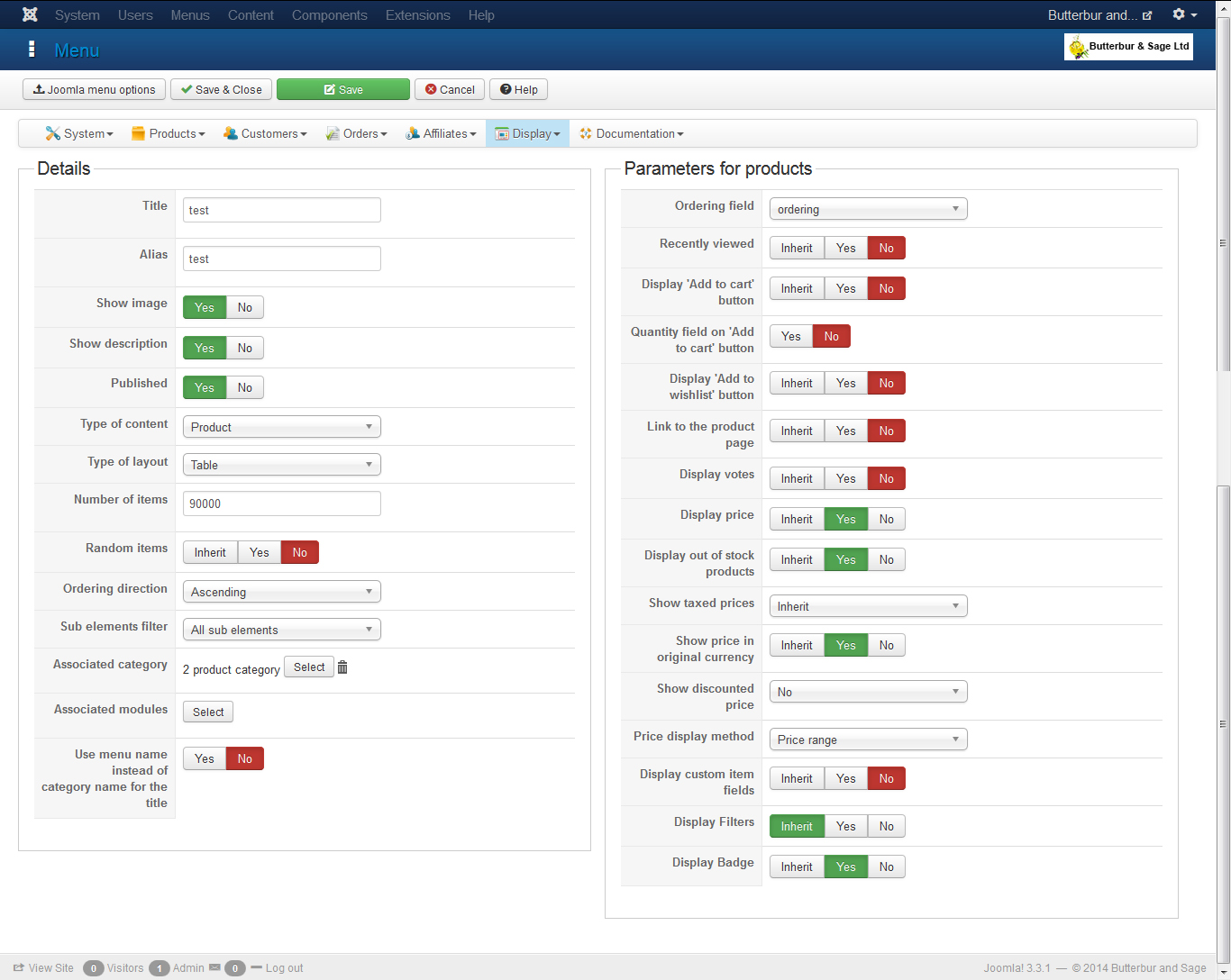
Thanks to give us a screenshot of your search module settings, and another one for the settings of your selected product listing menu.
Thanks to give us a screenshot of your search module settings, and another one for the settings of your selected product listing menu.
Please Log in or Create an account to join the conversation.
12 years 2 months ago #165778
by cefnllys
Replied by cefnllys on topic Import of products and variants price not working
Hi, thanks for reply I think this is what you mean?
Please Log in or Create an account to join the conversation.
12 years 2 months ago #166784
by cefnllys
Replied by cefnllys on topic Import of products and variants price not working
Am iI going to get a reply to this thread at all either?
Please Log in or Create an account to join the conversation.
12 years 2 months ago #166826
by nicolas
Replied by nicolas on topic Import of products and variants price not working
Hi,
The filter system will search in the products data not in the variants data. If you use a filter to search the code of variants, it's thus normal you don't find it. Adding such capability is actually quite complex because when you have 100 variants for each product, if you have a 1000 products, that means that the search need to work on 100000 elements. If you have several filters, or even with some filters, that will already be too much to handle resources-wise. So I don't see us adding that capability any time soon.
The filter system will search in the products data not in the variants data. If you use a filter to search the code of variants, it's thus normal you don't find it. Adding such capability is actually quite complex because when you have 100 variants for each product, if you have a 1000 products, that means that the search need to work on 100000 elements. If you have several filters, or even with some filters, that will already be too much to handle resources-wise. So I don't see us adding that capability any time soon.
Please Log in or Create an account to join the conversation.
11 years 11 months ago #181491
by iedwards
Replied by iedwards on topic Import of products and variants price not working
Just came across this thread while investigating how to get the filter to work on variant product codes.
Appreciate it might be a bit resource intensive but the example you cite Nicolas is quite extreme. My shop has about 80 products with about 10 variants each so resources shouldn't be a problem, but it means filtering by product code is useless if you have variants.
I would very much like to see this facility added, we can then decide for ourselves whether to use it or not.
Thanks,
Ian
Appreciate it might be a bit resource intensive but the example you cite Nicolas is quite extreme. My shop has about 80 products with about 10 variants each so resources shouldn't be a problem, but it means filtering by product code is useless if you have variants.
I would very much like to see this facility added, we can then decide for ourselves whether to use it or not.
Thanks,
Ian
Please Log in or Create an account to join the conversation.
11 years 11 months ago #181510
by nicolas
Replied by nicolas on topic Import of products and variants price not working
I understand what you mean.
But in that case, if you don't have many products, just add the variants code in a custom product field of the main product separated each one by a space and configure your filter to search on that custom product field so that it can find the products with the variant code you want. With a bit of Excel magic a mass action CSV export/import, you should be able to add that without too much hassle.
But in that case, if you don't have many products, just add the variants code in a custom product field of the main product separated each one by a space and configure your filter to search on that custom product field so that it can find the products with the variant code you want. With a bit of Excel magic a mass action CSV export/import, you should be able to add that without too much hassle.
Please Log in or Create an account to join the conversation.
11 years 10 months ago #181594
by iedwards
Replied by iedwards on topic Import of products and variants price not working
Yes as a workaround that would do it, and it would be ok if I maintain the site myself but when I hand it over to the customer it's extra maintenance and not in my view an acceptable solution for a system that is supposed to be easy to use. Why not just add the capability to filter on variants?
Ian
Ian
Please Log in or Create an account to join the conversation.
11 years 10 months ago #181664
by nicolas
Replied by nicolas on topic Import of products and variants price not working
That would indeed be the best in your case to add that capability.
I can always tell you that we add that to our todo list, but it's definitely not a priority (really not easy to do it so that it works well with everything else already in the filtering/listing options, and it's going to break quite rapidly above a certain amount of variants/products and thus more support for us when people complain that it doesn't work for them).
Using my workaround with a small plugin to set/update automatically the custom product field each item a product/variant is saved would be way way easier to implement and a lot cheaper for you if you need that capability to be added rapidly.
I can always tell you that we add that to our todo list, but it's definitely not a priority (really not easy to do it so that it works well with everything else already in the filtering/listing options, and it's going to break quite rapidly above a certain amount of variants/products and thus more support for us when people complain that it doesn't work for them).
Using my workaround with a small plugin to set/update automatically the custom product field each item a product/variant is saved would be way way easier to implement and a lot cheaper for you if you need that capability to be added rapidly.
Please Log in or Create an account to join the conversation.
11 years 10 months ago #181721
by iedwards
Replied by iedwards on topic Import of products and variants price not working
Hi Nicolas,
I had a similar problem with search some time ago in a site using another cart, all the filter needs to do is find the product code of the variant and then return the product code of the parent, everything else is as if you had filtered for the parent. I don't see that as being overly complicated.
Thanks for the offer but on principle I'm not sure I'd be willing to pay for a plugin to include functionality that should already be there, and it would still be a very untidy workaroud.
Regards,
Ian
I had a similar problem with search some time ago in a site using another cart, all the filter needs to do is find the product code of the variant and then return the product code of the parent, everything else is as if you had filtered for the parent. I don't see that as being overly complicated.
Thanks for the offer but on principle I'm not sure I'd be willing to pay for a plugin to include functionality that should already be there, and it would still be a very untidy workaroud.
Regards,
Ian
Please Log in or Create an account to join the conversation.
Time to create page: 0.584 seconds