
- Posts: 64
- Thank you received: 1
Google Shopping abroad foreign language
- jarnodesign
-
 Topic Author
- Offline
Less
More
12 years 3 months ago #165384
by jarnodesign
Google Shopping abroad foreign language was created by jarnodesign
Hello,
I have a dutch webshop also translated in other languages. When I want to add my webshop to google merchant (shopping) I use the plugin thats provided by you. It works great, it also works for google Belgium because of the same language.
But when I want to add this to merchant for Germany, google will not accept it, I guess because of the language.
I use Gtranslate Pro to translate the website, how can I make sure this will work? When I add /de to my URL the website is in German language.
Regards Jarno
I have a dutch webshop also translated in other languages. When I want to add my webshop to google merchant (shopping) I use the plugin thats provided by you. It works great, it also works for google Belgium because of the same language.
But when I want to add this to merchant for Germany, google will not accept it, I guess because of the language.
I use Gtranslate Pro to translate the website, how can I make sure this will work? When I add /de to my URL the website is in German language.
Regards Jarno
Please Log in or Create an account to join the conversation.

12 years 3 months ago #165439
by nicolas
Replied by nicolas on topic Google Shopping abroad foreign language
Hi,
GTranslate translates the pages on the browser-side and thus HikaShop itself only knows of the language stored in the database that you configured, not the GTranslate translations.
So you won't be able to have our plugin output a XML file with another language of GTranslate.
The only, not too difficult, solution I can see is to give the XML file content to Google Translate's website so that it translates it automatically and make sure that it only translates the data, not the XML tags. And then you can manually feed the XML to Google Products.
GTranslate translates the pages on the browser-side and thus HikaShop itself only knows of the language stored in the database that you configured, not the GTranslate translations.
So you won't be able to have our plugin output a XML file with another language of GTranslate.
The only, not too difficult, solution I can see is to give the XML file content to Google Translate's website so that it translates it automatically and make sure that it only translates the data, not the XML tags. And then you can manually feed the XML to Google Products.
Please Log in or Create an account to join the conversation.
- jarnodesign
-
Topic Author
- Offline
Less
More
- Posts: 64
- Thank you received: 1
12 years 3 months ago #165544
by jarnodesign
Replied by jarnodesign on topic Google Shopping abroad foreign language
It's almost clear what you mean I guess.
I need to open the XML file and run it through the normal Google translate? Is it possible to translate the whole content, replace it and edit in the Merchant center?
Regards
I need to open the XML file and run it through the normal Google translate? Is it possible to translate the whole content, replace it and edit in the Merchant center?
Regards
Please Log in or Create an account to join the conversation.
12 years 3 months ago #165568
by nicolas
Replied by nicolas on topic Google Shopping abroad foreign language
Yes. You open the xml file with notepad, translate it with the normal google translate. Make sure that the XML is correct, and upload it up manually to your Google Merchant center and it will upload the products in that language.
Please note that if you already have the products on your account in another language, it's likely that Google will replace them.
I don't know of anything to upload several translations of the same products in the same Google Merchant account. So if that's what you're trying to do, I would recommend first to contact Google's support.
Please note that if you already have the products on your account in another language, it's likely that Google will replace them.
I don't know of anything to upload several translations of the same products in the same Google Merchant account. So if that's what you're trying to do, I would recommend first to contact Google's support.
Please Log in or Create an account to join the conversation.
- jarnodesign
-
Topic Author
- Offline
Less
More
- Posts: 64
- Thank you received: 1
12 years 3 months ago - 12 years 3 months ago #165815
by jarnodesign
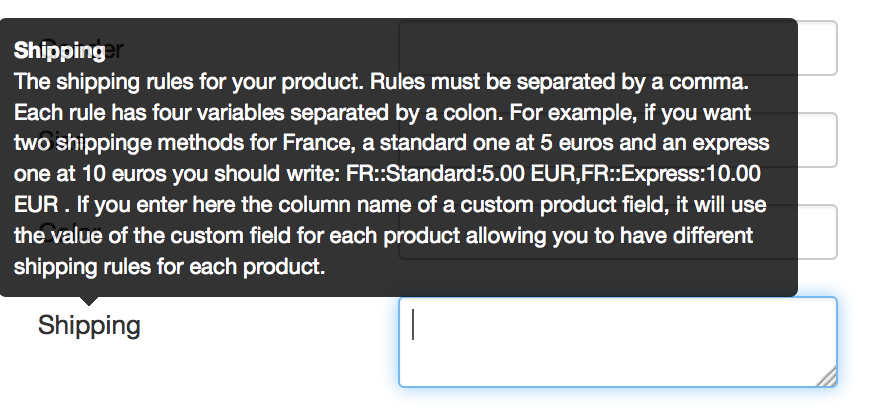
The feed worked partly, but it has nothing to do with the translation but with the shipping code.
I didn't use the shipping part of the plugin before, because google didn't ask for it before. Google gives an error because I didn't edit any shipping code. Could you please inform me how to edit this code:
We have a couple of shipping prices:
1. Free shipping above € 100,- order in Europe
2. Insured shipping above € 100,- a € 2,95 in Europe
3. Shipping normal below € 100,- order in Europe € 4,95
4. Insured shipping below € 100,- order in Europe € 7,95
How to edit this in the Google shopping plugin on shipping part?
Thanks!
Replied by jarnodesign on topic Google Shopping abroad foreign language
The feed worked partly, but it has nothing to do with the translation but with the shipping code.
I didn't use the shipping part of the plugin before, because google didn't ask for it before. Google gives an error because I didn't edit any shipping code. Could you please inform me how to edit this code:
We have a couple of shipping prices:
1. Free shipping above € 100,- order in Europe
2. Insured shipping above € 100,- a € 2,95 in Europe
3. Shipping normal below € 100,- order in Europe € 4,95
4. Insured shipping below € 100,- order in Europe € 7,95
How to edit this in the Google shopping plugin on shipping part?
Thanks!
Last edit: 12 years 3 months ago by jarnodesign. Reason: add image
Please Log in or Create an account to join the conversation.
12 years 3 months ago #165826
by nicolas
Replied by nicolas on topic Google Shopping abroad foreign language
Hi,
Note that this shipping field is for each product in Google Merchant, not for the whole order like you have in HikaShop.
So you cannot translate exactly the shipping methods you have in HikaShop to what Google Merchant wants.
The safe way is to do that:
FR::Normal:4.95 EUR,FR::Insured:7.95 EUR,DE::Normal:4.95 EUR,DE::Insured:7.95 EUR (etc for all the countries of EU)
Note that this shipping field is for each product in Google Merchant, not for the whole order like you have in HikaShop.
So you cannot translate exactly the shipping methods you have in HikaShop to what Google Merchant wants.
The safe way is to do that:
FR::Normal:4.95 EUR,FR::Insured:7.95 EUR,DE::Normal:4.95 EUR,DE::Insured:7.95 EUR (etc for all the countries of EU)
Please Log in or Create an account to join the conversation.
Time to create page: 0.120 seconds