

- Posts: 37
- Thank you received: 0
Product are not imported from RedShop (1064)
10 years 11 months ago - 10 years 11 months ago #221585
by Labas
Product are not imported from RedShop (1064) was created by Labas
-- HikaShop version -- : Starter
-- Joomla version -- : 3.4.5
-- PHP version -- : 5.5.19
-- Browser(s) name and version -- : FF 42
-- Error-message(debug-mod must be tuned on) -- : "1064 You have an error in your SQL syntax; check the manual that corresponds to your MySQL server version for the right syntax to use near '81,'product',(...)"
Hello HikaShop World!
After a long time, i decided to migrate from RedShop to HikaShop.
I am working on my local machine for tests.
I have installed HikaShop, and started import from RedShop. Unfortunatelly, after step 4, i get error like attached.
I see manufacturers, categories, taxes ect ... but products are not imported
I was searching for solution, but couldn't find
I am using MySQLi
Maybe can you suggest something ??
Maybe ESSENTIAL version will handle that??
EDIT:
I tried to import via CSV file but i get blang page in result
Best Regards
Wojciech
-- Joomla version -- : 3.4.5
-- PHP version -- : 5.5.19
-- Browser(s) name and version -- : FF 42
-- Error-message(debug-mod must be tuned on) -- : "1064 You have an error in your SQL syntax; check the manual that corresponds to your MySQL server version for the right syntax to use near '81,'product',(...)"
Hello HikaShop World!
After a long time, i decided to migrate from RedShop to HikaShop.
I am working on my local machine for tests.
I have installed HikaShop, and started import from RedShop. Unfortunatelly, after step 4, i get error like attached.
I see manufacturers, categories, taxes ect ... but products are not imported
I was searching for solution, but couldn't find
I am using MySQLi
Maybe can you suggest something ??
Maybe ESSENTIAL version will handle that??
EDIT:
I tried to import via CSV file but i get blang page in result
Best Regards
Wojciech
Last edit: 10 years 11 months ago by Labas.
Please Log in or Create an account to join the conversation.

10 years 11 months ago #221675
by charlesdh
Replied by charlesdh on topic Product are not imported from RedShop (1064)
Hi,
I'm not a "HikaShop" expert.
But, I believe if the Header for your CSV file is not correct this may be the problem.
I'm not a "HikaShop" expert.
But, I believe if the Header for your CSV file is not correct this may be the problem.
Please Log in or Create an account to join the conversation.

10 years 11 months ago #221684
by nicolas
Replied by nicolas on topic Product are not imported from RedShop (1064)
Hi,
Upgrading to the Essential edition won't help. You'll get the same error.
Could you try again with the "debug mode" setting of the Joomla configuration turned on ?
Do you get additional debug data on the page when that error happen ?
If so, could you provide it ?
It would help in understanding what's going on.
Upgrading to the Essential edition won't help. You'll get the same error.
Could you try again with the "debug mode" setting of the Joomla configuration turned on ?
Do you get additional debug data on the page when that error happen ?
If so, could you provide it ?
It would help in understanding what's going on.
Please Log in or Create an account to join the conversation.
10 years 11 months ago - 10 years 11 months ago #221698
by Labas
Replied by Labas on topic Product are not imported from RedShop (1064)
Hi,
@charlesdh,
CSV file is generated in RedShop, and i think it is "standard" CSV file, with "standard" header.
@nicolas
Sure, i checked it with Debug mode on, and all what i get is:
That is all.
Thank you for you time.
EDIT:
I tried today on backup of site on my server (second FTP) , but result was the same. No products imported.
@charlesdh,
CSV file is generated in RedShop, and i think it is "standard" CSV file, with "standard" header.
@nicolas
Sure, i checked it with Debug mode on, and all what i get is:
Code:
Call stack
# Function Location
1 JApplicationCms->execute() C:\xampp\htdocs\fryzjer\administrator\index.php:47
2 JApplicationAdministrator->doExecute() C:\xampp\htdocs\fryzjer\libraries\cms\application\cms.php:252
3 JApplicationAdministrator->dispatch() C:\xampp\htdocs\fryzjer\libraries\cms\application\administrator.php:152
4 JComponentHelper::renderComponent() C:\xampp\htdocs\fryzjer\libraries\cms\application\administrator.php:98
5 JComponentHelper::executeComponent() C:\xampp\htdocs\fryzjer\libraries\cms\component\helper.php:372
6 require_once() C:\xampp\htdocs\fryzjer\libraries\cms\component\helper.php:392
7 hikashopController->execute() C:\xampp\htdocs\fryzjer\administrator\components\com_hikashop\hikashop.php:54
8 JControllerLegacy->execute() C:\xampp\htdocs\fryzjer\administrator\components\com_hikashop\helpers\helper.php:1601
9 ImportController->import() C:\xampp\htdocs\fryzjer\libraries\legacy\controller\legacy.php:728
10 ImportController->_redshop() C:\xampp\htdocs\fryzjer\administrator\components\com_hikashop\controllers\import.php:102
11 hikashopImportredsHelper->importFromRedshop() C:\xampp\htdocs\fryzjer\administrator\components\com_hikashop\controllers\import.php:151
12 hikashopImportredsHelper->doImport() C:\xampp\htdocs\fryzjer\administrator\components\com_hikashop\helpers\import\reds.php:41
13 hikashopImportredsHelper->importCategories() C:\xampp\htdocs\fryzjer\administrator\components\com_hikashop\helpers\import\reds.php:94
14 JDatabase->query() C:\xampp\htdocs\fryzjer\administrator\components\com_hikashop\helpers\import\reds.php:753
15 RDatabaseDriverMysqli->execute() C:\xampp\htdocs\fryzjer\libraries\joomla\database\database.php:33
16 JDatabaseDriverMysqli->execute() C:\xampp\htdocs\fryzjer\libraries\redcore\database\driver\mysqli.php:71
Thank you for you time.
EDIT:
I tried today on backup of site on my server (second FTP) , but result was the same. No products imported.
Last edit: 10 years 11 months ago by Labas.
Please Log in or Create an account to join the conversation.
10 years 11 months ago #221704
by nicolas
Replied by nicolas on topic Product are not imported from RedShop (1064)
Hi,
But could you provide the full query mentioned in the error message ?
You should be able to see it either in the queries debug area at the bottom, or just below the "1064 You have an error in your SQL syntax; check the manual that corresponds to your MySQL server version for the right syntax to use near '81,'product',(...)" error message.
But could you provide the full query mentioned in the error message ?
You should be able to see it either in the queries debug area at the bottom, or just below the "1064 You have an error in your SQL syntax; check the manual that corresponds to your MySQL server version for the right syntax to use near '81,'product',(...)" error message.
Please Log in or Create an account to join the conversation.
10 years 11 months ago - 10 years 11 months ago #221747
by Labas
Replied by Labas on topic Product are not imported from RedShop (1064)
Hi,
Please see att. There is all what i see. Debug mode is ON in config.
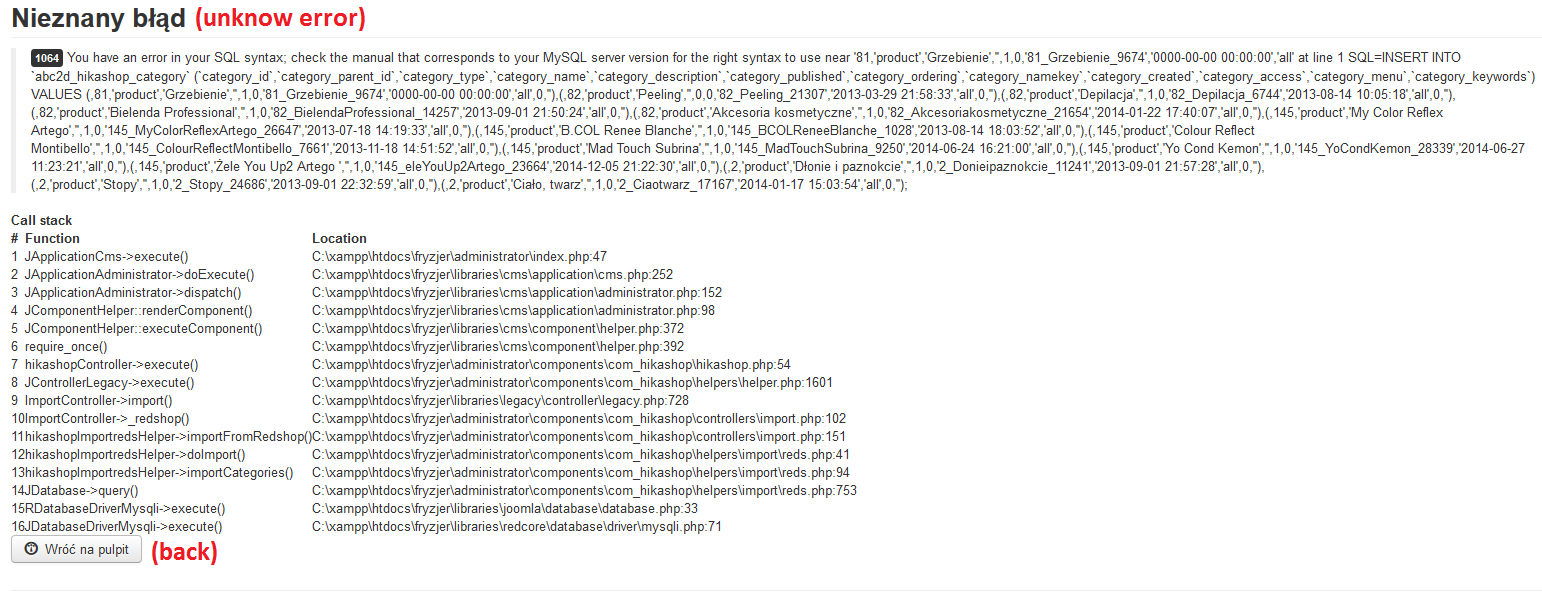
Nicolas, if you want, i can give you admin acces to online site (test), where i have the same issue. If yes, please PM me.
Please see att. There is all what i see. Debug mode is ON in config.
Nicolas, if you want, i can give you admin acces to online site (test), where i have the same issue. If yes, please PM me.
Last edit: 10 years 11 months ago by Labas.
Please Log in or Create an account to join the conversation.
10 years 10 months ago #221804
by nicolas
Replied by nicolas on topic Product are not imported from RedShop (1064)
Hi,
Change the line:
to:
in the file administrator/components/com_hikashop/helpers/import/reds.php and that should hopefully fix the problem.
Change the line:
Code:
$id = $ids[$data->category_id];
Code:
$id = (int)$ids[$data->category_id];
The following user(s) said Thank You: Labas
Please Log in or Create an account to join the conversation.
10 years 10 months ago - 10 years 10 months ago #221856
by Labas
Replied by Labas on topic Product are not imported from RedShop (1064)
Thank You Nicolas,
Product import works perfect.
Unfortunatelly i see another issue.
After import, product is not assigned to manufacturer (on localhost manufacturers were imported, online - no , but on localhost product also do not have assigned manufacturer). Product code is wrong, tax is not assigned, quantity of all is set to 0 and ... i do not see products on frontpage (yes, they are published ).
I have some time, but editing almost 1300 products will take a veeeery long time
EDIT:
I will uninstall Hikashop and try everythinf again with your fix.
EDIT2:
After new installation (tables in DB also deleted), only products were imported. No Manufacturers, Users, Orders, taxes ect ...
Product import works perfect.
Unfortunatelly i see another issue.
After import, product is not assigned to manufacturer (on localhost manufacturers were imported, online - no
, but on localhost product also do not have assigned manufacturer). Product code is wrong, tax is not assigned, quantity of all is set to 0 and ... i do not see products on frontpage (yes, they are published ).I have some time, but editing almost 1300 products will take a veeeery long time
EDIT:
I will uninstall Hikashop and try everythinf again with your fix.
EDIT2:
After new installation (tables in DB also deleted), only products were imported. No Manufacturers, Users, Orders, taxes ect ...
Last edit: 10 years 10 months ago by Labas.
Please Log in or Create an account to join the conversation.
10 years 10 months ago #221870
by nicolas
Replied by nicolas on topic Product are not imported from RedShop (1064)
Hi,
Well it's hard to say. The import from RedShop was written a few years ago. If you have a recent version of RedShop, I suppose many things changed since then, and not many people migrate from RedShop, so I suppose that it might require changes in the code of the import to support the changes of the recent version of RedShop in order to have something working smoothly and it won't be easy either.
Well it's hard to say. The import from RedShop was written a few years ago. If you have a recent version of RedShop, I suppose many things changed since then, and not many people migrate from RedShop, so I suppose that it might require changes in the code of the import to support the changes of the recent version of RedShop in order to have something working smoothly and it won't be easy either.
Please Log in or Create an account to join the conversation.
10 years 10 months ago #221993
by Labas
Replied by Labas on topic Product are not imported from RedShop (1064)
Hi Nicolas,
I understand, and i will try to migrate manually.
Thank you for your time and help.
Best Regards
Wojciech
I understand, and i will try to migrate manually.
Thank you for your time and help.
Best Regards
Wojciech
Please Log in or Create an account to join the conversation.
Time to create page: 0.331 seconds