

- Posts: 61
- Thank you received: 0
Can import csv
10 years 10 months ago - 10 years 10 months ago #221828
by DimLVL
Can import csv was created by DimLVL
-- HikaShop version -- : 2.6.0
-- Joomla version -- : 3.4.5
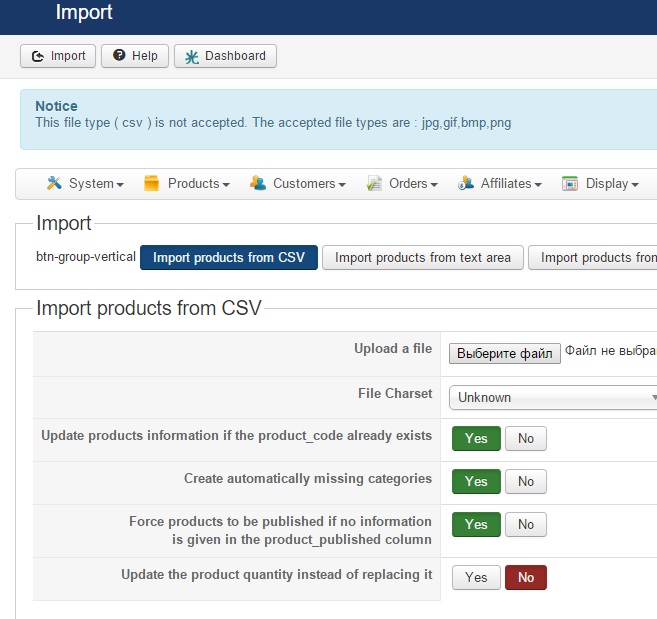
-- Error-message(debug-mod must be tuned on) -- : This file type ( csv ) is not accepted. The accepted file types are : jpg,gif,bmp,png
Trying to import csv, unfortunately it's not working. I've created export file for sample and without any changings tryed to import same file and receive same errror
This file type ( csv ) is not accepted. The accepted file types are : jpg,gif,bmp,png
-- Joomla version -- : 3.4.5
-- Error-message(debug-mod must be tuned on) -- : This file type ( csv ) is not accepted. The accepted file types are : jpg,gif,bmp,png
Trying to import csv, unfortunately it's not working. I've created export file for sample and without any changings tryed to import same file and receive same errror
This file type ( csv ) is not accepted. The accepted file types are : jpg,gif,bmp,png
Last edit: 10 years 10 months ago by DimLVL.
Please Log in or Create an account to join the conversation.

10 years 10 months ago #221839
by charlesdh
Replied by charlesdh on topic Can import csv
HI,
Hikashop should import Image "Names" not the image itself.
Can you attach a copy of the CSV file?
Hikashop should import Image "Names" not the image itself.
Can you attach a copy of the CSV file?
Please Log in or Create an account to join the conversation.

10 years 10 months ago #221876
by nicolas
Replied by nicolas on topic Can import csv
Hi,
Make sure that you allow csv in the "allowed files" setting of the HikaShop configuration, as it is be default
Make sure that you allow csv in the "allowed files" setting of the HikaShop configuration, as it is be default
Please Log in or Create an account to join the conversation.
Time to create page: 0.190 seconds