

- Posts: 107
- Thank you received: 4
Shipping and Google Merchant account
Less
More
2 years 8 months ago #357925
by daedalusteks
Replied by daedalusteks on topic Shipping and Google Merchant account
I found this topic after googling Missing value for shipping rate [shipping weight] hikashop because I've been trying to do this for IDK how long but its a 7 year problem. I don't know what to do, create a field, can't name it what it needs to be becuase hikashop has a name like that internally. Can we just a get a fix that integrates this?
This seems like its broken and get us to do a patch with extra steps fix. Or can we get an actual walk through, after 7 years of this being such a problem i think that would be the easiest solution until you fix this.
BTW i just commented on this post because and found out I have been already... i feel so dumb going in circles.
This seems like its broken and get us to do a patch with extra steps fix. Or can we get an actual walk through, after 7 years of this being such a problem i think that would be the easiest solution until you fix this.
BTW i just commented on this post because and found out I have been already... i feel so dumb going in circles.
Please Log in or Create an account to join the conversation.
Less
More
- Posts: 107
- Thank you received: 4
2 years 8 months ago - 2 years 8 months ago #357926
by daedalusteks
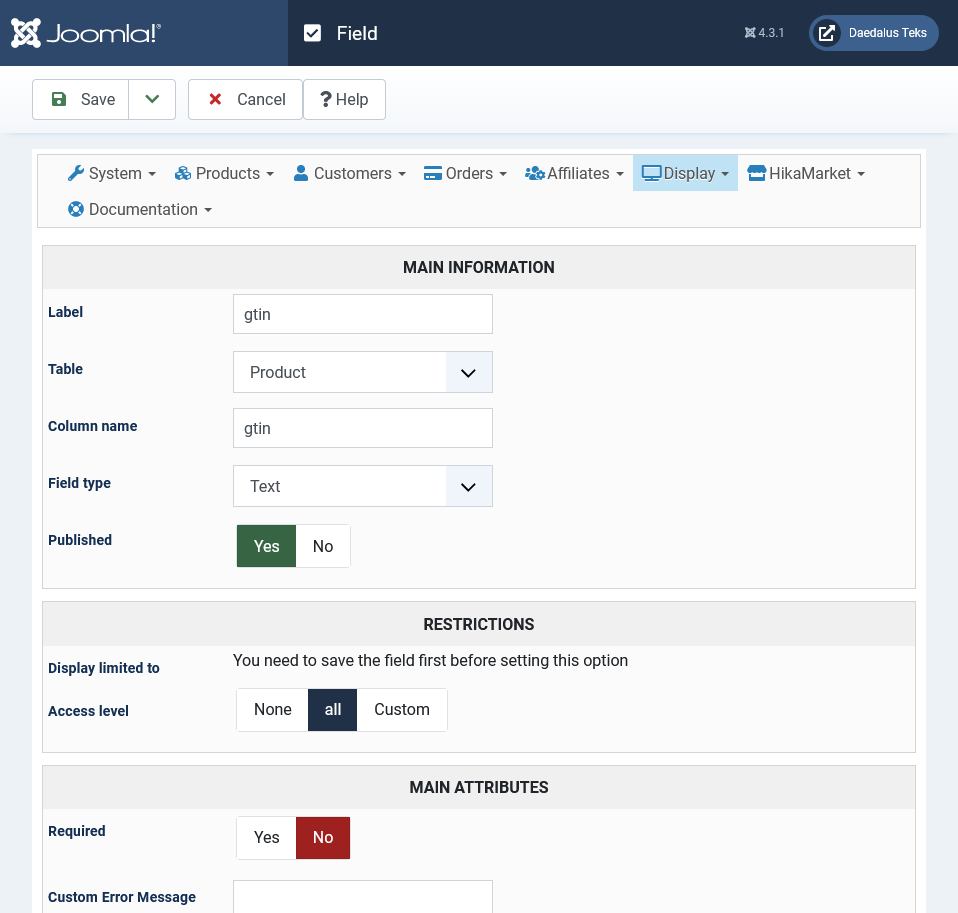
Does this look right? What do you mean you'll get the field when you edit each product? And I have to add a gtin number to the product myself? So I have to go through all 4000+ products and create a random gtin? I'm so lost.
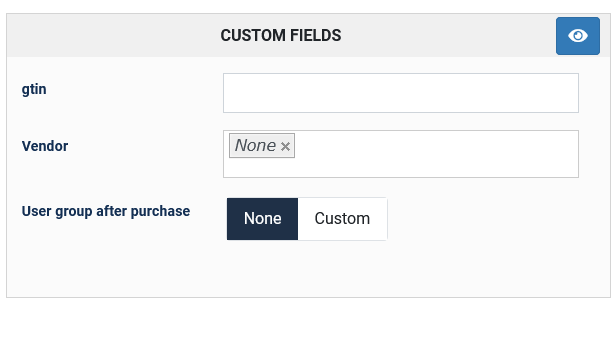
Which I'm guessing so because now there is a blank field but, its blank. SO if we have to go through each product and put in a random number or etc.... its going to take forever and be so inefficient...
Replied by daedalusteks on topic Shipping and Google Merchant account
nicolas wrote: Hi,
You need to create a custom field of the table "product" where you can store the gtin of each one of your products (you'll get the field when you edit each product in the backend).
Then, in the settings of the Google Products plugin, in the "gtin" field, enter the column name of the custom field and the generated XML feed will include the gtin of your products and you won't get that limited performance warning on the missing gtin.
Does this look right? What do you mean you'll get the field when you edit each product? And I have to add a gtin number to the product myself? So I have to go through all 4000+ products and create a random gtin? I'm so lost.
Which I'm guessing so because now there is a blank field but, its blank. SO if we have to go through each product and put in a random number or etc.... its going to take forever and be so inefficient...
Last edit: 2 years 8 months ago by daedalusteks. Reason: adding
Please Log in or Create an account to join the conversation.

2 years 8 months ago #357940
by nicolas
Replied by nicolas on topic Shipping and Google Merchant account
Hi,
You've answered to this request 2 days ago:
www.hikashop.com/forum/import-export-csv...-account.html#357899
Now you're complaining that it's been 6 months that you're not able to use this plugin, as if it's because of my answers that you're not able to set it up, but you're the one slowing down the process.
The help for the GTIN setting in the plugin says:
A GTIN is not mandatory for Google Merchant, it depends where you're located and what you're selling, and the product edit page already has many settings. That's why it uses custom products when necessary, so that only merchants who need it can have a GTIN field in their products edit screen.
support.google.com/merchants/answer/6324461?hl=en
If you're selling books, then the GTIN should be the ISBN of each book for example.
If you already have a GTIN in the "product code" of each product, then you don't need to create a custom field. You can just enter "product_code" in the GTIN setting of the plugin so that the plugin will provide the product code as GTIN of your products to Google.
The best for what to use as GTIN is to read and follow the Google documentation page on this.
That's why I told you:
The screenshot says "So please check your products". And that was 1 month ago.I'm sorry "Screenshot says what?"
You've answered to this request 2 days ago:
www.hikashop.com/forum/import-export-csv...-account.html#357899
Now you're complaining that it's been 6 months that you're not able to use this plugin, as if it's because of my answers that you're not able to set it up, but you're the one slowing down the process.
Click on the "help" button on the page where you're editing the settings of the plugin, and you'll get information about each setting.So how would I do that, look all I"m saying is it should work without us having to "patch" or use custom fields to get it functional and if we should there should be a forum instructional area or perhaps instructions on the plugin page to get it running.
The help for the GTIN setting in the plugin says:
Custom fields can be created in the menu Display>Custom fields of HikaShop. Please go there, click on the "new" button, select "product" in the "table" setting, and enter the label "gtin". Then, click "save" and that's it. Then, in each product edit page, you'll have that gtin field where you can enter the gtin of the product. And in the settings of the Google Products plugin, you can enter the column name "gtin" so that the plugin will use the value in each product in order to provide the GTIN in the XML feed.If you enter here the column name of a custom product field, it will use the value of the custom field for each product allowing you to have a GTIN for each products for which the custom field is filled. If you leave this field empty, no GTIN will be added to the feed.
A GTIN is not mandatory for Google Merchant, it depends where you're located and what you're selling, and the product edit page already has many settings. That's why it uses custom products when necessary, so that only merchants who need it can have a GTIN field in their products edit screen.
Yes, it looks right. And yes, you would have to edit each product to provide it. I don't know if you have to create a random gtin. What to do depends on what you're selling:Does this look right? What do you mean you'll get the field when you edit each product? And I have to add a gtin number to the product myself? So I have to go through all 4000+ products and create a random gtin? I'm so lost.
support.google.com/merchants/answer/6324461?hl=en
If you're selling books, then the GTIN should be the ISBN of each book for example.
If you already have a GTIN in the "product code" of each product, then you don't need to create a custom field. You can just enter "product_code" in the GTIN setting of the plugin so that the plugin will provide the product code as GTIN of your products to Google.
The best for what to use as GTIN is to read and follow the Google documentation page on this.
I also don't know what to do or what fix would prevent this issue.Missing value for shipping rate [shipping weight] hikashop because I've been trying to do this for IDK how long but its a 7 year problem. I don't know what to do, create a field, can't name it what it needs to be becuase hikashop has a name like that internally. Can we just a get a fix that integrates this?
This seems like its broken and get us to do a patch with extra steps fix. Or can we get an actual walk through, after 7 years of this being such a problem i think that would be the easiest solution until you fix this.
That's why I told you:
You just ignored the instructions in my previous message and then you're complaining that we're not providing the solution... If you want your issue to be solved, please follow my instructions.we'll need more information to be able to understand what's going on because you're the first person to report this issue.
Please provide a copy of the XML file. A backend access in order to check your settings would be great too.
Also, could you provide the product code of one or two products with the issue ? Or is that error output for all the products ?
Also, if you could provide access to the Google Merchant account in order to try to reproduce the error, it would be great, but I suppose it will be difficult.
You can provide these via our contact form with a link to this thread for reference :
www.hikashop.com/support/contact-us.html
Please Log in or Create an account to join the conversation.
Less
More
- Posts: 107
- Thank you received: 4
2 years 7 months ago #358619
by daedalusteks
Replied by daedalusteks on topic Shipping and Google Merchant account
I'm still having issues with this, I need help. Can we get some assistance? And Gtin is required
Please Log in or Create an account to join the conversation.
2 years 7 months ago #358630
by nicolas
Replied by nicolas on topic Shipping and Google Merchant account
Hi,
Sure. We'll need more information to be able to understand what's going on because you're the first person to report this issue.
Please provide a copy of the XML file. A backend access in order to check your settings would be great too.
Also, could you provide the product code of one or two products with the issue ? Or is that error output for all the products ?
Also, if you could provide access to the Google Merchant account in order to try to reproduce the error, it would be great, but I suppose it will be difficult.
You can provide these via our contact form with a link to this thread for reference :
www.hikashop.com/support/contact-us.html
Sure. We'll need more information to be able to understand what's going on because you're the first person to report this issue.
Please provide a copy of the XML file. A backend access in order to check your settings would be great too.
Also, could you provide the product code of one or two products with the issue ? Or is that error output for all the products ?
Also, if you could provide access to the Google Merchant account in order to try to reproduce the error, it would be great, but I suppose it will be difficult.
You can provide these via our contact form with a link to this thread for reference :
www.hikashop.com/support/contact-us.html
Please Log in or Create an account to join the conversation.
Less
More
- Posts: 107
- Thank you received: 4
2 years 6 months ago #359414
by daedalusteks
Replied by daedalusteks on topic Shipping and Google Merchant account
Nicolas,
Can I create you an account on the backend? We are due for renewal and I'm trying to justify to my partners (we are just 3 too) the cost vs how long we've spent trying to get this going correctly.
If I get you back logins and what you need can we continue from there?
Can I create you an account on the backend? We are due for renewal and I'm trying to justify to my partners (we are just 3 too) the cost vs how long we've spent trying to get this going correctly.
If I get you back logins and what you need can we continue from there?
Please Log in or Create an account to join the conversation.
2 years 6 months ago #359417
by nicolas
Replied by nicolas on topic Shipping and Google Merchant account
Hi,
If you can provide the information I requested, I'll be happy to look into it.
If you can provide the information I requested, I'll be happy to look into it.
Please Log in or Create an account to join the conversation.
Time to create page: 0.237 seconds