
- Posts: 31
- Thank you received: 0
Import products via CSV (Able to attach files (pdfs))
- trevor.icon
-
 Topic Author
- Offline
Less
More
9 years 8 months ago - 9 years 8 months ago #261237
by trevor.icon
Import products via CSV (Able to attach files (pdfs)) was created by trevor.icon
-- HikaShop version -- : 3.0.0
-- Joomla version -- : 3.6.5
-- PHP version -- : 5.4.24
-- Error-message(debug-mod must be tuned on) -- : No error message, just a question regarding upload csv
Hi,
I am wondering if it is possible when updating or adding products via import csv file if it is possible to add files (pdfs) against a product within the csv?
I see there is a field (cell) files, I added the filename in this cell but it did not add it to the section IMAGES AND FILES (in administrator area) nor on the product detail page.
I placed the pdf into the directory /media/com_hikashop/upload/safe
I am wondering if this is possible to add a file against a product via csv import.
If possible, can you also name the file, update the downloads number limit and free download within the csv import?
Thank you
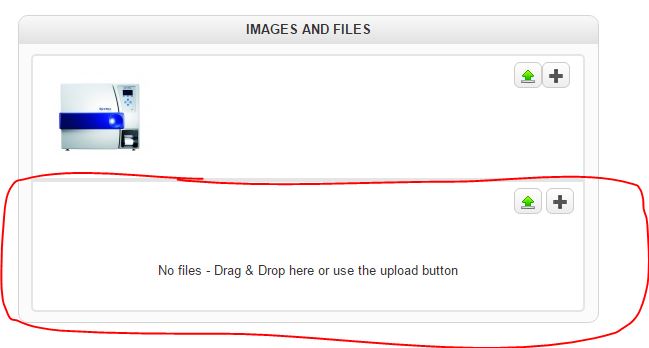 - Files section within admin area
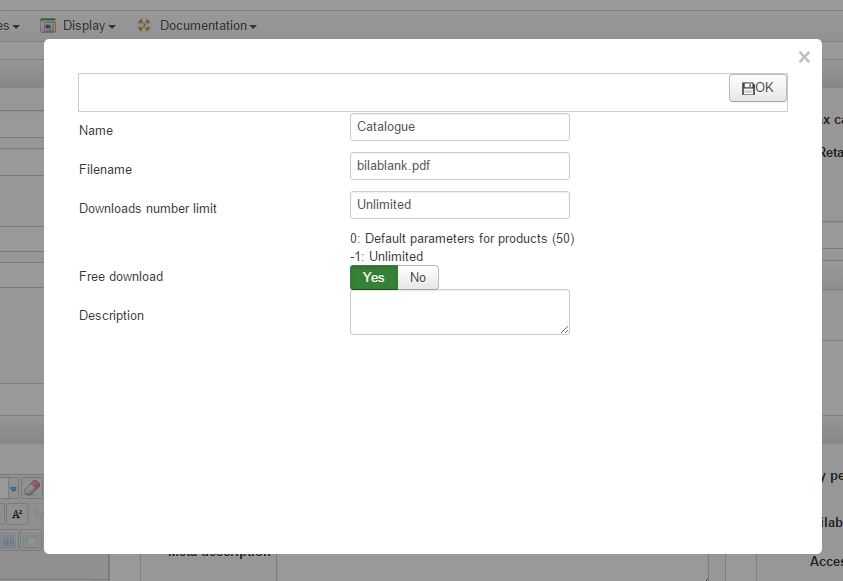 - Change file details
-- Joomla version -- : 3.6.5
-- PHP version -- : 5.4.24
-- Error-message(debug-mod must be tuned on) -- : No error message, just a question regarding upload csv
Hi,
I am wondering if it is possible when updating or adding products via import csv file if it is possible to add files (pdfs) against a product within the csv?
I see there is a field (cell) files, I added the filename in this cell but it did not add it to the section IMAGES AND FILES (in administrator area) nor on the product detail page.
I placed the pdf into the directory /media/com_hikashop/upload/safe
I am wondering if this is possible to add a file against a product via csv import.
If possible, can you also name the file, update the downloads number limit and free download within the csv import?
Thank you
This attachment is hidden for guests.
Please log in or register to see it.
- csv filePlease log in or register to see it.
Last edit: 9 years 8 months ago by trevor.icon.
Please Log in or Create an account to join the conversation.

9 years 8 months ago #261240
by nicolas
Replied by nicolas on topic Import products via CSV
Hi,
Here is what I get on my test website when I import your CSV:
monosnap.com/file/q5UpAzUieerziZxPumYUnRWAywBTUz
As you can see, I get the PDF in the Images and Files section as it should.
So there is no reason it wouldn't work the same on your end too.
The problem must be elsewhere. For example, you're not looking at the product you imported but another one with the same name, or something like that.
And yes, you can also set the number limit and the free download with the columns files_free_download and files_limit in your CSV.
Here is what I get on my test website when I import your CSV:
monosnap.com/file/q5UpAzUieerziZxPumYUnRWAywBTUz
As you can see, I get the PDF in the Images and Files section as it should.
So there is no reason it wouldn't work the same on your end too.
The problem must be elsewhere. For example, you're not looking at the product you imported but another one with the same name, or something like that.
And yes, you can also set the number limit and the free download with the columns files_free_download and files_limit in your CSV.
Please Log in or Create an account to join the conversation.
- trevor.icon
-
Topic Author
- Offline
Less
More
- Posts: 31
- Thank you received: 0
9 years 8 months ago #261413
by trevor.icon
Replied by trevor.icon on topic Import products via CSV
Thank you for the reply.
Just want to double check, in the csv upload file, the cell name is files or pdf?
Also can you name the file within the csv? e.g. when you upload the file via the administrator area, it reads on the front end as the filename; but in the admin area you can change the name to display on the front end.
And...
In the csv upload, can you add multiple files within the cell by adding a comma between the filenames? e.g. file1.pdf, file2.pdf like you can do for the images?
Plus were do you upload the files to, which directory?
Just want to double check, in the csv upload file, the cell name is files or pdf?
Also can you name the file within the csv? e.g. when you upload the file via the administrator area, it reads on the front end as the filename; but in the admin area you can change the name to display on the front end.
And...
In the csv upload, can you add multiple files within the cell by adding a comma between the filenames? e.g. file1.pdf, file2.pdf like you can do for the images?
Plus were do you upload the files to, which directory?
Please Log in or Create an account to join the conversation.
9 years 8 months ago #261422
by nicolas
Replied by nicolas on topic Import products via CSV
Hi,
It should be "files".
And yes, you can name the file within the CSV. You have the files_name column you can use for that.
And yes, you can have multiple files by separating them with a comma. In that case, you need to same number of comma in all the files_* columns of the CSV.
The files can be uploaded in the upload safe folder that you configured in the HikaShop configuration. The default folder is media/com_hikashop/upload/safe/
It should be "files".
And yes, you can name the file within the CSV. You have the files_name column you can use for that.
And yes, you can have multiple files by separating them with a comma. In that case, you need to same number of comma in all the files_* columns of the CSV.
The files can be uploaded in the upload safe folder that you configured in the HikaShop configuration. The default folder is media/com_hikashop/upload/safe/
Please Log in or Create an account to join the conversation.
- trevor.icon
-
Topic Author
- Offline
Less
More
- Posts: 31
- Thank you received: 0
9 years 7 months ago #264621
by trevor.icon
Replied by trevor.icon on topic Import products via CSV
Hi
Another question regarding the csv, is there a field (what is it) to resize the image that has been uploaded into the image directory along with auto creating a thumbnail.
Is there a field? what is the label? also is there a field to add width and height?
Another question regarding the csv, is there a field (what is it) to resize the image that has been uploaded into the image directory along with auto creating a thumbnail.
Is there a field? what is the label? also is there a field to add width and height?
Please Log in or Create an account to join the conversation.
9 years 7 months ago #264644
by nicolas
Replied by nicolas on topic Import products via CSV
Hi,
Images are automatically resized if you set the "image" (width/height) setting of the Images section of the HikaShop configuration.
Note that this is a resizing of the original image. You won't get it big again after it is resized, even if you change that setting, unless the image is deleted and reuploaded.
The thumbnails are generated automatically based on the settings of your menu items, your modules, and the other settings of the "Images" section of the configuration.
Images are automatically resized if you set the "image" (width/height) setting of the Images section of the HikaShop configuration.
Note that this is a resizing of the original image. You won't get it big again after it is resized, even if you change that setting, unless the image is deleted and reuploaded.
The thumbnails are generated automatically based on the settings of your menu items, your modules, and the other settings of the "Images" section of the configuration.
Please Log in or Create an account to join the conversation.
Time to create page: 0.292 seconds