

- Posts: 80
- Thank you received: 0
export via quickbook
6 years 11 months ago - 6 years 11 months ago #312579
by idimarco
-- Joomla version -- : Joomla! 3.9.12
-- PHP version -- : 7.1.30
-- Browser(s) name and version -- : firefox
Hi
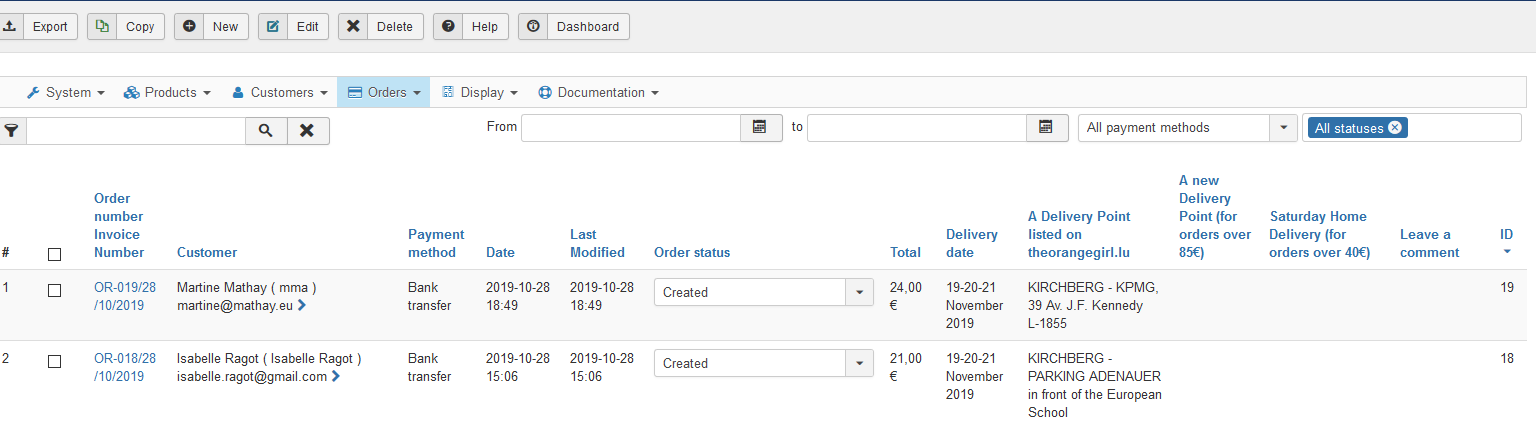
When I export order listing from backend using Quickbook, the extract file with colomns from A to AQ (see attachment) does not desplay the colomns I can see in the backend, like
A Delivery Point listed on theorangegirl.lu
A new Delivery Point (for orders over 85€)
Saturday Home Delivery (for orders over 40€)
(see the printscreen attached)
How can I do to have in the extract file the same colomns as the ones I can see in order listing backend screen?
Thanks
export via quickbook was created by idimarco
This attachment is hidden for guests.
Please log in or register to see it.
-- HikaShop version -- : 4.2.2Please log in or register to see it.
-- Joomla version -- : Joomla! 3.9.12
-- PHP version -- : 7.1.30
-- Browser(s) name and version -- : firefox
Hi
When I export order listing from backend using Quickbook, the extract file with colomns from A to AQ (see attachment) does not desplay the colomns I can see in the backend, like
A Delivery Point listed on theorangegirl.lu
A new Delivery Point (for orders over 85€)
Saturday Home Delivery (for orders over 40€)
(see the printscreen attached)
How can I do to have in the extract file the same colomns as the ones I can see in order listing backend screen?
Thanks
Last edit: 6 years 11 months ago by idimarco.
Please Log in or Create an account to join the conversation.

6 years 11 months ago #312589
by nicolas
Replied by nicolas on topic export via quickbook
Hi,
I suppose that you're using this quickbook plugin:
www.hikashop.com/marketplace/product/216...port-by-obsidev.html
This plugin was made to only export a specific set of columns and not all the columns like the default export do.
So if you want to change that, you'll have to edit the file plugins/hikashop/quickbooks/quickbooks.php and add the column name of the custom fields you want to export in the $fields array starting from line 53.
I suppose that you're using this quickbook plugin:
www.hikashop.com/marketplace/product/216...port-by-obsidev.html
This plugin was made to only export a specific set of columns and not all the columns like the default export do.
So if you want to change that, you'll have to edit the file plugins/hikashop/quickbooks/quickbooks.php and add the column name of the custom fields you want to export in the $fields array starting from line 53.
Please Log in or Create an account to join the conversation.
Time to create page: 0.143 seconds