

- Posts: 645
- Thank you received: 26
Why different output of column order_full_price?
5 years 6 months ago - 5 years 6 months ago #332372
by Lumiga
Kind regards,
Lumiga
Why different output of column order_full_price? was created by Lumiga
Hi Support,
When we export order and we open the file in Excel and we look al the column order_full_price we don't see consistent input.
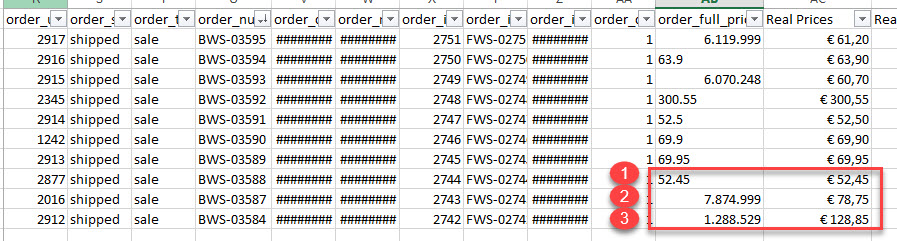
For example:
Line 1: We have to change the . (point) to a , (comma)
Line 2: We have to divide the cell by 100000 (hundred thousand)
Line 3: we have to divide the cell by 10000 (ten thousand)
Why? this way we cannot quickly add up because we have to manually check all orders first.
I hope you have a solution for this.
Kind regards,
Lumiga
When we export order and we open the file in Excel and we look al the column order_full_price we don't see consistent input.
For example:
Line 1: We have to change the . (point) to a , (comma)
Line 2: We have to divide the cell by 100000 (hundred thousand)
Line 3: we have to divide the cell by 10000 (ten thousand)
Why? this way we cannot quickly add up because we have to manually check all orders first.
I hope you have a solution for this.
Kind regards,
Lumiga
Kind regards,
Lumiga
Last edit: 5 years 6 months ago by Lumiga.
Please Log in or Create an account to join the conversation.

5 years 6 months ago #332386
by nicolas
Replied by nicolas on topic Why different output of column order_full_price?
Hi,
That's because of how your software interpret the number with a dot. Instead of considering it as a decimal separator it considers it as a thousand separator and thus it gets messed up.
Change the "decimal separator" setting of the HikaShop configuration to comma instead of dot and it should help when you export new CSV files and open them with your software.
Alternatively, you can configure your software to use the correct separators when you open the CSV file with it. For example for excel, you need to use the "CSV import" tool ( www.hesa.ac.uk/support/user-guides/import-csv ) instead of just double clicking on the file. If you double click on the file, it just use the default presets of your locale (based on your Excel version, and language, it can vary ).
The following user(s) said Thank You: Lumiga
Please Log in or Create an account to join the conversation.
5 years 6 months ago #332405
by Lumiga
Kind regards,
Lumiga
Replied by Lumiga on topic Why different output of column order_full_price?
Thanks! Works perfect now! 
Kind regards,
Lumiga
Please Log in or Create an account to join the conversation.
Time to create page: 0.059 seconds