

- Posts: 1186
- Thank you received: 13
import procedure create new product id's
4 years 5 months ago #341390
by verzevoul
import procedure create new product id's was created by verzevoul
-- HikaShop version -- : 4.5.1
-- Joomla version -- : 3.10.8
-- PHP version -- : 7.4
Ιmport procedure create new product id's : 153GM 153GXS 153GXL 153GXXL while the mentioned product id already exist in database
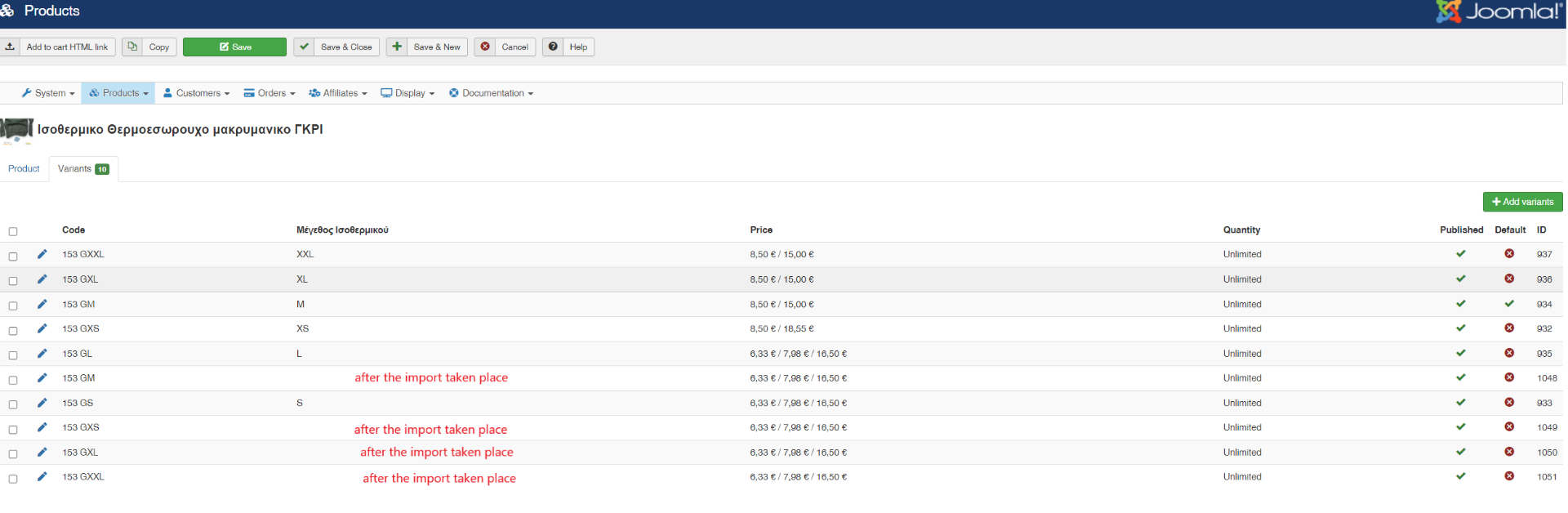
both parent id and product id are the same
-- Joomla version -- : 3.10.8
-- PHP version -- : 7.4
Ιmport procedure create new product id's : 153GM 153GXS 153GXL 153GXXL while the mentioned product id already exist in database
both parent id and product id are the same
Please Log in or Create an account to join the conversation.

4 years 5 months ago #341394
by nicolas
Replied by nicolas on topic import procedure create new product id's
Hi,
This sounds like the value entered under the column of the characteristic in your CSV doesn't exist for that characteristic in the HikaShop backend.
For example, if you have an extra space at the end of the value for that characteristic, this could happen. And in that case, since the system can create the variant, but doesn't know to which value it should assign the variant for that characteristic, there would be no value displayed in the column of that characteristic for the variants with the issue.
This sounds like the value entered under the column of the characteristic in your CSV doesn't exist for that characteristic in the HikaShop backend.
For example, if you have an extra space at the end of the value for that characteristic, this could happen. And in that case, since the system can create the variant, but doesn't know to which value it should assign the variant for that characteristic, there would be no value displayed in the column of that characteristic for the variants with the issue.
Please Log in or Create an account to join the conversation.
4 years 5 months ago #341743
by verzevoul
Replied by verzevoul on topic import procedure create new product id's
Please check the file I uploaded, I only erased the prices.
Do you see any error?
problematic product code 153g (main) 472 line
variants lines 559 to 564
Do you see any error?
problematic product code 153g (main) 472 line
variants lines 559 to 564
Please Log in or Create an account to join the conversation.
4 years 5 months ago #341749
by nicolas
Replied by nicolas on topic import procedure create new product id's
Hi,
You're missing the columns for the characteristics of your products / variants in your CSV.
I would recommend you to check the section "Importing products with variants" of our import documentation here:
www.hikashop.com/support/documentation/7...shop-import.html#csv
You're missing the columns for the characteristics of your products / variants in your CSV.
I would recommend you to check the section "Importing products with variants" of our import documentation here:
www.hikashop.com/support/documentation/7...shop-import.html#csv
Please Log in or Create an account to join the conversation.
4 years 3 months ago - 4 years 3 months ago #342842
by verzevoul
Replied by verzevoul on topic import procedure create new product id's
Hello!
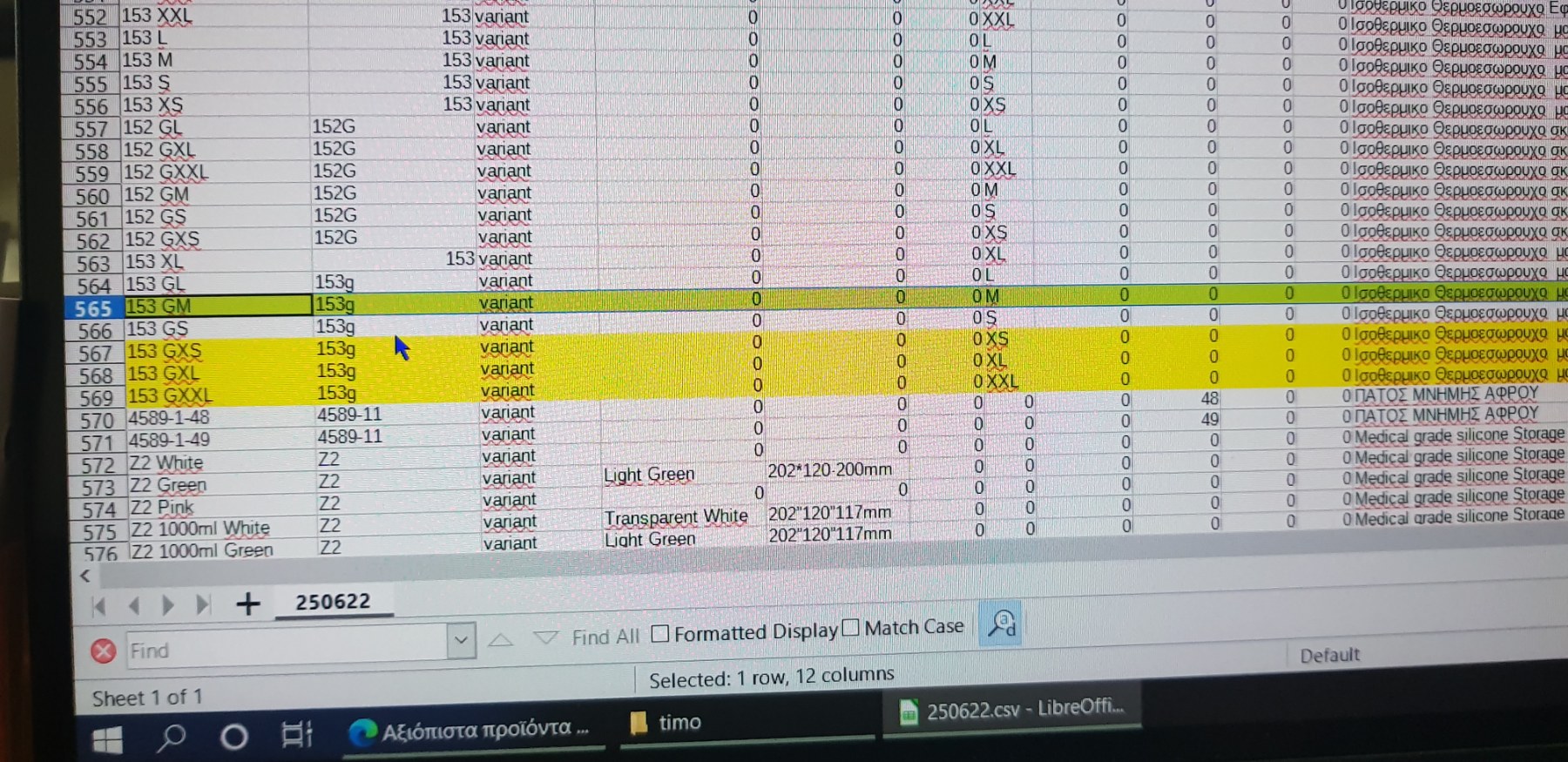
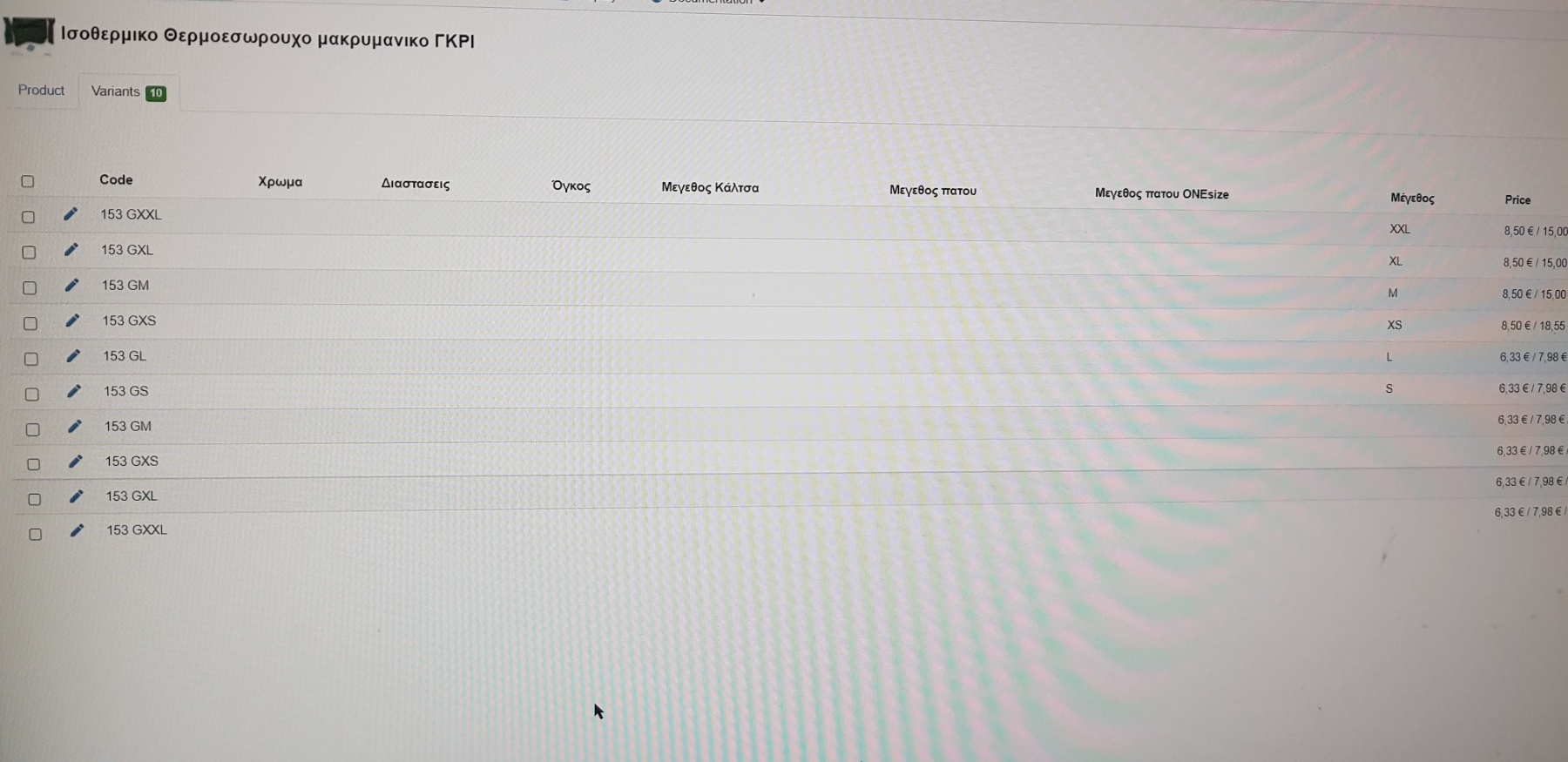
We tried to import with the new columns (characteristics) and default value on the main product. But again it created the unecessary rows
Please check printscreens and csv imported.
I can give you backend if its possible to try it yourself.
Thanks
We tried to import with the new columns (characteristics) and default value on the main product. But again it created the unecessary rows
Please check printscreens and csv imported.
I can give you backend if its possible to try it yourself.
Thanks
Last edit: 4 years 3 months ago by verzevoul. Reason: Not all files were uploaded
Please Log in or Create an account to join the conversation.
4 years 3 months ago #342843
by verzevoul
Replied by verzevoul on topic import procedure create new product id's
Please Log in or Create an account to join the conversation.
4 years 3 months ago #342844
by nicolas
Replied by nicolas on topic import procedure create new product id's
Hi,
You can't have "0" for the columns of characteristics you don't want to use for a variant / main product. You should have a completely empty cell.
Here, the system thinks you're trying to add variants with characteristics with a "0" value.
You can't have "0" for the columns of characteristics you don't want to use for a variant / main product. You should have a completely empty cell.
Here, the system thinks you're trying to add variants with characteristics with a "0" value.
Please Log in or Create an account to join the conversation.
4 years 3 months ago #342958
by verzevoul
Replied by verzevoul on topic import procedure create new product id's
Hello Nicolas and thank you for the reply!
I tried as adviced but still these extra variants are created.
Please check my scv.
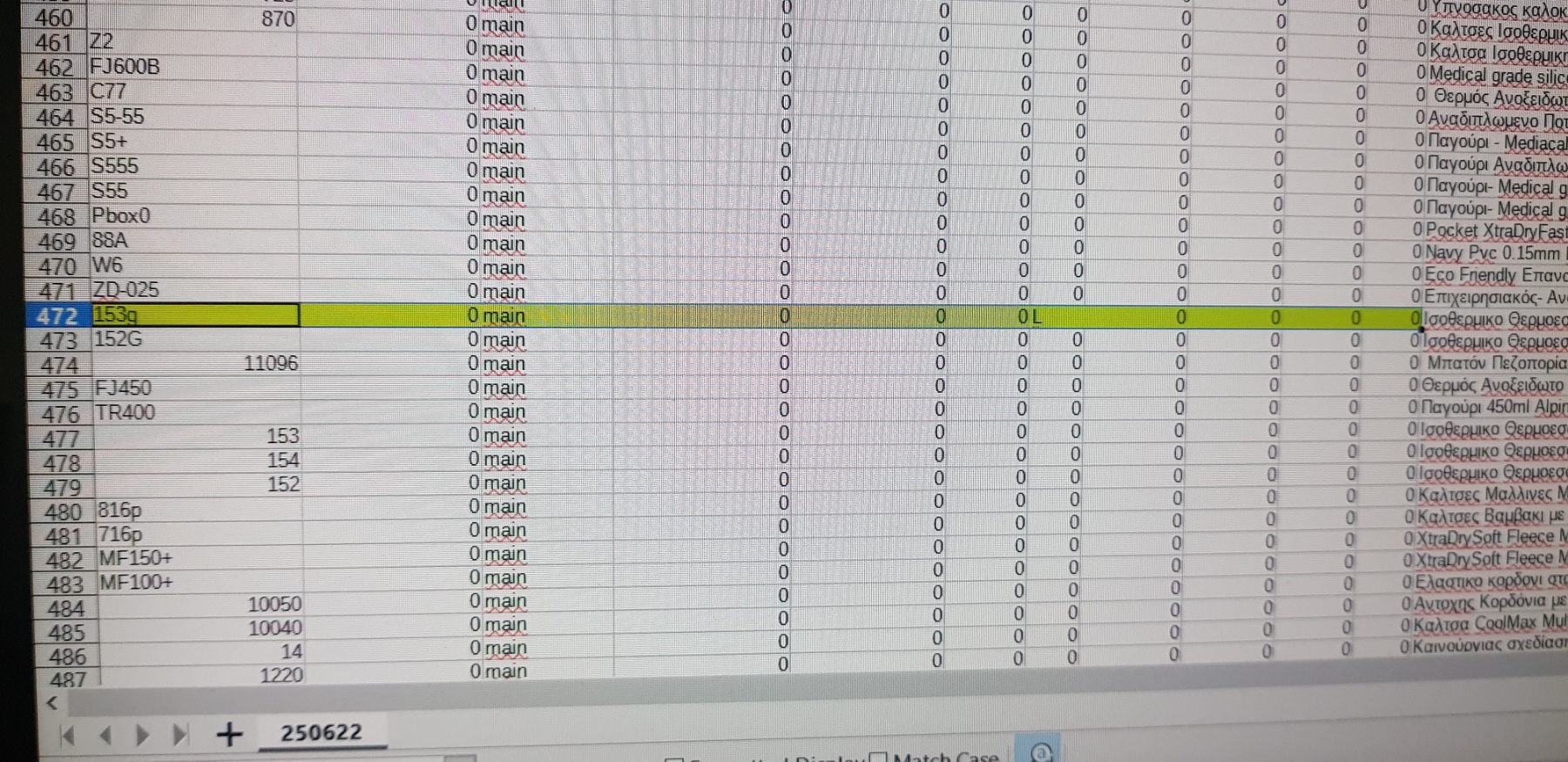
Look for the groduct with product_code : 153g
This is the main product that has the default value (L) for Large and his variants as you chech product_parent_id: 153g
But again we have dublicated entries see screenshot 2
I tried as adviced but still these extra variants are created.
Please check my scv.
Look for the groduct with product_code : 153g
This is the main product that has the default value (L) for Large and his variants as you chech product_parent_id: 153g
But again we have dublicated entries see screenshot 2
Please Log in or Create an account to join the conversation.
4 years 3 months ago - 4 years 3 months ago #342964
by nicolas
Replied by nicolas on topic import procedure create new product id's
Hi,
I made tests with HikaShop 4.6.1's import tool with a simplified version of your CSV file and it works just fine:
i.imgur.com/jNeh2Ts.png
I attach the CSV I used. You can see I left only that 153g product and removed the unnessecary columns.
So either there is still a problem with the CSV you're using, or there is a problem with the settings of the characteristic "size" itself, or your HikaShop has a bug which mean doesn't, but I don't recall any issue regarding the import of variants that we fixed.
I made tests with HikaShop 4.6.1's import tool with a simplified version of your CSV file and it works just fine:
i.imgur.com/jNeh2Ts.png
I attach the CSV I used. You can see I left only that 153g product and removed the unnessecary columns.
This attachment is hidden for guests.
Please log in or register to see it.
Please log in or register to see it.
So either there is still a problem with the CSV you're using, or there is a problem with the settings of the characteristic "size" itself, or your HikaShop has a bug which mean doesn't, but I don't recall any issue regarding the import of variants that we fixed.
Last edit: 4 years 3 months ago by nicolas.
Please Log in or Create an account to join the conversation.
4 years 3 months ago #342980
by verzevoul
Replied by verzevoul on topic import procedure create new product id's
Hello.
So my attached file should normally work?
So my attached file should normally work?
Please Log in or Create an account to join the conversation.
4 years 3 months ago #342983
by verzevoul
Replied by verzevoul on topic import procedure create new product id's
If you import this csv , in my installation I get all ok in the db (see attached) but in the backend there is no
Please Log in or Create an account to join the conversation.
4 years 3 months ago - 4 years 3 months ago #342982
by nicolas
Replied by nicolas on topic import procedure create new product id's
Hi,
Yes. It works fine on my end (minus the missing columns that I didn't create on my end like xml_show).
Please note however that you've changed the product_code of your variants. Before they had a space between 153G and the size. If the variant doesn't have the same product_code between the CSV and the database, the system won't be able to update it and that could explain why it's adding extra variants instead of updating them.
Now there is a solution to this:
If you turn off the "KEEP_OTHER_VARIANTS" setting, the import will delete the old variants when importing the new ones, so it will be as if it was replacing them (although the information not provided in the CSV and already in the variants in the database will be lost (like for example the "product_description").
Also, did you check the "values" of the characteistic itself in the menu Products>characteristics to make sure that the values are exactly the same as you have in the CSV file (no extra space) ?
Yes. It works fine on my end (minus the missing columns that I didn't create on my end like xml_show).
Please note however that you've changed the product_code of your variants. Before they had a space between 153G and the size. If the variant doesn't have the same product_code between the CSV and the database, the system won't be able to update it and that could explain why it's adding extra variants instead of updating them.
Now there is a solution to this:
If you turn off the "KEEP_OTHER_VARIANTS" setting, the import will delete the old variants when importing the new ones, so it will be as if it was replacing them (although the information not provided in the CSV and already in the variants in the database will be lost (like for example the "product_description").
Also, did you check the "values" of the characteistic itself in the menu Products>characteristics to make sure that the values are exactly the same as you have in the CSV file (no extra space) ?
Last edit: 4 years 3 months ago by nicolas.
Please Log in or Create an account to join the conversation.
3 years 9 months ago #348313
by verzevoul
Replied by verzevoul on topic import procedure create new product id's
Hello Nicolas!
In this matter we still get a problem .
Whan we import csv as we already discussed we have as parent _ id the product code. And in some cases it doesn t work. I think it doesn t work when the value is int. Is it true?
Because for examle you see attached the product with code 153 that has some variants. They where created in the database but with the wrong parent_id.
It should be 939 because id 939 has product code 153.
But if its code was 153f (for example) not just int, import i think works.
Is it true? How can we overcome this?
In this matter we still get a problem .
Whan we import csv as we already discussed we have as parent _ id the product code. And in some cases it doesn t work. I think it doesn t work when the value is int. Is it true?
Because for examle you see attached the product with code 153 that has some variants. They where created in the database but with the wrong parent_id.
It should be 939 because id 939 has product code 153.
But if its code was 153f (for example) not just int, import i think works.
Is it true? How can we overcome this?
Please Log in or Create an account to join the conversation.
3 years 9 months ago #348316
by nicolas
Replied by nicolas on topic import procedure create new product id's
Hi,
Indeed. If you provide an integer, then the system will think you're referencing a product_id and not a product_code and so it will first look for the product with that product_id and only if it doesn't find it, it will look for the a product with that product_code.
There are three ways to overcome this:
- don't use a number for the product_code
- use a number which isn't a product_id
- delete the code:
from hikashop/administrator/components/com_hikashop/helpers/import.php so that it doesn't look for the product_id, only product_code
Indeed. If you provide an integer, then the system will think you're referencing a product_id and not a product_code and so it will first look for the product with that product_id and only if it doesn't find it, it will look for the a product with that product_code.
There are three ways to overcome this:
- don't use a number for the product_code
- use a number which isn't a product_id
- delete the code:
Code:
if(is_numeric($parent_code)){
foreach($products as $k2 => $main){
if($variant->product_parent_id == @$main->product_id){
$parent_code=$main->product_code;
}
}
}
Please Log in or Create an account to join the conversation.
Time to create page: 0.272 seconds