

- Posts: 637
- Thank you received: 26
How does the process work after the payment of the affiliates
5 years 11 months ago - 5 years 11 months ago #325961
by Lumiga
Kind regards,
Lumiga
-- HikaShop version -- : 4.3
Hi Nicolas,
When we paid the partner, they get an e-mail.
1. Where can we change the text of those emails (only for the payments of the affiliates)?
2. Why does this e-mail have an ordernumber but we can't see it on the back-end orderlist or at the affiliate page on the partners account?
3. We can see this order only on the website when we click on the ordernumber link in the e-mail. Is that correct?
4. And if we want to print the invoice, there is no invoicenumber on it. Is that also correct?
5. Do you have any idea why we get Telephone on the Billing address? With normal orders we don't have this issue. (see screenshot)
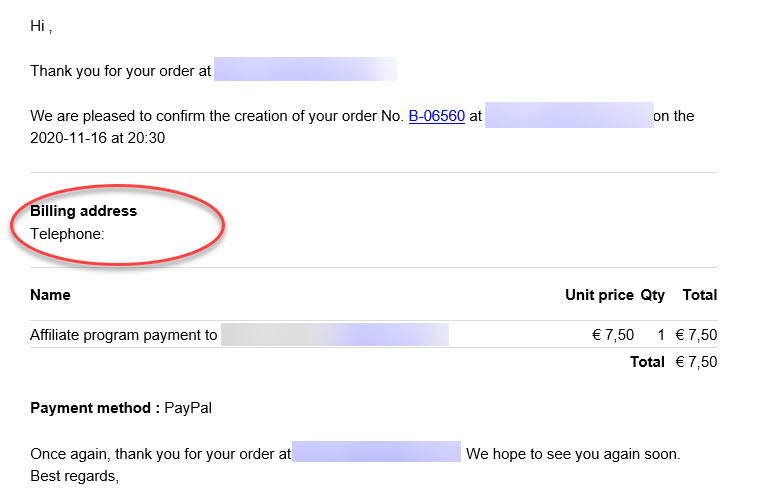
Kind regards,
Lumiga
Hi Nicolas,
When we paid the partner, they get an e-mail.
1. Where can we change the text of those emails (only for the payments of the affiliates)?
2. Why does this e-mail have an ordernumber but we can't see it on the back-end orderlist or at the affiliate page on the partners account?
3. We can see this order only on the website when we click on the ordernumber link in the e-mail. Is that correct?
4. And if we want to print the invoice, there is no invoicenumber on it. Is that also correct?
5. Do you have any idea why we get Telephone on the Billing address? With normal orders we don't have this issue. (see screenshot)
Kind regards,
Lumiga
Kind regards,
Lumiga
Last edit: 5 years 11 months ago by Lumiga.
Please Log in or Create an account to join the conversation.

5 years 11 months ago #325983
by nicolas
Replied by nicolas on topic How does the process work after the payment of the affiliates
Hi,
1. You will have to edit the code of the email in the System>Emails menu. There is no easy way to do it. You'll have to check if it is an affiliate order or not based on the order_type which will not be "sale".
2. We don't display it on the backend as it's not a normal order but a "payout".
3. That's correct
4. I guess that means that the PayPal plugin didn't receive the payment notification for that order. It can come from many things:
www.hikashop.com/support/documentation/i...or.html#notification
5. I'm not sure. Could you provide a screenshot of the details of that order in the backend (you can change the id in the URL of another order to access it) ?
1. You will have to edit the code of the email in the System>Emails menu. There is no easy way to do it. You'll have to check if it is an affiliate order or not based on the order_type which will not be "sale".
2. We don't display it on the backend as it's not a normal order but a "payout".
3. That's correct
4. I guess that means that the PayPal plugin didn't receive the payment notification for that order. It can come from many things:
www.hikashop.com/support/documentation/i...or.html#notification
5. I'm not sure. Could you provide a screenshot of the details of that order in the backend (you can change the id in the URL of another order to access it) ?
Please Log in or Create an account to join the conversation.
Time to create page: 0.062 seconds