

- Posts: 182
- Thank you received: 1
how can i edit module width?
15 years 6 months ago - 15 years 6 months ago #10011
by resif
how can i edit module width? was created by resif
there is a problem width module?
how can i edit module width?
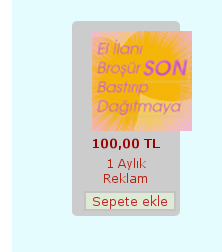
i want to use 150 px image width but backgorund is very tight and image is not center?
how can i edit module width?
i want to use 150 px image width but backgorund is very tight and image is not center?
Last edit: 15 years 6 months ago by resif.
Please Log in or Create an account to join the conversation.

15 years 6 months ago #10012
by nicolas
Replied by nicolas on topic Re: how can i edit module width?
The width will depend on the number of columns of your module. If you want a bigger width, just reduce the number of columns.
Please Log in or Create an account to join the conversation.
15 years 6 months ago #10013
by resif
Replied by resif on topic Re: how can i edit module width?
no my columns 210px this background aproaxly 120 px
or this module has padding or margin 20 or higher px
or this module has padding or margin 20 or higher px
Please Log in or Create an account to join the conversation.
15 years 6 months ago #10014
by nicolas
Replied by nicolas on topic Re: how can i edit module width?
The margin is also an option available in your module's hikashop options.
Please Log in or Create an account to join the conversation.
15 years 6 months ago #10015
by resif
Replied by resif on topic Re: how can i edit module width?
ok yes it is empty 0
but i didnt understand why is not separate product image and module image
changing together width
i want to use diffrent width
but i didnt understand why is not separate product image and module image
changing together width
i want to use diffrent width
Please Log in or Create an account to join the conversation.
15 years 6 months ago #10017
by nicolas
Replied by nicolas on topic Re: how can i edit module width?
You can use some CSS to reduce the size of your module images:
www.hikashop.com/en/support/forum/4-how-...uct-images.html#8333
www.hikashop.com/en/support/forum/4-how-...uct-images.html#8333
Please Log in or Create an account to join the conversation.
15 years 6 months ago - 15 years 6 months ago #10020
by resif
Replied by resif on topic Re: how can i edit module width?
not succesfuly i bored
lost backgorund color and overflow from box
lost backgorund color and overflow from box
Last edit: 15 years 6 months ago by resif.
Please Log in or Create an account to join the conversation.
15 years 6 months ago #10025
by nicolas
Replied by nicolas on topic Re: how can i edit module width?
There is no overflow and the background color is not related to the image size... I'm not following you...
Please Log in or Create an account to join the conversation.
Time to create page: 0.191 seconds