

- Posts: 42
- Thank you received: 1
Larger image on the product page?
14 years 10 months ago #29834
by Darken
Replied by Darken on topic Re: Larger image on the product page?
nicolas wrote:
Nicolas, I checked the "Help" documentation on that page and saw a "Height" field (no width though). But I cant see the height field on the right. Here is screenshot please take a look.
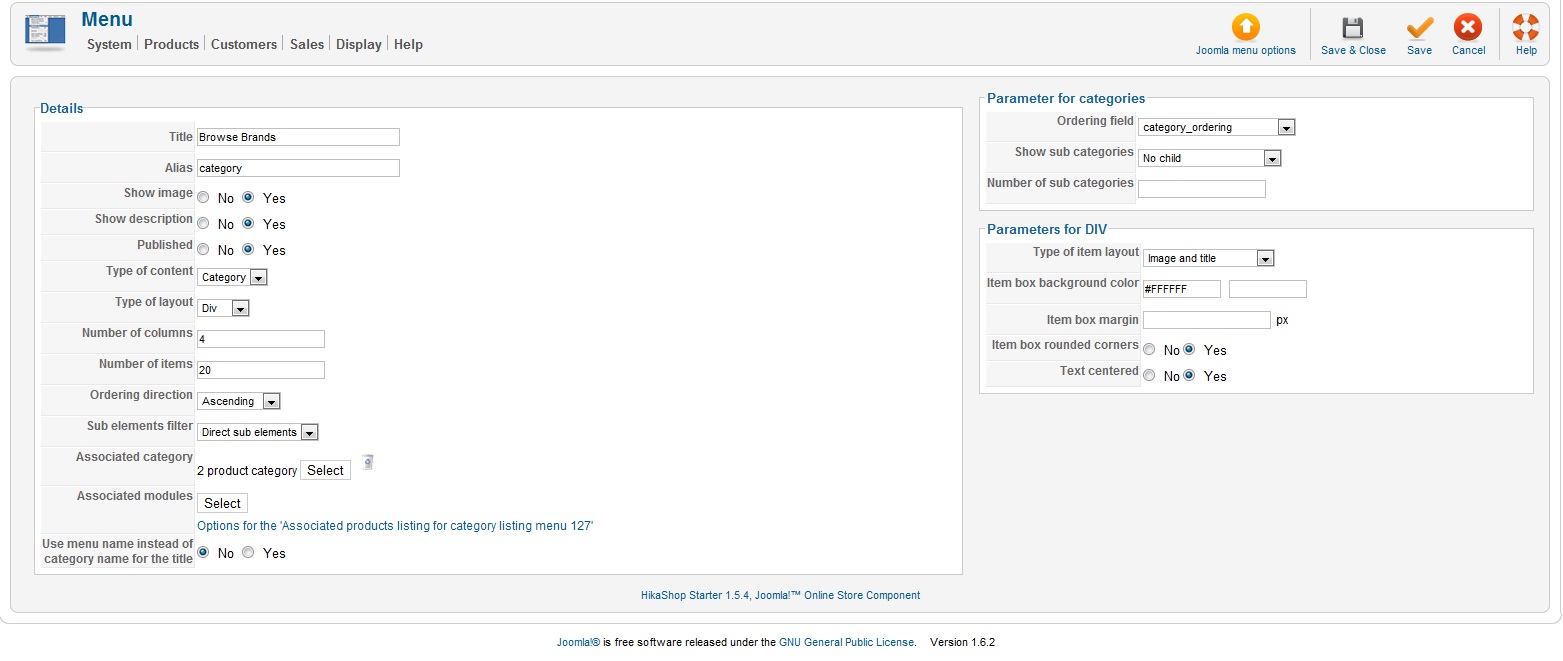
When you edit a module/menu, on the right side of the screen, you should find these options if you're using the latest version of HikaShop.
Nicolas, I checked the "Help" documentation on that page and saw a "Height" field (no width though). But I cant see the height field on the right. Here is screenshot please take a look.
Please Log in or Create an account to join the conversation.

14 years 10 months ago #29838
by nicolas
Replied by nicolas on topic Re: Larger image on the product page?
That's strange. You should see them, like on our demo website:
www.demo.hikashop.com/administrator/inde...=menus&task=edit&cid []=89
Could you give a back end access to your website so that we can check on that ?
www.demo.hikashop.com/administrator/inde...=menus&task=edit&cid []=89
Could you give a back end access to your website so that we can check on that ?
Please Log in or Create an account to join the conversation.
14 years 10 months ago #29840
by Darken
Replied by Darken on topic Re: Larger image on the product page?
nicolas wrote:
i have pm u. thank you
That's strange. You should see them, like on our demo website:
www.demo.hikashop.com/administrator/inde...=menus&task=edit&cid []=89
Could you give a back end access to your website so that we can check on that ?
i have pm u. thank you
Please Log in or Create an account to join the conversation.
14 years 10 months ago #29843
by nicolas
Replied by nicolas on topic Re: Larger image on the product page?
I checked the file administrator/components/com_hikashop/views/menus/tmpl/form.php and I can see that header at the top:
<?php
/**
* @package HikaShop for Joomla!
* @version 1.4.9
* @author hikashop.com
* @copyright (C) 2010 HIKARI SOFTWARE. All rights reserved.
* @license GNU/GPLv3 www.gnu.org/licenses/gpl-3.0.html
*/
defined('_JEXEC') or die('Restricted access');
?>
Which means that this file comes from an old version of HikaShop.
Thus, it's normal that you don't have these fields.
There was apparently a problem when you updated.
<?php
/**
* @package HikaShop for Joomla!
* @version 1.4.9
* @author hikashop.com
* @copyright (C) 2010 HIKARI SOFTWARE. All rights reserved.
* @license GNU/GPLv3 www.gnu.org/licenses/gpl-3.0.html
*/
defined('_JEXEC') or die('Restricted access');
?>
Which means that this file comes from an old version of HikaShop.
Thus, it's normal that you don't have these fields.
There was apparently a problem when you updated.
Please Log in or Create an account to join the conversation.
14 years 10 months ago #29844
by Darken
Replied by Darken on topic Re: Larger image on the product page?
nicolas wrote:
I see, how should I "re-update" hikashop then?
I checked the file administrator/components/com_hikashop/views/menus/tmpl/form.php and I can see that header at the top:
<?php
/**
* @package HikaShop for Joomla!
* @version 1.4.9
* @author hikashop.com
* @copyright (C) 2010 HIKARI SOFTWARE. All rights reserved.
* @license GNU/GPLv3 www.gnu.org/licenses/gpl-3.0.html
*/
defined('_JEXEC') or die('Restricted access');
?>
Which means that this file comes from an old version of HikaShop.
Thus, it's normal that you don't have these fields.
There was apparently a problem when you updated.
I see, how should I "re-update" hikashop then?
Please Log in or Create an account to join the conversation.
14 years 10 months ago #29845
by nicolas
Replied by nicolas on topic Re: Larger image on the product page?
Usually, you just have to use the joomla installer put upload the package via that screen.
Normally, it should work unless something, like access rights is not setup properly.
In that case you might want to try the install via FTP:
www.hikashop.com/en/support/documentatio...-install.html#errors
Normally, it should work unless something, like access rights is not setup properly.
In that case you might want to try the install via FTP:
www.hikashop.com/en/support/documentatio...-install.html#errors
Please Log in or Create an account to join the conversation.
14 years 10 months ago #29847
by Darken
Replied by Darken on topic Re: Larger image on the product page?
Nicolas,
I have installed again hikashop via the joomla installer and the settings have appeared. However, oddly the settings for width/height of product picture pop-up seem to have disappeared (it is not affecting me at the moment though).
My only problem left is for the product listings page whereby the div around each picture still had a big wide gap, I did not put any css that would affect it, so I do not know how to solve this, would appreciate your help. Thanks. My categories listings have since been solved.
I have installed again hikashop via the joomla installer and the settings have appeared. However, oddly the settings for width/height of product picture pop-up seem to have disappeared (it is not affecting me at the moment though).
My only problem left is for the product listings page whereby the div around each picture still had a big wide gap, I did not put any css that would affect it, so I do not know how to solve this, would appreciate your help. Thanks. My categories listings have since been solved.
Please Log in or Create an account to join the conversation.
14 years 10 months ago #29858
by nicolas
Replied by nicolas on topic Re: Larger image on the product page?
Make sure that you set the width/height you need for all your menus/modules via the menu Display->Content menus/modules.
Please Log in or Create an account to join the conversation.
14 years 10 months ago - 14 years 10 months ago #29885
by Darken
Replied by Darken on topic Re: Larger image on the product page?
nicolas wrote:
Thank you, problem has been solved!
However, there is a new problem. When I change characteristics, the main product image becomes very big and doesn't stay like normal thumbnail size.
Make sure that you set the width/height you need for all your menus/modules via the menu Display->Content menus/modules.
Thank you, problem has been solved!
However, there is a new problem. When I change characteristics, the main product image becomes very big and doesn't stay like normal thumbnail size.
Last edit: 14 years 10 months ago by Darken.
Please Log in or Create an account to join the conversation.
14 years 10 months ago #29887
by nicolas
Replied by nicolas on topic Re: Larger image on the product page?
That sounds like you didn't set the image width/height option in the config and that it uses instead some CSS to force the main image size.
Could you give a link to that page ?
Could you give a link to that page ?
Please Log in or Create an account to join the conversation.
14 years 10 months ago #29889
by Darken
Replied by Darken on topic Re: Larger image on the product page?
Nicolas,
I have pm-ed you. Thanks!
I have pm-ed you. Thanks!
Please Log in or Create an account to join the conversation.
14 years 10 months ago #29948
by nicolas
Replied by nicolas on topic Re: Larger image on the product page?
You apparently modified the file "show" of the view "product" so that the main image is displayed as a thumbnail while the variants image is displayed in full.
The easiest is to revert the modifications you did to that file on the Display->Views listing with the "remove customization" icon. Make sure that you back up your modifications before doing that.
The easiest is to revert the modifications you did to that file on the Display->Views listing with the "remove customization" icon. Make sure that you back up your modifications before doing that.
Please Log in or Create an account to join the conversation.
14 years 10 months ago #30562
by Darken
Replied by Darken on topic Re: Larger image on the product page?
Nicolas,
I have a menu on the right of my website "Shop By Category". The product listings inside still have div that is very long in height which I am unable to solve. The other menus are fine. Please advice. Thanks!
Have pm you a link for reference.
I have a menu on the right of my website "Shop By Category". The product listings inside still have div that is very long in height which I am unable to solve. The other menus are fine. Please advice. Thanks!
Have pm you a link for reference.
Please Log in or Create an account to join the conversation.
14 years 10 months ago #30574
by nicolas
Replied by nicolas on topic Re: Larger image on the product page?
That's because you changed the size of the images with the CSS
.hikashop_product_image img {
width: 100px !important;
height: auto !important;
}
But you didn't change the size of the div around it.
You should also add that:
.hikashop_product_image{
width: 100px !important;
height: auto !important;
}
.hikashop_product_image img {
width: 100px !important;
height: auto !important;
}
But you didn't change the size of the div around it.
You should also add that:
.hikashop_product_image{
width: 100px !important;
height: auto !important;
}
Please Log in or Create an account to join the conversation.
Less
More
- Posts: 1
- Thank you received: 0
13 years 9 months ago #82112
by aaronmfisher86
I know it's been a year since you posted this but I'm hoping you can help me. The fix you suggested works, however I've also added a modal link that goes to the full-size picture when you click on the image. I've resized the images to 275x275 and put them in a folder called thumbnail_275x275 with the same names. However that's not too important to what I'm trying to accomplish. I'd like to load the image on the product page from /thumb275x275/image.jpg instead of just /image.jpg. How could I change the path that it loads the image from?
Replied by aaronmfisher86 on topic Re: Larger image on the product page?
myownfixz wrote: Try to edit tmpl/show.php line 38
if(!$this->config->get('thumbnail'))
to
if(!$this->config->get('image'))
This will display your main image, I hope this can help
I know it's been a year since you posted this but I'm hoping you can help me. The fix you suggested works, however I've also added a modal link that goes to the full-size picture when you click on the image. I've resized the images to 275x275 and put them in a folder called thumbnail_275x275 with the same names. However that's not too important to what I'm trying to accomplish. I'd like to load the image on the product page from /thumb275x275/image.jpg instead of just /image.jpg. How could I change the path that it loads the image from?
Please Log in or Create an account to join the conversation.
13 years 9 months ago #82310
by nicolas
Replied by nicolas on topic Re: Larger image on the product page?
The path is set in hard in the image library.
You won't be able to override it like that.
You will have to modify directly the file administrator/components/com_hikashop/helpers/image.php
But if you don't use the thumbnail auto creation, then you could directly display the img HTML tag yourself without going through the library. That would be easier and would require any hack in HikaShop core files.
You won't be able to override it like that.
You will have to modify directly the file administrator/components/com_hikashop/helpers/image.php
But if you don't use the thumbnail auto creation, then you could directly display the img HTML tag yourself without going through the library. That would be easier and would require any hack in HikaShop core files.
Please Log in or Create an account to join the conversation.
13 years 7 months ago #87702
by suzesuze
Replied by suzesuze on topic Re: Larger image on the product page?
Hi,
I seemed to have resize my thumbnails correctly but now the thumbanil on the product page has shifted and has a big margain above it? And another issue is that the price and the characteristic i set for the product over lap the thumbnail? Does this make sense? I can send a link if needbe.
Many Thanks if you can help
I seemed to have resize my thumbnails correctly but now the thumbanil on the product page has shifted and has a big margain above it? And another issue is that the price and the characteristic i set for the product over lap the thumbnail? Does this make sense? I can send a link if needbe.
Many Thanks if you can help
Please Log in or Create an account to join the conversation.
13 years 7 months ago #87704
by suzesuze
Replied by suzesuze on topic Re: Larger image on the product page?
Also I forgot to mention I cant find the media/com_hikashop/upload/thumbnail can you explain how to get to that folder?
Thanks so much again
Thanks so much again
Please Log in or Create an account to join the conversation.

13 years 7 months ago #87799
by Xavier
Replied by Xavier on topic Re: Larger image on the product page?
Hi,
Yes thanks to give us a link to your website.
The thumbnail folder is in "media/com_hikashop/upload/" but it's name is "thumbnail..x.." where ".." are the dimensions of the thumbnails.
Yes thanks to give us a link to your website.
The thumbnail folder is in "media/com_hikashop/upload/" but it's name is "thumbnail..x.." where ".." are the dimensions of the thumbnails.
Please Log in or Create an account to join the conversation.
13 years 7 months ago #87847
by suzesuze
Replied by suzesuze on topic Re: Larger image on the product page?
I DM the link to you.
Thanks,
Suzi
Thanks,
Suzi
Please Log in or Create an account to join the conversation.
Time to create page: 0.376 seconds