

- Posts: 21
- Thank you received: 0
Product pag layout
15 years 6 months ago #10649
by Sub-R
Product pag layout was created by Sub-R
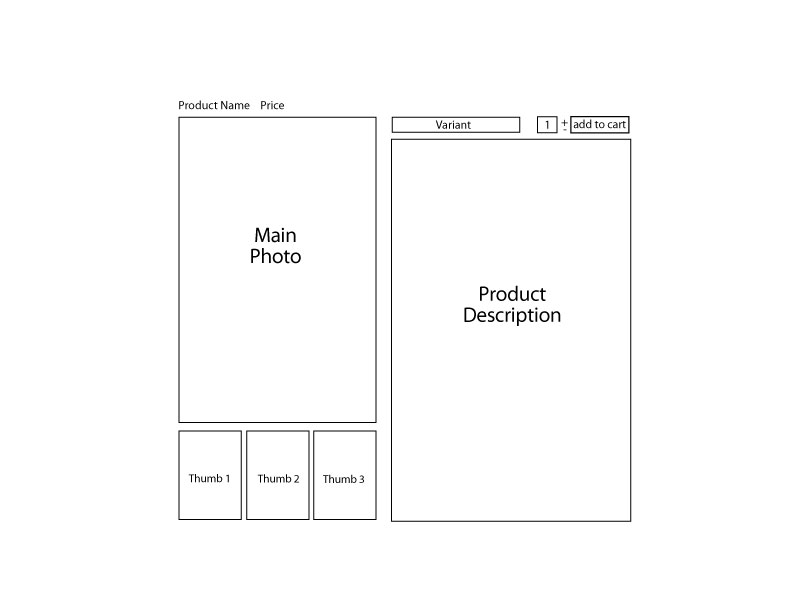
I am trying to change the layout of my product page, but cant figure out where in the CSS(if in the CSS) to make the changes. I have attached a jpeg showing what I want to do. Any suggestions would be very much appreciated.
Thanks.
Thanks.
Please Log in or Create an account to join the conversation.

15 years 6 months ago #10661
by nicolas
Replied by nicolas on topic Re: Product pag layout
You will have to edit the file show of the view product via the menu Display->Views to move around the different elements.
Please Log in or Create an account to join the conversation.
15 years 6 months ago #10693
by Sub-R
Replied by Sub-R on topic Re: Product pag layout
Thanks for the reply Nicolas. However, I am not very knowledgeable with php. I don't expect a php training class, but could you point me in the right direction with an example? I am going to read up on the subject tonight, but an example might give me an ah ha moment. Thanks again.
Please Log in or Create an account to join the conversation.
15 years 6 months ago #10696
by nicolas
Replied by nicolas on topic Re: Product pag layout
It's more about HTML than PHP.
You have four parts on that view: top, left, right and bottom.
You will find the corresponding divs in that file: hikashop_product_top_part, hikashop_product_left_part, hikashop_product_right_part and hikashop_product_bottom_part
Inside each part, you will find one div or span per element: hikashop_product_name_main, hikashop_product_code_main, hikashop_product_image_main, hikashop_product_price_main, etc...
As you can see, the description is in the bottom part. If you want to move it to the right part, just cut and past the description code in the right part div.
You have four parts on that view: top, left, right and bottom.
You will find the corresponding divs in that file: hikashop_product_top_part, hikashop_product_left_part, hikashop_product_right_part and hikashop_product_bottom_part
Inside each part, you will find one div or span per element: hikashop_product_name_main, hikashop_product_code_main, hikashop_product_image_main, hikashop_product_price_main, etc...
As you can see, the description is in the bottom part. If you want to move it to the right part, just cut and past the description code in the right part div.
Please Log in or Create an account to join the conversation.
15 years 6 months ago #10727
by Sub-R
Replied by Sub-R on topic Re: Product pag layout
That's exactly what I needed. I wasn't able to get it exactly like I wanted, but pretty close. Thanks again.
Please Log in or Create an account to join the conversation.

Less
More
- Posts: 52
- Thank you received: 0
15 years 6 months ago - 15 years 6 months ago #11433
by dontflinch
Replied by dontflinch on topic Re: Product pag layout
I am not following the direction of this answer.
I would like to move the product price BELOW the description and cannot find yet where to do that.
which Display > View file do I edit? I am using (modified) beez20 template.
example:
instead of
I want it to be
edit: to be clear on where I am referring to:
this is on the layout of all products in a particular category.
I would like to move the product price BELOW the description and cannot find yet where to do that.
which Display > View file do I edit? I am using (modified) beez20 template.
example:
instead of
$26.15 each
product #1
I want it to be
product #1
$26.15 each
edit: to be clear on where I am referring to:
this is on the layout of all products in a particular category.
Last edit: 15 years 6 months ago by dontflinch.
Please Log in or Create an account to join the conversation.
15 years 6 months ago #11434
by nicolas
Replied by nicolas on topic Re: Product pag layout
As stated in my first post of that thread, you need to edit the file "show" of the view "product" via the menu Display->Views. If you have several of these files, that's because you have several templates installed for your front end (you can personalized differently the views for different templates) so you just need to edit the one of your template.
Please Log in or Create an account to join the conversation.
Less
More
- Posts: 52
- Thank you received: 0
15 years 6 months ago #11435
by dontflinch
Replied by dontflinch on topic Re: Product pag layout
ah ok the quotes helped, I did not see a "Show" file, I was looking for a "view". thanks
Please Log in or Create an account to join the conversation.
Less
More
- Posts: 52
- Thank you received: 0
15 years 6 months ago - 15 years 6 months ago #11436
by dontflinch
Replied by dontflinch on topic Re: Product page layout
ok, I found that and am pretty sure that is not the file I was looking to edit. that seems to edit the individual product page (where you add the item to cart).
I want to edit this page:
/index.php/products/category/listing/cid-12/name-categoryname
that has this code in source:
and I want it to look like this:
I thought it might be in Category > listing_div (((code is not protecting php from being eaten in this post))):
but I get the feeling I have to edit whatever file this refers to:
echo $this->loadTemplate($this->params->get('div_item_layout_type'));
I want to edit this page:
/index.php/products/category/listing/cid-12/name-categoryname
that has this code in source:
Code:
<div class="hikashop_product" style="width:32%;">
<div class="hikashop_container">
<div class="hikashop_subcontainer">
<div style="height:100px;text-align:center;clear:both;" class="hikashop_product_image">
<a href="/link/link.php">
<img src="/image/file/link.jpg" height="100" width="100" /> </a>
</div>
<span class="hikashop_product_price_full">
<span class="hikashop_product_price">$26.15</span> each</span><span class="hikashop_product_name">
<a href="/link/link-174">
product example text </a>
</span>
</div>
</div>
</div>
and I want it to look like this:
Code:
<div class="hikashop_product" style="width:32%;">
<div class="hikashop_container">
<div class="hikashop_subcontainer">
<div style="height:100px;text-align:center;clear:both;" class="hikashop_product_image">
<a href="/link/link.php">
<img src="/image/file/link.jpg" height="100" width="100" /> </a>
</div>
<span class="hikashop_product_name">
<a href="/link/link-174">
product example text </a>
</span>
*****<span class="hikashop_product_price_full">
<span class="hikashop_product_price">$26.15</span> each</span>*****
</div>
</div>
</div>
I thought it might be in Category > listing_div (((code is not protecting php from being eaten in this post))):
Code:
<div class="hikashop_category" style="width:<?php echo $width;?>%;">
<div class="hikashop_container">
<div class="hikashop_subcontainer">
<?php
$this->row =& $row;
echo $this->loadTemplate($this->params->get('div_item_layout_type'));
if(!empty($this->row->childs)){
?>
<ul class="hikashop_category_list">
<?php
foreach($this->row->childs as $child){
$link = hikashop::completeLink('category&task=listing&cid='.$child->category_id.'&name='.$child->alias.$this->menu_id);
?>
<li class="hikashop_category_list_item">
<a href="<?php echo $link; ?>">
<?php echo $child->category_name; ?>
</a>
</li>
<?php
}
?>
</ul>
but I get the feeling I have to edit whatever file this refers to:
echo $this->loadTemplate($this->params->get('div_item_layout_type'));
Last edit: 15 years 6 months ago by dontflinch. Reason: there is php in last code block that is rendering instead of showing
Please Log in or Create an account to join the conversation.
15 years 6 months ago #11438
by nicolas
Replied by nicolas on topic Re: Product page layout
The listing_div file is for the listing of categories. If you want to edit the listing of products, you should edit the file listing_div of the view product. Also, in this file you will have the code general to the listing. If you want to edit the item box's code itself, it will be in the files listing_img, listing_img_desc, listing_title or listing_img_title based on the item box layout you select in your module/menu.
Please Log in or Create an account to join the conversation.
Less
More
- Posts: 52
- Thank you received: 0
15 years 6 months ago #11440
by dontflinch
Replied by dontflinch on topic Re: Product pag layout
yes I have a listing of categories and then when I click on a category it goes to a listing (really a 3 column div based layout) of the products in that category. that is the page I am talking about wanting to move the price below the description. I have tracked that bit of code to the Category > listing_div file and then in that file the php (that is not appearing in my post above) calls this:
echo $this->loadTemplate($this->params->get('div_item_layout_type'));
I believe it is that "layout template" I want to edit, not any individual piece within it, but the actual item layout.
I want the listing_price to come after the listing_title.
please be patient because I think sometimes there is a bit of a language barrier. I try to speak simply but this stuff does not make that easy.
echo $this->loadTemplate($this->params->get('div_item_layout_type'));
I believe it is that "layout template" I want to edit, not any individual piece within it, but the actual item layout.
I want the listing_price to come after the listing_title.
please be patient because I think sometimes there is a bit of a language barrier. I try to speak simply but this stuff does not make that easy.
Please Log in or Create an account to join the conversation.
15 years 6 months ago #11441
by nicolas
Replied by nicolas on topic Re: Product pag layout
As I said, you need to edit the file listing_img_title of the view product and NOT category.
Please Log in or Create an account to join the conversation.
Less
More
- Posts: 52
- Thank you received: 0
15 years 6 months ago - 15 years 6 months ago #11443
by dontflinch
Replied by dontflinch on topic Re: Product page layout
nicolas wrote:
that was it exactly! thanks!
I would suggest however for someone that does not have basic php skill this is what it must look like to work:
[strike]
[/strike]
well, still the php is getting eaten, although it shows correctly in preview.
As I said, you need to edit the file listing_img_title of the view product and NOT category.
that was it exactly! thanks!
I would suggest however for someone that does not have basic php skill this is what it must look like to work:
[strike]
Code:
<?php
}
?>
<span class="hikashop_product_name">
<?php if($this->params->get('link_to_product_page',1)){ ?>
<a href="<?php echo $link;?>">
<?php }
echo $this->row->product_name;
if($this->params->get('link_to_product_page',1)){ ?>
</a>
<?php } ?>
</span>
<?php
if($this->params->get('show_price')){
$this->setLayout('listing_price');
echo $this->loadTemplate();
}
?>
well, still the php is getting eaten, although it shows correctly in preview.
Last edit: 15 years 6 months ago by dontflinch.
Please Log in or Create an account to join the conversation.
15 years 6 months ago #11445
by nicolas
Replied by nicolas on topic Re: Product page layout
The forum does not handle well mixture of php and html. If you want to post such code, you need to make it a file and upload it with your post.
Please Log in or Create an account to join the conversation.
15 years 4 months ago #16760
by crcairo
Replied by crcairo on topic Re: Product pag layout
Hi after reading the thread I tryed to move the product description to the top.
I moved this code and it seems to work:
<span id="hikashop_product_description_main" class="hikashop_product_description_main"> <?php echo JHTML::_('content.prepare',preg_replace('#<hr *id="system-readmore" */>#i','',$this->element->product_description)); ?> </span>
However after moving the prod description the text format has changed. I want it to be "paragraph" like before but now the font is much bigger.
what went wrong?
thansk
Chris
I moved this code and it seems to work:
<span id="hikashop_product_description_main" class="hikashop_product_description_main"> <?php echo JHTML::_('content.prepare',preg_replace('#<hr *id="system-readmore" */>#i','',$this->element->product_description)); ?> </span>
However after moving the prod description the text format has changed. I want it to be "paragraph" like before but now the font is much bigger.
what went wrong?
thansk
Chris
Please Log in or Create an account to join the conversation.
15 years 4 months ago #16768
by nicolas
Replied by nicolas on topic Re: Product pag layout
I don't know. The CSS of your website is mainly controlled by your template. Could you give a link to that page so that we can have a look ?
Please Log in or Create an account to join the conversation.
15 years 4 months ago #16830
by crcairo
Replied by crcairo on topic Re: Product pag layout
ok I got it I copied it into the section within </h2>
thanks
Chris
thanks
Chris
Please Log in or Create an account to join the conversation.
Time to create page: 0.290 seconds