
- Posts: 110
- Thank you received: 0
Change Category list to products
- deborahharrison
-
 Topic Author
- Offline
Less
More
15 years 6 months ago #11268
by deborahharrison
Change Category list to products was created by deborahharrison
Hello and help
Where I originally had a category list on my main navigation, I now need to change this to a product list.
I thought I had done the right thing,
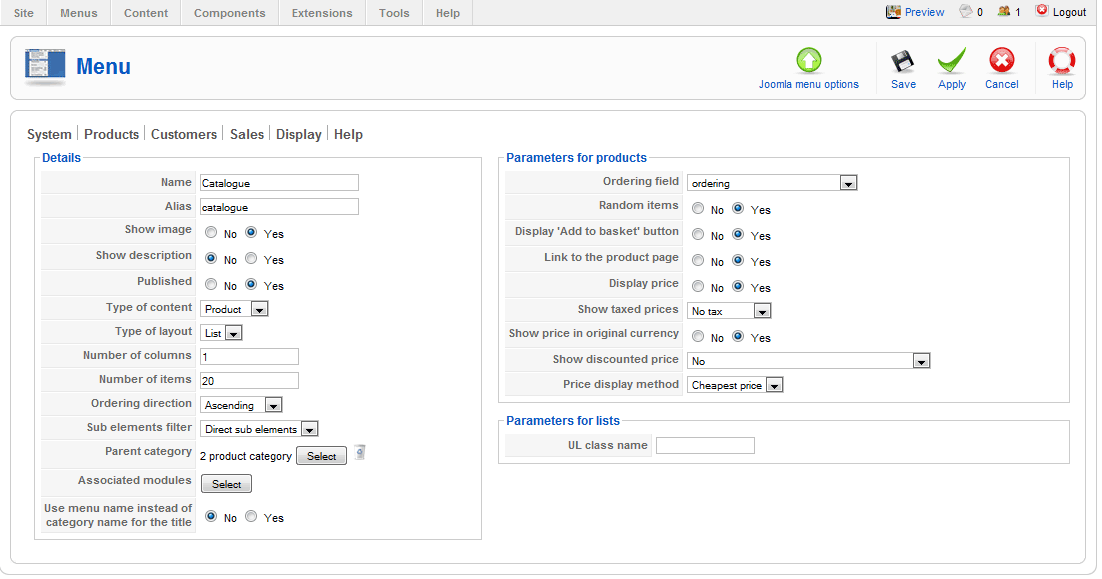
Where I originally had a category list on my main navigation, I now need to change this to a product list.
I thought I had done the right thing,
Please Log in or Create an account to join the conversation.
- deborahharrison
-
Topic Author
- Offline
Less
More
- Posts: 110
- Thank you received: 0
15 years 6 months ago - 15 years 6 months ago #11269
by deborahharrison
Replied by deborahharrison on topic Re: Change Category list to products
However, my listing now looks like this:
Completely disappeared. Please is there something I am missing?

Completely disappeared. Please is there something I am missing?
Last edit: 15 years 6 months ago by deborahharrison.
Please Log in or Create an account to join the conversation.

15 years 6 months ago #11284
by nicolas
Replied by nicolas on topic Re: Change Category list to products
Do you have products attached to the category "product category" ?
If not, it's normal that it doesn't display anything.
If you want to display all the products including the ones which are in sub categories of that category, you need to change the option "Sub elements filter" to "all sub elements" instead of "direct sub elements".
If not, it's normal that it doesn't display anything.
If you want to display all the products including the ones which are in sub categories of that category, you need to change the option "Sub elements filter" to "all sub elements" instead of "direct sub elements".
Please Log in or Create an account to join the conversation.
- deborahharrison
-
Topic Author
- Offline
Less
More
- Posts: 110
- Thank you received: 0
15 years 6 months ago #11291
by deborahharrison
Replied by deborahharrison on topic Re: Change Category list to products
Hi Nicolas
I think she means all the books regardless of what category they are in. A listing of the books on the site at the moment.
I have tried product listing, but by choosing that is when I get the blank screen.
I think she means all the books regardless of what category they are in. A listing of the books on the site at the moment.
I have tried product listing, but by choosing that is when I get the blank screen.
Please Log in or Create an account to join the conversation.
15 years 6 months ago #11304
by nicolas
Replied by nicolas on topic Re: Change Category list to products
If you want to display all the products including the ones which are in sub categories of that category, you need to change the option "Sub elements filter" to "all sub elements" instead of "direct sub elements" in the hikashop options of your menu.
Please Log in or Create an account to join the conversation.
- deborahharrison
-
Topic Author
- Offline
Less
More
- Posts: 110
- Thank you received: 0
15 years 6 months ago #12121
by deborahharrison
Replied by deborahharrison on topic Re: Change Category list to products
Hi Nicolas
I have tried with this. I have changed the setup on my menu link
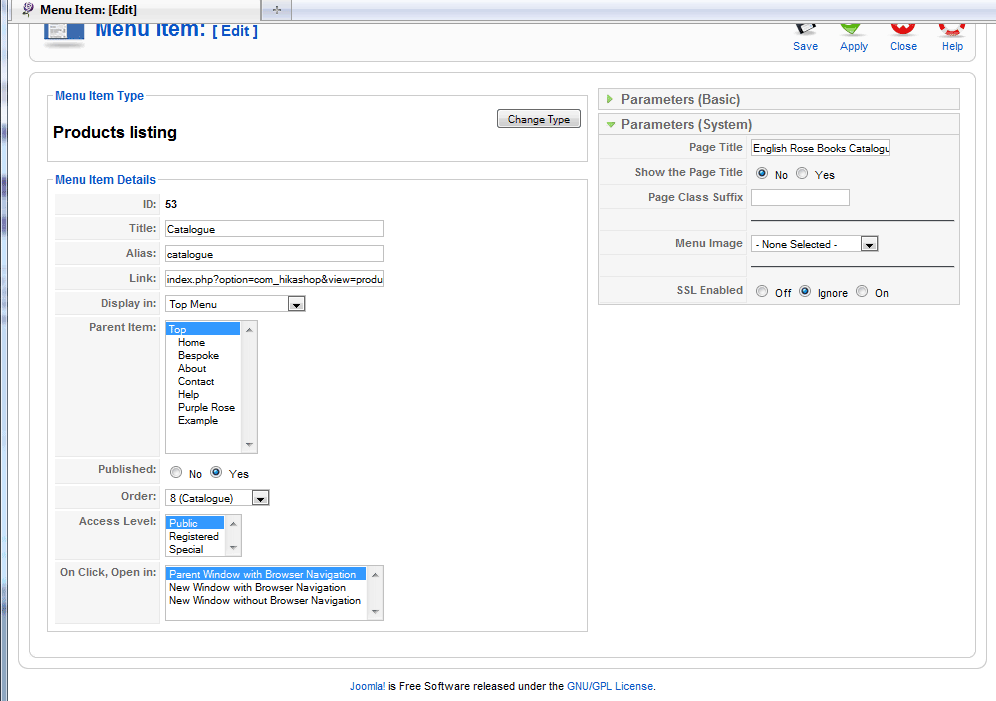
I have tried with this. I have changed the setup on my menu link
Please Log in or Create an account to join the conversation.
- deborahharrison
-
Topic Author
- Offline
Less
More
- Posts: 110
- Thank you received: 0
15 years 6 months ago - 15 years 6 months ago #12122
by deborahharrison
Replied by deborahharrison on topic Re: Change Category list to products
Forget that it does work but no images show up. I am assuming one of the many pages under Display > Views needs to be tweaked. Please advise which one?
Last edit: 15 years 6 months ago by deborahharrison.
Please Log in or Create an account to join the conversation.
15 years 6 months ago #12124
by nicolas
Replied by nicolas on topic Re: Change Category list to products
The display of images will depend of the item box layout option you have in the hikashop options of your menu
Please Log in or Create an account to join the conversation.
- deborahharrison
-
Topic Author
- Offline
Less
More
- Posts: 110
- Thank you received: 0
15 years 6 months ago #12285
by deborahharrison
Replied by deborahharrison on topic Re: Change Category list to products
I have done that and it works. Is there a way I can also list which category each book comes under?
212.113.133.235/~englishr/index.php?opti...ut=listing&Itemid=53 is what I have at the moment
212.113.133.235/~englishr/index.php?opti...ut=listing&Itemid=53 is what I have at the moment
Please Log in or Create an account to join the conversation.
15 years 6 months ago #12289
by nicolas
Replied by nicolas on topic Re: Change Category list to products
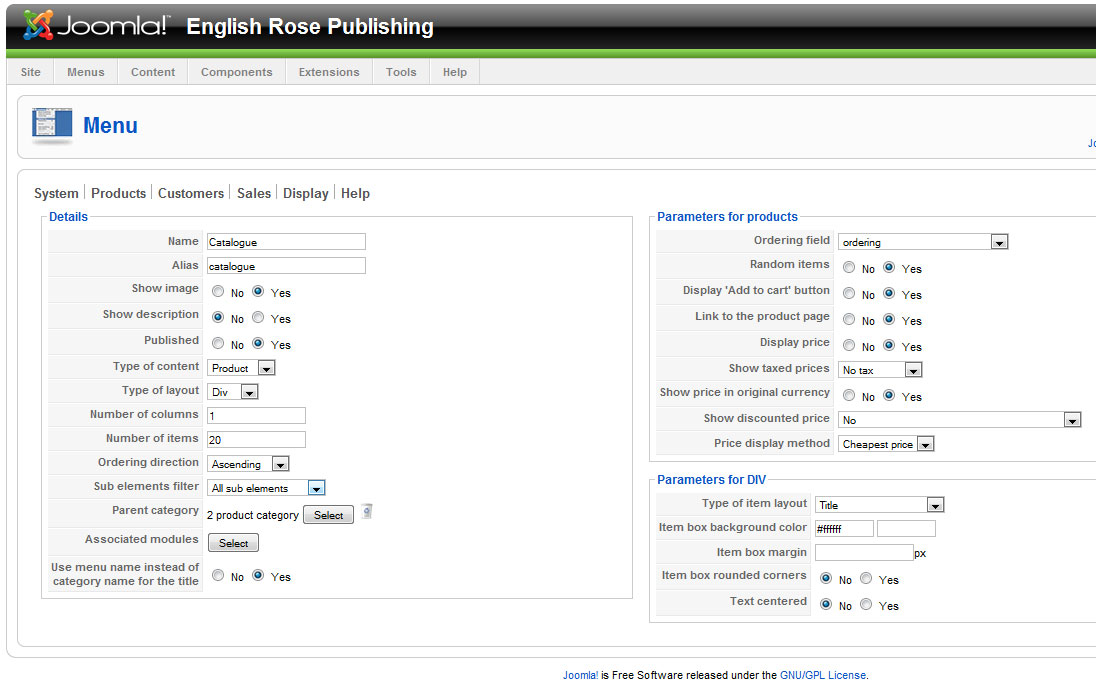
Could you do a screenshot of your listing menu's hikashop options ? That's hard to answer without understanding how you're displaying the listing.
Please Log in or Create an account to join the conversation.
- deborahharrison
-
Topic Author
- Offline
Less
More
- Posts: 110
- Thank you received: 0
15 years 6 months ago #12296
by deborahharrison
Replied by deborahharrison on topic Re: Change Category list to products
Content Menu View:
Please Log in or Create an account to join the conversation.
- deborahharrison
-
Topic Author
- Offline
Less
More
- Posts: 110
- Thank you received: 0
15 years 6 months ago #12298
by deborahharrison
Replied by deborahharrison on topic Re: Change Category list to products
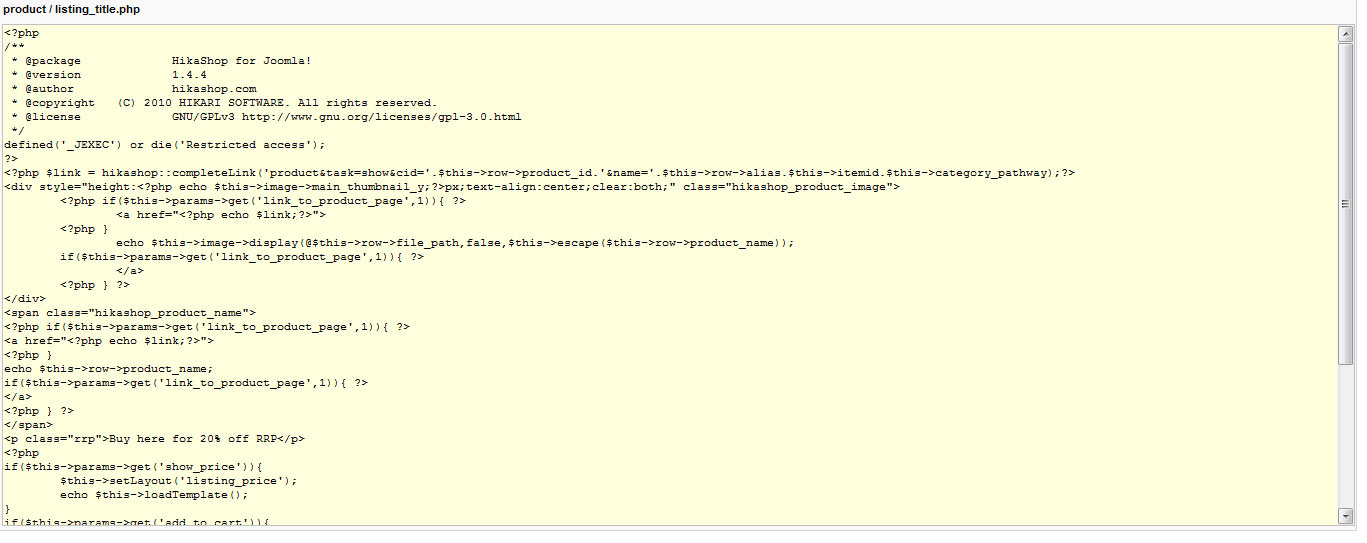
And the View > listings > Listing_title:
Hope this helps.
Hope this helps.
Please Log in or Create an account to join the conversation.
15 years 6 months ago - 15 years 6 months ago #12306
by nicolas
Replied by nicolas on topic Re: Change Category list to products
I see. Actually, that information is not loaded on that page. You would have to run a mysql query on the product_category and category tables to load the category data before being able to display it:
Code:
$db=& JFactory::getDBO();
$db->setQuery('SELECT b.* FROM '.hikashop::table('product_category').' AS a LEFT JOIN '.hikashop::table('category').' AS b ON a.category_id=b.category_id WHERE a.product_id = '.$this->row->product_id );
$category = $db->loadObject();
echo $category->category_name;
Last edit: 15 years 6 months ago by nicolas.
Please Log in or Create an account to join the conversation.
- deborahharrison
-
Topic Author
- Offline
Less
More
- Posts: 110
- Thank you received: 0
15 years 6 months ago #12396
by deborahharrison
Replied by deborahharrison on topic Re: Change Category list to products
From adding that code, I get a :
I have the following info about my server:
* Server: Localhost via UNIX socket
* Server version: 5.0.92-community-log
* Protocol version: 10
* User: ???????
* MySQL charset: UTF-8 Unicode (utf8)
Web server
* cpsrvd 11.28.87
* MySQL client version: 5.0.92
* PHP extension: mysql
PHP My admin
Version information: 3.3.9.2
Please advise.
Error
There seems to be an error in your SQL query. The MySQL server error output below, if there is any, may also help you in diagnosing the problem
ERROR: Unknown Punctuation String @ 4
STR: =&
SQL: $db=& JFactory::getDBO();$db=& JFactory::getDBO();$db=& JFactory::getDBO();$db=& JFactory::getDBO();$db=& JFactory::getDBO();
SQL query:
$db=& JFactory::getDBO();
MySQL said: Documentation
#1064 - You have an error in your SQL syntax; check the manual that corresponds to your MySQL server version for the right syntax to use near '$db=& JFactory::getDBO()' at line 1
I have the following info about my server:
* Server: Localhost via UNIX socket
* Server version: 5.0.92-community-log
* Protocol version: 10
* User: ???????
* MySQL charset: UTF-8 Unicode (utf8)
Web server
* cpsrvd 11.28.87
* MySQL client version: 5.0.92
* PHP extension: mysql
PHP My admin
Version information: 3.3.9.2
Please advise.
Please Log in or Create an account to join the conversation.
15 years 6 months ago #12428
by nicolas
Replied by nicolas on topic Re: Change Category list to products
Please make sure that the code you write is the exact same as the one I posted and make sure that you put it in the file listing_img_title of the view product in a php block of code.
We tested the code on our end and it's working fine.
We tested the code on our end and it's working fine.
Please Log in or Create an account to join the conversation.
- deborahharrison
-
Topic Author
- Offline
Less
More
- Posts: 110
- Thank you received: 0
15 years 6 months ago #12486
by deborahharrison
Replied by deborahharrison on topic Re: Change Category list to products
I promise you I did copy what you put and I got that message. I shall try again as you have since edited it.
Once I have, can I just clarify its then a case of adding the PHP code in the listing file.
Once I have, can I just clarify its then a case of adding the PHP code in the listing file.
Please Log in or Create an account to join the conversation.
15 years 6 months ago #12489
by nicolas
Replied by nicolas on topic Re: Change Category list to products
I just put the syntax coloration to make sure that there was no typo on my end and that the quotes were fine.
I'm not sure what you did but I just did it for you on your website since the access you gave us was still working: 212.113.133.235/~englishr/administrator/...ct|listing_title.php
Now the category name is written on the listing: 212.113.133.235/~englishr/index.php?opti...ut=listing&Itemid=53
I'm not sure what you did but I just did it for you on your website since the access you gave us was still working: 212.113.133.235/~englishr/administrator/...ct|listing_title.php
Now the category name is written on the listing: 212.113.133.235/~englishr/index.php?opti...ut=listing&Itemid=53
Please Log in or Create an account to join the conversation.
- deborahharrison
-
Topic Author
- Offline
Less
More
- Posts: 110
- Thank you received: 0
15 years 6 months ago #12514
by deborahharrison
Replied by deborahharrison on topic Re: Change Category list to products
Thank you very much for that Nicolas :kiss:
Please Log in or Create an account to join the conversation.
Time to create page: 0.272 seconds