
- Posts: 609
- Thank you received: 13
Characteristics Limit?
- mohairbears
-
 Topic Author
- Offline
Less
More
15 years 7 months ago #11369
by mohairbears
Characteristics Limit? was created by mohairbears
Hi,
I am trying to achive a product page that allows the buyer to select 4 colours from a choice of 34 colours, the way I have been trying is using 4 characteristic, i.e. colour 1, colour 2 etc. but this will not work with 4 options, it does work with just 2 options though? when options 3 & 4 are in the fields in the characteristics for those options are blank?
I am trying to achive a product page that allows the buyer to select 4 colours from a choice of 34 colours, the way I have been trying is using 4 characteristic, i.e. colour 1, colour 2 etc. but this will not work with 4 options, it does work with just 2 options though? when options 3 & 4 are in the fields in the characteristics for those options are blank?
Please Log in or Create an account to join the conversation.

15 years 7 months ago #11371
by nicolas
Replied by nicolas on topic Re: Characteristics Limit?
Hi,
You shouldn't use characteristics for that. the characteristic system creates one variant per combination of values of the characteristics. If you have 4 characteristics with 34 values each, that's 34*34*34*34 variants. Way too much to be processed by a normal server.
Instead, you should use custom fields on the table 'item' (business version). The limitation is that it will be displaying for all the products in your store which might not be what you're looking for. In that case, you can always change a bit the code of the show file of the view product to display them only for the products where you need them.
You shouldn't use characteristics for that. the characteristic system creates one variant per combination of values of the characteristics. If you have 4 characteristics with 34 values each, that's 34*34*34*34 variants. Way too much to be processed by a normal server.
Instead, you should use custom fields on the table 'item' (business version). The limitation is that it will be displaying for all the products in your store which might not be what you're looking for. In that case, you can always change a bit the code of the show file of the view product to display them only for the products where you need them.
Please Log in or Create an account to join the conversation.
- mohairbears
-
Topic Author
- Offline
Less
More
- Posts: 609
- Thank you received: 13
15 years 7 months ago #11373
by mohairbears
Replied by mohairbears on topic Re: Characteristics Limit?
Yeah makes sense it is rather a lot of options, not php savvy though so what code would I need if the item page was called 'Multi-pack'
thanks
thanks
Please Log in or Create an account to join the conversation.
15 years 7 months ago #11375
by nicolas
Replied by nicolas on topic Re: Characteristics Limit?
In that file you have the line:
if(!empty($this->itemFields)){
Suppose that your product has the code "multi_pack", you can change it to:
if($this->element->product_code=="multi_pack" && !empty($this->itemFields)){
if(!empty($this->itemFields)){
Suppose that your product has the code "multi_pack", you can change it to:
if($this->element->product_code=="multi_pack" && !empty($this->itemFields)){
Please Log in or Create an account to join the conversation.
- mohairbears
-
Topic Author
- Offline
Less
More
- Posts: 609
- Thank you received: 13
15 years 7 months ago #11377
by mohairbears
Replied by mohairbears on topic Re: Characteristics Limit?
Hi, works a treat except that the field 'label' shows on every item in checkout, I can leave the label blank but ':' still shows, can I prevent this?
thanks
thanks
Please Log in or Create an account to join the conversation.
15 years 7 months ago #11378
by nicolas
Replied by nicolas on topic Re: Characteristics Limit?
In the file cart of the view checkout, you can check the line:
if(hikashop::level(2) && !empty($this->extraFields)){
to:
if($row->product_code=="multi_pack" && hikashop::level(2) && !empty($this->extraFields)){
if(hikashop::level(2) && !empty($this->extraFields)){
to:
if($row->product_code=="multi_pack" && hikashop::level(2) && !empty($this->extraFields)){
Please Log in or Create an account to join the conversation.
- mohairbears
-
Topic Author
- Offline
Less
More
- Posts: 609
- Thank you received: 13
15 years 7 months ago #11403
by mohairbears
Replied by mohairbears on topic Re: Characteristics Limit?
Hi again,
It works ok what you have given me so far but I now have label showing in the order email and in the 'orders' (tried to use the same/similar code but will not work for the orders) + the invoices
can you assist again please...sorry
It works ok what you have given me so far but I now have label showing in the order email and in the 'orders' (tried to use the same/similar code but will not work for the orders) + the invoices
can you assist again please...sorry
Please Log in or Create an account to join the conversation.
15 years 7 months ago #11415
by nicolas
Replied by nicolas on topic Re: Characteristics Limit?
In the email you have the line:
if(!empty($itemFields)){
that you can replace by:
if($item->product_code=="multi_pack" && !empty($this->itemFields)){
In the invoice, the items custom fields are not displayed.
In the order page details on the front end and on the back end (file show and form of the view order), you have the code:
if(hikashop::level(2) && !empty($this->fields)){
that you can replace by:
if($product->product_code=="multi_pack" && hikashop::level(2) && !empty($this->fields)){
if(!empty($itemFields)){
that you can replace by:
if($item->product_code=="multi_pack" && !empty($this->itemFields)){
In the invoice, the items custom fields are not displayed.
In the order page details on the front end and on the back end (file show and form of the view order), you have the code:
if(hikashop::level(2) && !empty($this->fields)){
that you can replace by:
if($product->product_code=="multi_pack" && hikashop::level(2) && !empty($this->fields)){
Please Log in or Create an account to join the conversation.
- mohairbears
-
Topic Author
- Offline
Less
More
- Posts: 609
- Thank you received: 13
15 years 7 months ago #11425
by mohairbears
Replied by mohairbears on topic Re: Characteristics Limit?
Hi Nicolas,
When I change the code it also takes out the custom fields that are required to show?
When I change the code it also takes out the custom fields that are required to show?
Please Log in or Create an account to join the conversation.
15 years 7 months ago #11427
by nicolas
Replied by nicolas on topic Re: Characteristics Limit?
Yes. You should not have required custom fields on the table item if you hide them because the system will refuse the operation on pages where you hide them
Please Log in or Create an account to join the conversation.
- mohairbears
-
Topic Author
- Offline
Less
More
- Posts: 609
- Thank you received: 13
15 years 7 months ago #11430
by mohairbears
Replied by mohairbears on topic Re: Characteristics Limit?
Hi sorry I do not mean as a required field but required to show.
The first screen dump shows what I want to show ringed in blue this is with the code
if(hikashop::level(2) && !empty($this->fields)){
the next screen dump is what happens when I change the code to
if($product->product_code=="multi_pack" && hikashop::level(2) && !empty($this->fields)){ I get no itmes that I am after.
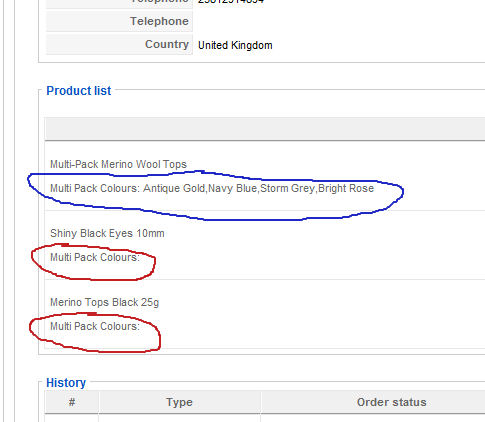
The first screen dump shows what I want to show ringed in blue this is with the code
if(hikashop::level(2) && !empty($this->fields)){
the next screen dump is what happens when I change the code to
if($product->product_code=="multi_pack" && hikashop::level(2) && !empty($this->fields)){ I get no itmes that I am after.
Please Log in or Create an account to join the conversation.
- mohairbears
-
Topic Author
- Offline
Less
More
- Posts: 609
- Thank you received: 13
15 years 7 months ago #11431
by mohairbears
Replied by mohairbears on topic Re: Characteristics Limit?
No items

Please Log in or Create an account to join the conversation.
15 years 7 months ago #11432
by nicolas
Replied by nicolas on topic Re: Characteristics Limit?
So you want to display the custom field value only if there is a value in it ?
In that case you need to add the line below in the foreach displaying all the custom fields:
if(empty($product->$namekey)) continue;
after the line:
$namekey = $field->field_namekey;
for example in the file form of the view order.
In that case you need to add the line below in the foreach displaying all the custom fields:
if(empty($product->$namekey)) continue;
after the line:
$namekey = $field->field_namekey;
for example in the file form of the view order.
Please Log in or Create an account to join the conversation.
- mohairbears
-
Topic Author
- Offline
Less
More
- Posts: 609
- Thank you received: 13
15 years 7 months ago #11437
by mohairbears
Replied by mohairbears on topic Re: Characteristics Limit?
Hi, yes that's correct, sorted the files etc. but cannot solve the email, their does not appear to be any custom fields in the email?
Please Log in or Create an account to join the conversation.
15 years 7 months ago #11439
by nicolas
Replied by nicolas on topic Re: Characteristics Limit?
In the order creation email sent to the user, you have the code:
if(!empty($itemFields)){
foreach($itemFields as $field){
$namekey = $field->field_namekey;
echo '<p>'.$fieldsClass->getFieldName($field).': '.$fieldsClass->show($field,$item->$namekey).'</p>';
}
}
which handles the custom item fields display.
if(!empty($itemFields)){
foreach($itemFields as $field){
$namekey = $field->field_namekey;
echo '<p>'.$fieldsClass->getFieldName($field).': '.$fieldsClass->show($field,$item->$namekey).'</p>';
}
}
which handles the custom item fields display.
Please Log in or Create an account to join the conversation.
- mohairbears
-
Topic Author
- Offline
Less
More
- Posts: 609
- Thank you received: 13
15 years 7 months ago #11447
by mohairbears
Replied by mohairbears on topic Re: Characteristics Limit?
This is the code? this does not put the custom field value in the email, I have just inserted the line like you said and it will not work with or without?
<p><?php echo $item->order_product_name; ?></p>
<?php
if(!empty($itemFields)){
foreach($itemFields as $field){
$namekey = $field->field_namekey;
if(empty($product->$namekey)) continue;
echo '<p>'.$fieldsClass->getFieldName($field).': '.$fieldsClass->show($field,$item->$namekey).'</p>';
}
} ?>
<p><?php echo $item->order_product_name; ?></p>
<?php
if(!empty($itemFields)){
foreach($itemFields as $field){
$namekey = $field->field_namekey;
if(empty($product->$namekey)) continue;
echo '<p>'.$fieldsClass->getFieldName($field).': '.$fieldsClass->show($field,$item->$namekey).'</p>';
}
} ?>
Please Log in or Create an account to join the conversation.
15 years 7 months ago #11449
by nicolas
Replied by nicolas on topic Re: Characteristics Limit?
That code is ALREADY in the email. So you should already see the custom fields.
Maybe you're using an old version of the email (the version number should be at the top of the email) ?
Maybe you're using an old version of the email (the version number should be at the top of the email) ?
Please Log in or Create an account to join the conversation.
- mohairbears
-
Topic Author
- Offline
Less
More
- Posts: 609
- Thank you received: 13
15 years 7 months ago #11451
by mohairbears
Replied by mohairbears on topic Re: Characteristics Limit?
Using 1.4.7 the code is there yes, I have added this if(empty($product->$namekey)) continue; like you said.
So you want to display the custom field value only if there is a value in it ?
In that case you need to add the line below in the foreach displaying all the custom fields:
if(empty($product->$namekey)) continue;
after the line:
$namekey = $field->field_namekey;
for example in the file form of the view order.
Inserting this will not show the custom field data?
So you want to display the custom field value only if there is a value in it ?
In that case you need to add the line below in the foreach displaying all the custom fields:
if(empty($product->$namekey)) continue;
after the line:
$namekey = $field->field_namekey;
for example in the file form of the view order.
Inserting this will not show the custom field data?
Please Log in or Create an account to join the conversation.
15 years 7 months ago #11454
by nicolas
Replied by nicolas on topic Re: Characteristics Limit?
My code was an example...
As you can see, the product information comes from the variable $item in the email where that variable is called $product in other places.
So instead of using
if(empty($product->$namekey)) continue;
you should use:
if(empty($item->$namekey)) continue;
As you can see, the product information comes from the variable $item in the email where that variable is called $product in other places.
So instead of using
if(empty($product->$namekey)) continue;
you should use:
if(empty($item->$namekey)) continue;
Please Log in or Create an account to join the conversation.
- mohairbears
-
Topic Author
- Offline
Less
More
- Posts: 609
- Thank you received: 13
15 years 7 months ago #11456
by mohairbears
Replied by mohairbears on topic Re: Characteristics Limit?
got it.. thank you for your patience.
Please Log in or Create an account to join the conversation.
Time to create page: 0.455 seconds